
How to Use TCS34725: Examples, Pinouts, and Specs
 Design with TCS34725 in Cirkit Designer
Introduction
The TCS34725 is a high-performance color sensor manufactured by Arduino, with the part ID UNO. It is designed to detect and measure the intensity of red, green, blue, and clear light. The sensor features an integrated infrared (IR) filter to minimize IR interference, ensuring accurate color measurements. It communicates via the I2C protocol, making it easy to integrate into microcontroller-based projects.
Explore Projects Built with TCS34725
 Open Project in Cirkit Designer
 Open Project in Cirkit Designer
 Open Project in Cirkit Designer
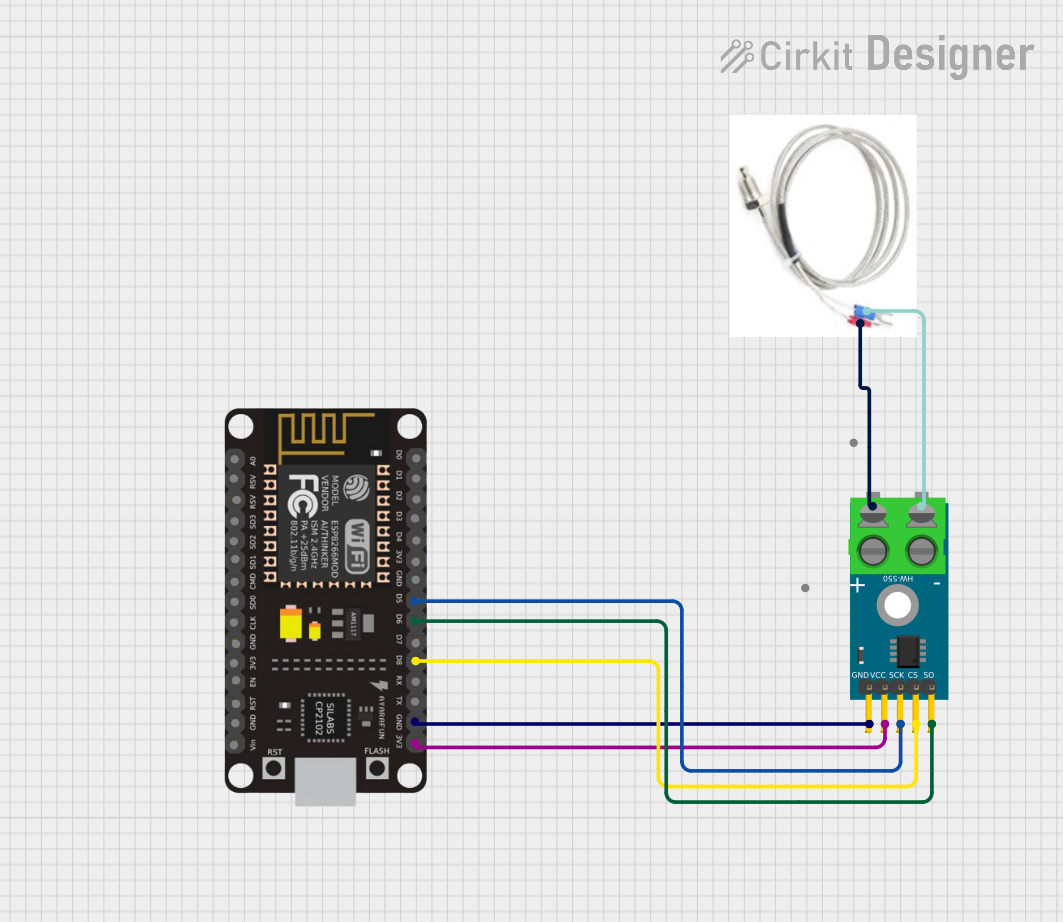 Open Project in Cirkit Designer
Explore Projects Built with TCS34725
Open Project in Cirkit DesignerOpen Project in Cirkit DesignerOpen Project in Cirkit DesignerOpen Project in Cirkit DesignerCommon Applications and Use Cases
- Color recognition for robotics and automation
- Ambient light sensing for display brightness adjustment
- Color matching in industrial and consumer applications
- DIY projects involving color detection and sorting
- Environmental monitoring for light intensity and color spectrum
Technical Specifications
The TCS34725 is a versatile and precise sensor with the following key specifications:
| Parameter | Value |
|---|---|
| Supply Voltage (VDD) | 3.3V to 5V |
| Communication Interface | I2C |
| I2C Address | 0x29 |
| Operating Current | 240 µA (typical) |
| Standby Current | 2.5 µA (typical) |
| Light Sensing Range | 0 to 65,535 (16-bit resolution) |
| IR Filter | Integrated |
| Operating Temperature | -30°C to 85°C |
Pin Configuration and Descriptions
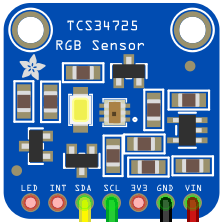
The TCS34725 module typically comes with the following pinout:
| Pin Name | Description |
|---|---|
| VIN | Power supply input (3.3V to 5V) |
| GND | Ground connection |
| SDA | I2C data line |
| SCL | I2C clock line |
| INT | Interrupt output (optional, for advanced use cases) |
Usage Instructions
How to Use the TCS34725 in a Circuit
- Power the Sensor: Connect the VIN pin to a 3.3V or 5V power source and the GND pin to ground.
- Connect I2C Lines: Connect the SDA and SCL pins to the corresponding I2C pins on your microcontroller (e.g., Arduino UNO: A4 for SDA, A5 for SCL).
- Optional Interrupt: If needed, connect the INT pin to a GPIO pin on your microcontroller for interrupt-based applications.
- Install Required Libraries: Use the Adafruit TCS34725 library for Arduino to simplify communication and data processing.
Important Considerations and Best Practices
- Avoid Direct Sunlight: The sensor is sensitive to light; avoid exposing it to direct sunlight for accurate readings.
- Use Pull-Up Resistors: Ensure that the I2C lines (SDA and SCL) have pull-up resistors (typically 4.7kΩ) if not already included on the module.
- Calibrate for Accuracy: Perform calibration in your specific lighting environment to improve measurement accuracy.
- Minimize IR Interference: The integrated IR filter helps, but additional shielding may be required in environments with strong IR sources.
Example Code for Arduino UNO
Below is an example code snippet to read RGB and clear light values from the TCS34725 using an Arduino UNO:
#include <Wire.h>
#include "Adafruit_TCS34725.h"

// Create an instance of the TCS34725 sensor
Adafruit_TCS34725 tcs = Adafruit_TCS34725(TCS34725_INTEGRATIONTIME_700MS,
                                          TCS34725_GAIN_1X);

void setup() {
  Serial.begin(9600); // Initialize serial communication
  if (tcs.begin()) {
    Serial.println("TCS34725 found and initialized.");
  } else {
    Serial.println("No TCS34725 found. Check connections.");
    while (1); // Halt execution if sensor is not found
  }
}

void loop() {
  uint16_t r, g, b, c; // Variables to store color data
  tcs.getRawData(&r, &g, &b, &c); // Read raw color data

  // Calculate color temperature and lux (optional)
  uint16_t colorTemp = tcs.calculateColorTemperature(r, g, b);
  uint16_t lux = tcs.calculateLux(r, g, b);

  // Print the results to the Serial Monitor
  Serial.print("R: "); Serial.print(r);
  Serial.print(" G: "); Serial.print(g);
  Serial.print(" B: "); Serial.print(b);
  Serial.print(" C: "); Serial.print(c);
  Serial.print(" Temp: "); Serial.print(colorTemp); Serial.print(" K");
  Serial.print(" Lux: "); Serial.println(lux);

  delay(1000); // Wait 1 second before the next reading
}
Notes on the Code
- The
Adafruit_TCS34725library must be installed via the Arduino Library Manager. - The integration time and gain settings can be adjusted to suit your application.
Troubleshooting and FAQs
Common Issues and Solutions
Sensor Not Detected
- Ensure the SDA and SCL connections are correct.
- Verify that the I2C address (0x29) matches the library's default setting.
- Check for proper power supply (3.3V or 5V).
Inaccurate Readings
- Calibrate the sensor in your specific lighting environment.
- Avoid reflective surfaces or strong IR sources near the sensor.
No Output on Serial Monitor
- Confirm that the correct COM port and baud rate (9600) are selected in the Arduino IDE.
- Check for loose or incorrect wiring.
FAQs
Q: Can the TCS34725 measure ambient light intensity?
A: Yes, the sensor can measure ambient light intensity in lux using its clear light channel.
Q: Is the TCS34725 compatible with 3.3V microcontrollers?
A: Yes, the sensor operates with both 3.3V and 5V logic levels, making it compatible with a wide range of microcontrollers.
Q: How do I reduce noise in the sensor readings?
A: Use proper shielding to minimize electrical noise and avoid placing the sensor near high-frequency components.
Q: Can I use multiple TCS34725 sensors on the same I2C bus?
A: The TCS34725 has a fixed I2C address (0x29), so using multiple sensors requires an I2C multiplexer.
By following this documentation, you can effectively integrate and utilize the TCS34725 color sensor in your projects.