
How to Use DFRobot SER0062: Examples, Pinouts, and Specs
 Design with DFRobot SER0062 in Cirkit Designer
Introduction
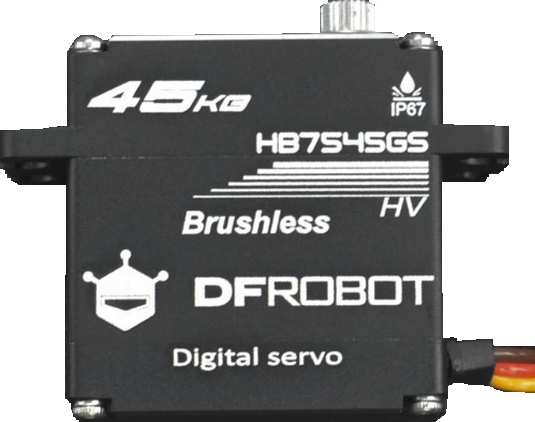
The DFRobot SER0062 is a high-performance servo motor designed for precise control in robotics and automation projects. With its compact design, high torque, and wide range of motion, the SER0062 is ideal for applications requiring accurate positioning and smooth operation. Common use cases include robotic arms, drones, model vehicles, and other mechatronic systems where precision and reliability are critical.
Explore Projects Built with DFRobot SER0062
 Open Project in Cirkit Designer
 Open Project in Cirkit Designer
 Open Project in Cirkit Designer
 Open Project in Cirkit Designer
Explore Projects Built with DFRobot SER0062
Open Project in Cirkit DesignerOpen Project in Cirkit DesignerOpen Project in Cirkit DesignerOpen Project in Cirkit DesignerTechnical Specifications
The following table outlines the key technical details of the DFRobot SER0062 servo motor:
| Parameter | Specification |
|---|---|
| Operating Voltage | 4.8V - 6.6V |
| Stall Torque | 2.5 kg·cm @ 4.8V, 3.0 kg·cm @ 6.6V |
| Operating Speed | 0.12 sec/60° @ 4.8V, 0.10 sec/60° @ 6.6V |
| Control Signal | PWM (Pulse Width Modulation) |
| PWM Range | 500 µs - 2500 µs |
| Angle of Rotation | 0° - 180° |
| Dimensions | 35.5mm x 15mm x 29.5mm |
| Weight | 25g |
| Connector Type | 3-pin female header (GND, VCC, PWM) |
Pin Configuration and Descriptions
The DFRobot SER0062 servo motor has a standard 3-pin connector. The pinout is as follows:
| Pin | Name | Description |
|---|---|---|
| 1 | GND | Ground connection (black or brown wire) |
| 2 | VCC | Power supply (red wire) |
| 3 | PWM | Control signal input (orange or yellow wire) |
Usage Instructions
How to Use the SER0062 in a Circuit
- Power Supply: Connect the VCC pin to a stable power source within the operating voltage range (4.8V - 6.6V). Ensure the power supply can provide sufficient current for the servo's operation.
- Ground Connection: Connect the GND pin to the ground of your circuit.
- Control Signal: Connect the PWM pin to a microcontroller or servo driver capable of generating PWM signals. The pulse width determines the servo's position:
- 500 µs corresponds to 0°.
- 1500 µs corresponds to 90° (center position).
- 2500 µs corresponds to 180°.
Important Considerations and Best Practices
- Power Supply: Use a dedicated power source for the servo to avoid voltage drops that could affect other components in your circuit.
- PWM Signal: Ensure the PWM signal is within the specified range (500 µs - 2500 µs) to prevent damage to the servo.
- Mechanical Load: Avoid overloading the servo beyond its torque rating to ensure longevity and prevent overheating.
- Mounting: Secure the servo properly to minimize vibrations and ensure accurate positioning.
Example Code for Arduino UNO
The following example demonstrates how to control the SER0062 servo motor using an Arduino UNO:
#include <Servo.h> // Include the Servo library

Servo myServo; // Create a Servo object to control the SER0062

void setup() {
  myServo.attach(9); // Attach the servo to pin 9 on the Arduino
}

void loop() {
  myServo.write(0); // Move the servo to 0 degrees
  delay(1000); // Wait for 1 second

  myServo.write(90); // Move the servo to 90 degrees (center position)
  delay(1000); // Wait for 1 second

  myServo.write(180); // Move the servo to 180 degrees
  delay(1000); // Wait for 1 second
}
Note: Ensure the servo is connected to the correct pins on the Arduino:
- GND to Arduino GND
- VCC to a 5V power source
- PWM to Arduino pin 9
Troubleshooting and FAQs
Common Issues and Solutions
Servo Not Moving:
- Cause: Incorrect wiring or insufficient power supply.
- Solution: Double-check the connections and ensure the power supply meets the voltage and current requirements.
Servo Jittering:
- Cause: Noise in the PWM signal or unstable power supply.
- Solution: Use a decoupling capacitor across the power supply and ensure the PWM signal is clean.
Servo Overheating:
- Cause: Excessive mechanical load or prolonged operation at high torque.
- Solution: Reduce the load on the servo and allow it to cool down periodically.
Limited Range of Motion:
- Cause: PWM signal out of range or mechanical obstruction.
- Solution: Verify the PWM signal is within the 500 µs - 2500 µs range and check for physical obstructions.
FAQs
Q: Can I power the SER0062 directly from the Arduino's 5V pin?
A: While it is possible, it is not recommended for high-torque applications, as the Arduino's 5V pin may not provide sufficient current. Use an external power source for optimal performance.
Q: What happens if I send a PWM signal outside the specified range?
A: Sending a PWM signal outside the 500 µs - 2500 µs range may cause the servo to behave unpredictably or become damaged. Always stay within the recommended range.
Q: Can the SER0062 rotate continuously?
A: No, the SER0062 is a standard servo with a limited range of motion (0° - 180°). For continuous rotation, consider using a continuous rotation servo.
Q: How do I increase the torque of the servo?
A: The torque is determined by the servo's design and operating voltage. To achieve maximum torque, operate the servo at 6.6V, but do not exceed this voltage to avoid damage.