
How to Use SPEEDYBEE F405 WING Wires Board Front: Examples, Pinouts, and Specs
 Design with SPEEDYBEE F405 WING Wires Board Front in Cirkit Designer
Introduction
The SPEEDYBEE F405 WING Wires Board Front is a high-performance flight controller designed for fixed-wing and VTOL (Vertical Take-Off and Landing) drones. It is equipped with advanced features such as an F4 processor, multiple UARTs, and integrated OSD (On-Screen Display) for FPV (First-Person View) applications. This board is tailored for drone enthusiasts and professionals who require precise control and reliable performance in their aerial projects.
Explore Projects Built with SPEEDYBEE F405 WING Wires Board Front
 Open Project in Cirkit Designer
 Open Project in Cirkit Designer
 Open Project in Cirkit Designer
 Open Project in Cirkit Designer
Explore Projects Built with SPEEDYBEE F405 WING Wires Board Front
Open Project in Cirkit DesignerOpen Project in Cirkit DesignerOpen Project in Cirkit DesignerOpen Project in Cirkit DesignerCommon Applications and Use Cases
- Fixed-wing drones for recreational or professional use
- VTOL drones for advanced aerial operations
- FPV systems with integrated OSD for real-time telemetry
- Autonomous flight systems with GPS and telemetry modules
- Long-range UAVs requiring multiple UARTs for peripherals
Technical Specifications
Key Technical Details
- Processor: STM32F405 (F4 series, 32-bit ARM Cortex-M4)
- Input Voltage: 7V–36V (2S–8S LiPo battery)
- BEC Output: 5V/2A and 9V/2A
- UART Ports: 6 UARTs for peripherals (GPS, telemetry, etc.)
- IMU: MPU6000 (6-axis gyroscope and accelerometer)
- OSD: Integrated Betaflight OSD
- Flash Memory: 16MB for Blackbox logging
- PWM Outputs: 8 PWM outputs for servos or ESCs
- Dimensions: 50mm x 50mm
- Mounting Holes: 30.5mm x 30.5mm (standard M3 screws)
Pin Configuration and Descriptions
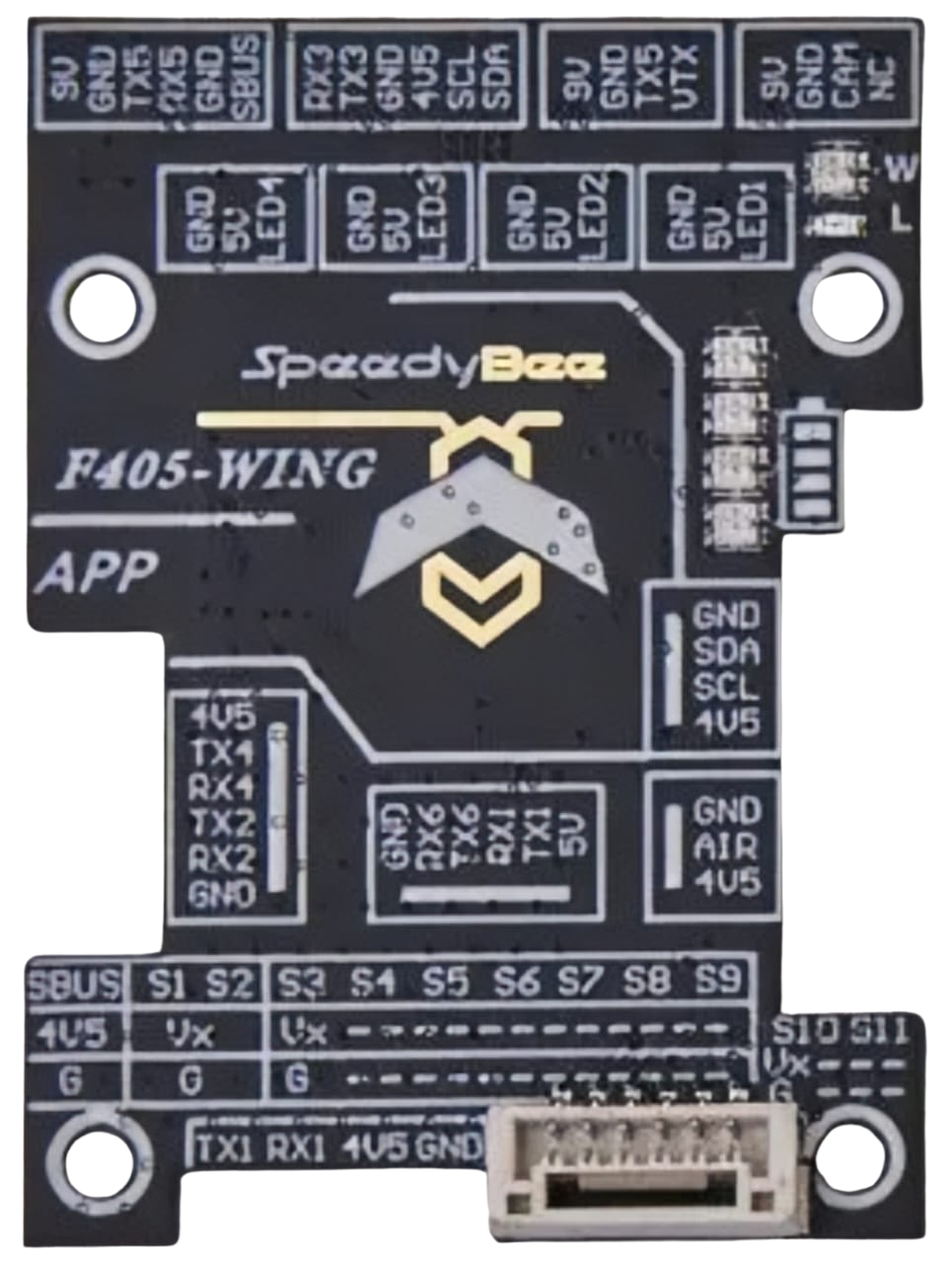
The SPEEDYBEE F405 WING Wires Board Front features a variety of pins for connecting peripherals. Below is the pinout description:
| Pin Name | Description |
|---|---|
| GND | Ground connection |
| VBAT | Battery voltage input (7V–36V) |
| 5V | 5V output for peripherals |
| 9V | 9V output for FPV camera or VTX |
| UART1 TX/RX | UART1 for GPS or telemetry |
| UART2 TX/RX | UART2 for additional peripherals |
| UART3 TX/RX | UART3 for receiver or telemetry |
| UART4 TX/RX | UART4 for FPV camera control |
| UART5 TX/RX | UART5 for additional peripherals |
| UART6 TX/RX | UART6 for external modules |
| PWM1–PWM8 | PWM outputs for servos or ESCs |
| RSSI | Analog RSSI input for receiver signal |
| SCL/SDA | I2C interface for external sensors |
| BOOT | Bootloader mode selection |
Usage Instructions
How to Use the Component in a Circuit
- Powering the Board: Connect a 2S–8S LiPo battery to the VBAT pin. Ensure the voltage is within the 7V–36V range.
- Connecting Peripherals:
- Use the UART ports to connect GPS, telemetry modules, or receivers.
- Connect FPV cameras and VTX modules to the 9V output for stable power.
- Attach servos or ESCs to the PWM outputs for motor control.
- Configuring the Board:
- Use Betaflight Configurator to set up the flight controller.
- Assign UART ports to specific peripherals in the configuration tool.
- Calibrate the IMU and set up the OSD for telemetry display.
- Mounting: Secure the board using M3 screws and ensure proper vibration isolation.
Important Considerations and Best Practices
- Voltage Compatibility: Always verify the input voltage to avoid damaging the board.
- Peripheral Connections: Double-check the pinout to ensure correct wiring of peripherals.
- Firmware Updates: Keep the firmware updated via Betaflight Configurator for optimal performance.
- Heat Management: Ensure proper airflow around the board to prevent overheating during operation.
Example Code for Arduino UNO Integration
Although the SPEEDYBEE F405 WING is not typically used with an Arduino UNO, you can use an Arduino to send telemetry data to the board via UART. Below is an example:
#include <SoftwareSerial.h>

// Define RX and TX pins for SoftwareSerial
SoftwareSerial telemetrySerial(10, 11); // RX = pin 10, TX = pin 11

void setup() {
  // Initialize serial communication
  Serial.begin(9600); // Default serial monitor
  telemetrySerial.begin(9600); // UART communication with SPEEDYBEE F405

  // Print initialization message
  Serial.println("Arduino to SPEEDYBEE F405 telemetry example");
}

void loop() {
  // Send telemetry data to SPEEDYBEE F405
  telemetrySerial.println("Telemetry data from Arduino");

  // Check for incoming data from SPEEDYBEE F405
  if (telemetrySerial.available()) {
    String data = telemetrySerial.readString();
    Serial.println("Received from SPEEDYBEE: " + data);
  }

  delay(1000); // Delay for 1 second
}
Troubleshooting and FAQs
Common Issues Users Might Face
Board Not Powering On:
- Cause: Incorrect input voltage or loose connections.
- Solution: Verify the battery voltage and ensure secure connections to the VBAT pin.
No Communication with Peripherals:
- Cause: Incorrect UART configuration or wiring.
- Solution: Check the Betaflight Configurator settings and verify the pin connections.
OSD Not Displaying:
- Cause: Misconfigured OSD settings or incompatible FPV camera.
- Solution: Reconfigure the OSD in Betaflight and ensure the camera is connected to the correct pins.
Overheating:
- Cause: Insufficient airflow or excessive current draw.
- Solution: Improve ventilation and ensure peripherals do not exceed the board's power limits.
Solutions and Tips for Troubleshooting
- Use a multimeter to check voltage levels at the pins.
- Update the firmware to the latest version to resolve software-related issues.
- Refer to the official SPEEDYBEE documentation for advanced troubleshooting steps.