
How to Use sensor de color tcs3200: Examples, Pinouts, and Specs
 Design with sensor de color tcs3200 in Cirkit Designer
Introduction
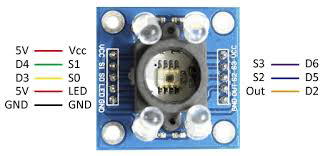
The TCS3200 is a color sensor capable of detecting and measuring the intensity of red, green, blue, and clear light. It features an array of photodiodes with integrated color filters, allowing it to capture precise color data. The sensor outputs a frequency signal proportional to the intensity of the detected light, making it easy to interface with microcontrollers and other digital systems.
Explore Projects Built with sensor de color tcs3200
 Open Project in Cirkit Designer
 Open Project in Cirkit Designer
 Open Project in Cirkit Designer
 Open Project in Cirkit Designer
Explore Projects Built with sensor de color tcs3200
Open Project in Cirkit DesignerOpen Project in Cirkit DesignerOpen Project in Cirkit DesignerOpen Project in Cirkit DesignerCommon Applications
- Color recognition in robotics
- Object sorting by color
- Ambient light detection
- Industrial automation for color-based quality control
- Educational projects involving color sensing
Technical Specifications
The TCS3200 sensor is designed for high accuracy and ease of use. Below are its key technical details:
| Parameter | Value |
|---|---|
| Supply Voltage (Vcc) | 2.7V to 5.5V |
| Operating Current | 2mA (typical) |
| Output | Square wave frequency |
| Frequency Range | 2Hz to 500kHz |
| Light Intensity Range | 0 to 65535 (16-bit resolution) |
| Photodiode Array | 8x8 (64 photodiodes) |
| Filters | Red, Green, Blue, and Clear (no filter) |
| Operating Temperature | -40°C to +85°C |
Pin Configuration
The TCS3200 sensor module typically comes with the following pinout:
| Pin | Name | Description |
|---|---|---|
| 1 | Vcc | Power supply input (2.7V to 5.5V). Connect to the 5V pin of a microcontroller. |
| 2 | GND | Ground. Connect to the ground of the circuit. |
| 3 | S0 | Output frequency scaling selection pin (see usage instructions). |
| 4 | S1 | Output frequency scaling selection pin (see usage instructions). |
| 5 | S2 | Photodiode filter selection pin (see usage instructions). |
| 6 | S3 | Photodiode filter selection pin (see usage instructions). |
| 7 | OUT | Frequency output signal proportional to light intensity. |
| 8 | OE | Output enable pin (active low). Pull low to enable the output. |
Usage Instructions
The TCS3200 sensor is straightforward to use in a circuit. Below are the steps and considerations for proper operation:
Connecting the TCS3200
- Power Supply: Connect the Vcc pin to a 5V power source and the GND pin to the ground.
- Frequency Scaling: Use the S0 and S1 pins to set the output frequency scaling:
- S0 = LOW, S1 = LOW: Power down mode
- S0 = LOW, S1 = HIGH: 2% scaling
- S0 = HIGH, S1 = LOW: 20% scaling
- S0 = HIGH, S1 = HIGH: 100% scaling
- Filter Selection: Use the S2 and S3 pins to select the photodiode filter:
- S2 = LOW, S3 = LOW: Red filter
- S2 = LOW, S3 = HIGH: Blue filter
- S2 = HIGH, S3 = LOW: Clear (no filter)
- S2 = HIGH, S3 = HIGH: Green filter
- Output Enable: Pull the OE pin LOW to enable the frequency output on the OUT pin.
Example Circuit with Arduino UNO
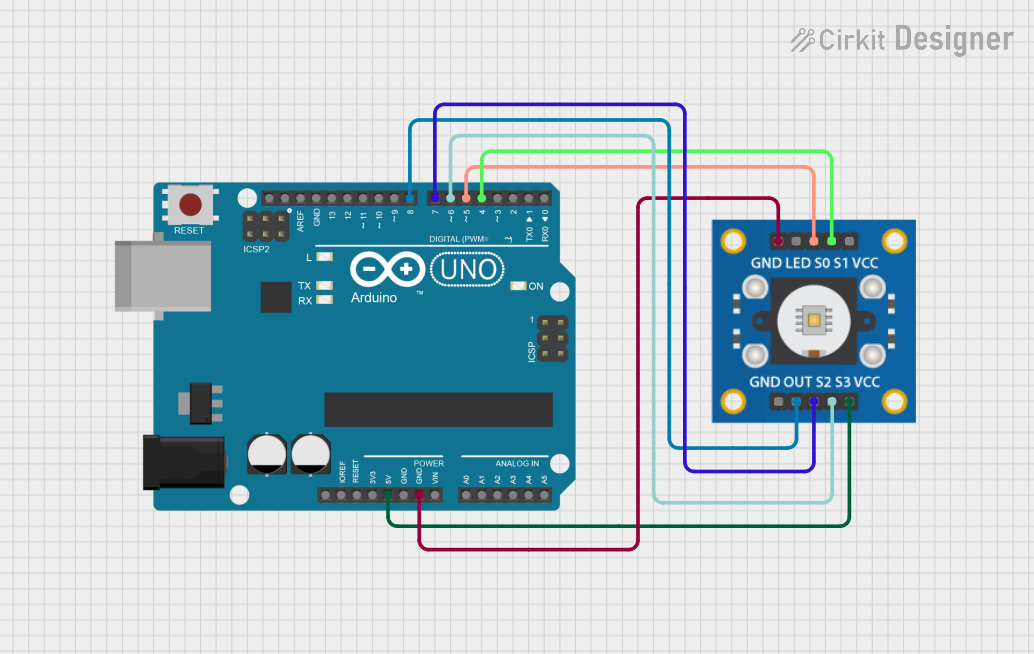
Below is an example of how to connect the TCS3200 to an Arduino UNO:
| TCS3200 Pin | Arduino Pin |
|---|---|
| Vcc | 5V |
| GND | GND |
| S0 | Digital Pin 4 |
| S1 | Digital Pin 5 |
| S2 | Digital Pin 6 |
| S3 | Digital Pin 7 |
| OUT | Digital Pin 8 |
| OE | GND |
Sample Arduino Code
// TCS3200 Color Sensor Example Code
// This code reads the frequency output of the TCS3200 sensor and determines
// the intensity of red, green, and blue light.

const int S0 = 4;  // Frequency scaling pin
const int S1 = 5;  // Frequency scaling pin
const int S2 = 6;  // Filter selection pin
const int S3 = 7;  // Filter selection pin
const int OUT = 8; // Frequency output pin

void setup() {
  pinMode(S0, OUTPUT);
  pinMode(S1, OUTPUT);
  pinMode(S2, OUTPUT);
  pinMode(S3, OUTPUT);
  pinMode(OUT, INPUT);

  // Set frequency scaling to 20%
  digitalWrite(S0, HIGH);
  digitalWrite(S1, LOW);

  Serial.begin(9600); // Initialize serial communication
}

void loop() {
  int redFrequency, greenFrequency, blueFrequency;

  // Read red light intensity
  digitalWrite(S2, LOW);
  digitalWrite(S3, LOW);
  redFrequency = pulseIn(OUT, LOW); // Measure frequency
  delay(100);

  // Read green light intensity
  digitalWrite(S2, HIGH);
  digitalWrite(S3, HIGH);
  greenFrequency = pulseIn(OUT, LOW);
  delay(100);

  // Read blue light intensity
  digitalWrite(S2, LOW);
  digitalWrite(S3, HIGH);
  blueFrequency = pulseIn(OUT, LOW);
  delay(100);

  // Print the results
  Serial.print("Red: ");
  Serial.print(redFrequency);
  Serial.print(" Green: ");
  Serial.print(greenFrequency);
  Serial.print(" Blue: ");
  Serial.println(blueFrequency);

  delay(500); // Wait before the next reading
}
Best Practices
- Use a stable power supply to avoid noise in the frequency output.
- Place the sensor at a consistent distance from the object being measured for accurate readings.
- Avoid exposing the sensor to direct sunlight or strong ambient light, as it may affect accuracy.
Troubleshooting and FAQs
Common Issues
No Output Signal:
- Ensure the OE pin is pulled LOW to enable the output.
- Verify that the sensor is powered correctly (check Vcc and GND connections).
Inconsistent Readings:
- Check for stable power supply and proper grounding.
- Ensure the object being measured is stationary and at a consistent distance.
Incorrect Color Detection:
- Verify the S2 and S3 pin configurations for the correct filter selection.
- Ensure the sensor is not exposed to strong ambient light.
FAQs
Q: Can the TCS3200 detect colors in complete darkness?
A: No, the TCS3200 requires a light source to detect colors. Use an external LED for illumination if needed.
Q: How do I increase the accuracy of the sensor?
A: Use a consistent light source, minimize ambient light interference, and calibrate the sensor for your specific application.
Q: What is the purpose of the frequency scaling pins (S0 and S1)?
A: The frequency scaling pins allow you to adjust the output frequency range, which can help match the sensor's output to the microcontroller's input capabilities.
By following this documentation, you can effectively integrate the TCS3200 color sensor into your projects and achieve reliable color detection.