
How to Use FTDI USB-TTL: Examples, Pinouts, and Specs
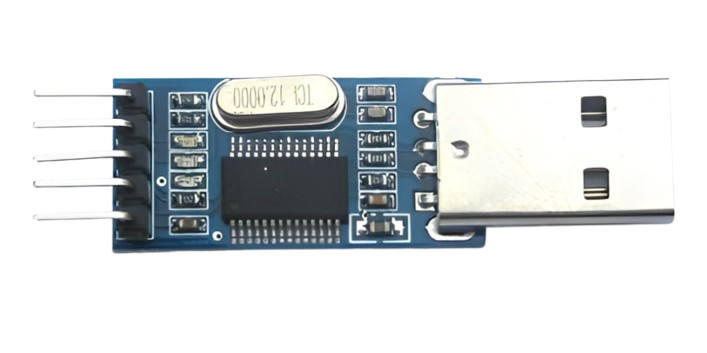
 Design with FTDI USB-TTL in Cirkit Designer
Introduction
The FTDI USB-TTL (PL2303), manufactured by Prolific, is a USB to TTL serial converter. It enables seamless communication between a USB port and TTL (Transistor-Transistor Logic) serial devices. This component is widely used for programming microcontrollers, debugging embedded systems, and interfacing with various electronic components such as sensors, modules, and development boards.
Explore Projects Built with FTDI USB-TTL
 Open Project in Cirkit Designer
 Open Project in Cirkit Designer
 Open Project in Cirkit Designer
 Open Project in Cirkit Designer
Explore Projects Built with FTDI USB-TTL
Open Project in Cirkit DesignerOpen Project in Cirkit DesignerOpen Project in Cirkit DesignerOpen Project in Cirkit DesignerCommon Applications
- Programming microcontrollers (e.g., Arduino, ESP8266, ESP32, etc.)
- Debugging and monitoring serial communication
- Interfacing with TTL-based devices like GPS modules, GSM modules, and sensors
- Data logging and serial communication with PCs or laptops
Technical Specifications
The following table outlines the key technical details of the FTDI USB-TTL (PL2303):
| Parameter | Specification |
|---|---|
| Manufacturer | Prolific |
| Part ID | PL2303 |
| USB Standard | USB 2.0 |
| TTL Voltage Levels | 3.3V and 5V (selectable) |
| Baud Rate | 75 bps to 6 Mbps |
| Operating Temperature | -40°C to +85°C |
| Power Supply | Powered via USB (5V) |
| Driver Support | Windows, macOS, Linux |
Pin Configuration and Descriptions
The FTDI USB-TTL module typically has a 6-pin header for interfacing with TTL devices. Below is the pinout:
| Pin | Name | Description |
|---|---|---|
| 1 | GND | Ground connection |
| 2 | TXD | Transmit data (output from the FTDI module to the connected device) |
| 3 | RXD | Receive data (input to the FTDI module from the connected device) |
| 4 | VCC | Power output (3.3V or 5V, depending on jumper setting) |
| 5 | RTS | Request to Send (optional, used for hardware flow control) |
| 6 | CTS | Clear to Send (optional, used for hardware flow control) |
Note: Some FTDI USB-TTL modules may have additional pins or slightly different layouts. Always refer to the specific module's datasheet for exact details.
Usage Instructions
Connecting the FTDI USB-TTL to a Device
- Identify the Voltage Level: Ensure the voltage level (3.3V or 5V) matches the requirements of your TTL device. Set the jumper on the FTDI module accordingly.
- Connect the Pins:
- Connect the GND pin of the FTDI module to the ground of the TTL device.
- Connect the TXD pin of the FTDI module to the RX pin of the TTL device.
- Connect the RXD pin of the FTDI module to the TX pin of the TTL device.
- Optionally, connect RTS and CTS if hardware flow control is required.
- Power the Device: If the TTL device requires power, connect the VCC pin of the FTDI module to the device's power input.
Using the FTDI USB-TTL with an Arduino UNO
The FTDI USB-TTL can be used to program or communicate with an Arduino UNO. Below is an example of how to use it for serial communication:
Example Code for Arduino UNO
// This code sends a message from the Arduino to the PC via the FTDI USB-TTL module.
// Ensure the FTDI module is connected to the Arduino's RX and TX pins.

void setup() {
  Serial.begin(9600); // Initialize serial communication at 9600 baud
  delay(1000);        // Wait for the serial connection to stabilize
  Serial.println("FTDI USB-TTL Communication Initialized!");
  // Send a message to the PC
}

void loop() {
  Serial.println("Hello from Arduino!"); // Send a message repeatedly
  delay(1000);                           // Wait for 1 second
}
Important Considerations
- Driver Installation: Ensure the Prolific PL2303 driver is installed on your computer. Drivers are available for Windows, macOS, and Linux.
- Voltage Compatibility: Always verify the voltage level (3.3V or 5V) before connecting the FTDI module to a device to avoid damage.
- Cross-Connection of TX and RX: The TXD pin of the FTDI module must connect to the RX pin of the device, and the RXD pin must connect to the TX pin of the device.
Troubleshooting and FAQs
Common Issues
- Device Not Recognized by the Computer
- Solution: Ensure the Prolific PL2303 driver is installed correctly. Check the USB cable and port for proper connection.
- No Data Transmission
- Solution: Verify the TX and RX connections. Ensure the baud rate in the software matches the device's baud rate.
- Incorrect Voltage Level
- Solution: Check the voltage jumper setting on the FTDI module and ensure it matches the TTL device's requirements.
- Garbage Data in Serial Monitor
- Solution: Ensure the baud rate in the serial monitor matches the baud rate set in the code.
FAQs
Q: Can the FTDI USB-TTL power my device?
A: Yes, the module can provide 3.3V or 5V power to your device, but ensure the current requirements of your device do not exceed the module's capacity.
Q: Is the FTDI USB-TTL compatible with Linux?
A: Yes, the Prolific PL2303 driver supports Linux. Most modern Linux distributions include the driver by default.
Q: How do I check if the driver is installed?
A: On Windows, check the Device Manager for "Prolific USB-to-Serial Comm Port." On Linux, use the lsusb command to verify the device is detected.
Q: Can I use this module for UART communication?
A: Yes, the FTDI USB-TTL is designed for UART communication and supports standard UART protocols.
By following this documentation, you can effectively use the FTDI USB-TTL (PL2303) module for a wide range of serial communication applications.