
How to Use 4 Channel Relay Module: Examples, Pinouts, and Specs
 Design with 4 Channel Relay Module in Cirkit Designer
Introduction
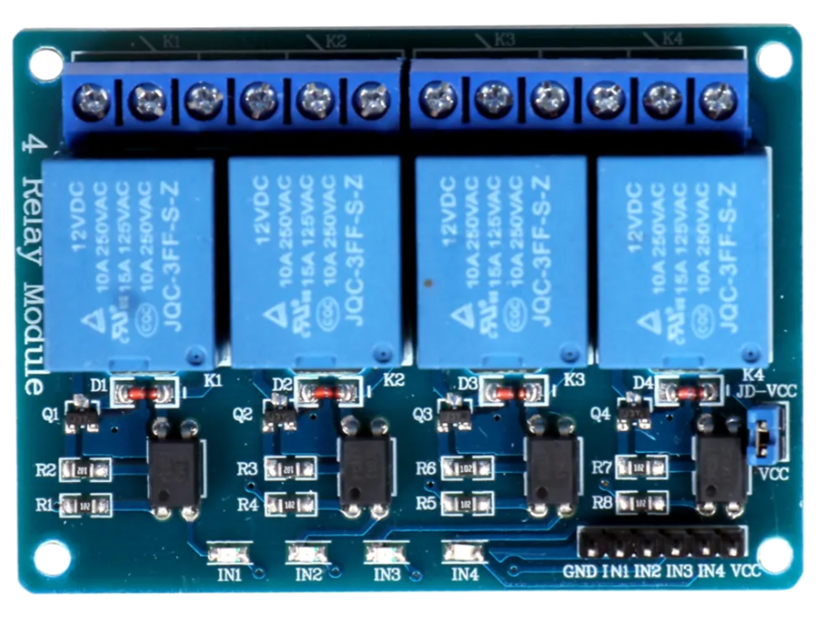
The 4 Channel Relay Module is an electronic component designed to control up to four independent circuits using low voltage signals. It acts as an interface between low-power control systems, such as microcontrollers or single-board computers, and high-power devices like lights, motors, or appliances. The module uses electromagnetic relays to safely switch high voltage or high current loads without directly exposing the control system to these potentially dangerous levels.
Explore Projects Built with 4 Channel Relay Module
 Open Project in Cirkit Designer
 Open Project in Cirkit Designer
 Open Project in Cirkit Designer
 Open Project in Cirkit Designer
Explore Projects Built with 4 Channel Relay Module
Open Project in Cirkit DesignerOpen Project in Cirkit DesignerOpen Project in Cirkit DesignerOpen Project in Cirkit DesignerCommon Applications and Use Cases
- Home automation systems (e.g., controlling lights, fans, or appliances)
- Industrial automation for switching motors or machinery
- Robotics projects requiring control of high-power actuators
- IoT (Internet of Things) applications for remote device control
- Prototyping and educational projects involving high-power switching
Technical Specifications
The 4 Channel Relay Module is designed to work with a variety of control systems and power loads. Below are its key technical details:
General Specifications
- Operating Voltage: 5V DC
- Trigger Voltage: 3.3V to 5V (compatible with most microcontrollers)
- Relay Type: Electromagnetic
- Maximum Load (per channel):
- AC: 250V at 10A
- DC: 30V at 10A
- Isolation: Optocoupler isolation for safe operation
- Indicator LEDs: One LED per channel to indicate relay status
- Dimensions: Approximately 75mm x 55mm x 20mm
Pin Configuration and Descriptions
The module has two main interfaces: the control pins and the relay output terminals.
Control Pins
| Pin Name | Description |
|---|---|
| VCC | Power supply input (5V DC) |
| GND | Ground connection |
| IN1 | Control signal for Relay 1 (active LOW) |
| IN2 | Control signal for Relay 2 (active LOW) |
| IN3 | Control signal for Relay 3 (active LOW) |
| IN4 | Control signal for Relay 4 (active LOW) |
Relay Output Terminals
Each relay has three output terminals:
| Terminal | Description |
|---|---|
| NO (Normally Open) | Open circuit when the relay is inactive; closes when active |
| COM (Common) | Common terminal for the relay |
| NC (Normally Closed) | Closed circuit when the relay is inactive; opens when active |
Usage Instructions
How to Use the 4 Channel Relay Module in a Circuit
Power the Module:
- Connect the VCC pin to a 5V DC power source.
- Connect the GND pin to the ground of your control system.
Connect the Control Signals:
- Connect the IN1, IN2, IN3, and IN4 pins to the digital output pins of your microcontroller or control system.
- Ensure the control signals are active LOW (i.e., sending a LOW signal activates the relay).
Connect the Load:
- For each relay, connect the load to the NO or NC terminal and the COM terminal, depending on whether you want the load to be normally off or normally on.
Test the Circuit:
- Activate the control signals to switch the relays and verify that the connected loads respond as expected.
Important Considerations and Best Practices
- Power Supply: Ensure the module is powered with a stable 5V DC supply. Using a higher voltage may damage the module.
- Isolation: The module includes optocoupler isolation, but always ensure proper grounding and avoid direct contact with high voltage terminals.
- Load Ratings: Do not exceed the maximum load ratings (250V AC/10A or 30V DC/10A) to prevent damage to the relays.
- Active LOW Logic: The relays are triggered by a LOW signal. Ensure your control system is configured accordingly.
- External Power for High Loads: If switching high-power loads, consider using an external power source for the load to avoid overloading the module.
Example: Connecting to an Arduino UNO
Below is an example of how to control the 4 Channel Relay Module using an Arduino UNO:
Circuit Connections
- Connect the module's VCC to the Arduino's 5V pin.
- Connect the module's GND to the Arduino's GND pin.
- Connect IN1, IN2, IN3, and IN4 to Arduino digital pins 7, 6, 5, and 4, respectively.
- Connect a load (e.g., a light bulb) to the NO and COM terminals of one relay.
Arduino Code
// Define the relay control pins
#define RELAY1 7  // Relay 1 connected to pin 7
#define RELAY2 6  // Relay 2 connected to pin 6
#define RELAY3 5  // Relay 3 connected to pin 5
#define RELAY4 4  // Relay 4 connected to pin 4

void setup() {
  // Set relay pins as outputs
  pinMode(RELAY1, OUTPUT);
  pinMode(RELAY2, OUTPUT);
  pinMode(RELAY3, OUTPUT);
  pinMode(RELAY4, OUTPUT);

  // Initialize all relays to OFF (HIGH state)
  digitalWrite(RELAY1, HIGH);
  digitalWrite(RELAY2, HIGH);
  digitalWrite(RELAY3, HIGH);
  digitalWrite(RELAY4, HIGH);
}

void loop() {
  // Example: Turn relays ON and OFF with a delay
  digitalWrite(RELAY1, LOW);  // Turn Relay 1 ON
  delay(1000);                // Wait for 1 second
  digitalWrite(RELAY1, HIGH); // Turn Relay 1 OFF
  delay(1000);                // Wait for 1 second

  digitalWrite(RELAY2, LOW);  // Turn Relay 2 ON
  delay(1000);                // Wait for 1 second
  digitalWrite(RELAY2, HIGH); // Turn Relay 2 OFF
  delay(1000);                // Wait for 1 second

  // Repeat for Relay 3 and Relay 4
}
Troubleshooting and FAQs
Common Issues and Solutions
Relays Not Activating:
- Cause: Insufficient power supply or incorrect wiring.
- Solution: Ensure the module is powered with 5V DC and all connections are secure.
Load Not Switching:
- Cause: Incorrect wiring of the load to the relay terminals.
- Solution: Verify that the load is connected to the correct NO/NC and COM terminals.
Control Signals Not Working:
- Cause: Incorrect logic level or faulty microcontroller pins.
- Solution: Ensure the control signals are active LOW and test the microcontroller outputs.
Module Overheating:
- Cause: Exceeding the maximum load ratings.
- Solution: Reduce the load or use an external relay for high-power applications.
FAQs
Q: Can I use the module with a 3.3V microcontroller?
A: Yes, the module is compatible with 3.3V control signals, but ensure the power supply is 5V.Q: Is it safe to switch AC loads with this module?
A: Yes, but take proper precautions when working with high voltage to avoid electric shock.Q: Can I control all four relays simultaneously?
A: Yes, as long as the total load does not exceed the module's power ratings.Q: Do I need an external flyback diode for the relays?
A: No, the module includes built-in flyback diodes for protection.