
How to Use Cytron SHIELD-2AMOTOR: Examples, Pinouts, and Specs
 Design with Cytron SHIELD-2AMOTOR in Cirkit Designer
Introduction
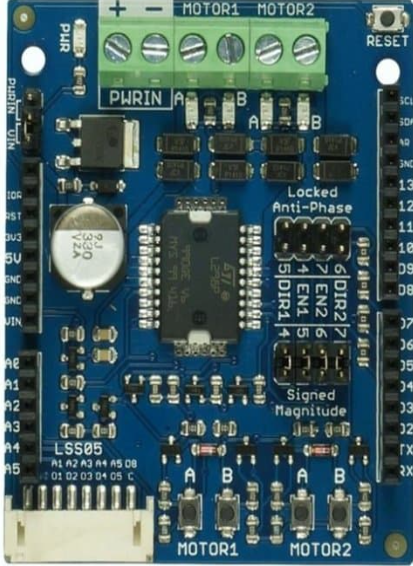
The Cytron SHIELD-2AMOTOR is a motor driver shield designed specifically for Arduino and other compatible microcontrollers. It allows users to control two DC motors independently, with a maximum current of 2A per channel. This shield is ideal for robotics and automation projects, offering built-in protection features such as thermal shutdown and overcurrent protection. Its plug-and-play design ensures easy integration, making it suitable for both beginners and advanced users.
Explore Projects Built with Cytron SHIELD-2AMOTOR
 Open Project in Cirkit Designer
 Open Project in Cirkit Designer
 Open Project in Cirkit Designer
 Open Project in Cirkit Designer
Explore Projects Built with Cytron SHIELD-2AMOTOR
Open Project in Cirkit DesignerOpen Project in Cirkit DesignerOpen Project in Cirkit DesignerOpen Project in Cirkit DesignerCommon Applications and Use Cases
- Robotics: Driving wheels or actuators in robotic systems
- Automation: Controlling conveyor belts or small mechanical systems
- DIY Projects: Building remote-controlled cars, boats, or other motorized devices
- Educational Purposes: Teaching motor control and Arduino programming
Technical Specifications
Key Technical Details
| Parameter | Specification |
|---|---|
| Operating Voltage | 7V to 12V (recommended) |
| Maximum Motor Current | 2A per channel |
| Number of Channels | 2 (independent control) |
| Control Logic Voltage | 5V (compatible with Arduino UNO) |
| PWM Frequency | Up to 20 kHz |
| Protection Features | Overcurrent, thermal shutdown |
| Dimensions | 68.6mm x 53.3mm x 18mm |
| Weight | 30g |
Pin Configuration and Descriptions
The Cytron SHIELD-2AMOTOR connects directly to an Arduino UNO via its headers. Below is the pin configuration:
| Pin Name | Description |
|---|---|
| M1A, M1B | Motor 1 terminals for connecting the DC motor |
| M2A, M2B | Motor 2 terminals for connecting the DC motor |
| DIR1, DIR2 | Direction control pins for Motor 1 and Motor 2 |
| PWM1, PWM2 | PWM input pins for speed control of Motor 1 and Motor 2 |
| VIN | External power supply input (7V to 12V recommended) |
| GND | Ground connection |
| 5V | Logic voltage supply (provided by Arduino UNO when connected) |
Usage Instructions
How to Use the Component in a Circuit
- Mount the Shield: Place the Cytron SHIELD-2AMOTOR on top of an Arduino UNO, ensuring the headers align properly.
- Connect Motors: Attach the DC motors to the M1A/M1B and M2A/M2B terminals.
- Power the Shield: Provide an external power supply (7V to 12V) to the VIN and GND terminals.
- Control Logic: Use the DIR1/DIR2 pins to set the motor direction and PWM1/PWM2 pins to control the motor speed.
- Upload Code: Write and upload the Arduino code to control the motors as needed.
Important Considerations and Best Practices
- Power Supply: Ensure the external power supply voltage matches the motor's requirements and stays within the shield's operating range.
- Current Limit: Do not exceed the 2A current limit per channel to avoid damaging the shield.
- Heat Dissipation: If operating at high currents for extended periods, ensure proper ventilation to prevent overheating.
- Wiring: Double-check all connections before powering the shield to avoid short circuits.
Example Arduino Code
Below is an example code snippet to control two DC motors using the Cytron SHIELD-2AMOTOR:
// Example code to control two DC motors using Cytron SHIELD-2AMOTOR
// Connect the shield to an Arduino UNO and ensure proper wiring

#define DIR1 7  // Direction pin for Motor 1
#define PWM1 6  // PWM pin for Motor 1
#define DIR2 4  // Direction pin for Motor 2
#define PWM2 5  // PWM pin for Motor 2

void setup() {
  // Set motor control pins as outputs
  pinMode(DIR1, OUTPUT);
  pinMode(PWM1, OUTPUT);
  pinMode(DIR2, OUTPUT);
  pinMode(PWM2, OUTPUT);
}

void loop() {
  // Motor 1: Forward at 50% speed
  digitalWrite(DIR1, HIGH);  // Set direction forward
  analogWrite(PWM1, 128);    // Set speed (0-255, 128 = 50%)

  // Motor 2: Reverse at 75% speed
  digitalWrite(DIR2, LOW);   // Set direction reverse
  analogWrite(PWM2, 192);    // Set speed (0-255, 192 = 75%)

  delay(2000);  // Run motors for 2 seconds

  // Stop both motors
  analogWrite(PWM1, 0);
  analogWrite(PWM2, 0);

  delay(1000);  // Wait for 1 second before repeating
}
Troubleshooting and FAQs
Common Issues and Solutions
Motors Not Running:
- Cause: Incorrect wiring or insufficient power supply.
- Solution: Verify all connections and ensure the external power supply meets the voltage and current requirements.
Overheating:
- Cause: Prolonged operation at high currents.
- Solution: Reduce the motor load or provide better ventilation.
Erratic Motor Behavior:
- Cause: Noise or interference in the PWM signal.
- Solution: Use proper decoupling capacitors on the motor terminals to reduce noise.
Arduino Not Responding:
- Cause: Shield not properly seated on the Arduino headers.
- Solution: Ensure the shield is securely mounted and aligned with the Arduino pins.
FAQs
Can I use this shield with other microcontrollers? Yes, as long as the microcontroller provides 5V logic signals and compatible PWM outputs.
What happens if I exceed the 2A current limit? The shield's built-in overcurrent protection will activate, shutting down the affected channel to prevent damage.
Can I control stepper motors with this shield? No, this shield is designed specifically for DC motors and does not support stepper motors.
Is it possible to power the Arduino through the shield? Yes, if you provide power to the VIN terminal, the shield can supply power to the Arduino via its 5V pin.
This concludes the documentation for the Cytron SHIELD-2AMOTOR.