
How to Use tpa6132: Examples, Pinouts, and Specs
 Design with tpa6132 in Cirkit Designer
Introduction
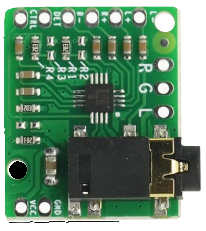
The TPA6132 is a high-performance audio amplifier designed and manufactured by Arduino (Part ID: 1111). This component is optimized for driving headphones and small speakers, delivering high-quality audio output with low distortion and high efficiency. It features an integrated volume control, making it ideal for portable audio devices, smartphones, tablets, and other battery-powered applications.
Explore Projects Built with tpa6132
 Open Project in Cirkit Designer
 Open Project in Cirkit Designer
 Open Project in Cirkit Designer
 Open Project in Cirkit Designer
Explore Projects Built with tpa6132
Open Project in Cirkit DesignerOpen Project in Cirkit DesignerOpen Project in Cirkit DesignerOpen Project in Cirkit DesignerCommon Applications and Use Cases
- Portable audio devices (e.g., MP3 players, smartphones, tablets)
- Headphone amplifiers
- Personal audio systems
- Embedded systems requiring audio output
- Battery-powered devices requiring low power consumption
Technical Specifications
The TPA6132 is designed to provide excellent audio performance while maintaining low power consumption. Below are the key technical details:
General Specifications
| Parameter | Value |
|---|---|
| Supply Voltage Range | 2.5V to 5.5V |
| Output Power | 25mW per channel (typical) |
| Total Harmonic Distortion (THD+N) | 0.01% (typical) at 1kHz |
| Signal-to-Noise Ratio | 100dB (typical) |
| Quiescent Current | 4mA (typical) |
| Shutdown Current | 0.01µA (typical) |
| Gain Control | Integrated volume control |
| Output Load Impedance | 16Ω to 32Ω |
| Package Type | QFN-20 |
Pin Configuration and Descriptions
The TPA6132 is available in a 20-pin QFN package. Below is the pinout and description:
| Pin Number | Pin Name | Description |
|---|---|---|
| 1 | INL | Left channel audio input |
| 2 | INR | Right channel audio input |
| 3 | GND | Ground connection |
| 4 | VDD | Power supply input |
| 5 | OUTL | Left channel audio output |
| 6 | OUTR | Right channel audio output |
| 7 | SHUTDOWN | Shutdown control (active low) |
| 8 | BYPASS | Bypass capacitor connection |
| 9 | GAIN | Gain control pin |
| 10 | NC | No connection |
| 11-20 | NC | Reserved (No connection) |
Usage Instructions
The TPA6132 is straightforward to use in audio amplification circuits. Below are the steps and best practices for integrating it into your design:
Basic Circuit Connection
- Power Supply: Connect the VDD pin to a stable power supply within the range of 2.5V to 5.5V. Connect the GND pin to the ground of your circuit.
- Audio Input: Feed the left and right audio signals to the INL and INR pins, respectively. Use decoupling capacitors if necessary to block DC offset.
- Audio Output: Connect the OUTL and OUTR pins to the left and right headphone or speaker terminals.
- Shutdown Control: To enable the amplifier, ensure the SHUTDOWN pin is pulled high. Pull it low to disable the amplifier and reduce power consumption.
- Gain Control: Use the GAIN pin to adjust the amplifier's gain. Refer to the datasheet for specific gain settings.
Example Circuit with Arduino UNO
The TPA6132 can be controlled using an Arduino UNO for applications requiring volume control or shutdown functionality. Below is an example:
// Example code to control the TPA6132 using Arduino UNO
// This code demonstrates toggling the SHUTDOWN pin and adjusting gain

#define SHUTDOWN_PIN 7  // Connect SHUTDOWN pin of TPA6132 to Arduino pin 7
#define GAIN_PIN A0     // Connect GAIN pin of TPA6132 to Arduino analog pin A0

void setup() {
  pinMode(SHUTDOWN_PIN, OUTPUT); // Set SHUTDOWN pin as output
  digitalWrite(SHUTDOWN_PIN, HIGH); // Enable the amplifier (active high)

  pinMode(GAIN_PIN, OUTPUT); // Set GAIN pin as output
  analogWrite(GAIN_PIN, 128); // Set gain to mid-level (adjust as needed)
}

void loop() {
  // Example: Toggle SHUTDOWN pin to save power
  digitalWrite(SHUTDOWN_PIN, LOW); // Disable amplifier
  delay(5000); // Wait for 5 seconds
  digitalWrite(SHUTDOWN_PIN, HIGH); // Enable amplifier
  delay(5000); // Wait for 5 seconds
}
Best Practices
- Use decoupling capacitors on the power supply line to reduce noise.
- Ensure proper grounding to minimize distortion and interference.
- Avoid exceeding the maximum supply voltage to prevent damage to the component.
- Use appropriate heat dissipation techniques if operating at high power levels.
Troubleshooting and FAQs
Common Issues and Solutions
No Audio Output
- Ensure the SHUTDOWN pin is pulled high to enable the amplifier.
- Verify that the audio input signals are correctly connected to the INL and INR pins.
- Check the power supply voltage and ensure it is within the specified range.
Distorted Audio
- Verify that the output load impedance is within the recommended range (16Ω to 32Ω).
- Check for proper grounding and minimize noise in the circuit.
- Ensure the input signal amplitude is not too high, as it may cause clipping.
Excessive Power Consumption
- Confirm that the SHUTDOWN pin is pulled low when the amplifier is not in use.
- Check for any short circuits or incorrect connections in the circuit.
FAQs
Q: Can the TPA6132 drive speakers with an impedance lower than 16Ω?
A: No, the TPA6132 is designed for loads between 16Ω and 32Ω. Using lower impedance loads may cause excessive current draw and damage the component.
Q: How do I adjust the volume using the TPA6132?
A: The volume can be adjusted by controlling the GAIN pin. Use a microcontroller or a variable resistor to set the desired gain level.
Q: Is the TPA6132 suitable for battery-powered devices?
A: Yes, the TPA6132 is highly efficient and has a low quiescent current, making it ideal for battery-powered applications.