
How to Use TP4056 + DW01: Examples, Pinouts, and Specs
 Design with TP4056 + DW01 in Cirkit Designer
Introduction
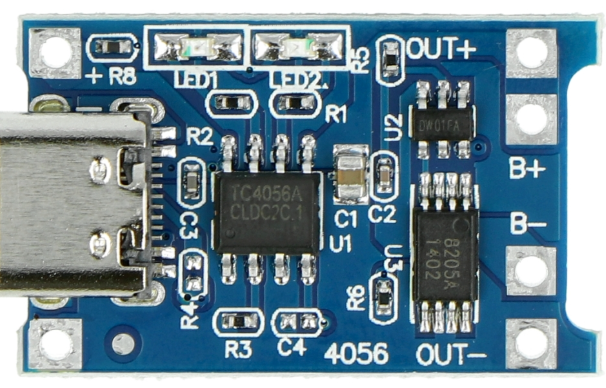
The TP4056 + DW01 is a compact and efficient lithium-ion battery charging and protection module manufactured by Makers. It integrates the TP4056 linear battery charger IC with the DW01 battery protection IC, providing a complete solution for charging and safeguarding single-cell lithium-ion or lithium-polymer batteries. This module is widely used in portable electronics, DIY projects, and battery-powered devices due to its simplicity, reliability, and cost-effectiveness.
Explore Projects Built with TP4056 + DW01
 Open Project in Cirkit Designer
 Open Project in Cirkit Designer
 Open Project in Cirkit Designer
 Open Project in Cirkit Designer
Explore Projects Built with TP4056 + DW01
Open Project in Cirkit DesignerOpen Project in Cirkit DesignerOpen Project in Cirkit DesignerOpen Project in Cirkit DesignerCommon Applications
- Charging single-cell lithium-ion or lithium-polymer batteries
- Power banks and portable chargers
- Wearable devices and IoT gadgets
- DIY electronics projects
- Battery-powered tools and toys
Technical Specifications
Key Technical Details
| Parameter | Value |
|---|---|
| Input Voltage Range | 4.5V to 6V |
| Charging Current | Adjustable, up to 1A (default: 1A) |
| Battery Voltage | 4.2V (fully charged) |
| Protection Features | Overcharge, over-discharge, and overcurrent |
| Charging Method | Constant Current (CC) / Constant Voltage (CV) |
| Operating Temperature Range | -10°C to +85°C |
| Dimensions | ~25mm x 19mm |
Pin Configuration and Descriptions
TP4056 Module Pinout
| Pin Name | Description |
|---|---|
| IN+ | Positive input terminal for charging voltage (4.5V to 6V). |
| IN- | Negative input terminal (ground) for charging voltage. |
| BAT+ | Positive terminal for the lithium-ion battery. |
| BAT- | Negative terminal for the lithium-ion battery. |
| OUT+ | Positive output terminal for the load (connected to the battery). |
| OUT- | Negative output terminal for the load (connected to the battery). |
Indicator LEDs
| LED Color | Status Description |
|---|---|
| Red | Charging in progress. |
| Blue | Charging complete or no battery connected. |
Usage Instructions
How to Use the TP4056 + DW01 Module in a Circuit
Connect the Input Voltage:
- Connect a 5V DC power source (e.g., USB power supply) to the
IN+andIN-pins. - Ensure the input voltage is within the range of 4.5V to 6V to avoid damaging the module.
- Connect a 5V DC power source (e.g., USB power supply) to the
Connect the Battery:
- Attach the positive terminal of the lithium-ion battery to the
BAT+pin. - Attach the negative terminal of the battery to the
BAT-pin.
- Attach the positive terminal of the lithium-ion battery to the
Connect the Load (Optional):
- If you want to power a load while charging the battery, connect the load to the
OUT+andOUT-pins.
- If you want to power a load while charging the battery, connect the load to the
Adjust the Charging Current (Optional):
- The default charging current is set to 1A. To adjust it, replace the onboard resistor (Rprog) with a different value:
- Charging current (Icharge) = 1200V / Rprog (in ohms).
- For example, use a 2kΩ resistor for a charging current of 600mA.
- The default charging current is set to 1A. To adjust it, replace the onboard resistor (Rprog) with a different value:
Monitor the Charging Status:
- Observe the onboard LEDs to determine the charging status:
- Red LED: Charging in progress.
- Blue LED: Charging complete.
- Observe the onboard LEDs to determine the charging status:
Important Considerations and Best Practices
- Battery Compatibility: Use only single-cell lithium-ion or lithium-polymer batteries with a nominal voltage of 3.7V.
- Heat Dissipation: The module may heat up during operation. Ensure proper ventilation or heat sinking if necessary.
- Input Voltage: Avoid exceeding the maximum input voltage of 6V to prevent damage to the module.
- Load Current: Do not exceed the module's maximum output current (1A) to ensure safe operation.
Example: Using TP4056 + DW01 with Arduino UNO
The TP4056 + DW01 module can be used to power an Arduino UNO from a lithium-ion battery. Below is an example of how to connect the module and monitor the battery voltage using the Arduino.
Circuit Connections
- Connect the
OUT+andOUT-pins of the TP4056 module to the Arduino'sVINandGNDpins, respectively. - Connect the battery to the
BAT+andBAT-pins of the module. - Connect a 5V USB power source to the
IN+andIN-pins for charging.
Arduino Code
// Example code to monitor battery voltage using Arduino UNO
const int batteryPin = A0; // Analog pin connected to battery voltage divider
float voltageDividerRatio = 2.0; // Adjust based on your resistor values

void setup() {
  Serial.begin(9600); // Initialize serial communication
  pinMode(batteryPin, INPUT); // Set battery pin as input
}

void loop() {
  int analogValue = analogRead(batteryPin); // Read analog value
  float batteryVoltage = (analogValue * 5.0 / 1023.0) * voltageDividerRatio;

  // Print battery voltage to the Serial Monitor
  Serial.print("Battery Voltage: ");
  Serial.print(batteryVoltage);
  Serial.println(" V");

  delay(1000); // Wait for 1 second before the next reading
}
Troubleshooting and FAQs
Common Issues and Solutions
Module Overheating:
- Cause: High input voltage or excessive charging current.
- Solution: Ensure the input voltage is within the 4.5V to 6V range. Reduce the charging current by replacing the Rprog resistor.
Battery Not Charging:
- Cause: Incorrect wiring or damaged battery.
- Solution: Double-check all connections. Verify the battery is functional and compatible with the module.
No LED Indicator:
- Cause: No input power or faulty module.
- Solution: Confirm the input voltage is present. Replace the module if necessary.
Load Not Powering On:
- Cause: Insufficient battery charge or excessive load current.
- Solution: Fully charge the battery and ensure the load current does not exceed 1A.
FAQs
Q: Can I use the TP4056 module to charge multiple batteries in series?
A: No, the TP4056 + DW01 is designed for single-cell batteries only. Charging multiple batteries in series requires a specialized charger.
Q: How do I adjust the charging current?
A: Replace the onboard Rprog resistor with a different value. Use the formula Icharge = 1200V / Rprog to calculate the desired charging current.
Q: Can I use the module without a battery connected?
A: Yes, the module can power a load directly from the input voltage, but this is not recommended for long-term use.
Q: What happens if the battery is over-discharged?
A: The DW01 protection IC will disconnect the battery to prevent damage. Reconnect the battery to a charger to restore functionality.