
How to Use Molex Picoblade Series Header: Examples, Pinouts, and Specs
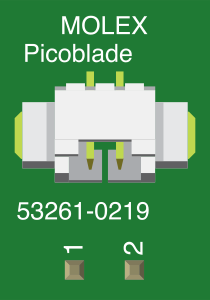
 Design with Molex Picoblade Series Header in Cirkit Designer
Introduction
The Molex Picoblade Series Header (Part ID: 53261-0219) is a compact, low-profile connector designed for high-density applications. It features a reliable locking mechanism, ensuring secure wire-to-board connections. With a pitch of 1.25mm, this connector is ideal for applications where space is limited but performance and reliability are critical.
Explore Projects Built with Molex Picoblade Series Header
 Open Project in Cirkit Designer
 Open Project in Cirkit Designer
 Open Project in Cirkit Designer
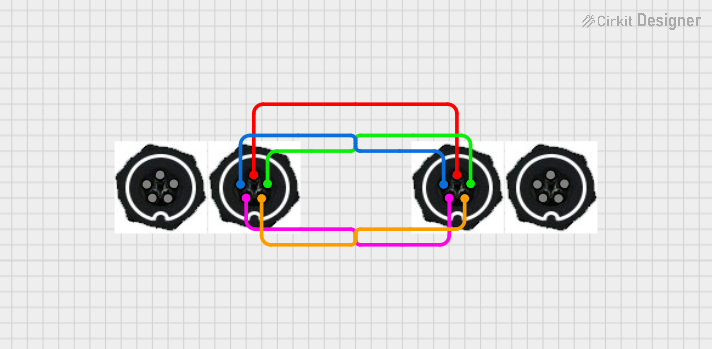 Open Project in Cirkit Designer
Explore Projects Built with Molex Picoblade Series Header
Open Project in Cirkit DesignerOpen Project in Cirkit DesignerOpen Project in Cirkit DesignerOpen Project in Cirkit DesignerCommon Applications and Use Cases
- Consumer electronics (e.g., cameras, wearables, and handheld devices)
- Industrial equipment
- Medical devices
- Automotive systems
- Robotics and drones
- Prototyping and development boards
Technical Specifications
The Molex Picoblade Series Header is designed to meet the needs of compact and high-density electronic systems. Below are the key technical details:
General Specifications
| Parameter | Value |
|---|---|
| Manufacturer | Molex |
| Series | Picoblade |
| Part Number | 53261-0219 |
| Connector Type | Header, Male Pins |
| Number of Positions | 2 |
| Pitch | 1.25mm |
| Mounting Type | Surface Mount (SMT) |
| Termination Style | Solder |
| Current Rating | 1A |
| Voltage Rating | 125V AC/DC |
| Operating Temperature | -25°C to +85°C |
| Contact Material | Phosphor Bronze |
| Contact Plating | Tin |
| Housing Material | Nylon 46 |
Pin Configuration and Descriptions
| Pin Number | Description | Notes |
|---|---|---|
| 1 | Signal/Power Line | Connects to the circuit signal |
| 2 | Ground (GND) | Common ground connection |
Usage Instructions
The Molex Picoblade Series Header is straightforward to use in wire-to-board connections. Below are the steps and considerations for proper usage:
How to Use the Component in a Circuit
- PCB Design: Ensure the PCB layout matches the 1.25mm pitch of the header. Use the Molex footprint specifications for accurate placement.
- Soldering:
- Use a fine-tip soldering iron or reflow soldering for surface-mount installation.
- Avoid overheating the connector to prevent damage to the housing material.
- Mating Connector: Use a compatible Molex Picoblade receptacle (e.g., Molex 51021 series) for proper mating.
- Wire Preparation: If using pre-crimped wires, ensure they are securely inserted into the mating connector.
- Connection: Align the mating connector with the header and press gently until the locking mechanism clicks into place.
Important Considerations and Best Practices
- Current and Voltage Ratings: Do not exceed the specified 1A current and 125V voltage ratings to avoid overheating or damage.
- Operating Environment: Ensure the component operates within the -25°C to +85°C temperature range.
- Mechanical Stress: Avoid applying excessive force during mating or unmating to prevent damage to the locking mechanism.
- Cleaning: If cleaning the PCB, ensure no cleaning agents damage the nylon housing or tin plating.
Example: Connecting to an Arduino UNO
While the Molex Picoblade Series Header is not directly compatible with Arduino UNO headers, you can use it to connect sensors or modules with custom wiring. Below is an example of interfacing a sensor with a Picoblade connector to an Arduino UNO:
// Example: Reading data from a sensor connected via Molex Picoblade
// Ensure the sensor's signal pin is connected to Arduino pin A0
// and the ground pin is connected to Arduino GND.

const int sensorPin = A0;  // Analog pin connected to the sensor
int sensorValue = 0;       // Variable to store the sensor reading

void setup() {
  Serial.begin(9600);  // Initialize serial communication
}

void loop() {
  sensorValue = analogRead(sensorPin);  // Read the sensor value
  Serial.print("Sensor Value: ");
  Serial.println(sensorValue);         // Print the value to the Serial Monitor
  delay(500);                          // Wait for 500ms before the next reading
}
Troubleshooting and FAQs
Common Issues Users Might Face
Loose Connections:
- Cause: Improper mating of the connector.
- Solution: Ensure the mating connector is fully inserted until the locking mechanism clicks.
Overheating During Soldering:
- Cause: Excessive heat applied during soldering.
- Solution: Use a temperature-controlled soldering iron and limit soldering time to a few seconds per pin.
Signal Interference:
- Cause: Poor grounding or long wire lengths.
- Solution: Ensure a proper ground connection and minimize wire lengths to reduce noise.
Connector Damage:
- Cause: Excessive force during mating/unmating.
- Solution: Handle the connector gently and avoid pulling on the wires.
FAQs
Q: Can I use the Molex Picoblade Series Header for high-current applications?
A: No, the header is rated for a maximum current of 1A. For higher currents, consider using connectors with higher current ratings.
Q: Is the Molex Picoblade Series Header waterproof?
A: No, this connector is not designed for waterproof applications. Use a sealed connector for environments exposed to moisture.
Q: Can I use this header with breadboards?
A: The 1.25mm pitch is not compatible with standard breadboards. Use an adapter or custom PCB for prototyping.
Q: What tools are recommended for crimping wires for the mating connector?
A: Molex recommends using their official crimping tools (e.g., Molex 63819-0900) for reliable connections.
By following this documentation, you can effectively integrate the Molex Picoblade Series Header into your projects while ensuring reliable performance and durability.