Cirkit Designer LogoCirkit DesignerYour all-in-one circuit design IDE Launch Cirkit Designer App

How to Use 12v 4 Pin Common Vehicle Relay: Examples, Pinouts, and Specs

Image of 12v 4 Pin Common Vehicle RelayDesign with 12v 4 Pin Common Vehicle Relay in Cirkit Designer

Introduction

The 12V 4 Pin Common Vehicle Relay is an electromechanical switch designed to control high-current devices using a low-current signal. It operates at 12 volts, making it ideal for automotive applications. This relay is widely used in vehicles to control components such as headlights, horns, fuel pumps, and cooling fans. Its compact design and four-pin configuration make it easy to integrate into various circuits.

Explore Projects Built with 12v 4 Pin Common Vehicle Relay

Use Cirkit Designer to design, explore, and prototype these projects online. Some projects support real-time simulation. Click "Open Project" to start designing instantly!
Image of Wi-Fi Controlled Relay System for Home Automation: A project utilizing 12v 4 Pin Common Vehicle Relay in a practical application
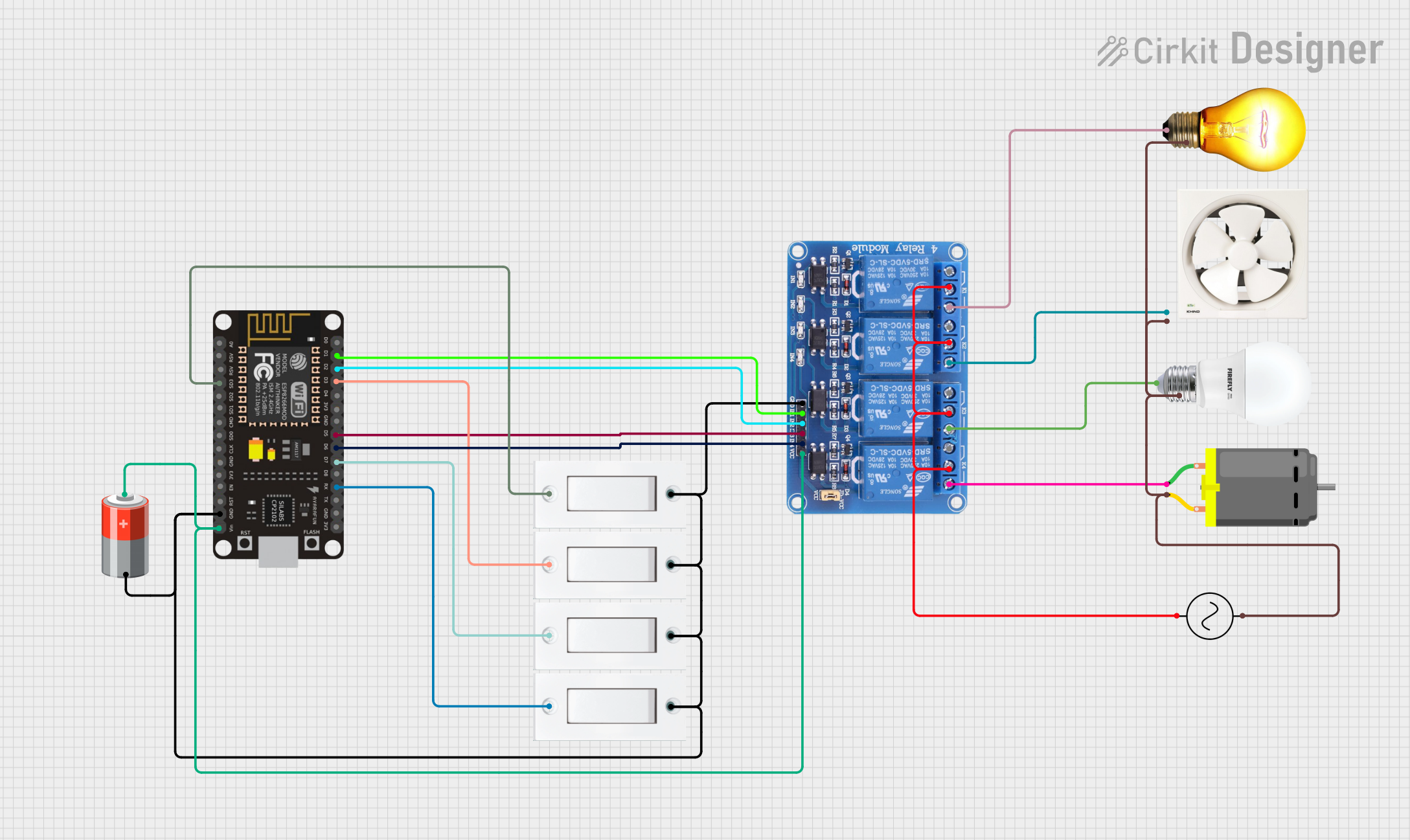
Wi-Fi Controlled Relay System for Home Automation

This circuit is designed to control an AC bulb, an exhaust fan, a DC motor, and another bulb using a 4-channel relay module interfaced with an ESP8266 NodeMCU microcontroller. The ESP8266 controls the relay channels via its digital pins (D1, D2, D5, D6), which in turn switch the connected loads (AC bulb, exhaust fan, DC motor, and bulb) on and off. The circuit is powered by a 5V battery, and the common ground is shared among the components, with the AC supply providing power to the relay for switching the AC loads.

Open Project in Cirkit Designer

Common Applications and Use Cases

Technical Specifications

The following table outlines the key technical details of the 12V 4 Pin Common Vehicle Relay:

Parameter Value
Operating Voltage 12V DC
Coil Resistance ~85 Ohms
Contact Rating 30A at 12V DC
Contact Configuration SPST (Single Pole Single Throw)
Pin Count 4
Dimensions ~28mm x 28mm x 25mm
Operating Temperature -40°C to +85°C
Insulation Resistance ≥100MΩ at 500V DC
Dielectric Strength 500V AC for 1 minute

Pin Configuration and Descriptions

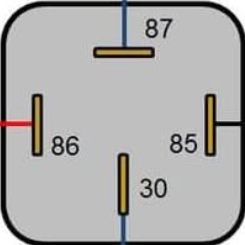
The 12V 4 Pin Common Vehicle Relay has the following pin configuration:

Pin Number Name Description
85 Coil (-) Connects to the negative terminal of the control signal (ground).
86 Coil (+) Connects to the positive terminal of the control signal (12V DC).
30 Common (COM) The input terminal for the high-current load.
87 Normally Open (NO) The output terminal that connects to the load when the relay is activated.

Usage Instructions

How to Use the Component in a Circuit

  1. Identify the Pins: Refer to the pin configuration table to correctly identify the pins (85, 86, 30, and 87).
  2. Connect the Coil:
    • Pin 85 should be connected to the ground (negative terminal of the control circuit).
    • Pin 86 should be connected to the positive terminal of the control signal (12V DC).
  3. Connect the Load:
    • Pin 30 should be connected to the positive terminal of the power source for the load.
    • Pin 87 should be connected to one terminal of the load. The other terminal of the load should be connected to the ground.
  4. Activate the Relay: When a 12V DC signal is applied across pins 85 and 86, the relay will activate, allowing current to flow from pin 30 to pin 87 and powering the connected load.

Important Considerations and Best Practices

Example: Connecting to an Arduino UNO

The 12V 4 Pin Common Vehicle Relay can be controlled using an Arduino UNO. Below is an example circuit and code to toggle a relay using a digital output pin.

Circuit Connections

Arduino Code

// Define the relay control pin
const int relayPin = 7;

void setup() {
  // Set the relay pin as an output
  pinMode(relayPin, OUTPUT);
  
  // Ensure the relay is off initially
  digitalWrite(relayPin, LOW);
}

void loop() {
  // Turn the relay on
  digitalWrite(relayPin, HIGH);
  delay(1000); // Keep the relay on for 1 second
  
  // Turn the relay off
  digitalWrite(relayPin, LOW);
  delay(1000); // Keep the relay off for 1 second
}

Troubleshooting and FAQs

Common Issues and Solutions

  1. Relay Not Activating:

    • Cause: Insufficient voltage or current to the coil.
    • Solution: Ensure the control signal provides 12V DC and sufficient current (typically ~140mA).
  2. Load Not Powering On:

    • Cause: Incorrect wiring of pins 30 and 87.
    • Solution: Double-check the connections to ensure pin 30 is connected to the power source and pin 87 to the load.
  3. Relay Buzzing Noise:

    • Cause: Unstable or insufficient control signal voltage.
    • Solution: Use a stable 12V DC power source and check for loose connections.
  4. Voltage Spikes Damaging Components:

    • Cause: Lack of flyback diode across the coil.
    • Solution: Install a flyback diode (e.g., 1N4007) across pins 85 and 86.

FAQs