
How to Use Adafruit ADXL326: Examples, Pinouts, and Specs
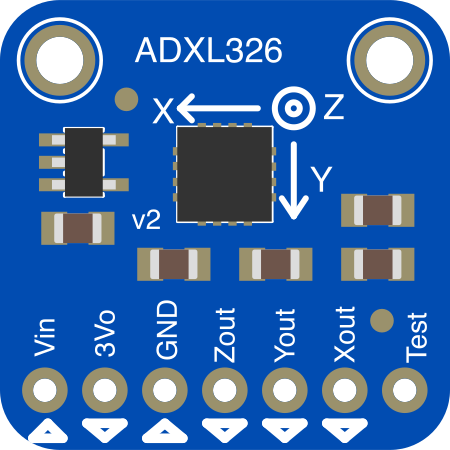
 Design with Adafruit ADXL326 in Cirkit Designer
Introduction
The Adafruit ADXL326 (Manufacturer Part ID: 1018) is a high-performance 3-axis accelerometer designed to measure acceleration in three dimensions (X, Y, and Z axes). It provides an analog output proportional to the acceleration experienced by the sensor. This component is ideal for applications such as motion detection, orientation sensing, vibration monitoring, and tilt measurement. Its compact size and high sensitivity make it suitable for use in robotics, wearable devices, gaming controllers, and industrial equipment.
Explore Projects Built with Adafruit ADXL326
 Open Project in Cirkit Designer
 Open Project in Cirkit Designer
 Open Project in Cirkit Designer
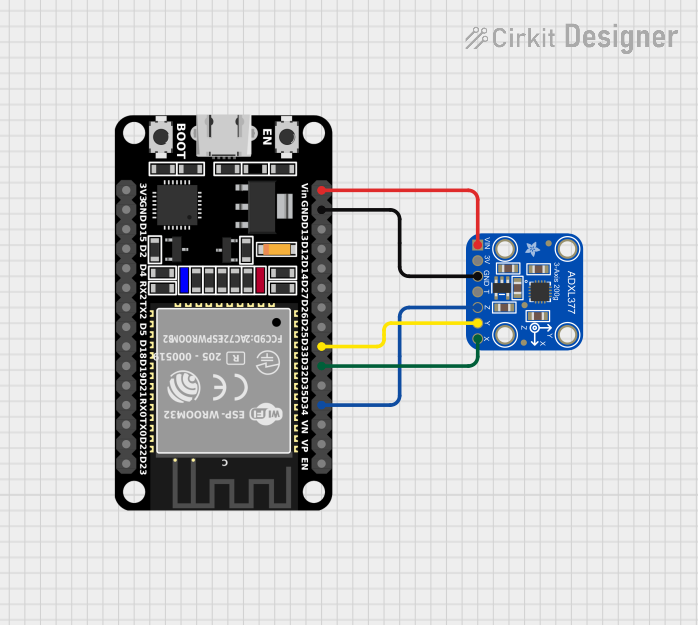 Open Project in Cirkit Designer
Explore Projects Built with Adafruit ADXL326
Open Project in Cirkit DesignerOpen Project in Cirkit DesignerOpen Project in Cirkit DesignerOpen Project in Cirkit DesignerTechnical Specifications
The following table outlines the key technical details of the Adafruit ADXL326:
| Parameter | Value |
|---|---|
| Supply Voltage (Vcc) | 1.8V to 3.6V |
| Typical Operating Voltage | 3.3V |
| Measurement Range | ±16g |
| Sensitivity | 57 mV/g (at 3.3V supply) |
| Bandwidth | Selectable via capacitors |
| Output Type | Analog |
| Operating Temperature | -40°C to +85°C |
| Dimensions | 20mm x 20mm x 2mm |
Pin Configuration and Descriptions
The Adafruit ADXL326 has the following pin configuration:
| Pin Name | Pin Number | Description |
|---|---|---|
| VCC | 1 | Power supply input (1.8V to 3.6V). |
| GND | 2 | Ground connection. |
| XOUT | 3 | Analog output for X-axis acceleration. |
| YOUT | 4 | Analog output for Y-axis acceleration. |
| ZOUT | 5 | Analog output for Z-axis acceleration. |
| ST | 6 | Self-test pin (leave unconnected if unused). |
Usage Instructions
How to Use the ADXL326 in a Circuit
- Power Supply: Connect the VCC pin to a 3.3V power source and the GND pin to ground.
- Analog Outputs: Connect the XOUT, YOUT, and ZOUT pins to the analog input pins of a microcontroller (e.g., Arduino UNO) to read the acceleration data.
- Bandwidth Selection: To set the bandwidth, connect external capacitors between the XOUT, YOUT, and ZOUT pins and ground. The capacitor value determines the bandwidth according to the formula: [ f_{BW} = \frac{1}{2 \pi \times R \times C} ] where ( R ) is the internal resistance (32 kΩ) and ( C ) is the external capacitor value.
Important Considerations and Best Practices
- Power Supply Stability: Ensure a stable power supply to avoid noise in the output signals.
- Mounting Orientation: Mount the sensor securely to minimize vibrations and ensure accurate readings.
- Filtering Noise: Use appropriate capacitors to filter high-frequency noise from the output signals.
- Self-Test: Use the self-test pin to verify the functionality of the sensor during development.
Example Code for Arduino UNO
The following example demonstrates how to read acceleration data from the ADXL326 using an Arduino UNO:
// Define the analog input pins for the ADXL326
const int xPin = A0; // X-axis output connected to A0
const int yPin = A1; // Y-axis output connected to A1
const int zPin = A2; // Z-axis output connected to A2

void setup() {
  Serial.begin(9600); // Initialize serial communication at 9600 baud
}

void loop() {
  // Read analog values from the ADXL326
  int xValue = analogRead(xPin); // Read X-axis acceleration
  int yValue = analogRead(yPin); // Read Y-axis acceleration
  int zValue = analogRead(zPin); // Read Z-axis acceleration

  // Convert the analog values to voltage (assuming 3.3V reference)
  float xVoltage = xValue * (3.3 / 1023.0);
  float yVoltage = yValue * (3.3 / 1023.0);
  float zVoltage = zValue * (3.3 / 1023.0);

  // Print the voltage values to the Serial Monitor
  Serial.print("X Voltage: ");
  Serial.print(xVoltage);
  Serial.print(" V, Y Voltage: ");
  Serial.print(yVoltage);
  Serial.print(" V, Z Voltage: ");
  Serial.print(zVoltage);
  Serial.println(" V");

  delay(500); // Wait for 500ms before the next reading
}
Troubleshooting and FAQs
Common Issues and Solutions
No Output Signal:
- Ensure the VCC and GND pins are properly connected.
- Verify that the power supply voltage is within the specified range (1.8V to 3.6V).
Noisy Output:
- Add external capacitors to filter high-frequency noise.
- Ensure the sensor is mounted securely to reduce mechanical vibrations.
Incorrect Readings:
- Check the wiring connections to ensure the XOUT, YOUT, and ZOUT pins are connected to the correct analog input pins.
- Verify that the microcontroller's analog reference voltage matches the sensor's supply voltage.
Self-Test Fails:
- Ensure the self-test pin is properly configured during testing.
- Verify the sensor is not damaged or subjected to extreme environmental conditions.
FAQs
Q: Can the ADXL326 be used with a 5V microcontroller?
A: Yes, but you must use a voltage divider or level shifter to ensure the analog output signals are compatible with the 5V microcontroller's ADC input range.
Q: How do I calculate acceleration from the output voltage?
A: Use the formula:
[
a = \frac{V_{out} - V_{zero-g}}{\text{Sensitivity}}
]
where ( V_{out} ) is the output voltage, ( V_{zero-g} ) is the zero-g voltage (typically 1.65V at 3.3V supply), and Sensitivity is 57 mV/g.
Q: What is the maximum bandwidth of the ADXL326?
A: The maximum bandwidth is 1600 Hz for the X and Y axes, and 550 Hz for the Z axis.
Q: Can I use the ADXL326 for vibration monitoring?
A: Yes, the ADXL326 is well-suited for vibration monitoring due to its high sensitivity and wide bandwidth.