
How to Use terminalblock-04-01: Examples, Pinouts, and Specs
 Design with terminalblock-04-01 in Cirkit Designer
Introduction
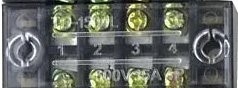
The TerminalBlock-04-01 is a versatile and reliable terminal block designed for connecting multiple wires together in a secure and organized manner. It is commonly used in electrical and electronic systems to simplify wiring, reduce clutter, and ensure stable connections. This component is ideal for applications requiring frequent wire changes or where a durable and reusable connection point is needed.
Explore Projects Built with terminalblock-04-01
 Open Project in Cirkit Designer
 Open Project in Cirkit Designer
 Open Project in Cirkit Designer
 Open Project in Cirkit Designer
Explore Projects Built with terminalblock-04-01
Open Project in Cirkit DesignerOpen Project in Cirkit DesignerOpen Project in Cirkit DesignerOpen Project in Cirkit DesignerCommon Applications and Use Cases
- Industrial control panels and automation systems
- Power distribution in electrical circuits
- Prototyping and testing of electronic circuits
- Home and building electrical wiring
- Audio and speaker connections
Technical Specifications
The TerminalBlock-04-01 is a 4-position terminal block with a single row of screw terminals. Below are its key technical details:
Key Specifications
| Parameter | Value |
|---|---|
| Number of Positions | 4 |
| Rated Voltage | 300V AC/DC |
| Rated Current | 15A |
| Wire Gauge Support | 22-12 AWG |
| Insulation Material | Polyamide (PA66), flame-retardant |
| Contact Material | Nickel-plated brass |
| Operating Temperature | -40°C to +105°C |
| Mounting Style | PCB mount or DIN rail mount |
Pin Configuration and Descriptions
The TerminalBlock-04-01 does not have traditional "pins" like ICs but instead features screw terminals for wire connections. Below is a description of its layout:
| Terminal Number | Description |
|---|---|
| 1 | Wire connection point 1 |
| 2 | Wire connection point 2 |
| 3 | Wire connection point 3 |
| 4 | Wire connection point 4 |
Each terminal is connected internally to its corresponding position, allowing for secure and independent wire connections.
Usage Instructions
How to Use the TerminalBlock-04-01 in a Circuit
- Prepare the Wires: Strip the insulation from the ends of the wires you want to connect. Ensure the exposed conductor length matches the terminal block's specifications (typically 5-7 mm).
- Insert the Wires: Loosen the screw on the terminal block using a screwdriver. Insert the stripped wire into the terminal opening.
- Secure the Connection: Tighten the screw to clamp the wire securely in place. Avoid overtightening, as this may damage the wire or the terminal block.
- Connect to the Circuit: Mount the terminal block on a PCB or DIN rail as required. Ensure all connections are properly insulated and secure before powering the circuit.
Important Considerations and Best Practices
- Wire Gauge Compatibility: Ensure the wire gauge matches the terminal block's supported range (22-12 AWG).
- Avoid Overloading: Do not exceed the rated voltage (300V) or current (15A) to prevent overheating or damage.
- Tighten Screws Properly: Loose connections can cause arcing or unreliable performance.
- Environmental Conditions: Use the terminal block within its specified operating temperature range (-40°C to +105°C).
- Periodic Maintenance: Check connections periodically to ensure screws remain tight and wires are secure.
Example: Connecting to an Arduino UNO
While the TerminalBlock-04-01 is not directly connected to an Arduino UNO, it can be used to organize and distribute power or signals in Arduino-based projects. Below is an example of how to use it for power distribution:
// Example: Distributing 5V power from Arduino UNO to multiple components
// Connect the Arduino's 5V and GND pins to the terminal block
// Use the terminal block to distribute power to sensors, modules, etc.

// No specific code is required for the terminal block itself, as it is a passive
// component. Ensure proper wiring and secure connections for reliable operation.
Troubleshooting and FAQs
Common Issues Users Might Face
- Loose Connections: Wires may come loose if screws are not tightened properly.
- Solution: Re-tighten the screws and ensure the wire is fully inserted.
- Overheating: The terminal block may overheat if the current exceeds its rated capacity.
- Solution: Verify the current draw of connected devices and ensure it is within the 15A limit.
- Wire Slippage: Thin wires may slip out of the terminal if not clamped securely.
- Solution: Use ferrules or twist the wire strands before inserting them into the terminal.
- Corrosion or Oxidation: Over time, the contacts may corrode in humid environments.
- Solution: Use terminal blocks with corrosion-resistant materials or apply contact grease.
FAQs
Q: Can I use the TerminalBlock-04-01 for AC and DC circuits?
A: Yes, the terminal block is rated for both AC and DC circuits up to 300V.
Q: Is the TerminalBlock-04-01 reusable?
A: Yes, it is designed for repeated use. You can loosen the screws to disconnect wires and reuse the terminal block.
Q: Can I mount the TerminalBlock-04-01 on a PCB?
A: Yes, the terminal block is compatible with PCB mounting. Ensure the PCB layout matches the terminal block's footprint.
Q: What tools are required to use this terminal block?
A: A standard flathead or Phillips screwdriver is typically sufficient for tightening and loosening the screws.
By following the guidelines and best practices outlined in this documentation, you can effectively use the TerminalBlock-04-01 in your electrical and electronic projects.