
How to Use pixhawk: Examples, Pinouts, and Specs
 Design with pixhawk in Cirkit Designer
Introduction
The Pixhawk 2.4.8, manufactured by 3DR, is an open-source flight control hardware designed for a wide range of autonomous vehicles, including drones, planes, and rovers. It is a highly versatile and reliable platform that supports advanced autopilot capabilities, sensor integration, and real-time control. The Pixhawk is widely used in robotics, unmanned aerial vehicles (UAVs), and other autonomous systems due to its robust design and compatibility with open-source software like PX4 and ArduPilot.
Explore Projects Built with pixhawk
 Open Project in Cirkit Designer
 Open Project in Cirkit Designer
 Open Project in Cirkit Designer
 Open Project in Cirkit Designer
Explore Projects Built with pixhawk
Open Project in Cirkit DesignerOpen Project in Cirkit DesignerOpen Project in Cirkit DesignerOpen Project in Cirkit DesignerCommon Applications and Use Cases
- Multirotor drones for aerial photography, mapping, and surveying
- Fixed-wing planes for long-range autonomous missions
- Ground rovers for exploration and research
- Robotics projects requiring precise navigation and control
- Academic and research projects in autonomous systems
Technical Specifications
The Pixhawk 2.4.8 is equipped with powerful hardware and a wide range of interfaces to support various sensors, peripherals, and communication modules.
Key Technical Details
- Processor: 32-bit STM32F427 Cortex-M4 core with FPU
- IMU Sensors:
- MPU6000 (3-axis accelerometer and gyroscope)
- LSM303D (3-axis magnetometer)
- MS5611 (barometer)
- Input Voltage: 4.8V to 5.4V
- Power Supply: Redundant power inputs with automatic failover
- Interfaces:
- 14 PWM/Servo outputs
- 5 UART ports
- I2C, SPI, CAN, and ADC ports
- Flash Memory: 2MB
- RAM: 256KB
- Dimensions: 81.5mm x 50mm x 15.5mm
- Weight: 38g
Pin Configuration and Descriptions
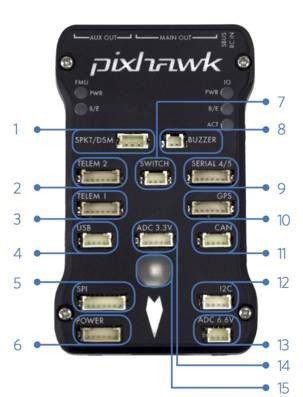
The Pixhawk 2.4.8 features multiple connectors for peripherals and sensors. Below is a summary of the key pin configurations:
Power Input
| Pin Name | Description |
|---|---|
| Power Module | Main power input (4.8V to 5.4V) |
| USB Port | Secondary power input via USB |
| Backup Power | Redundant power input |
PWM/Servo Outputs
| Pin Number | Description |
|---|---|
| PWM 1-8 | Main motor/servo outputs |
| PWM 9-14 | Auxiliary motor/servo outputs |
Communication Ports
| Port Name | Description |
|---|---|
| UART1-5 | Serial communication ports |
| I2C | Interface for external sensors |
| SPI | High-speed sensor interface |
| CAN | Communication for UAVCAN devices |
Other Interfaces
| Port Name | Description |
|---|---|
| ADC | Analog-to-digital converter inputs |
| SBUS | RC receiver input |
| GPS | GPS module connection |
| Telemetry 1/2 | Telemetry radio connection |
Usage Instructions
The Pixhawk 2.4.8 is designed to be user-friendly, but proper setup and configuration are essential for optimal performance.
How to Use the Pixhawk in a Circuit
Powering the Pixhawk:
- Connect the power module to the "Power" port on the Pixhawk.
- Ensure the input voltage is within the range of 4.8V to 5.4V.
- Optionally, connect a USB cable for secondary power during configuration.
Connecting Peripherals:
- Attach motors or servos to the PWM output pins.
- Connect the GPS module to the GPS port.
- Attach telemetry radios to the Telemetry 1 or 2 ports.
- Connect additional sensors (e.g., rangefinders, cameras) to the I2C or SPI ports.
Software Configuration:
- Install a ground control software like QGroundControl or Mission Planner.
- Flash the desired firmware (PX4 or ArduPilot) to the Pixhawk via USB.
- Calibrate the sensors, radio, and ESCs using the ground control software.
Testing and Deployment:
- Perform a pre-flight check to ensure all systems are functioning correctly.
- Test the vehicle in a controlled environment before full deployment.
Important Considerations and Best Practices
- Always use a reliable power source to prevent in-flight failures.
- Ensure proper vibration damping for the Pixhawk to avoid sensor errors.
- Regularly update the firmware to benefit from the latest features and bug fixes.
- Use shielded cables for communication ports to minimize interference.
- Perform thorough pre-flight checks, including GPS lock and sensor calibration.
Example Code for Arduino UNO Integration
The Pixhawk can communicate with an Arduino UNO via UART. Below is an example code snippet for reading MAVLink messages from the Pixhawk:
#include <mavlink.h> // Include MAVLink library

// Define the serial port for Pixhawk communication
#define PIXHAWK_SERIAL Serial1

void setup() {
  // Initialize serial communication with Pixhawk
  PIXHAWK_SERIAL.begin(57600); // Set baud rate to 57600
  Serial.begin(9600); // For debugging on the Arduino Serial Monitor
}

void loop() {
  mavlink_message_t msg;
  mavlink_status_t status;

  // Check if data is available from Pixhawk
  while (PIXHAWK_SERIAL.available()) {
    uint8_t c = PIXHAWK_SERIAL.read();

    // Parse incoming MAVLink message
    if (mavlink_parse_char(MAVLINK_COMM_0, c, &msg, &status)) {
      // Print message ID and sequence number for debugging
      Serial.print("Message ID: ");
      Serial.print(msg.msgid);
      Serial.print(", Sequence: ");
      Serial.println(msg.seq);
    }
  }
}
Troubleshooting and FAQs
Common Issues and Solutions
Pixhawk Not Powering On:
- Cause: Insufficient or incorrect power supply.
- Solution: Verify the power module connection and ensure the input voltage is within the specified range (4.8V to 5.4V).
No GPS Lock:
- Cause: Poor satellite visibility or incorrect GPS module connection.
- Solution: Ensure the GPS module is connected to the correct port and placed in an open area with a clear view of the sky.
Telemetry Not Working:
- Cause: Incorrect baud rate or wiring.
- Solution: Verify the telemetry radio connections and ensure the baud rate matches the ground control software settings.
Unstable Flight:
- Cause: Improper sensor calibration or vibration issues.
- Solution: Recalibrate the sensors and ensure the Pixhawk is mounted on vibration-damping material.
FAQs
Q: Can the Pixhawk 2.4.8 be used with PX4 firmware?
- A: Yes, the Pixhawk 2.4.8 is fully compatible with PX4 and ArduPilot firmware.
Q: What is the maximum number of PWM outputs supported?
- A: The Pixhawk 2.4.8 supports up to 14 PWM outputs (8 main and 6 auxiliary).
Q: How do I update the firmware on the Pixhawk?
- A: Use a ground control software like QGroundControl or Mission Planner to flash the latest firmware via USB.
Q: Can I connect multiple sensors to the Pixhawk?
- A: Yes, the Pixhawk supports multiple sensors via I2C, SPI, and ADC ports.
This concludes the documentation for the Pixhawk 2.4.8. For further assistance, refer to the official 3DR support resources or community forums.