
How to Use Membrane Switch: Examples, Pinouts, and Specs
 Design with Membrane Switch in Cirkit Designer
Introduction
A membrane switch is a type of electrical switch that consists of a thin, flexible membrane that can be pressed to complete a circuit. It is widely used in devices such as keyboards, control panels, and household appliances due to its low profile, lightweight design, and durability. Membrane switches are ideal for applications requiring a compact and cost-effective interface for user input.
Explore Projects Built with Membrane Switch
 Open Project in Cirkit Designer
 Open Project in Cirkit Designer
 Open Project in Cirkit Designer
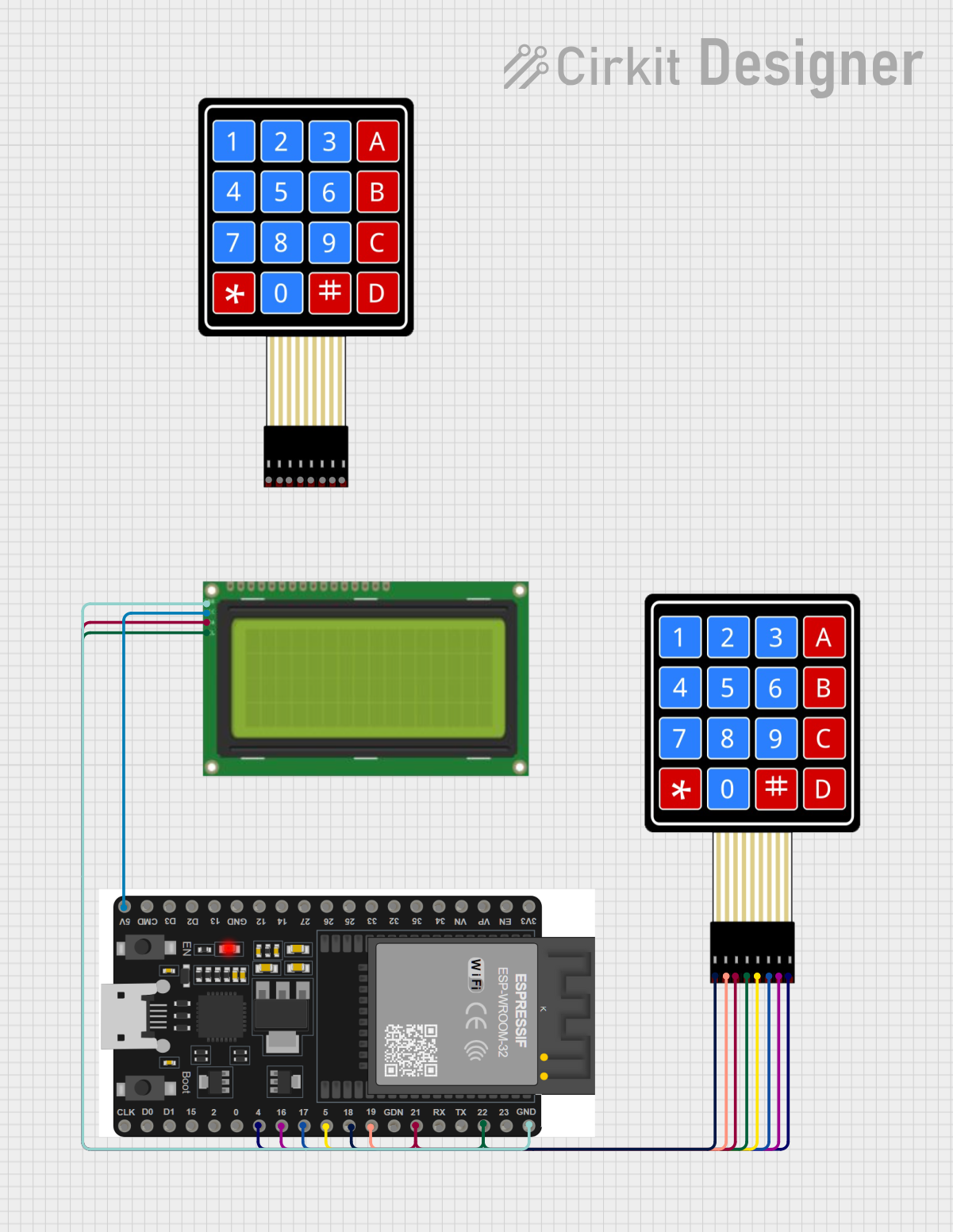 Open Project in Cirkit Designer
Explore Projects Built with Membrane Switch
Open Project in Cirkit DesignerOpen Project in Cirkit DesignerOpen Project in Cirkit DesignerOpen Project in Cirkit DesignerCommon Applications:
- Keyboards (e.g., computer keyboards, calculator keypads)
- Control panels for industrial equipment
- Consumer electronics (e.g., microwave ovens, washing machines)
- Medical devices
- Automotive dashboards
Technical Specifications
Key Technical Details:
- Operating Voltage: Typically 3.3V to 5V
- Current Rating: < 100mA
- Contact Resistance: 10Ω to 500Ω (varies by design)
- Insulation Resistance: > 100MΩ at 100V DC
- Operating Temperature: -40°C to 70°C
- Lifespan: Up to 1 million actuations per key
- Material: Polyester or polycarbonate for the membrane layers
- Actuation Force: 150g to 300g (typical)
Pin Configuration and Descriptions:
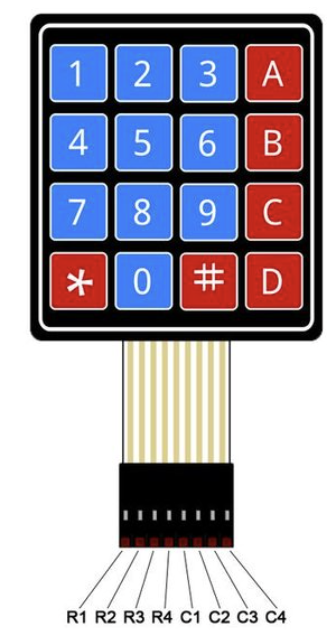
Membrane switches typically have a flexible ribbon cable with a connector that interfaces with a circuit. The number of pins depends on the number of keys or contacts in the switch matrix.
Example: 4x4 Membrane Keypad Pinout
| Pin Number | Description |
|---|---|
| 1 | Row 1 (R1) |
| 2 | Row 2 (R2) |
| 3 | Row 3 (R3) |
| 4 | Row 4 (R4) |
| 5 | Column 1 (C1) |
| 6 | Column 2 (C2) |
| 7 | Column 3 (C3) |
| 8 | Column 4 (C4) |
The rows and columns form a matrix that allows the detection of key presses by scanning the rows and columns for connections.
Usage Instructions
How to Use the Membrane Switch in a Circuit:
- Connect the Ribbon Cable: Attach the ribbon cable from the membrane switch to a compatible connector or directly to a microcontroller using jumper wires.
- Matrix Scanning: Use a microcontroller to scan the rows and columns of the switch matrix to detect key presses.
- Pull-Up Resistors: If necessary, enable internal pull-up resistors on the microcontroller pins to ensure stable readings.
- Debouncing: Implement software debouncing to filter out noise caused by rapid key presses or releases.
Example: Connecting a 4x4 Membrane Keypad to an Arduino UNO
Below is an example of how to connect and program a 4x4 membrane keypad with an Arduino UNO.
Circuit Diagram:
- Connect the 8 pins of the keypad to digital pins 2 through 9 on the Arduino UNO.
- Enable pull-up resistors in the code or use external resistors if needed.
Arduino Code:
#include <Keypad.h>

// Define the rows and columns of the keypad
const byte ROWS = 4; // Four rows
const byte COLS = 4; // Four columns

// Define the keymap for the 4x4 keypad
char keys[ROWS][COLS] = {
  {'1', '2', '3', 'A'},
  {'4', '5', '6', 'B'},
  {'7', '8', '9', 'C'},
  {'*', '0', '#', 'D'}
};

// Define the row and column pins connected to the Arduino
byte rowPins[ROWS] = {9, 8, 7, 6}; // Connect to R1, R2, R3, R4
byte colPins[COLS] = {5, 4, 3, 2}; // Connect to C1, C2, C3, C4

// Create a Keypad object
Keypad keypad = Keypad(makeKeymap(keys), rowPins, colPins, ROWS, COLS);

void setup() {
  Serial.begin(9600); // Initialize serial communication
  Serial.println("Membrane Keypad Test");
}

void loop() {
  char key = keypad.getKey(); // Check for key press

  if (key) {
    // Print the key pressed to the Serial Monitor
    Serial.print("Key Pressed: ");
    Serial.println(key);
  }
}
Important Considerations:
- Voltage Levels: Ensure the operating voltage of the membrane switch matches the microcontroller's input voltage.
- Debouncing: Without proper debouncing, key presses may register multiple times.
- Connector Compatibility: Use a compatible connector or adapter for the ribbon cable to avoid damaging the switch.
Troubleshooting and FAQs
Common Issues:
No Key Press Detected:
- Cause: Loose or incorrect connections.
- Solution: Verify the ribbon cable connections and ensure the pins are correctly mapped in the code.
Multiple Keys Register Simultaneously:
- Cause: Poor debouncing or electrical noise.
- Solution: Implement software debouncing and check for proper grounding.
Keys Not Responding:
- Cause: Damaged membrane switch or incorrect pin configuration.
- Solution: Test the switch with a multimeter to check for continuity and verify the pin configuration.
Erratic Behavior:
- Cause: Voltage fluctuations or missing pull-up resistors.
- Solution: Use pull-up resistors and ensure a stable power supply.
FAQs:
Q1: Can I use a membrane switch with a Raspberry Pi?
A1: Yes, you can connect a membrane switch to a Raspberry Pi using GPIO pins. Use a library like gpiozero or RPi.GPIO to read the key presses.
Q2: How do I clean a membrane switch?
A2: Use a soft, lint-free cloth slightly dampened with isopropyl alcohol. Avoid using excessive moisture or abrasive materials.
Q3: What is the lifespan of a membrane switch?
A3: Most membrane switches are rated for up to 1 million actuations per key, depending on the manufacturer and usage conditions.
Q4: Can I customize the layout of a membrane switch?
A4: Yes, many manufacturers offer custom designs for membrane switches to suit specific applications.