
How to Use US100: Examples, Pinouts, and Specs
 Design with US100 in Cirkit Designer
Introduction
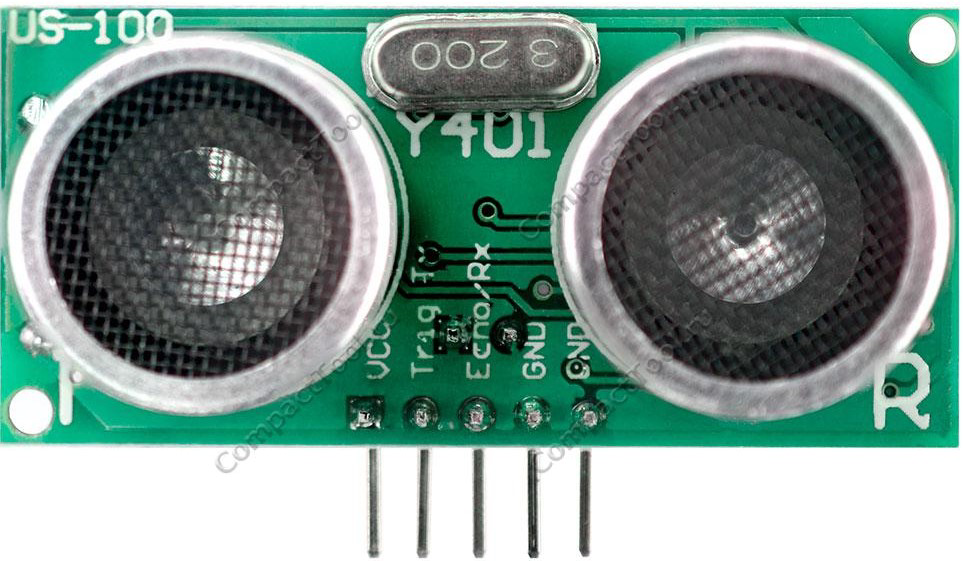
The US100 is a high-performance ultrasonic sensor designed for precise distance measurement and object detection. It operates by emitting ultrasonic waves and calculating the time taken for the echo to return, enabling accurate distance calculations. The US100 is versatile and can operate in both UART (serial) and PWM modes, making it suitable for a wide range of applications.
Explore Projects Built with US100
 Open Project in Cirkit Designer
 Open Project in Cirkit Designer
 Open Project in Cirkit Designer
 Open Project in Cirkit Designer
Explore Projects Built with US100
Open Project in Cirkit DesignerOpen Project in Cirkit DesignerOpen Project in Cirkit DesignerOpen Project in Cirkit DesignerCommon Applications
- Robotics for obstacle detection and avoidance
- Distance measurement in automation systems
- Liquid level sensing in tanks
- Proximity detection in security systems
- Smart parking systems for vehicle detection
Technical Specifications
The US100 ultrasonic sensor is equipped with advanced features for reliable and accurate performance. Below are its key technical details:
| Parameter | Specification |
|---|---|
| Operating Voltage | 2.4V to 5.5V |
| Operating Current | ≤ 2mA |
| Measuring Range | 2cm to 450cm |
| Measuring Accuracy | ±0.3cm |
| Operating Modes | UART (serial) and PWM |
| Communication Protocol | UART: 9600 baud rate |
| Operating Temperature | -20°C to +70°C |
| Dimensions | 45mm x 20mm x 15mm |
Pin Configuration
The US100 sensor has four pins, as described in the table below:
| Pin | Name | Description |
|---|---|---|
| 1 | VCC | Power supply input (2.4V to 5.5V) |
| 2 | GND | Ground connection |
| 3 | TX | UART transmit pin (used for serial communication) |
| 4 | RX | UART receive pin (used for serial communication) |
Usage Instructions
The US100 sensor can be used in either UART or PWM mode. Below are the steps and considerations for using the sensor in a circuit.
Using the US100 in UART Mode
- Wiring: Connect the VCC and GND pins to the power supply. Connect the TX and RX pins to the corresponding UART pins on your microcontroller (e.g., Arduino).
- Communication: The sensor communicates at a baud rate of 9600. It sends distance data in millimeters when queried.
- Query Command: To request a distance measurement, send the command
0x55to the sensor via the RX pin.
Example Code for Arduino UNO
// US100 Ultrasonic Sensor - UART Mode Example
// This code reads distance data from the US100 sensor and prints it to the Serial Monitor.

#include <SoftwareSerial.h>

// Define the RX and TX pins for SoftwareSerial
SoftwareSerial us100(10, 11); // RX = Pin 10, TX = Pin 11

void setup() {
  Serial.begin(9600);          // Initialize Serial Monitor at 9600 baud
  us100.begin(9600);           // Initialize US100 communication at 9600 baud
  Serial.println("US100 Sensor Initialized");
}

void loop() {
  us100.write(0x55);           // Send query command to the US100 sensor
  delay(100);                  // Wait for the sensor to process the command

  if (us100.available() >= 2) { // Check if at least 2 bytes are available
    uint8_t highByte = us100.read(); // Read the high byte of the distance
    uint8_t lowByte = us100.read();  // Read the low byte of the distance
    int distance = (highByte << 8) | lowByte; // Combine bytes into a 16-bit value

    Serial.print("Distance: ");
    Serial.print(distance);
    Serial.println(" mm");
  } else {
    Serial.println("No data received from US100 sensor");
  }

  delay(500);                  // Wait before the next measurement
}
Using the US100 in PWM Mode
- Wiring: Connect the VCC and GND pins to the power supply. The TX pin outputs a PWM signal representing the measured distance.
- PWM Signal: The duration of the high pulse corresponds to the measured distance in microseconds. For example, a 1000µs pulse represents a distance of 1000mm.
- Reading the Signal: Use a microcontroller to measure the pulse width of the TX pin.
Important Considerations
- Ensure the sensor is powered within its operating voltage range (2.4V to 5.5V).
- Avoid placing objects too close to the sensor (<2cm), as it may not provide accurate readings.
- Use decoupling capacitors near the power supply pins to reduce noise and improve stability.
Troubleshooting and FAQs
Common Issues and Solutions
No Data Received in UART Mode
- Cause: Incorrect wiring or baud rate mismatch.
- Solution: Verify the TX and RX connections. Ensure the baud rate is set to 9600.
Inaccurate Distance Measurements
- Cause: Objects are too close or outside the sensor's range.
- Solution: Ensure the object is within the 2cm to 450cm range. Avoid reflective or irregular surfaces.
Sensor Not Responding
- Cause: Insufficient power supply or loose connections.
- Solution: Check the power supply voltage and ensure all connections are secure.
PWM Signal Not Detected
- Cause: Incorrect pin configuration or measurement method.
- Solution: Verify the TX pin is connected to the correct input pin on the microcontroller. Use a pulse-width measurement function.
FAQs
Q1: Can the US100 operate in both UART and PWM modes simultaneously?
A1: No, the US100 operates in either UART or PWM mode. You must configure your circuit for the desired mode.
Q2: What is the maximum distance the US100 can measure?
A2: The US100 can measure distances up to 450cm with an accuracy of ±0.3cm.
Q3: Can the US100 be used outdoors?
A3: While the US100 can operate in a wide temperature range (-20°C to +70°C), it is not waterproof. Use a protective enclosure for outdoor applications.
Q4: How do I switch between UART and PWM modes?
A4: The US100 defaults to UART mode. To use PWM mode, configure your circuit to read the PWM signal from the TX pin.
By following this documentation, you can effectively integrate the US100 ultrasonic sensor into your projects for reliable distance measurement and object detection.