Cirkit Designer Logo
Cirkit Designer
Your all-in-one circuit design IDE
Home / 
Component Documentation

How to Use QTRX 13A: Examples, Pinouts, and Specs


Image of QTRX 13A
Cirkit Designer LogoDesign with QTRX 13A in Cirkit Designer

Introduction

The QTRX 13A, manufactured by Pololu (Part ID: HD 13A), is a high-performance relay designed for switching applications. It is capable of handling up to 13 amps of current, making it ideal for controlling high-power devices in electronic circuits. Its compact design ensures easy integration into various projects, including home automation, industrial control systems, and robotics.

Explore Projects Built with QTRX 13A
Use Cirkit Designer to design, explore, and prototype these projects online. Some projects support real-time simulation. Click "Open Project" to start designing instantly!
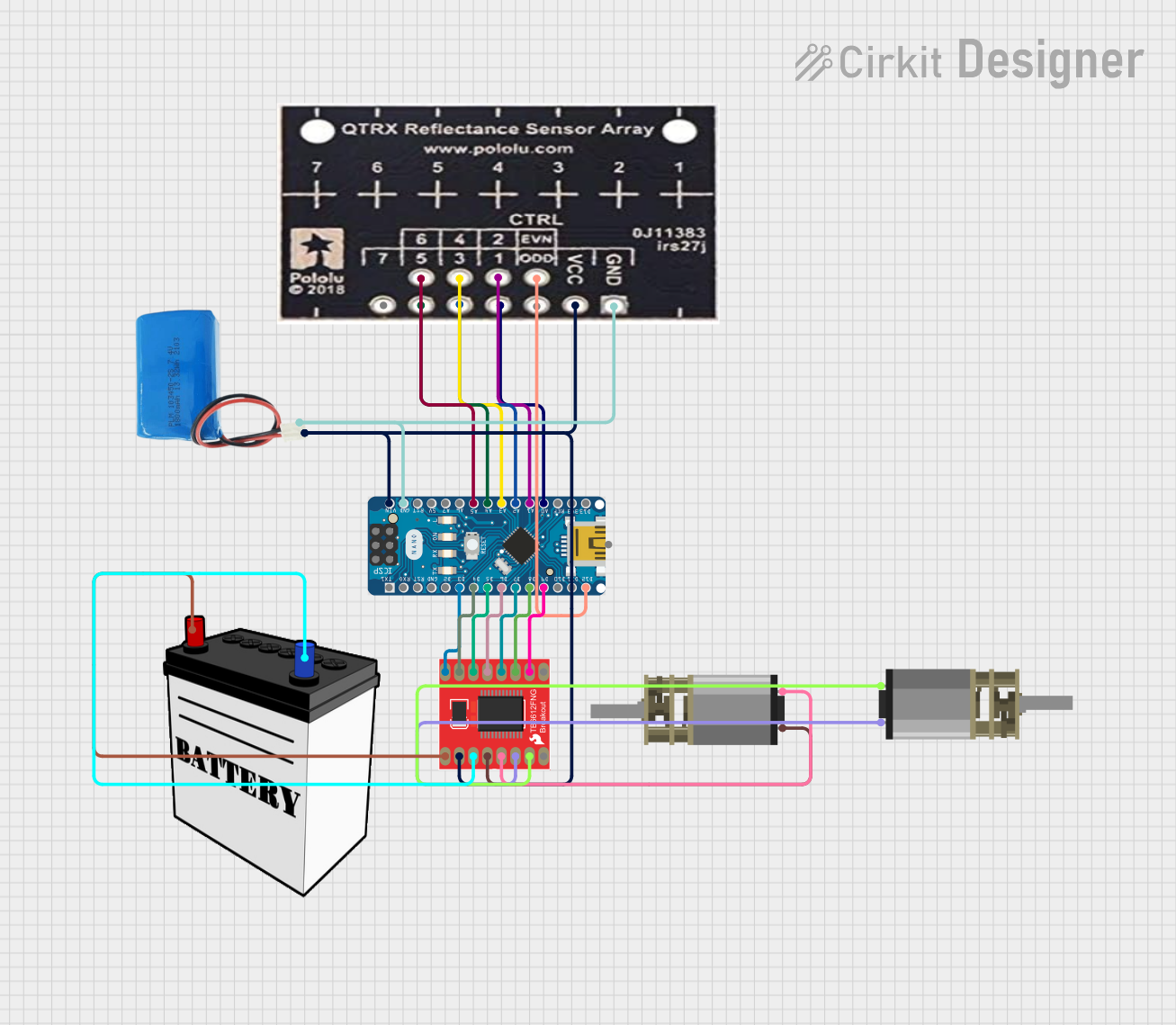
Arduino Nano-Powered PID Line Following Robot with Reflectance Sensor Array and Dual Motor Driver
Image of Line following bot: A project utilizing QTRX 13A in a practical application
This circuit is designed for an advanced line-following robot that uses a QTRX-HD-07RC Reflectance Sensor Array for line sensing and a Motor Driver 1A Dual TB6612FNG to control two DC Mini Metal Gear Motors. The Arduino Nano serves as the microcontroller, running a PID control algorithm to adjust the motor speeds for precise tracking. Power is supplied by a 5V battery for the logic and a 12V battery for the motor driver.
Cirkit Designer LogoOpen Project in Cirkit Designer
Satellite-Based Timing and Navigation System with SDR and Atomic Clock Synchronization
Image of GPS 시스템 측정 구성도_Confirm: A project utilizing QTRX 13A in a practical application
This circuit appears to be a complex system involving power supply management, GPS and timing synchronization, and data communication. It includes a SI-TEX G1 Satellite Compass for GPS data, an XHTF1021 Atomic Rubidium Clock for precise timing, and Ettus USRP B200 units for software-defined radio communication. Power is supplied through various SMPS units and distributed via terminal blocks and DC jacks. Data communication is facilitated by Beelink MINI S12 N95 computers, RS232 splitters, and a 1000BASE-T Media Converter for network connectivity. RF Directional Couplers are used to interface antennas with the USRP units, and the entire system is likely contained within cases for protection and organization.
Cirkit Designer LogoOpen Project in Cirkit Designer
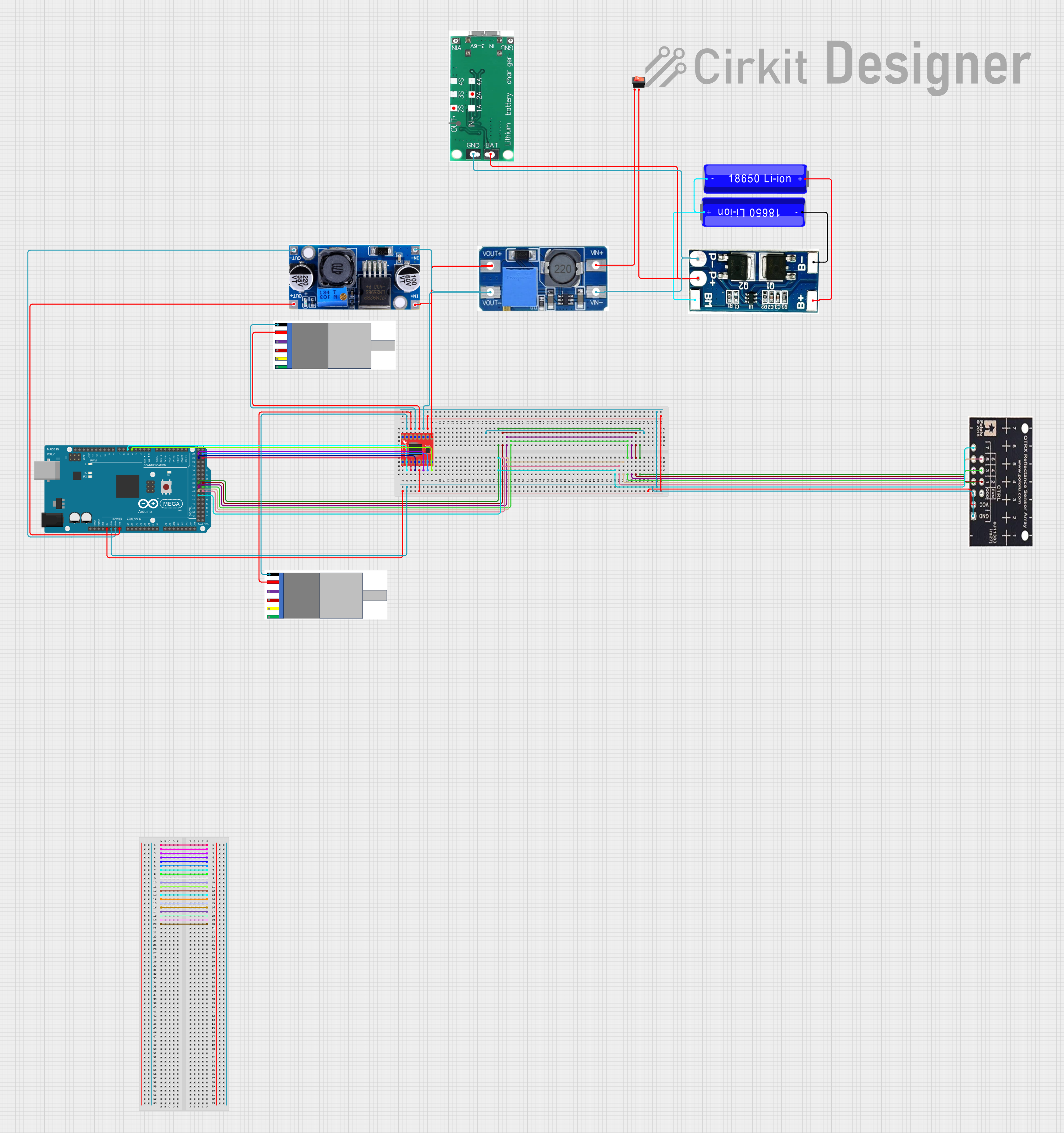
Arduino Mega 2560 Battery-Powered Robotic Vehicle with Reflectance Sensor and Motor Control
Image of PID Line Following Robot (No ESP32 or US): A project utilizing QTRX 13A in a practical application
This circuit is a motor control system powered by 18650 Li-ion batteries, featuring an Arduino Mega 2560 microcontroller that controls two gear motors with integrated encoders via a TB6612FNG motor driver. It also includes a QTRX-HD-07RC reflectance sensor array for line following, and power management components such as a lithium battery charging board, a step-up boost converter, and a buck converter to regulate voltage.
Cirkit Designer LogoOpen Project in Cirkit Designer
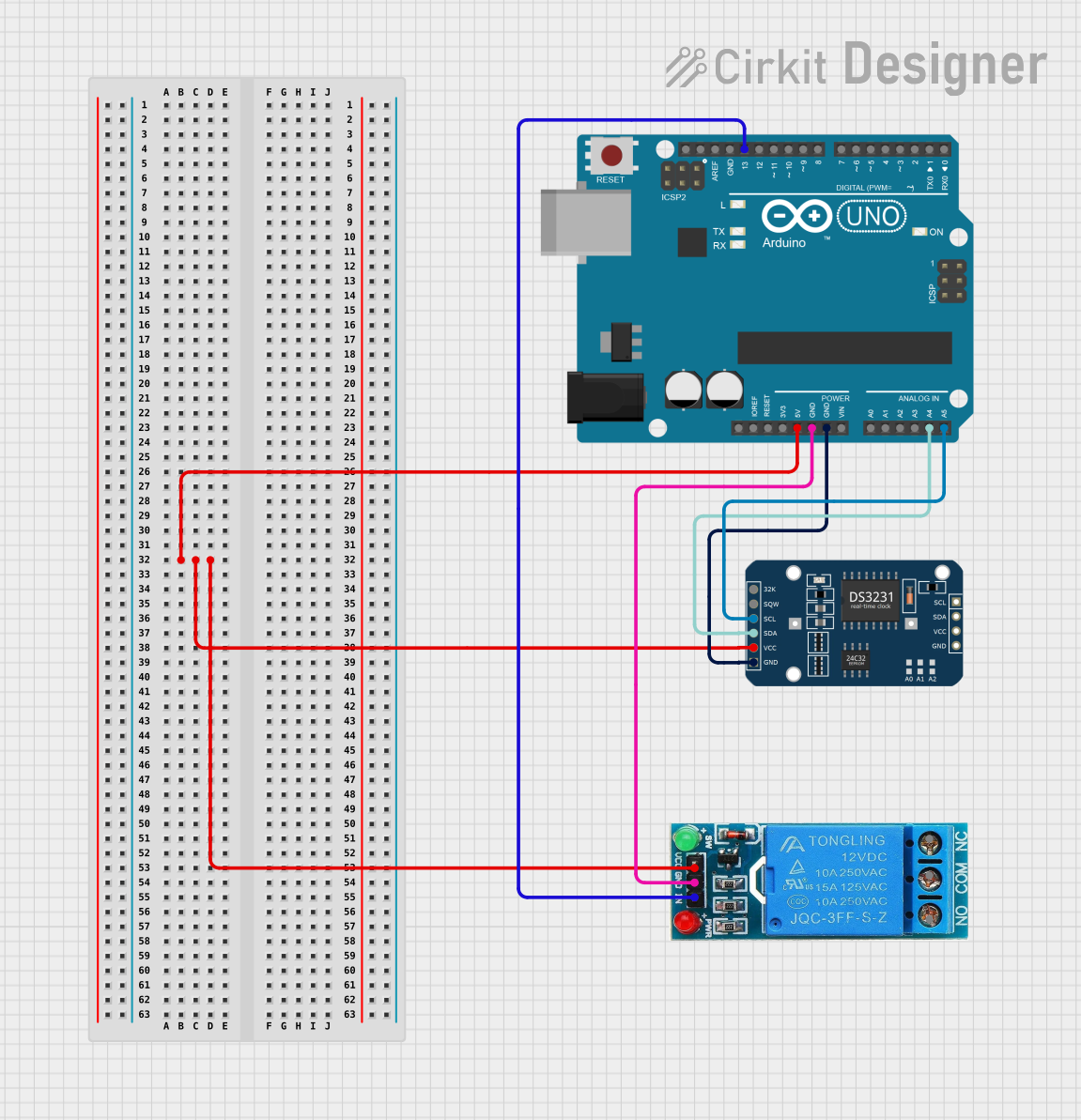
Arduino UNO Controlled Relay with DS3231 RTC
Image of Hooter connections: A project utilizing QTRX 13A in a practical application
This circuit features an Arduino UNO microcontroller connected to a DS3231 Real Time Clock (RTC) module and a 12V single-channel relay. The Arduino provides power to both the RTC and the relay, and it communicates with the RTC via I2C using the SDA and SCL lines connected to A4 and A5 respectively. The relay is controlled by the Arduino through a digital output on pin D13, allowing the Arduino to switch external loads on and off based on time events managed by the RTC.
Cirkit Designer LogoOpen Project in Cirkit Designer

Explore Projects Built with QTRX 13A

Use Cirkit Designer to design, explore, and prototype these projects online. Some projects support real-time simulation. Click "Open Project" to start designing instantly!
Image of Line following bot: A project utilizing QTRX 13A in a practical application
Arduino Nano-Powered PID Line Following Robot with Reflectance Sensor Array and Dual Motor Driver
This circuit is designed for an advanced line-following robot that uses a QTRX-HD-07RC Reflectance Sensor Array for line sensing and a Motor Driver 1A Dual TB6612FNG to control two DC Mini Metal Gear Motors. The Arduino Nano serves as the microcontroller, running a PID control algorithm to adjust the motor speeds for precise tracking. Power is supplied by a 5V battery for the logic and a 12V battery for the motor driver.
Cirkit Designer LogoOpen Project in Cirkit Designer
Image of GPS 시스템 측정 구성도_Confirm: A project utilizing QTRX 13A in a practical application
Satellite-Based Timing and Navigation System with SDR and Atomic Clock Synchronization
This circuit appears to be a complex system involving power supply management, GPS and timing synchronization, and data communication. It includes a SI-TEX G1 Satellite Compass for GPS data, an XHTF1021 Atomic Rubidium Clock for precise timing, and Ettus USRP B200 units for software-defined radio communication. Power is supplied through various SMPS units and distributed via terminal blocks and DC jacks. Data communication is facilitated by Beelink MINI S12 N95 computers, RS232 splitters, and a 1000BASE-T Media Converter for network connectivity. RF Directional Couplers are used to interface antennas with the USRP units, and the entire system is likely contained within cases for protection and organization.
Cirkit Designer LogoOpen Project in Cirkit Designer
Image of PID Line Following Robot (No ESP32 or US): A project utilizing QTRX 13A in a practical application
Arduino Mega 2560 Battery-Powered Robotic Vehicle with Reflectance Sensor and Motor Control
This circuit is a motor control system powered by 18650 Li-ion batteries, featuring an Arduino Mega 2560 microcontroller that controls two gear motors with integrated encoders via a TB6612FNG motor driver. It also includes a QTRX-HD-07RC reflectance sensor array for line following, and power management components such as a lithium battery charging board, a step-up boost converter, and a buck converter to regulate voltage.
Cirkit Designer LogoOpen Project in Cirkit Designer
Image of Hooter connections: A project utilizing QTRX 13A in a practical application
Arduino UNO Controlled Relay with DS3231 RTC
This circuit features an Arduino UNO microcontroller connected to a DS3231 Real Time Clock (RTC) module and a 12V single-channel relay. The Arduino provides power to both the RTC and the relay, and it communicates with the RTC via I2C using the SDA and SCL lines connected to A4 and A5 respectively. The relay is controlled by the Arduino through a digital output on pin D13, allowing the Arduino to switch external loads on and off based on time events managed by the RTC.
Cirkit Designer LogoOpen Project in Cirkit Designer

Common Applications

  • Home automation systems (e.g., controlling lights, fans, or appliances)
  • Industrial equipment control
  • Robotics and motor control
  • Power management in electronic circuits
  • Automotive electronics

Technical Specifications

The QTRX 13A relay is designed to provide reliable performance in demanding applications. Below are its key technical details:

General Specifications

Parameter Value
Manufacturer Pololu
Part ID HD 13A
Maximum Current Rating 13 A
Operating Voltage 5 V DC (coil voltage)
Contact Voltage Rating Up to 250 V AC / 30 V DC
Contact Type SPDT (Single Pole Double Throw)
Dimensions 29 mm x 12.7 mm x 15 mm
Weight 10 g

Pin Configuration

The QTRX 13A relay has five pins, as described in the table below:

Pin Number Pin Name Description
1 Coil+ Positive terminal of the relay coil (connect to 5 V DC)
2 Coil- Negative terminal of the relay coil (connect to ground)
3 Common (COM) Common terminal for the relay switch
4 Normally Open (NO) Connected to COM when the relay is activated (switch closed)
5 Normally Closed (NC) Connected to COM when the relay is deactivated (switch open)

Usage Instructions

How to Use the QTRX 13A in a Circuit

  1. Power the Relay Coil: Connect the Coil+ pin to a 5 V DC power source and the Coil- pin to ground. This energizes the relay coil and switches the contacts.
  2. Connect the Load:
    • For devices that should turn on when the relay is activated, connect the load between the COM and NO pins.
    • For devices that should turn off when the relay is activated, connect the load between the COM and NC pins.
  3. Control the Relay: Use a microcontroller (e.g., Arduino UNO) or a transistor circuit to control the relay coil. Ensure the control circuit can handle the relay's coil current.

Important Considerations

  • Flyback Diode: Always use a flyback diode across the relay coil to protect the control circuit from voltage spikes when the relay is deactivated.
  • Current Rating: Ensure the load current does not exceed the relay's maximum rating of 13 A.
  • Isolation: Use optocouplers or transistors to isolate the relay from sensitive control circuits if needed.

Example: Connecting QTRX 13A to an Arduino UNO

Below is an example of how to control the QTRX 13A relay using an Arduino UNO:

// Example code to control the QTRX 13A relay with an Arduino UNO

const int relayPin = 7; // Pin connected to the relay's control circuit

void setup() {
  pinMode(relayPin, OUTPUT); // Set the relay pin as an output
  digitalWrite(relayPin, LOW); // Ensure the relay is off at startup
}

void loop() {
  digitalWrite(relayPin, HIGH); // Activate the relay
  delay(5000); // Keep the relay on for 5 seconds
  digitalWrite(relayPin, LOW); // Deactivate the relay
  delay(5000); // Keep the relay off for 5 seconds
}

Note: Use a transistor or relay driver circuit between the Arduino and the relay to handle the coil current safely.

Troubleshooting and FAQs

Common Issues

  1. Relay Not Activating

    • Cause: Insufficient voltage or current to the relay coil.
    • Solution: Verify the power supply to the Coil+ and Coil- pins. Ensure the control circuit can provide enough current.
  2. Load Not Switching

    • Cause: Incorrect wiring of the load to the relay contacts.
    • Solution: Double-check the connections to the COM, NO, and NC pins.
  3. Voltage Spikes Damaging the Circuit

    • Cause: Lack of a flyback diode across the relay coil.
    • Solution: Add a flyback diode (e.g., 1N4007) across the Coil+ and Coil- pins.

FAQs

Q: Can the QTRX 13A handle AC loads?
A: Yes, the relay can handle AC loads up to 250 V, provided the current does not exceed 13 A.

Q: What is the minimum voltage required to activate the relay?
A: The relay requires a 5 V DC supply to activate the coil.

Q: Can I use the QTRX 13A with a 3.3 V microcontroller?
A: Yes, but you will need a transistor or relay driver circuit to step up the control voltage to 5 V for the relay coil.

Q: Is the relay suitable for switching inductive loads?
A: Yes, but ensure proper snubber circuits or flyback diodes are used to suppress voltage spikes.