
How to Use EMERGENCY STOP: Examples, Pinouts, and Specs
 Design with EMERGENCY STOP in Cirkit Designer
Introduction
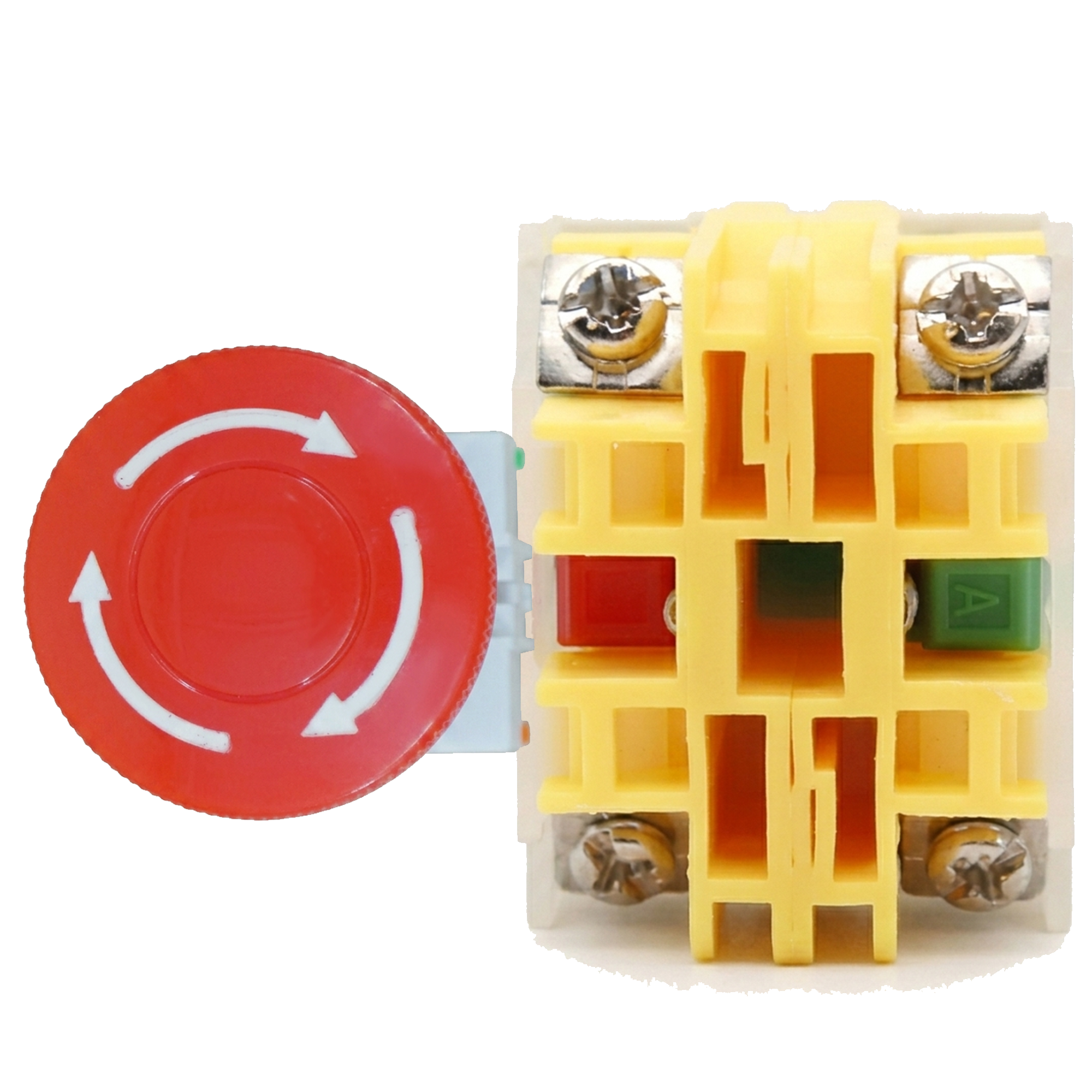
The EMERGENCY STOP (Manufacturer: CNAOM, Part ID: 4 PIN) is a critical safety device designed to immediately halt the operation of machinery or equipment in emergency situations. It ensures the safety of operators and prevents accidents by cutting off power or stopping motion when activated. This component is widely used in industrial, manufacturing, and automation systems where safety is paramount.
Explore Projects Built with EMERGENCY STOP
 Open Project in Cirkit Designer
 Open Project in Cirkit Designer
 Open Project in Cirkit Designer
 Open Project in Cirkit Designer
Explore Projects Built with EMERGENCY STOP
Open Project in Cirkit DesignerOpen Project in Cirkit DesignerOpen Project in Cirkit DesignerOpen Project in Cirkit DesignerCommon Applications and Use Cases
- Industrial machinery and equipment
- Conveyor systems
- Robotics and automation systems
- Elevators and escalators
- Laboratory and testing equipment
- Any system requiring immediate shutdown in emergencies
Technical Specifications
Key Technical Details
| Parameter | Specification |
|---|---|
| Manufacturer | CNAOM |
| Part ID | 4 PIN |
| Operating Voltage | 24V DC / 110V AC / 220V AC (varies by model) |
| Current Rating | 10A |
| Contact Configuration | Normally Closed (NC) and Normally Open (NO) |
| Mechanical Durability | 1,000,000 cycles |
| Electrical Durability | 50,000 cycles |
| Mounting Type | Panel Mount |
| Operating Temperature | -25°C to +55°C |
| Degree of Protection | IP65 (Dust-tight and water-resistant) |
Pin Configuration and Descriptions
The CNAOM 4 PIN Emergency Stop switch has four terminals, which are configured as follows:
| Pin Number | Label | Description |
|---|---|---|
| 1 | NC1 | Normally Closed contact 1 (opens when activated) |
| 2 | NO1 | Normally Open contact 1 (closes when activated) |
| 3 | NC2 | Normally Closed contact 2 (opens when activated) |
| 4 | NO2 | Normally Open contact 2 (closes when activated) |
Usage Instructions
How to Use the Component in a Circuit
Wiring the Emergency Stop:
- Connect the NC (Normally Closed) terminals (e.g., Pin 1 and Pin 3) in series with the power supply or control circuit. This ensures that the circuit is interrupted when the button is pressed.
- Optionally, use the NO (Normally Open) terminals (e.g., Pin 2 and Pin 4) for signaling or triggering an alarm when the button is activated.
Mounting the Switch:
- Drill a hole in the control panel according to the switch's mounting diameter (typically 22mm or 30mm).
- Secure the switch using the provided locking nut.
Testing the Emergency Stop:
- After installation, test the switch by pressing it to ensure it interrupts the circuit and stops the machinery.
- Reset the switch by turning or pulling it back to its original position (depending on the model).
Important Considerations and Best Practices
- Always ensure the Emergency Stop is easily accessible to operators.
- Use appropriate wire gauges and connectors to handle the rated current.
- Regularly inspect and test the switch to ensure proper functionality.
- Do not bypass or disable the Emergency Stop under any circumstances.
- For systems controlled by microcontrollers (e.g., Arduino), use the NO terminals to send a signal to the microcontroller for emergency handling.
Example Arduino Code
If you are using the Emergency Stop with an Arduino UNO to monitor its state, you can use the following code:
// Define the pin connected to the Emergency Stop NO terminal
const int emergencyStopPin = 2; // Digital pin 2

void setup() {
  pinMode(emergencyStopPin, INPUT_PULLUP);
  // Set the pin as input with an internal pull-up resistor
  Serial.begin(9600);
  // Initialize serial communication for debugging
}

void loop() {
  int buttonState = digitalRead(emergencyStopPin);
  // Read the state of the Emergency Stop button

  if (buttonState == LOW) {
    // LOW indicates the button is pressed (NO terminal closed)
    Serial.println("Emergency Stop Activated! Shutting down system...");
    // Add code here to safely shut down your system
  } else {
    Serial.println("System Running Normally.");
  }

  delay(500);
  // Add a small delay to avoid excessive serial output
}
Troubleshooting and FAQs
Common Issues and Solutions
| Issue | Possible Cause | Solution |
|---|---|---|
| Emergency Stop does not interrupt power | Incorrect wiring of NC terminals | Verify wiring and ensure NC terminals are in series with the circuit. |
| Button does not reset after activation | Mechanical fault or debris in the switch | Inspect the switch for damage or debris and clean/replace if necessary. |
| False triggering of the Emergency Stop | Electrical noise or loose connections | Use shielded cables and ensure all connections are secure. |
| Arduino does not detect button press | Incorrect pin configuration or wiring | Verify the pin connection and ensure the correct pin is defined in the code. |
FAQs
Can I use the Emergency Stop with high-voltage systems?
- Yes, as long as the voltage and current ratings of the switch are not exceeded.
How often should I test the Emergency Stop?
- It is recommended to test the switch at least once a month to ensure proper functionality.
Can I use the Emergency Stop for signaling only?
- Yes, you can use the NO terminals to send a signal to a controller or alarm system without interrupting the main power circuit.
What happens if the Emergency Stop fails?
- Regular maintenance and testing are crucial to prevent failure. If the switch fails, replace it immediately to maintain safety.
By following this documentation, you can safely and effectively integrate the CNAOM 4 PIN Emergency Stop into your system, ensuring reliable operation and enhanced safety.