
How to Use terminalblock-04-01: Examples, Pinouts, and Specs
 Design with terminalblock-04-01 in Cirkit Designer
Introduction
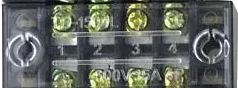
The TerminalBlock-04-01 is a versatile and reliable terminal block designed for securely connecting multiple wires together. It provides a convenient and organized solution for managing electrical connections in a wide range of applications. This component is particularly useful in industrial control systems, home automation, and prototyping projects where clean and secure wiring is essential.
Explore Projects Built with terminalblock-04-01
 Open Project in Cirkit Designer
 Open Project in Cirkit Designer
 Open Project in Cirkit Designer
 Open Project in Cirkit Designer
Explore Projects Built with terminalblock-04-01
Open Project in Cirkit DesignerOpen Project in Cirkit DesignerOpen Project in Cirkit DesignerOpen Project in Cirkit DesignerCommon Applications and Use Cases
- Industrial control panels and machinery
- Home automation systems
- Prototyping and breadboarding
- Power distribution in low-voltage circuits
- Connecting sensors, actuators, and other peripherals
Technical Specifications
The TerminalBlock-04-01 is designed to handle low to medium voltage and current levels, making it suitable for a variety of electrical and electronic applications.
Key Technical Details
| Parameter | Value |
|---|---|
| Number of Terminals | 4 |
| Rated Voltage | 300V AC/DC |
| Rated Current | 15A |
| Wire Size Compatibility | 22-12 AWG |
| Material | Flame-retardant thermoplastic |
| Mounting Type | Screw-down or PCB mount |
| Operating Temperature | -40°C to +105°C |
Pin Configuration and Descriptions
The TerminalBlock-04-01 features four terminals, each designed to connect a single wire. The terminals are secured using screws, ensuring a firm and reliable connection.
| Terminal Number | Description |
|---|---|
| 1 | Input/Output wire connection point |
| 2 | Input/Output wire connection point |
| 3 | Input/Output wire connection point |
| 4 | Input/Output wire connection point |
Usage Instructions
How to Use the TerminalBlock-04-01 in a Circuit
- Prepare the Wires: Strip the insulation from the ends of the wires you wish to connect. Ensure that the exposed conductor length matches the terminal block's specifications (typically 5-7mm).
- Insert the Wires: Loosen the screws on the terminal block using a screwdriver. Insert the stripped wire ends into the terminal openings.
- Secure the Connection: Tighten the screws to clamp the wires securely in place. Avoid overtightening, as this may damage the wires or the terminal block.
- Verify the Connection: Gently tug on the wires to ensure they are firmly secured.
Important Considerations and Best Practices
- Wire Compatibility: Ensure the wire gauge (22-12 AWG) is compatible with the terminal block.
- Current and Voltage Ratings: Do not exceed the rated current (15A) or voltage (300V) to prevent overheating or damage.
- Mounting: If using the PCB mount version, solder the terminal block securely to the PCB. For screw-down mounting, use appropriate screws and ensure a stable installation.
- Environmental Conditions: Use the terminal block within the specified operating temperature range (-40°C to +105°C).
Example: Connecting to an Arduino UNO
The TerminalBlock-04-01 can be used to connect external components, such as sensors or actuators, to an Arduino UNO. Below is an example of wiring an LED through the terminal block.
Circuit Diagram
- Connect one terminal of the TerminalBlock-04-01 to the Arduino's digital pin (e.g., D13).
- Connect another terminal to the LED's anode (+).
- Connect the LED's cathode (-) to a resistor, and then to the Arduino's GND.
Arduino Code
// Example code to blink an LED connected via TerminalBlock-04-01
const int ledPin = 13; // Pin connected to the terminal block

void setup() {
  pinMode(ledPin, OUTPUT); // Set the pin as an output
}

void loop() {
  digitalWrite(ledPin, HIGH); // Turn the LED on
  delay(1000);               // Wait for 1 second
  digitalWrite(ledPin, LOW);  // Turn the LED off
  delay(1000);               // Wait for 1 second
}
Troubleshooting and FAQs
Common Issues Users Might Face
- Loose Connections: If the wires are not securely clamped, the circuit may not function properly.
- Solution: Ensure the screws are tightened adequately without damaging the wires.
- Overheating: Exceeding the rated current or voltage can cause the terminal block to overheat.
- Solution: Verify that the connected load does not exceed 15A or 300V.
- Wire Slippage: Stripped wires may slip out of the terminals if not properly inserted.
- Solution: Ensure the stripped portion of the wire is the correct length and fully inserted before tightening the screws.
FAQs
Q: Can I use the TerminalBlock-04-01 for high-voltage applications?
A: No, the terminal block is rated for a maximum of 300V. For high-voltage applications, use a terminal block with a higher voltage rating.
Q: Is the TerminalBlock-04-01 suitable for outdoor use?
A: The terminal block is not specifically designed for outdoor use. If used outdoors, ensure it is housed in a weatherproof enclosure.
Q: Can I connect multiple wires to a single terminal?
A: It is not recommended to connect multiple wires to a single terminal, as this may compromise the connection's reliability and safety.
By following these guidelines and best practices, you can effectively use the TerminalBlock-04-01 in your projects for secure and organized wiring.