
How to Use SX1262 & ESP32-C3 Module: Examples, Pinouts, and Specs
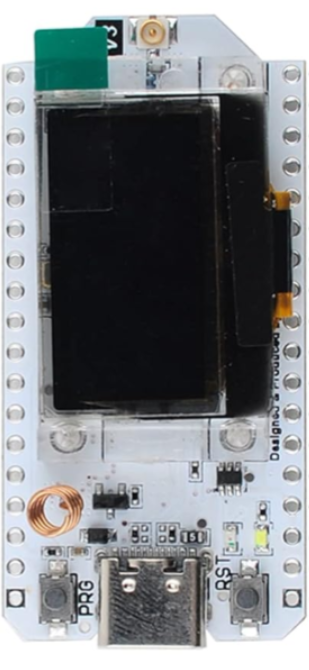
 Design with SX1262 & ESP32-C3 Module in Cirkit Designer
Introduction
The SX1262 & ESP32-C3 Module, manufactured by MakerFocus, is a versatile electronic component that combines the long-range, low-power LoRa transceiver SX1262 with the Wi-Fi and Bluetooth-enabled ESP32-C3 microcontroller. This module is designed for Internet of Things (IoT) applications, offering robust wireless communication and efficient data processing capabilities.
Explore Projects Built with SX1262 & ESP32-C3 Module
 Open Project in Cirkit Designer
 Open Project in Cirkit Designer
 Open Project in Cirkit Designer
 Open Project in Cirkit Designer
Explore Projects Built with SX1262 & ESP32-C3 Module
Open Project in Cirkit DesignerOpen Project in Cirkit DesignerOpen Project in Cirkit DesignerOpen Project in Cirkit DesignerCommon Applications and Use Cases
- Smart agriculture and environmental monitoring
- Industrial IoT (IIoT) and asset tracking
- Smart cities and home automation
- Remote sensing and telemetry
- Low-power, long-range wireless communication networks
Technical Specifications
Key Technical Details
| Parameter | Specification |
|---|---|
| LoRa Transceiver | SX1262 |
| Microcontroller | ESP32-C3 (RISC-V, single-core, 32-bit) |
| Wireless Connectivity | LoRa, Wi-Fi (802.11 b/g/n), Bluetooth 5.0 |
| Operating Voltage | 3.3V |
| Operating Frequency (LoRa) | 868 MHz / 915 MHz (region-dependent) |
| LoRa Output Power | Up to +22 dBm |
| Wi-Fi Frequency | 2.4 GHz |
| Flash Memory | 4 MB |
| SRAM | 400 KB |
| GPIO Pins | Up to 22 |
| Power Consumption | Ultra-low power in deep sleep mode (<10 µA) |
| Dimensions | Compact module form factor |
Pin Configuration and Descriptions
| Pin Number | Pin Name | Description |
|---|---|---|
| 1 | GND | Ground |
| 2 | 3V3 | 3.3V Power Supply |
| 3 | GPIO0 | General Purpose I/O, used for boot mode selection |
| 4 | GPIO1 | General Purpose I/O |
| 5 | GPIO2 | General Purpose I/O |
| 6 | TXD | UART Transmit |
| 7 | RXD | UART Receive |
| 8 | LoRa_SCK | SPI Clock for LoRa communication |
| 9 | LoRa_MISO | SPI Master-In-Slave-Out for LoRa communication |
| 10 | LoRa_MOSI | SPI Master-Out-Slave-In for LoRa communication |
| 11 | LoRa_NSS | SPI Chip Select for LoRa |
| 12 | LoRa_RST | Reset pin for LoRa transceiver |
| 13 | LoRa_DIO0 | Digital I/O for LoRa interrupt |
| 14 | EN | Enable pin for ESP32-C3 |
Usage Instructions
How to Use the Component in a Circuit
- Power Supply: Connect the
3V3pin to a 3.3V power source and theGNDpin to ground. - LoRa Communication: Use the SPI pins (
LoRa_SCK,LoRa_MISO,LoRa_MOSI,LoRa_NSS) to interface with the SX1262 transceiver. Ensure proper pull-up resistors if required. - Wi-Fi/Bluetooth: Configure the ESP32-C3 for Wi-Fi or Bluetooth communication using its GPIO pins and UART interface.
- Programming: Use the UART pins (
TXD,RXD) to upload firmware to the ESP32-C3. GPIO0 can be used to set the module into boot mode for programming. - Antenna: Attach an appropriate antenna to the LoRa and Wi-Fi/Bluetooth connectors for optimal signal strength.
Important Considerations and Best Practices
- Ensure the operating voltage does not exceed 3.3V to prevent damage to the module.
- Use decoupling capacitors near the power pins to stabilize the power supply.
- For LoRa communication, select the appropriate frequency band (868 MHz or 915 MHz) based on your region's regulations.
- Place the antenna away from noisy components to minimize interference.
- Use deep sleep mode to conserve power in battery-operated applications.
Example Code for Arduino UNO
Below is an example of using the SX1262 & ESP32-C3 module for LoRa communication. This code demonstrates sending a simple message.
#include <SPI.h>
#include <LoRa.h> // Include the LoRa library

#define SCK 5       // SPI Clock pin
#define MISO 19     // SPI MISO pin
#define MOSI 27     // SPI MOSI pin
#define NSS 18      // LoRa Chip Select pin
#define RST 14      // LoRa Reset pin
#define DIO0 26     // LoRa Interrupt pin

void setup() {
  Serial.begin(9600); // Initialize serial communication
  while (!Serial);

  // Initialize LoRa module
  LoRa.setPins(NSS, RST, DIO0); // Set LoRa pins
  if (!LoRa.begin(915E6)) {     // Initialize LoRa at 915 MHz
    Serial.println("Starting LoRa failed!");
    while (1);
  }
  Serial.println("LoRa initialized successfully!");
}

void loop() {
  Serial.println("Sending message...");
  LoRa.beginPacket();           // Start LoRa packet
  LoRa.print("Hello, LoRa!");   // Add message to packet
  LoRa.endPacket();             // Send packet
  delay(5000);                  // Wait 5 seconds before sending again
}
Notes:
- Replace
915E6with868E6if operating in the 868 MHz band. - Ensure the LoRa library is installed in your Arduino IDE.
Troubleshooting and FAQs
Common Issues and Solutions
Module Not Responding
- Cause: Incorrect wiring or insufficient power supply.
- Solution: Double-check all connections and ensure a stable 3.3V power source.
LoRa Communication Fails
- Cause: Incorrect frequency or mismatched settings between transmitter and receiver.
- Solution: Verify that both devices are using the same frequency and spreading factor.
Wi-Fi/Bluetooth Not Connecting
- Cause: Incorrect credentials or interference.
- Solution: Ensure the correct SSID and password are used for Wi-Fi. For Bluetooth, check pairing settings.
High Power Consumption
- Cause: Module not in sleep mode.
- Solution: Use deep sleep mode when the module is idle to reduce power consumption.
FAQs
Can I use this module with a 5V microcontroller?
- No, the module operates at 3.3V. Use a level shifter for 5V systems.
What is the maximum range of LoRa communication?
- The range depends on environmental factors but can reach up to 10 km in open areas.
How do I update the firmware on the ESP32-C3?
- Use the UART pins (
TXD,RXD) and a USB-to-serial adapter to upload firmware via the Arduino IDE or ESP-IDF.
- Use the UART pins (
By following this documentation, you can effectively integrate the SX1262 & ESP32-C3 module into your IoT projects.