Cirkit Designer Logo
Cirkit Designer
Your all-in-one circuit design IDE
Home / 
Component Documentation

How to Use LED Board: Examples, Pinouts, and Specs

Image of LED Board
Cirkit Designer LogoDesign with LED Board in Cirkit Designer

Introduction

The LED Board by Arron is a versatile and efficient lighting solution designed for a variety of applications. This electronic component is widely used for illumination, signaling, and decorative purposes. Its low power consumption and long lifespan make it a popular choice for projects ranging from simple DIY crafts to complex industrial systems.

Explore Projects Built with LED Board
Use Cirkit Designer to design, explore, and prototype these projects online. Some projects support real-time simulation. Click "Open Project" to start designing instantly!
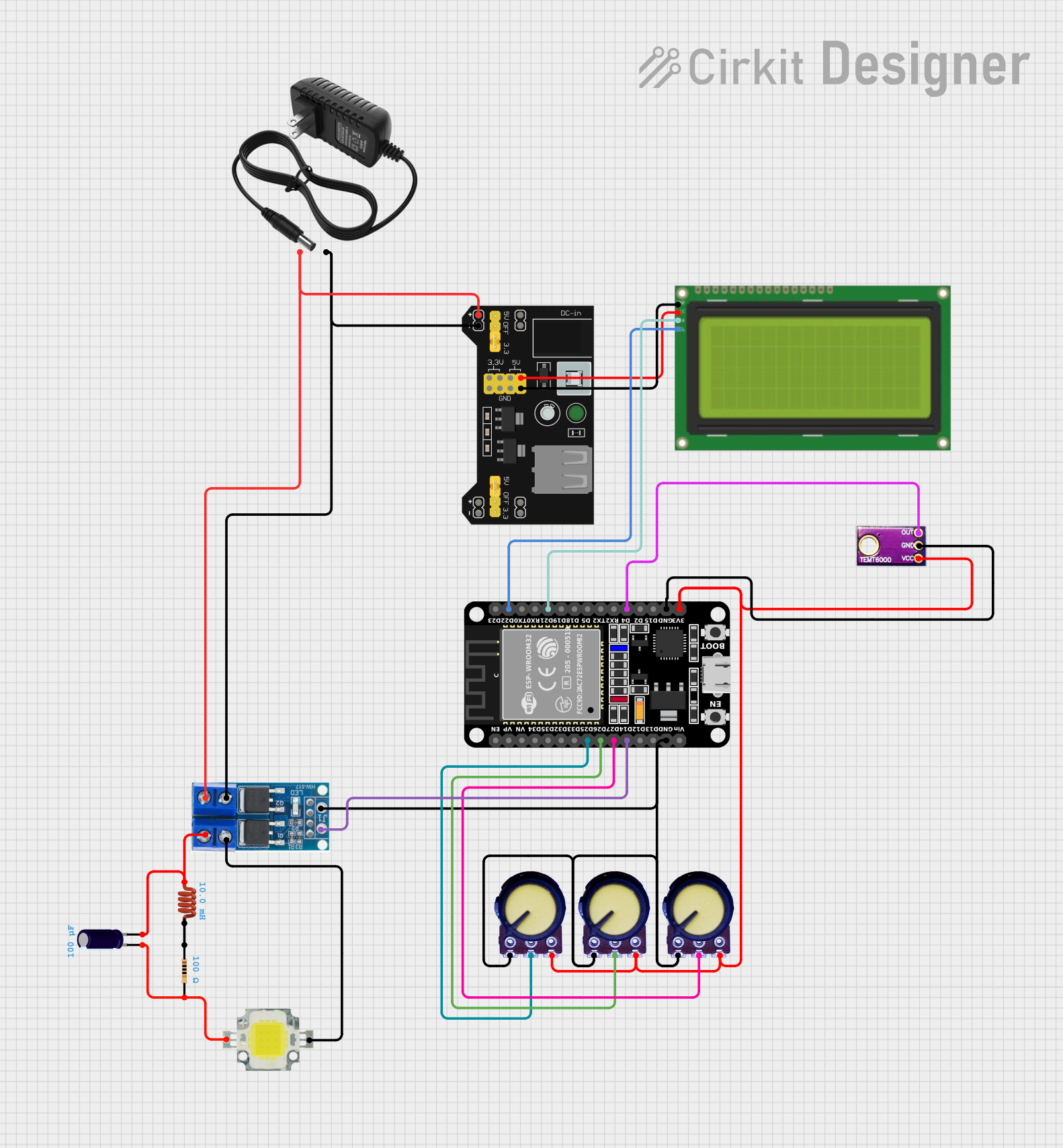
ESP32-Based Smart Light Control with Potentiometer and Ambient Light Sensor
Image of PID Light Dimmer: A project utilizing LED Board in a practical application
This circuit uses an ESP32 microcontroller to control a 12V power LED via a power MOSFET, with input from three potentiometers and an ambient light sensor. The ESP32 also interfaces with a 20x4 I2C LCD display to show relevant information, and the entire system is powered by a 12V power supply and a breadboard power module.
Cirkit Designer LogoOpen Project in Cirkit Designer
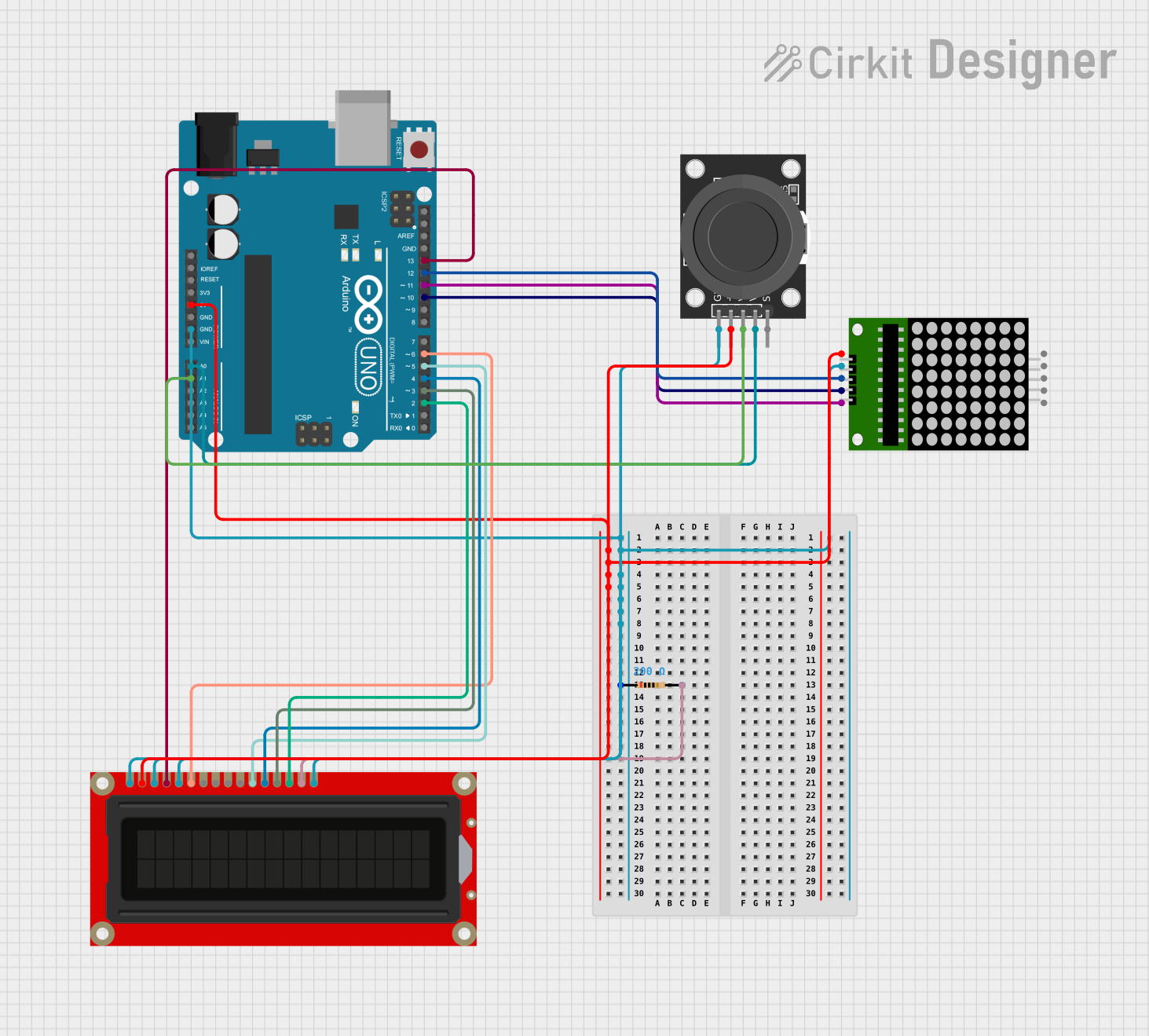
Arduino UNO Controlled LED Matrix and LCD Interface with Joystick Interaction
Image of Digital Game Circuit: A project utilizing LED Board in a practical application
This circuit features an Arduino UNO microcontroller interfaced with an 8x8 LED matrix, an LCD screen, and a KY-023 Dual Axis Joystick Module. The Arduino controls the LED matrix via digital pins D10-D12 and powers the matrix, LCD, and joystick module from its 5V output. The joystick's analog outputs are connected to the Arduino's analog inputs A0 and A1 for position sensing, while the LCD is controlled through digital pins D2-D6 and D13 for display purposes.
Cirkit Designer LogoOpen Project in Cirkit Designer
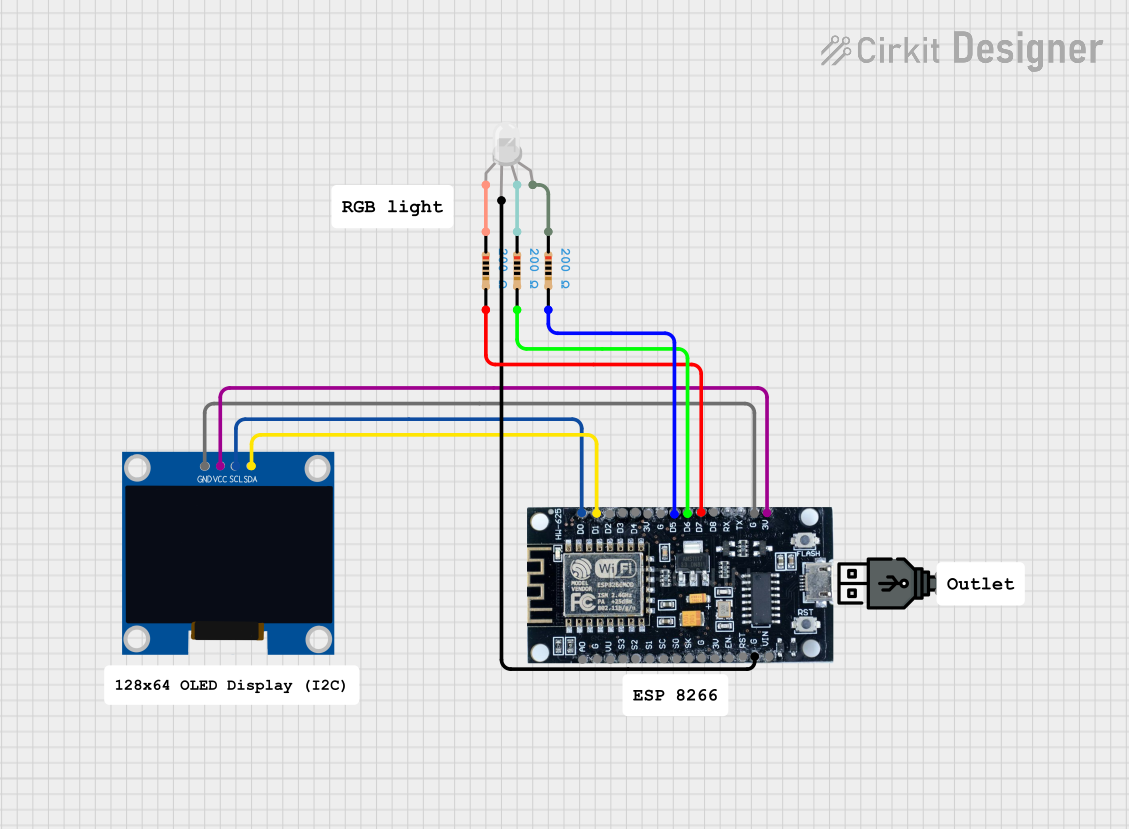
Wi-Fi Controlled RGB LED and OLED Display with ESP8266
Image of ESP thermometer reciever: A project utilizing LED Board in a practical application
This circuit features an ESP8266 microcontroller interfaced with a 128x64 OLED display via I2C for visual output and an RGB LED controlled through current-limiting resistors. The ESP8266 provides power and control signals to both the display and the LED, enabling visual feedback and status indication.
Cirkit Designer LogoOpen Project in Cirkit Designer
ESP32-Based Ambient Light Monitoring System with I2C LCD Display and Keypad Interface
Image of ESP roos: A project utilizing LED Board in a practical application
This circuit features an ESP32 microcontroller connected to an ambient light sensor, a 4x4 membrane matrix keypad, an I2C LCD screen, and a KY-008 laser emitter. The ESP32 reads ambient light intensity and displays it on the LCD screen, while the keypad allows user interaction to retrieve stored light intensity values from memory. The laser emitter is included in the circuit but not interfaced with the ESP32 in the provided code.
Cirkit Designer LogoOpen Project in Cirkit Designer

Explore Projects Built with LED Board

Use Cirkit Designer to design, explore, and prototype these projects online. Some projects support real-time simulation. Click "Open Project" to start designing instantly!
Image of PID Light Dimmer: A project utilizing LED Board in a practical application
ESP32-Based Smart Light Control with Potentiometer and Ambient Light Sensor
This circuit uses an ESP32 microcontroller to control a 12V power LED via a power MOSFET, with input from three potentiometers and an ambient light sensor. The ESP32 also interfaces with a 20x4 I2C LCD display to show relevant information, and the entire system is powered by a 12V power supply and a breadboard power module.
Cirkit Designer LogoOpen Project in Cirkit Designer
Image of Digital Game Circuit: A project utilizing LED Board in a practical application
Arduino UNO Controlled LED Matrix and LCD Interface with Joystick Interaction
This circuit features an Arduino UNO microcontroller interfaced with an 8x8 LED matrix, an LCD screen, and a KY-023 Dual Axis Joystick Module. The Arduino controls the LED matrix via digital pins D10-D12 and powers the matrix, LCD, and joystick module from its 5V output. The joystick's analog outputs are connected to the Arduino's analog inputs A0 and A1 for position sensing, while the LCD is controlled through digital pins D2-D6 and D13 for display purposes.
Cirkit Designer LogoOpen Project in Cirkit Designer
Image of ESP thermometer reciever: A project utilizing LED Board in a practical application
Wi-Fi Controlled RGB LED and OLED Display with ESP8266
This circuit features an ESP8266 microcontroller interfaced with a 128x64 OLED display via I2C for visual output and an RGB LED controlled through current-limiting resistors. The ESP8266 provides power and control signals to both the display and the LED, enabling visual feedback and status indication.
Cirkit Designer LogoOpen Project in Cirkit Designer
Image of ESP roos: A project utilizing LED Board in a practical application
ESP32-Based Ambient Light Monitoring System with I2C LCD Display and Keypad Interface
This circuit features an ESP32 microcontroller connected to an ambient light sensor, a 4x4 membrane matrix keypad, an I2C LCD screen, and a KY-008 laser emitter. The ESP32 reads ambient light intensity and displays it on the LCD screen, while the keypad allows user interaction to retrieve stored light intensity values from memory. The laser emitter is included in the circuit but not interfaced with the ESP32 in the provided code.
Cirkit Designer LogoOpen Project in Cirkit Designer

Common Applications and Use Cases

  • Indicator lights for electronic devices
  • Backlighting for LCD or display panels
  • Decorative lighting for events and venues
  • Educational projects and hobbyist circuits
  • Prototyping for product development

Technical Specifications

Key Technical Details

  • Operating Voltage: Typically 2V to 3.6V per LED
  • Forward Current: Recommended 20mA per LED
  • Power Ratings: Varies with the number and type of LEDs used

Pin Configuration and Descriptions

Pin Number Description Notes
1 Anode (+) Connect to positive voltage
2 Cathode (-) Connect to ground

Note: The pin configuration may vary depending on the specific LED board model. Refer to the manufacturer's datasheet for exact details.

Usage Instructions

How to Use the Component in a Circuit

  1. Power Supply: Ensure that the power supply matches the voltage requirements of the LED board. Exceeding the voltage rating can damage the LEDs.
  2. Current Limiting: Always use a current-limiting resistor in series with the LED to prevent excessive current flow.
  3. Wiring: Connect the anode pin to the positive side of the power supply through a current-limiting resistor, and the cathode pin to the ground.

Important Considerations and Best Practices

  • Heat Dissipation: LEDs generate heat; ensure adequate cooling if the LED board is used at high brightness levels for extended periods.
  • Dimming: Use a PWM (Pulse Width Modulation) signal to dim the LEDs if required.
  • Handling: Avoid static discharge by grounding yourself before handling the LED board.

Example Code for Arduino UNO

// Define the LED pin
const int ledPin = 13; // Most Arduino UNOs have an onboard LED on pin 13

void setup() {
  // Set the LED pin as an output
  pinMode(ledPin, OUTPUT);
}

void loop() {
  // Turn the LED on
  digitalWrite(ledPin, HIGH);
  delay(1000); // Wait for 1 second
  // Turn the LED off
  digitalWrite(ledPin, LOW);
  delay(1000); // Wait for 1 second
}

Note: The above code is for an onboard LED. For an external LED board, replace ledPin with the appropriate pin connected to the anode of the LED board.

Troubleshooting and FAQs

Common Issues Users Might Face

  • LEDs not lighting up: Check if the power supply is correctly connected and within the specified voltage range. Ensure the current-limiting resistor is in place.
  • LEDs too dim: Confirm that the current-limiting resistor value is not too high, which can limit the current flow and reduce brightness.
  • LEDs burning out: Ensure that the voltage and current do not exceed the maximum ratings specified for the LED board.

Solutions and Tips for Troubleshooting

  • Double-check connections: Verify that all connections are secure and correctly oriented.
  • Measure voltage and current: Use a multimeter to check that the voltage across and current through the LEDs are within specifications.
  • Resistor calculations: Use Ohm's law (V = IR) to calculate the correct resistor value for the desired current.

FAQs

Q: Can I power multiple LED boards in series? A: It's possible, but ensure that the power supply can handle the combined voltage requirements of all the LED boards.

Q: How do I change the color of the LEDs? A: The LED color is determined by the semiconductor material and cannot be changed. To use different colors, you need to use a different LED board with the desired color LEDs.

Q: Can I use a 9V battery to power the LED board? A: Yes, but you must use an appropriate current-limiting resistor to bring the voltage down to the LED's operating range and limit the current to the recommended level.

This documentation provides a comprehensive guide to using the Arron LED Board. For further assistance, consult the manufacturer's datasheet or contact technical support.