The ESP32 DevKit V1, manufactured by Espressif, is a versatile development board built around the powerful ESP32 chip. It features integrated Wi-Fi and Bluetooth capabilities, making it an excellent choice for Internet of Things (IoT) applications, smart devices, and rapid prototyping. The board is compact, cost-effective, and supports a wide range of peripherals, making it suitable for both beginners and experienced developers.
Explore Projects Built with ESP32 devkit v1
Use Cirkit Designer to design, explore, and prototype these projects online. Some projects support real-time simulation. Click "Open Project" to start designing instantly!
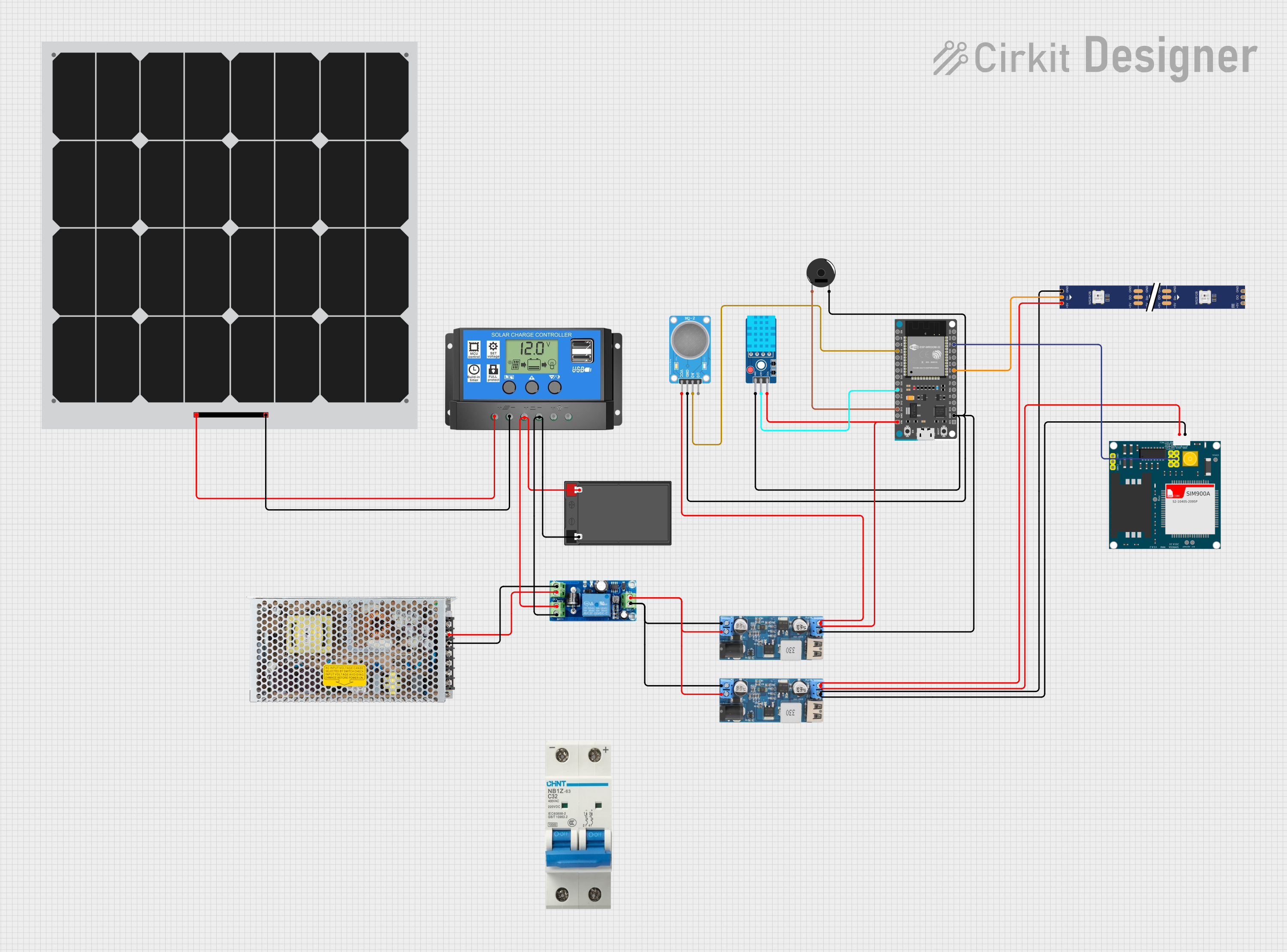
This circuit features an ESP32 Devkit V1 microcontroller connected to various sensors and modules for monitoring and communication purposes. It includes an MQ-2 gas sensor and a DHT11 temperature and humidity sensor, both interfaced with the ESP32 for environmental data collection. The circuit is powered by a 12V battery, regulated to 5V by step-down converters, and includes a solar charge controller connected to a solar panel for battery charging, a UPS module for power management, and a SIM900A module for GSM communication. Additionally, there is a WS2812 RGB LED strip for visual feedback and a piezo buzzer for audio alerts, both controlled by the ESP32.
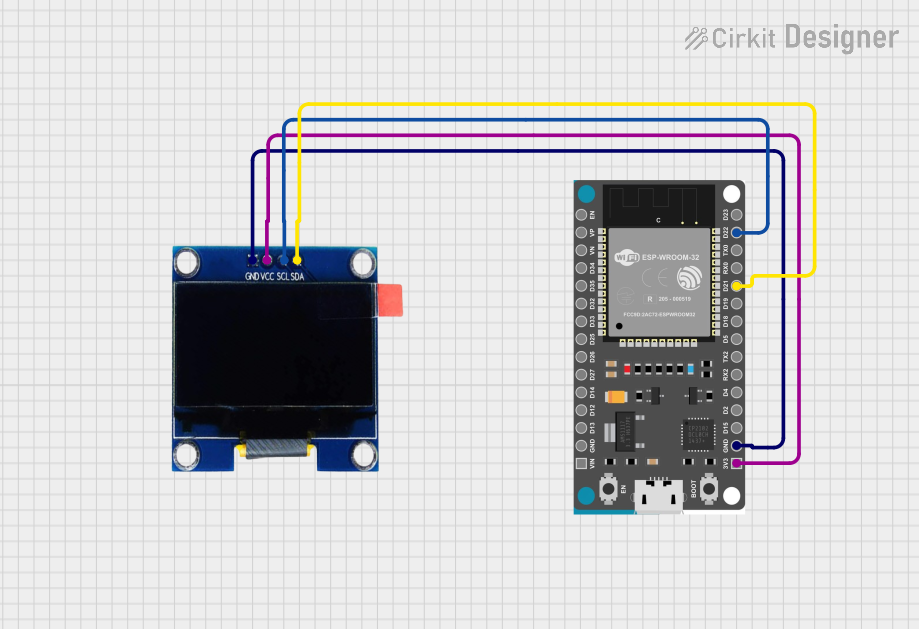
This circuit consists of an ESP32 Devkit V1 microcontroller connected to a 1.3" OLED display via I2C communication. The ESP32 initializes the OLED display and renders a predefined bitmap image on it.
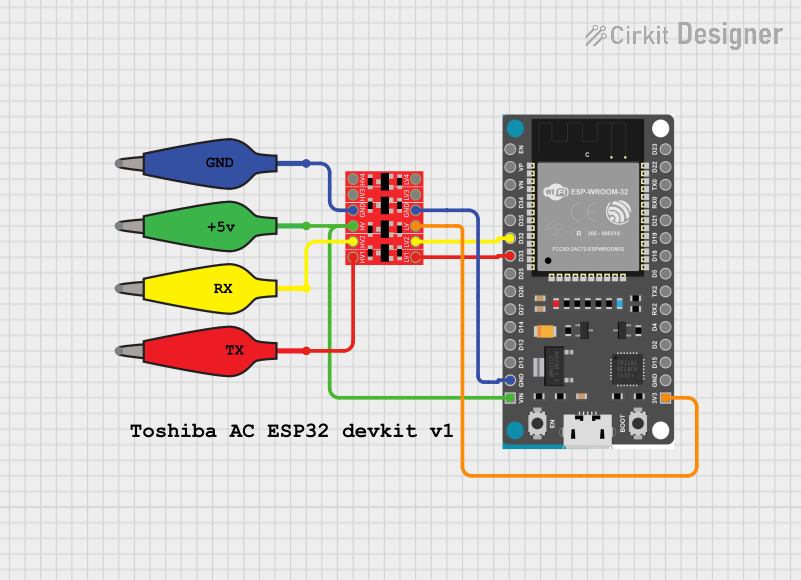
This circuit features an ESP32 Devkit V1 microcontroller connected to a Bi-Directional Logic Level Converter, which facilitates voltage level shifting between the ESP32 and external components. The ESP32 is powered through its VIN pin via an alligator clip cable, and the logic level converter is connected to various pins on the ESP32 to manage different voltage levels for communication.
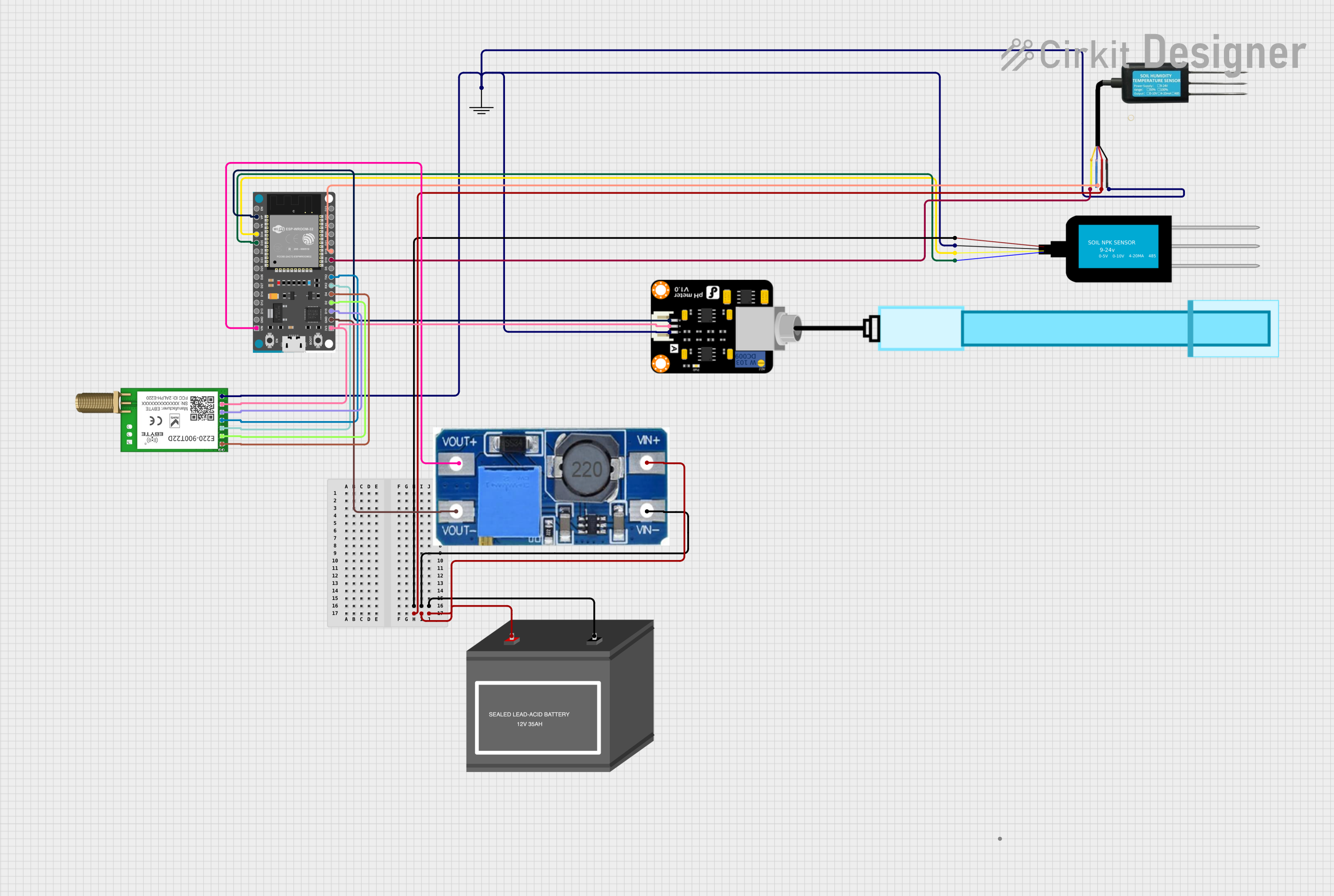
This circuit features an ESP32 Devkit V1 microcontroller as the central processing unit, interfacing with various sensors including a PH Meter, an NPK Soil Sensor, and a Soil Moisture Sensor for environmental data collection. It also includes an EBYTE LoRa E220 module for wireless communication. Power management is handled by a Step Up Boost Power Converter, which is connected to a 12V Battery, stepping up the voltage to power the ESP32 and sensors, with common ground connections throughout the circuit.
Prototyping for Wi-Fi and Bluetooth-enabled projects
Data logging and remote monitoring
Technical Specifications
The ESP32 DevKit V1 is equipped with the ESP32-WROOM-32 module, which includes a dual-core processor and a rich set of peripherals. Below are the key technical details:
Key Technical Details
Specification
Value
Microcontroller
ESP32 (dual-core Xtensa LX6)
Clock Speed
Up to 240 MHz
Flash Memory
4 MB (varies by model)
SRAM
520 KB
Wi-Fi
802.11 b/g/n (2.4 GHz)
Bluetooth
v4.2 BR/EDR and BLE
Operating Voltage
3.3V
Input Voltage (VIN)
5V (via USB or external power supply)
GPIO Pins
30 (varies by board version)
ADC Channels
18 (12-bit resolution)
DAC Channels
2
Communication Interfaces
UART, SPI, I2C, I2S, CAN, PWM
Power Consumption
Ultra-low power (varies by mode)
Dimensions
~54 mm x 27 mm
Pin Configuration and Descriptions
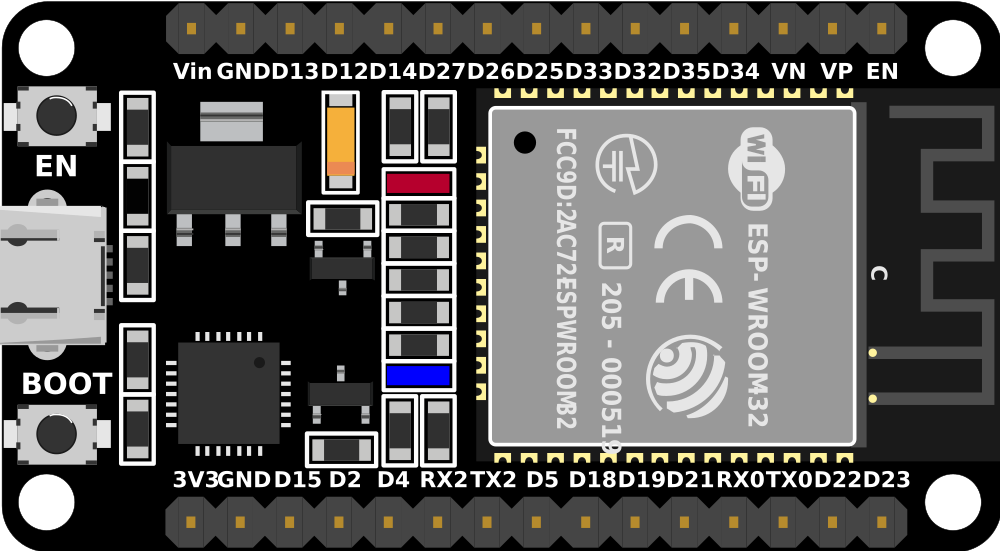
The ESP32 DevKit V1 has a 30-pin layout. Below is the pin configuration:
Pin Number
Pin Name
Description
1
EN
Enable pin (active high)
2
IO1 (TX0)
UART0 Transmit (TX)
3
IO3 (RX0)
UART0 Receive (RX)
4
IO4
GPIO4, PWM, ADC
5
IO5
GPIO5, PWM, ADC
6
GND
Ground
7
IO18
GPIO18, SPI_CLK
8
IO19
GPIO19, SPI_MISO
9
IO21
GPIO21, I2C SDA
10
IO22
GPIO22, I2C SCL
11
3V3
3.3V Power Output
12
GND
Ground
13
IO23
GPIO23, SPI_MOSI
14
IO25
GPIO25, DAC1, ADC
15
IO26
GPIO26, DAC2, ADC
16
IO27
GPIO27, ADC
17
IO32
GPIO32, ADC
18
IO33
GPIO33, ADC
19
IO34
GPIO34, ADC (input only)
20
IO35
GPIO35, ADC (input only)
21
VIN
5V Input Power
22
IO2
GPIO2, PWM, ADC
23
IO15
GPIO15, PWM, ADC
24
IO13
GPIO13, PWM, ADC
25
IO12
GPIO12, PWM, ADC
26
IO14
GPIO14, PWM, ADC
27
IO16
GPIO16, UART2 TX
28
IO17
GPIO17, UART2 RX
29
IO0
GPIO0, Boot Mode Selection
30
IO36 (VP)
GPIO36, ADC (input only)
Usage Instructions
The ESP32 DevKit V1 is easy to use and can be programmed using the Arduino IDE, ESP-IDF, or other development environments. Below are the steps to get started:
How to Use the Component in a Circuit
Powering the Board:
Connect the board to your computer via a micro-USB cable. This provides both power and a communication interface for programming.
Alternatively, supply 5V to the VIN pin and GND to power the board externally.
Programming the Board:
Install the Arduino IDE and add the ESP32 board support package.
Select the correct board (ESP32 Dev Module) and port in the Arduino IDE.
Write your code and upload it to the board.
Connecting Peripherals:
Use the GPIO pins to connect sensors, actuators, or other peripherals.
Ensure that the voltage levels of connected devices are compatible with the ESP32 (3.3V logic).
Important Considerations and Best Practices
Voltage Levels: The ESP32 operates at 3.3V. Avoid connecting 5V signals directly to the GPIO pins to prevent damage.
Boot Mode: GPIO0 must be pulled low during boot to enter programming mode.
Power Supply: Ensure a stable power supply, especially when using Wi-Fi or Bluetooth, as these features can cause power spikes.
Pin Multiplexing: Many pins have multiple functions. Refer to the datasheet to avoid conflicts when using peripherals.
Example Code for Arduino IDE
Below is an example code to blink an LED connected to GPIO2:
// Define the GPIO pin for the LED
#define LED_PIN 2

void setup() {
  // Set the LED pin as an output
  pinMode(LED_PIN, OUTPUT);
}

void loop() {
  // Turn the LED on
  digitalWrite(LED_PIN, HIGH);
  delay(1000); // Wait for 1 second

  // Turn the LED off
  digitalWrite(LED_PIN, LOW);
  delay(1000); // Wait for 1 second
}
Troubleshooting and FAQs
Common Issues and Solutions
Board Not Detected in Arduino IDE:
Ensure the correct USB driver is installed for the ESP32.
Check the USB cable and port connection.
Select the correct board and port in the Arduino IDE.
Upload Fails with Timeout Error:
Press and hold the BOOT button on the board while uploading the code.
Ensure GPIO0 is pulled low during programming.
Wi-Fi Connection Issues:
Verify the SSID and password in your code.
Ensure the router is operating on the 2.4 GHz band (ESP32 does not support 5 GHz).
Random Resets or Instability:
Check the power supply for stability. Use a capacitor if necessary.
Avoid using GPIO pins that are reserved for internal functions.
FAQs
Q: Can I use the ESP32 DevKit V1 with a 5V sensor?
A: Yes, but you will need a level shifter to convert the 5V signal to 3.3V.
Q: How do I reset the board?
A: Press the EN button to reset the board.
Q: Can I use both Wi-Fi and Bluetooth simultaneously?
A: Yes, the ESP32 supports simultaneous use of Wi-Fi and Bluetooth, but it may increase power consumption.
Q: What is the maximum current draw of the ESP32?
A: The ESP32 can draw up to 500 mA during peak operation (e.g., Wi-Fi transmission). Ensure your power supply can handle this.
This concludes the documentation for the ESP32 DevKit V1. For more details, refer to the official Espressif datasheet and user guide.

 Open Project in Cirkit Designer