
How to Use ESC (B-CUBE): Examples, Pinouts, and Specs
 Design with ESC (B-CUBE) in Cirkit Designer
Introduction
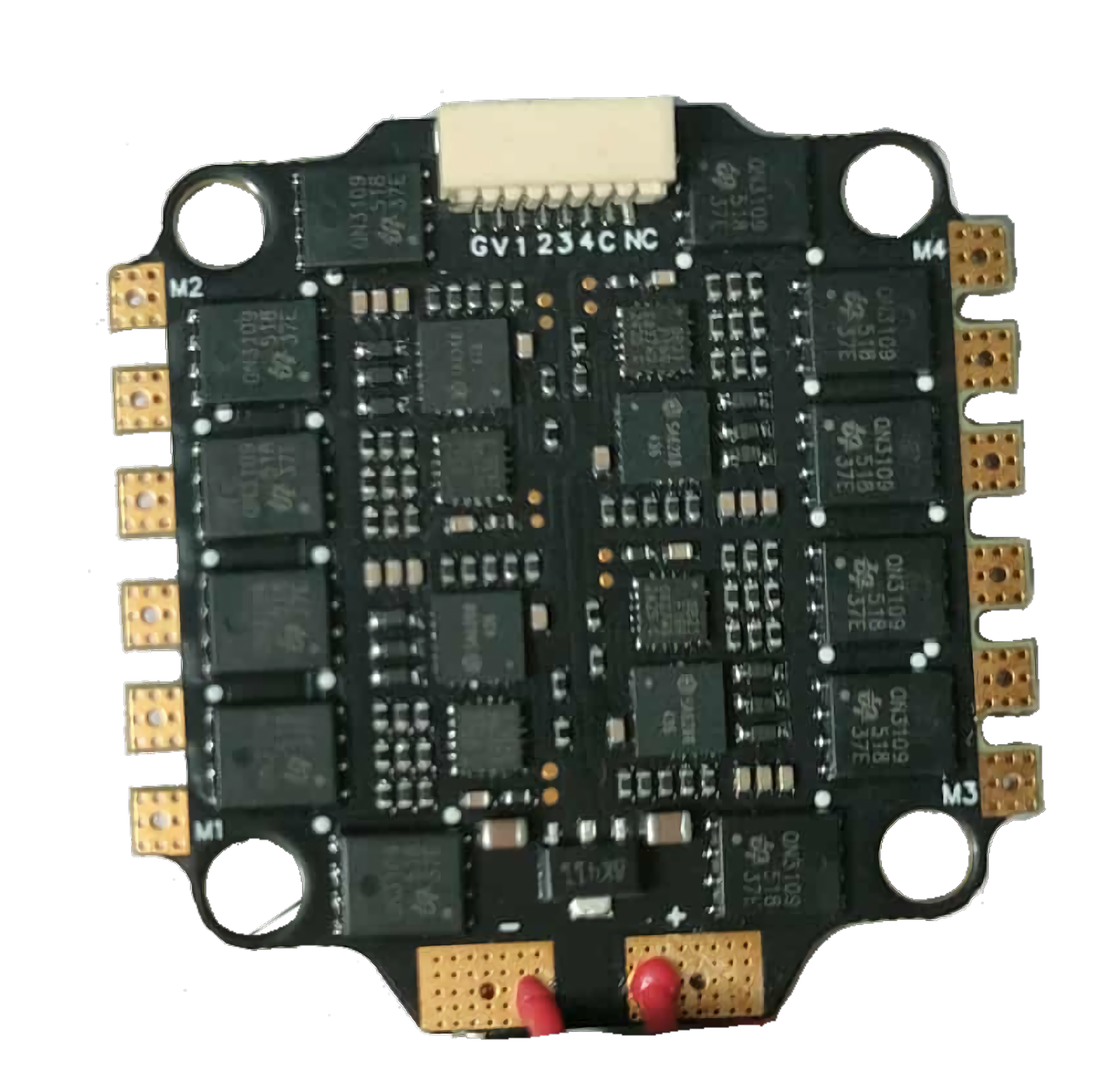
The ESC (B-CUBE) is an advanced Electronic Speed Controller designed specifically for brushless motors. It is widely used in applications such as drones, remote-controlled (RC) vehicles, and robotics. The ESC (B-CUBE) enables precise control of motor speed, direction, and braking, making it an essential component for high-performance systems requiring smooth and efficient motor operation.
Common applications include:
- Multirotor drones (quadcopters, hexacopters, etc.)
- RC cars, boats, and planes
- Robotics and automation systems
- Electric skateboards and scooters
Explore Projects Built with ESC (B-CUBE)
 Open Project in Cirkit Designer
 Open Project in Cirkit Designer
 Open Project in Cirkit Designer
 Open Project in Cirkit Designer
Explore Projects Built with ESC (B-CUBE)
Open Project in Cirkit DesignerOpen Project in Cirkit DesignerOpen Project in Cirkit DesignerOpen Project in Cirkit DesignerTechnical Specifications
The ESC (B-CUBE) is engineered to deliver reliable performance under demanding conditions. Below are its key technical specifications:
| Parameter | Specification |
|---|---|
| Input Voltage Range | 7.4V - 22.2V (2S to 6S LiPo) |
| Continuous Current Rating | 30A |
| Peak Current Rating | 40A (for up to 10 seconds) |
| Supported Motor Types | Brushless DC (BLDC) motors |
| Signal Input | PWM (Pulse Width Modulation) |
| PWM Frequency Range | 50Hz - 500Hz |
| BEC Output | 5V, 2A (for powering external devices) |
| Dimensions | 45mm x 25mm x 8mm |
| Weight | 20g |
| Operating Temperature | -10°C to 60°C |
Pin Configuration and Descriptions
The ESC (B-CUBE) has three main connection interfaces: motor wires, power input, and signal input. Below is the pin configuration:
Motor Wires
| Wire Color | Description |
|---|---|
| Yellow | Motor Phase A |
| Blue | Motor Phase B |
| Green | Motor Phase C |
Power Input
| Wire Color | Description |
|---|---|
| Red | Positive terminal (+) |
| Black | Negative terminal (-) |
Signal Input
| Pin | Description |
|---|---|
| White Wire | PWM Signal Input |
| Red Wire | 5V Output (BEC) |
| Black Wire | Ground (GND) |
Usage Instructions
How to Use the ESC (B-CUBE) in a Circuit
Connect the Motor Wires: Attach the yellow, blue, and green wires to the three terminals of the brushless motor. The order of connection determines the motor's rotation direction. If the motor spins in the wrong direction, swap any two wires.
Connect Power Input: Connect the red and black wires to the positive and negative terminals of your battery, respectively. Ensure the battery voltage is within the supported range (7.4V - 22.2V).
Connect Signal Input:
- Attach the white wire to the PWM signal pin of your microcontroller or receiver.
- Connect the black wire to the ground (GND) of your system.
- Optionally, use the red wire to power external devices (e.g., a microcontroller) with the built-in 5V BEC.
Calibrate the ESC: Before first use, calibrate the ESC to match the throttle range of your transmitter or microcontroller. This typically involves powering the ESC while the throttle is set to maximum, then lowering the throttle to minimum when prompted by the ESC's beeps.
Test the Setup: Gradually increase the throttle to ensure the motor responds correctly. Monitor the ESC and motor for any unusual behavior, such as overheating or erratic movement.
Important Considerations and Best Practices
- Cooling: Ensure adequate airflow around the ESC to prevent overheating during operation.
- Battery Compatibility: Use only LiPo batteries within the specified voltage range (2S to 6S).
- Signal Quality: Use a stable PWM signal to avoid erratic motor behavior.
- Safety: Always disconnect the battery when making adjustments to the wiring or motor connections.
Example: Using ESC (B-CUBE) with Arduino UNO
Below is an example of how to control the ESC (B-CUBE) using an Arduino UNO:
#include <Servo.h> // Include the Servo library for PWM signal generation

Servo esc; // Create a Servo object to control the ESC

void setup() {
  esc.attach(9); // Attach the ESC signal wire to pin 9 on the Arduino
  esc.writeMicroseconds(1000); // Send minimum throttle signal (1000 µs)
  delay(2000); // Wait for 2 seconds to initialize the ESC
}

void loop() {
  esc.writeMicroseconds(1500); // Send a mid-throttle signal (1500 µs)
  delay(5000); // Run the motor at mid-speed for 5 seconds

  esc.writeMicroseconds(1000); // Send minimum throttle signal to stop the motor
  delay(5000); // Wait for 5 seconds before repeating
}
Notes:
- The
writeMicroseconds()function sends a PWM signal to the ESC. The value typically ranges from 1000 µs (minimum throttle) to 2000 µs (maximum throttle). - Ensure the ESC is properly calibrated before running the code.
Troubleshooting and FAQs
Common Issues and Solutions
Motor Does Not Spin
- Cause: Incorrect wiring or no PWM signal.
- Solution: Verify motor wire connections and ensure the PWM signal is being sent correctly.
Motor Spins in the Wrong Direction
- Cause: Incorrect motor wire connections.
- Solution: Swap any two motor wires to reverse the direction.
ESC Overheats
- Cause: Insufficient cooling or excessive current draw.
- Solution: Improve airflow around the ESC and ensure the motor is not overloaded.
No Response from ESC
- Cause: Incorrect throttle calibration or signal input.
- Solution: Recalibrate the ESC and verify the PWM signal source.
FAQs
Q: Can I use the ESC (B-CUBE) with brushed motors?
A: No, the ESC (B-CUBE) is designed specifically for brushless motors.
Q: What happens if I exceed the voltage range?
A: Exceeding the voltage range can damage the ESC and void the warranty. Always use a compatible battery.
Q: How do I know if the ESC is calibrated?
A: The ESC will emit a series of beeps during calibration. Refer to the user manual for specific beep codes.
Q: Can I power my Arduino directly from the ESC's BEC?
A: Yes, the ESC's 5V BEC can safely power an Arduino UNO or similar microcontroller.
By following this documentation, you can effectively integrate the ESC (B-CUBE) into your projects for precise and reliable motor control.