
How to Use Adafruit Latching Mini Relay FeatherWing: Examples, Pinouts, and Specs
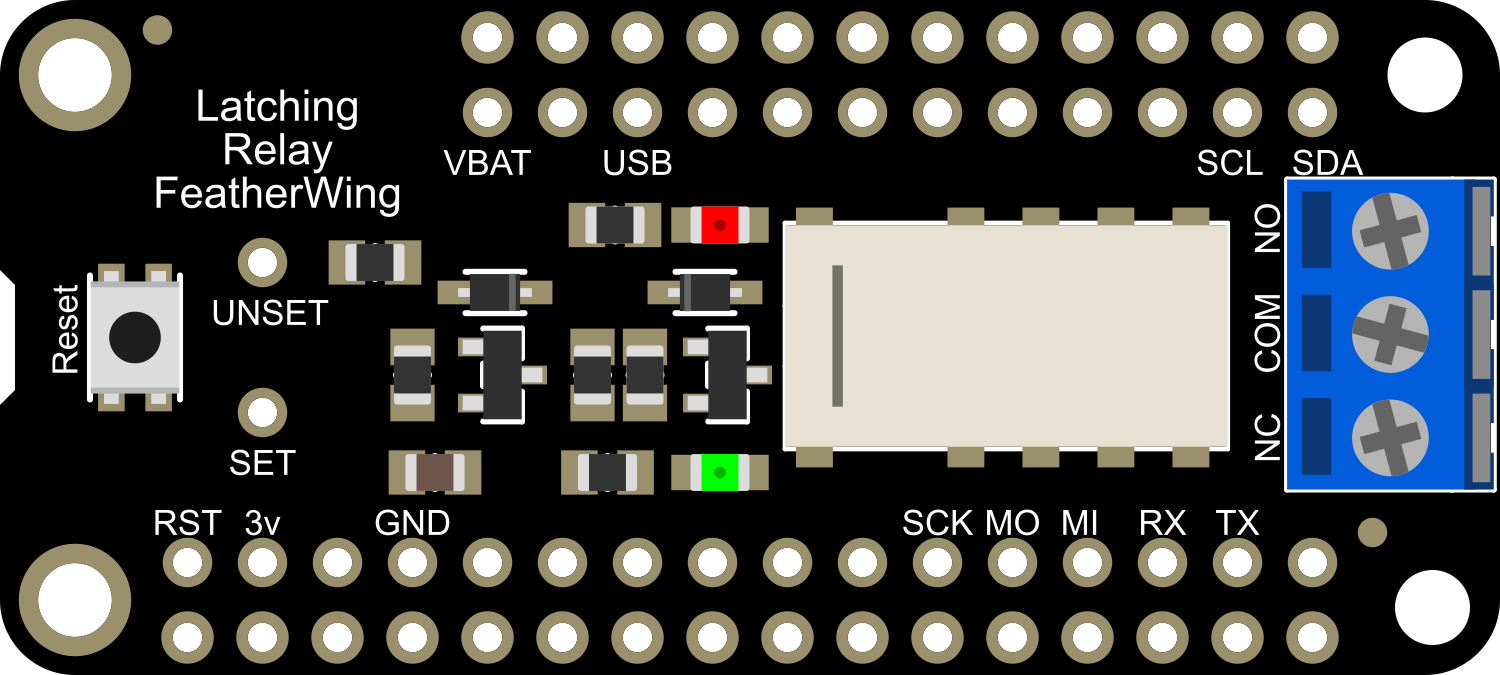
 Design with Adafruit Latching Mini Relay FeatherWing in Cirkit Designer
Introduction
The Adafruit Latching Mini Relay FeatherWing is a compact relay board designed to interface seamlessly with Adafruit Feather microcontrollers. This relay allows users to control high-power devices, such as lights, motors, or appliances, using low-power signals from a Feather board. Its latching functionality ensures that the relay maintains its state (on or off) even when power is removed, making it particularly suitable for battery-powered or energy-efficient applications.
Explore Projects Built with Adafruit Latching Mini Relay FeatherWing
 Open Project in Cirkit Designer
 Open Project in Cirkit Designer
 Open Project in Cirkit Designer
 Open Project in Cirkit Designer
Explore Projects Built with Adafruit Latching Mini Relay FeatherWing
Open Project in Cirkit DesignerOpen Project in Cirkit DesignerOpen Project in Cirkit DesignerOpen Project in Cirkit DesignerCommon Applications and Use Cases
- Home automation systems (e.g., controlling lights or fans)
- Battery-powered IoT devices
- Robotics and motor control
- Energy-efficient switching applications
- Industrial control systems
Technical Specifications
The Adafruit Latching Mini Relay FeatherWing is designed for ease of use and reliable operation. Below are its key technical details:
Key Technical Details
- Relay Type: Latching (bi-stable)
- Operating Voltage: 3.3V or 5V (compatible with Feather boards)
- Maximum Switching Voltage: 120V AC / 60V DC
- Maximum Switching Current: 2A
- Control Signal: Low-power digital signal from Feather microcontroller
- Dimensions: 51mm x 23mm x 8mm (2" x 0.9" x 0.3")
- Weight: 5.5g
Pin Configuration and Descriptions
The FeatherWing has a simple pinout for easy integration with Feather boards. Below is the pin configuration:
| Pin | Description |
|---|---|
| GND | Ground connection for the relay module. |
| VIN | Power input (3.3V or 5V, depending on the Feather board used). |
| SET | Digital input to set the relay to the "ON" state. |
| RESET | Digital input to reset the relay to the "OFF" state. |
| COM | Common terminal for the relay's switching circuit. |
| NO | Normally Open terminal; connected to COM when the relay is in the "ON" state. |
| NC | Normally Closed terminal; connected to COM when the relay is in the "OFF" state. |
Usage Instructions
How to Use the Component in a Circuit
- Connect the FeatherWing to a Feather Board:
- Align the FeatherWing's headers with the Feather microcontroller's pins and solder them securely.
- Power the Relay:
- Ensure the Feather board is powered via USB or a battery. The FeatherWing will draw power from the Feather's VIN pin.
- Connect the Load:
- Attach the device you want to control (e.g., a light or motor) to the relay's COM and NO (or NC) terminals.
- For example, connect one wire of the load to COM and the other to NO for normally open operation.
- Control the Relay:
- Use the Feather's GPIO pins to send signals to the SET and RESET pins of the relay to toggle its state.
Important Considerations and Best Practices
- Voltage and Current Ratings: Ensure the load connected to the relay does not exceed the maximum ratings (120V AC / 60V DC, 2A).
- Latching Behavior: Remember that the relay will maintain its state even if power is removed. Use the RESET pin to return it to the "OFF" state when needed.
- Isolation: The relay provides electrical isolation between the Feather board and the high-power load, but always exercise caution when working with high voltages.
- Debouncing: If you are using mechanical switches to control the relay, consider implementing software debouncing to avoid erratic behavior.
Example Code for Arduino UNO-Compatible Feather Boards
Below is an example of how to control the Adafruit Latching Mini Relay FeatherWing using an Arduino-compatible Feather board:
// Example code to control the Adafruit Latching Mini Relay FeatherWing
// Connect SET to pin 5 and RESET to pin 6 on the Feather board

#define RELAY_SET_PIN 5   // Pin connected to the SET input of the relay
#define RELAY_RESET_PIN 6 // Pin connected to the RESET input of the relay

void setup() {
  pinMode(RELAY_SET_PIN, OUTPUT);   // Configure SET pin as output
  pinMode(RELAY_RESET_PIN, OUTPUT); // Configure RESET pin as output

  // Initialize relay to OFF state
  digitalWrite(RELAY_SET_PIN, LOW);
  digitalWrite(RELAY_RESET_PIN, HIGH);
  delay(100); // Allow time for the relay to switch
  digitalWrite(RELAY_RESET_PIN, LOW);
}

void loop() {
  // Turn the relay ON
  digitalWrite(RELAY_SET_PIN, HIGH);
  delay(100); // Allow time for the relay to switch
  digitalWrite(RELAY_SET_PIN, LOW);

  delay(5000); // Keep the relay ON for 5 seconds

  // Turn the relay OFF
  digitalWrite(RELAY_RESET_PIN, HIGH);
  delay(100); // Allow time for the relay to switch
  digitalWrite(RELAY_RESET_PIN, LOW);

  delay(5000); // Keep the relay OFF for 5 seconds
}
Troubleshooting and FAQs
Common Issues and Solutions
Relay Does Not Switch:
- Cause: Insufficient power supply or incorrect wiring.
- Solution: Verify that the Feather board is powered and the SET/RESET pins are connected correctly.
Relay Stays in the Same State:
- Cause: The SET or RESET signal is not being sent properly.
- Solution: Check the GPIO pin configuration in your code and ensure the correct pins are used.
Load Does Not Operate:
- Cause: Load exceeds the relay's voltage or current rating.
- Solution: Ensure the load is within the relay's maximum ratings (120V AC / 60V DC, 2A).
Intermittent Operation:
- Cause: Noise or insufficient debounce in the control signal.
- Solution: Add software debouncing or use capacitors to filter noise.
FAQs
Q: Can I use this relay with a 12V load?
- A: Yes, as long as the load's current does not exceed 2A and the voltage is within 60V DC or 120V AC.
Q: Does the relay consume power when idle?
- A: No, the latching relay only consumes power momentarily when switching states.
Q: Can I control the relay with a 3.3V Feather board?
- A: Yes, the relay is compatible with both 3.3V and 5V Feather boards.
Q: How do I reset the relay to its default state after a power loss?
- A: Use the RESET pin to return the relay to the "OFF" state after power is restored.