
How to Use MATEK BEC 12S PRO: Examples, Pinouts, and Specs
 Design with MATEK BEC 12S PRO in Cirkit Designer
Introduction
The MATEK BEC 12S PRO is a high-efficiency voltage regulator designed to step down voltage from a 12S LiPo battery (up to 50.4V) to a stable output voltage. This component is ideal for use in RC (radio-controlled) applications, such as drones, planes, and other remote-controlled vehicles, where reliable power delivery is critical for onboard electronics. Its compact design and robust performance make it a popular choice for hobbyists and professionals alike.
Explore Projects Built with MATEK BEC 12S PRO
 Open Project in Cirkit Designer
 Open Project in Cirkit Designer
 Open Project in Cirkit Designer
 Open Project in Cirkit Designer
Explore Projects Built with MATEK BEC 12S PRO
Open Project in Cirkit DesignerOpen Project in Cirkit DesignerOpen Project in Cirkit DesignerOpen Project in Cirkit DesignerCommon Applications and Use Cases
- Powering flight controllers, receivers, and servos in RC drones and planes.
- Providing stable voltage for FPV (First Person View) cameras and video transmitters.
- Supplying power to microcontrollers and other low-voltage electronic components.
- General-purpose voltage regulation in high-voltage systems.
Technical Specifications
The MATEK BEC 12S PRO is designed to handle high input voltages and provide a stable output with minimal heat generation. Below are the key technical details:
| Parameter | Value |
|---|---|
| Input Voltage Range | 12S LiPo (up to 50.4V) |
| Output Voltage Options | 5V, 9V, 12V (selectable via jumper) |
| Maximum Output Current | 3A |
| Efficiency | Up to 95% |
| Dimensions | 21mm x 15mm x 6mm |
| Weight | 4g |
| Operating Temperature | -40°C to 85°C |
Pin Configuration and Descriptions
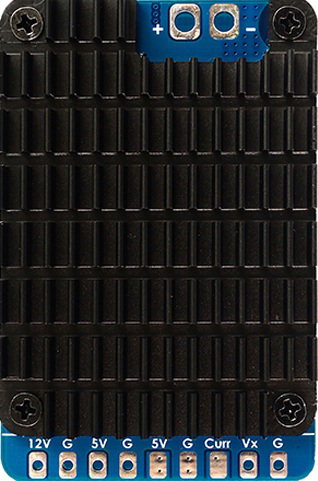
The MATEK BEC 12S PRO has a simple pinout for easy integration into your circuit. Below is the pin configuration:
| Pin Name | Description |
|---|---|
| VIN+ | Positive input voltage (connect to battery positive) |
| VIN- | Negative input voltage (connect to battery ground) |
| VOUT+ | Positive output voltage (regulated output) |
| VOUT- | Negative output voltage (ground) |
Usage Instructions
How to Use the Component in a Circuit
Connect the Input Voltage:
- Connect the VIN+ pin to the positive terminal of your 12S LiPo battery.
- Connect the VIN- pin to the negative terminal of your battery (ground).
Select the Output Voltage:
- Use the onboard jumper to select the desired output voltage (5V, 9V, or 12V).
- Ensure the selected voltage matches the requirements of your connected devices.
Connect the Output Voltage:
- Connect the VOUT+ pin to the positive input of your load (e.g., flight controller, camera).
- Connect the VOUT- pin to the ground of your load.
Verify Connections:
- Double-check all connections to ensure proper polarity and secure wiring.
- Use a multimeter to confirm the output voltage before connecting sensitive devices.
Important Considerations and Best Practices
- Heat Dissipation: Although the MATEK BEC 12S PRO is highly efficient, ensure adequate airflow or heat dissipation in high-current applications.
- Voltage Selection: Always verify the output voltage setting before powering your devices to prevent damage.
- Current Limitations: Do not exceed the maximum output current of 3A to avoid overheating or damage to the regulator.
- Polarity Protection: Double-check the polarity of your connections to prevent reverse voltage damage.
Example: Using with an Arduino UNO
The MATEK BEC 12S PRO can be used to power an Arduino UNO in high-voltage systems. Below is an example setup and code:
Circuit Setup
- Connect the VIN+ and VIN- pins of the BEC to a 12S LiPo battery.
- Set the output voltage to 5V using the jumper.
- Connect the VOUT+ pin to the 5V pin of the Arduino UNO.
- Connect the VOUT- pin to the GND pin of the Arduino UNO.
Example Code
// Example code to blink an LED on pin 13 of the Arduino UNO
// Ensure the MATEK BEC 12S PRO is providing 5V to the Arduino UNO

void setup() {
  pinMode(13, OUTPUT); // Set pin 13 as an output
}

void loop() {
  digitalWrite(13, HIGH); // Turn the LED on
  delay(1000);            // Wait for 1 second
  digitalWrite(13, LOW);  // Turn the LED off
  delay(1000);            // Wait for 1 second
}
Troubleshooting and FAQs
Common Issues and Solutions
No Output Voltage:
- Cause: Incorrect input connections or insufficient input voltage.
- Solution: Verify the input voltage is within the specified range (up to 50.4V) and check the polarity of the connections.
Overheating:
- Cause: Exceeding the maximum output current or poor ventilation.
- Solution: Reduce the load current or improve airflow around the component.
Incorrect Output Voltage:
- Cause: Jumper not set correctly or loose connection.
- Solution: Ensure the jumper is securely placed in the correct position for the desired voltage.
Device Not Powering On:
- Cause: Faulty wiring or damaged component.
- Solution: Inspect all connections and test the BEC with a multimeter to confirm proper operation.
FAQs
Q: Can I use the MATEK BEC 12S PRO with a 6S LiPo battery?
A: Yes, the BEC can handle input voltages lower than 12S, such as 6S (22.2V). Ensure the input voltage is within the specified range.
Q: Is the output voltage adjustable beyond the preset options?
A: No, the output voltage is fixed to 5V, 9V, or 12V, depending on the jumper setting.
Q: Can I power multiple devices simultaneously?
A: Yes, as long as the total current draw does not exceed 3A.
Q: Does the BEC have reverse polarity protection?
A: No, the MATEK BEC 12S PRO does not have built-in reverse polarity protection. Always double-check your connections.