
How to Use DSM501A: Examples, Pinouts, and Specs
 Design with DSM501A in Cirkit Designer
Introduction
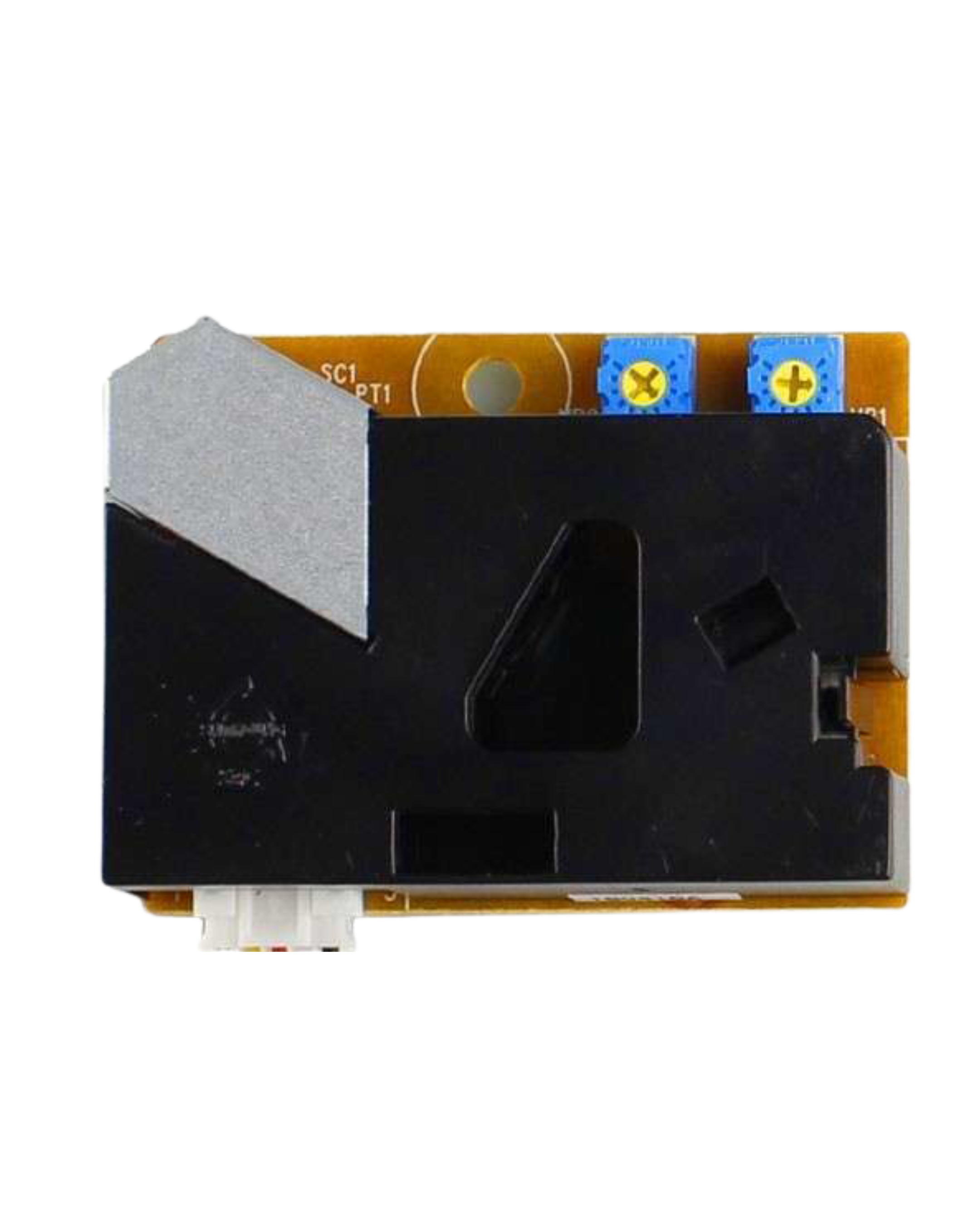
The DSM501A is a digital dust sensor designed to measure particulate matter (PM) in the air. It operates using a laser scattering method to detect and quantify dust particles, providing real-time data on air quality. This sensor is widely used in applications such as environmental monitoring, air purifiers, HVAC systems, and indoor air quality assessment. Its compact design and ease of integration make it a popular choice for both hobbyists and professionals.
Explore Projects Built with DSM501A
 Open Project in Cirkit Designer
 Open Project in Cirkit Designer
 Open Project in Cirkit Designer
 Open Project in Cirkit Designer
Explore Projects Built with DSM501A
Open Project in Cirkit DesignerOpen Project in Cirkit DesignerOpen Project in Cirkit DesignerOpen Project in Cirkit DesignerTechnical Specifications
The DSM501A is a reliable and efficient sensor with the following key specifications:
| Parameter | Value |
|---|---|
| Operating Voltage | 5V DC |
| Operating Current | ≤ 90 mA |
| Particle Size Detection | ≥ 1 µm |
| Output Signal | Digital PWM |
| Response Time | ≤ 1 second |
| Operating Temperature | -10°C to 65°C |
| Dimensions | 59 mm x 45 mm x 22 mm |
| Weight | Approximately 35 g |
Pin Configuration and Descriptions
The DSM501A has a 5-pin interface for easy integration into circuits. Below is the pinout:
| Pin | Name | Description |
|---|---|---|
| 1 | VCC | Power supply input (5V DC). |
| 2 | GND | Ground connection. |
| 3 | ILED | Infrared LED control pin (not commonly used; typically left unconnected). |
| 4 | OUT1 | Digital PWM output for detecting larger particles (e.g., PM10). |
| 5 | OUT2 | Digital PWM output for detecting smaller particles (e.g., PM2.5). |
Usage Instructions
How to Use the DSM501A in a Circuit
- Power Supply: Connect the VCC pin to a 5V DC power source and the GND pin to the ground.
- Signal Output: Use the OUT1 and OUT2 pins to read the digital PWM signals corresponding to larger and smaller particles, respectively.
- Signal Processing: The PWM output can be measured using a microcontroller (e.g., Arduino) to calculate the concentration of particulate matter in µg/m³.
- Placement: Ensure the sensor is placed in an area with good airflow for accurate readings. Avoid placing it near strong air currents or obstructions.
Important Considerations and Best Practices
- Warm-Up Time: Allow the sensor to warm up for at least 1 minute after powering it on to ensure accurate readings.
- Orientation: Install the sensor in an upright position to prevent dust accumulation inside the sensor chamber.
- Filtering Noise: Use capacitors or software filtering techniques to reduce noise in the PWM signal.
- Maintenance: Periodically clean the sensor's air inlet and outlet to prevent dust buildup, which can affect accuracy.
Example: Connecting DSM501A to Arduino UNO
Below is an example of how to connect the DSM501A to an Arduino UNO and read the PWM signal:
Circuit Connections
- Connect the DSM501A's VCC pin to the Arduino's 5V pin.
- Connect the GND pin to the Arduino's GND.
- Connect the OUT1 pin to Arduino digital pin 2 (for PM10).
- Connect the OUT2 pin to Arduino digital pin 3 (for PM2.5).
Arduino Code
// DSM501A Dust Sensor Example Code
// Reads PWM signals from OUT1 (PM10) and OUT2 (PM2.5) pins and calculates
// the percentage of low pulse time to determine dust concentration.

const int OUT1_PIN = 2; // Pin connected to OUT1 (PM10)
const int OUT2_PIN = 3; // Pin connected to OUT2 (PM2.5)

unsigned long duration1; // Low pulse duration for OUT1
unsigned long duration2; // Low pulse duration for OUT2

void setup() {
  pinMode(OUT1_PIN, INPUT);
  pinMode(OUT2_PIN, INPUT);
  Serial.begin(9600); // Initialize serial communication
}

void loop() {
  // Measure low pulse duration for OUT1 (PM10)
  duration1 = pulseIn(OUT1_PIN, LOW);

  // Measure low pulse duration for OUT2 (PM2.5)
  duration2 = pulseIn(OUT2_PIN, LOW);

  // Calculate the ratio of low pulse time to total time (30 seconds)
  float ratio1 = (duration1 / 30000.0) * 100.0; // PM10 percentage
  float ratio2 = (duration2 / 30000.0) * 100.0; // PM2.5 percentage

  // Print results to the Serial Monitor
  Serial.print("PM10 Ratio: ");
  Serial.print(ratio1);
  Serial.println("%");

  Serial.print("PM2.5 Ratio: ");
  Serial.print(ratio2);
  Serial.println("%");

  delay(1000); // Wait 1 second before the next reading
}
Troubleshooting and FAQs
Common Issues and Solutions
No Output Signal:
- Cause: Incorrect wiring or insufficient power supply.
- Solution: Double-check the connections and ensure the sensor is receiving 5V DC.
Inaccurate Readings:
- Cause: Dust accumulation inside the sensor or improper placement.
- Solution: Clean the sensor and ensure it is placed in an area with good airflow.
High Noise in PWM Signal:
- Cause: Electrical noise or interference.
- Solution: Add a capacitor (e.g., 10 µF) between VCC and GND to stabilize the power supply.
Sensor Not Responding After Power-Up:
- Cause: Insufficient warm-up time.
- Solution: Allow the sensor to warm up for at least 1 minute before taking readings.
FAQs
Q1: Can the DSM501A detect particles smaller than 1 µm?
A1: No, the DSM501A is designed to detect particles with a size of 1 µm or larger.
Q2: How do I convert the PWM signal to particle concentration in µg/m³?
A2: The PWM signal's low pulse ratio can be used to calculate particle concentration. Refer to the sensor's datasheet for the specific formula.
Q3: Is the DSM501A suitable for outdoor use?
A3: The DSM501A is not weatherproof and is best suited for indoor applications. For outdoor use, additional protection is required.
Q4: How often should I clean the sensor?
A4: Cleaning frequency depends on the environment. In dusty areas, clean the sensor every 1-2 months.