
How to Use Adafruit AS5600 Magnetic Angle Sensor: Examples, Pinouts, and Specs
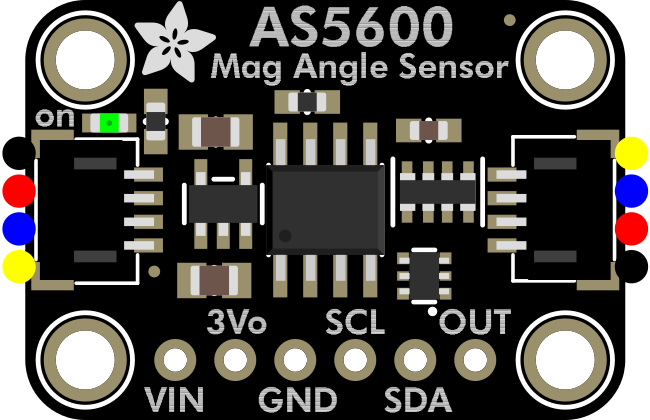
 Design with Adafruit AS5600 Magnetic Angle Sensor in Cirkit Designer
Introduction
The Adafruit AS5600 Magnetic Angle Sensor (Part ID: 6357) is a high-resolution sensor designed to measure precise angular positions using a magnetic field. This sensor leverages I2C communication, making it simple to integrate with microcontrollers such as Arduino and Raspberry Pi. Its compact design and high accuracy make it ideal for applications in robotics, automation, motor control, and position sensing.
Explore Projects Built with Adafruit AS5600 Magnetic Angle Sensor
 Open Project in Cirkit Designer
 Open Project in Cirkit Designer
 Open Project in Cirkit Designer
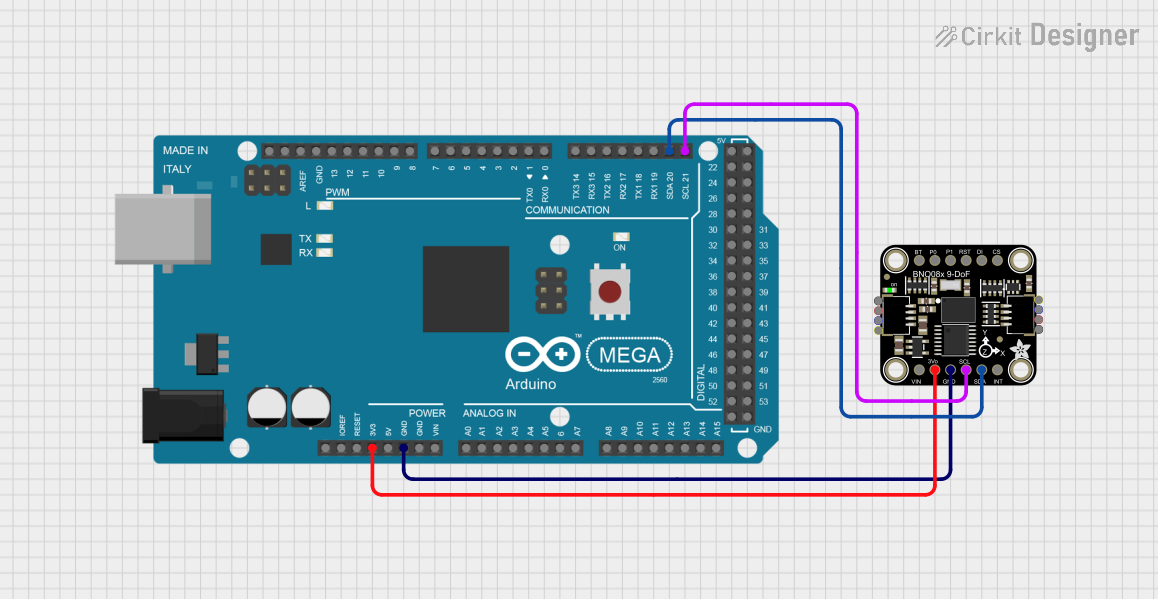 Open Project in Cirkit Designer
Explore Projects Built with Adafruit AS5600 Magnetic Angle Sensor
Open Project in Cirkit DesignerOpen Project in Cirkit DesignerOpen Project in Cirkit DesignerOpen Project in Cirkit DesignerCommon Applications
- Robotic arm joint position sensing
- Motor shaft angle measurement
- Rotary encoders for automation systems
- Precision control in industrial equipment
- Gaming controllers and joysticks
Technical Specifications
The following table outlines the key technical details of the Adafruit AS5600 Magnetic Angle Sensor:
| Parameter | Value |
|---|---|
| Supply Voltage | 3.3V to 5.5V |
| Operating Current | 6.5 mA (typical) |
| Communication Protocol | I2C |
| I2C Address (Default) | 0x36 |
| Resolution | 12-bit (4096 positions per 360°) |
| Measurement Range | 0° to 360° |
| Output Modes | I2C or PWM |
| Operating Temperature | -40°C to +125°C |
| Dimensions | 20mm x 20mm x 3mm |
Pin Configuration
The AS5600 sensor has the following pinout:
| Pin | Name | Description |
|---|---|---|
| 1 | VIN | Power supply input (3.3V to 5.5V) |
| 2 | GND | Ground |
| 3 | SDA | I2C data line |
| 4 | SCL | I2C clock line |
| 5 | OUT | PWM output (optional, for analog angle output) |
| 6 | DIR | Direction input (used for clockwise/counterclockwise) |
Usage Instructions
Connecting the AS5600 to an Arduino UNO
To use the AS5600 with an Arduino UNO, follow these steps:
- Connect the VIN pin of the AS5600 to the 5V pin on the Arduino.
- Connect the GND pin of the AS5600 to the GND pin on the Arduino.
- Connect the SDA pin of the AS5600 to the A4 pin on the Arduino (I2C data line).
- Connect the SCL pin of the AS5600 to the A5 pin on the Arduino (I2C clock line).
Sample Arduino Code
The following code demonstrates how to read the angular position from the AS5600 sensor using I2C communication:
#include <Wire.h>

#define AS5600_I2C_ADDRESS 0x36  // Default I2C address for AS5600

void setup() {
  Wire.begin();                 // Initialize I2C communication
  Serial.begin(9600);           // Start serial communication for debugging
  Serial.println("AS5600 Magnetic Angle Sensor Test");
}

void loop() {
  uint16_t angle = readAngle(); // Read the angle from the sensor
  Serial.print("Angle: ");
  Serial.print(angle * 0.0879); // Convert to degrees (12-bit resolution)
  Serial.println("°");
  delay(500);                   // Wait for 500ms before the next reading
}

// Function to read the angle from the AS5600 sensor
uint16_t readAngle() {
  Wire.beginTransmission(AS5600_I2C_ADDRESS);
  Wire.write(0x0E);             // Address of the angle register (MSB)
  Wire.endTransmission();
  Wire.requestFrom(AS5600_I2C_ADDRESS, 2); // Request 2 bytes (MSB + LSB)

  if (Wire.available() == 2) {
    uint8_t msb = Wire.read();  // Most significant byte
    uint8_t lsb = Wire.read();  // Least significant byte
    return (msb << 8) | lsb;    // Combine MSB and LSB into a 16-bit value
  }
  return 0;                     // Return 0 if no data is available
}
Important Considerations
- Ensure that the magnetic field is aligned correctly with the sensor for accurate readings.
- Use a high-quality magnet with a diameter of 6mm to 8mm for optimal performance.
- Avoid placing the sensor near strong electromagnetic interference (EMI) sources.
- If using the PWM output mode, ensure the OUT pin is connected to an appropriate input pin on your microcontroller.
Troubleshooting and FAQs
Common Issues and Solutions
No data is being read from the sensor.
- Ensure the I2C connections (SDA and SCL) are properly connected.
- Verify that the I2C address (0x36) matches the one in your code.
- Check the power supply voltage (3.3V to 5.5V) to ensure it is within the operating range.
Incorrect angle readings.
- Confirm that the magnet is positioned correctly above the sensor.
- Ensure the magnet is not tilted or too far from the sensor (optimal distance: 0.5mm to 3mm).
- Check for any nearby sources of magnetic interference.
The sensor is not detected on the I2C bus.
- Use an I2C scanner sketch to verify the sensor's address.
- Ensure pull-up resistors (4.7kΩ to 10kΩ) are present on the SDA and SCL lines if required.
FAQs
Q: Can the AS5600 measure angles beyond 360°?
A: No, the AS5600 measures angles within a 0° to 360° range. However, you can track multiple rotations in software by monitoring changes in the angle readings.
Q: Can I use the AS5600 with a 3.3V microcontroller?
A: Yes, the AS5600 is compatible with both 3.3V and 5V systems.
Q: What type of magnet should I use with the AS5600?
A: Use a diametrically magnetized cylindrical magnet with a diameter of 6mm to 8mm for best results.
Q: Does the AS5600 support SPI communication?
A: No, the AS5600 only supports I2C and PWM output modes.
By following this documentation, you can effectively integrate the Adafruit AS5600 Magnetic Angle Sensor into your projects for precise angular position measurements.