Cirkit Designer Logo
Cirkit Designer
Your all-in-one circuit design IDE
Home / 
Component Documentation

How to Use STM-32 NUCLEO-F401RE-KLA: Examples, Pinouts, and Specs
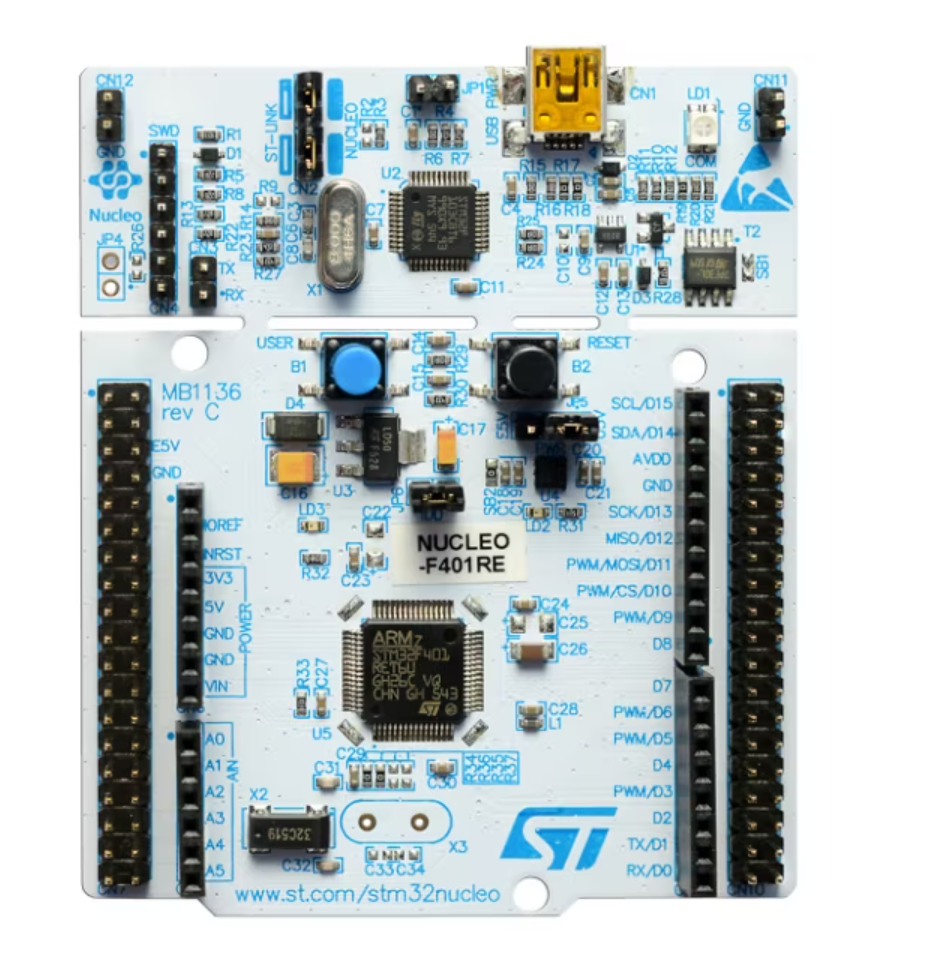

Image of STM-32 NUCLEO-F401RE-KLA
Cirkit Designer LogoDesign with STM-32 NUCLEO-F401RE-KLA in Cirkit Designer

Introduction

The STM-32 NUCLEO-F401RE-KLA is a development board manufactured by STM, featuring the STM32F401RE microcontroller. This board is part of the STM32 family and is designed for rapid prototyping and development of embedded applications. It provides a versatile platform with a variety of interfaces, connectivity options, and compatibility with Arduino Uno R3 headers, making it suitable for a wide range of projects.

Explore Projects Built with STM-32 NUCLEO-F401RE-KLA
Use Cirkit Designer to design, explore, and prototype these projects online. Some projects support real-time simulation. Click "Open Project" to start designing instantly!
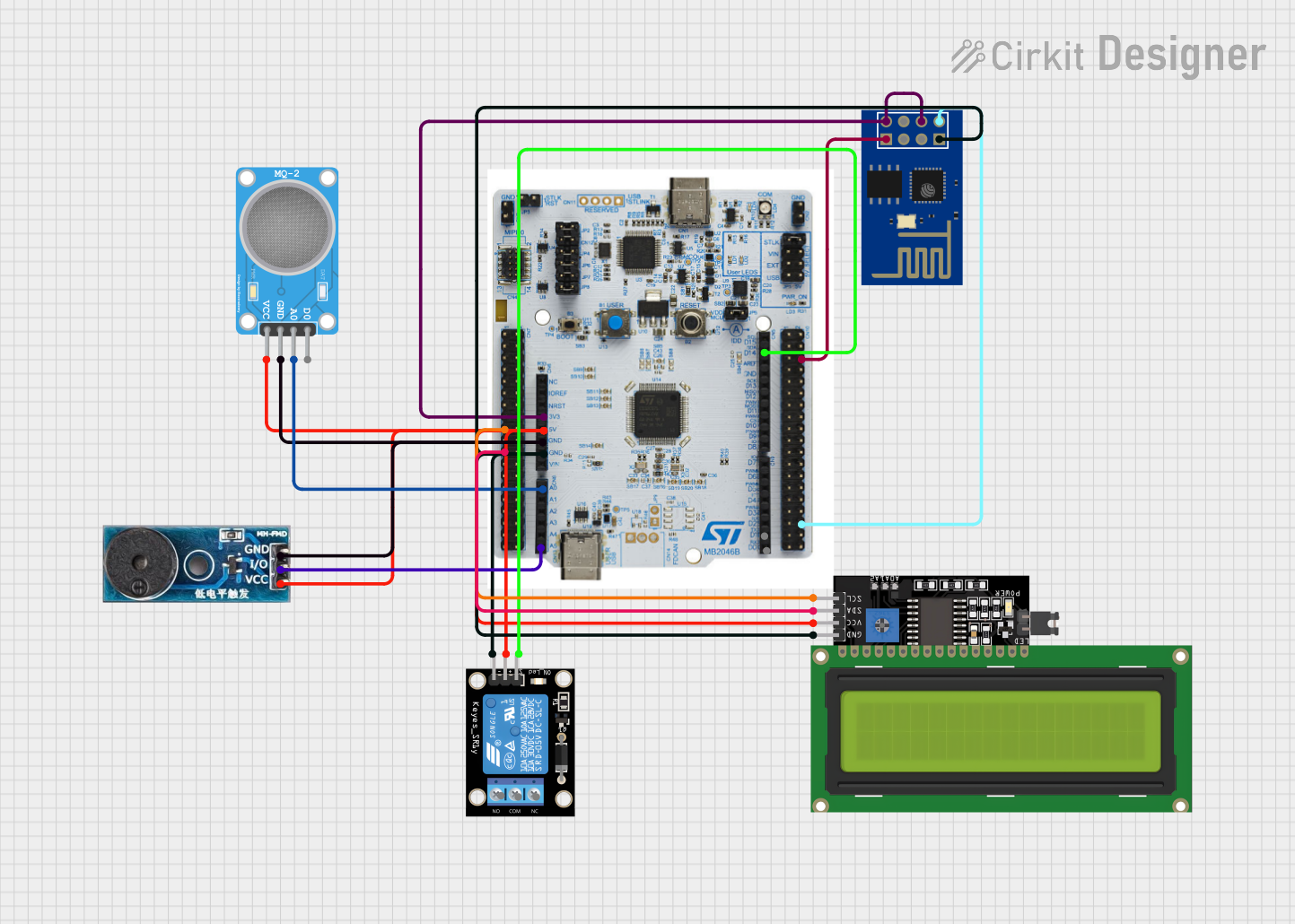
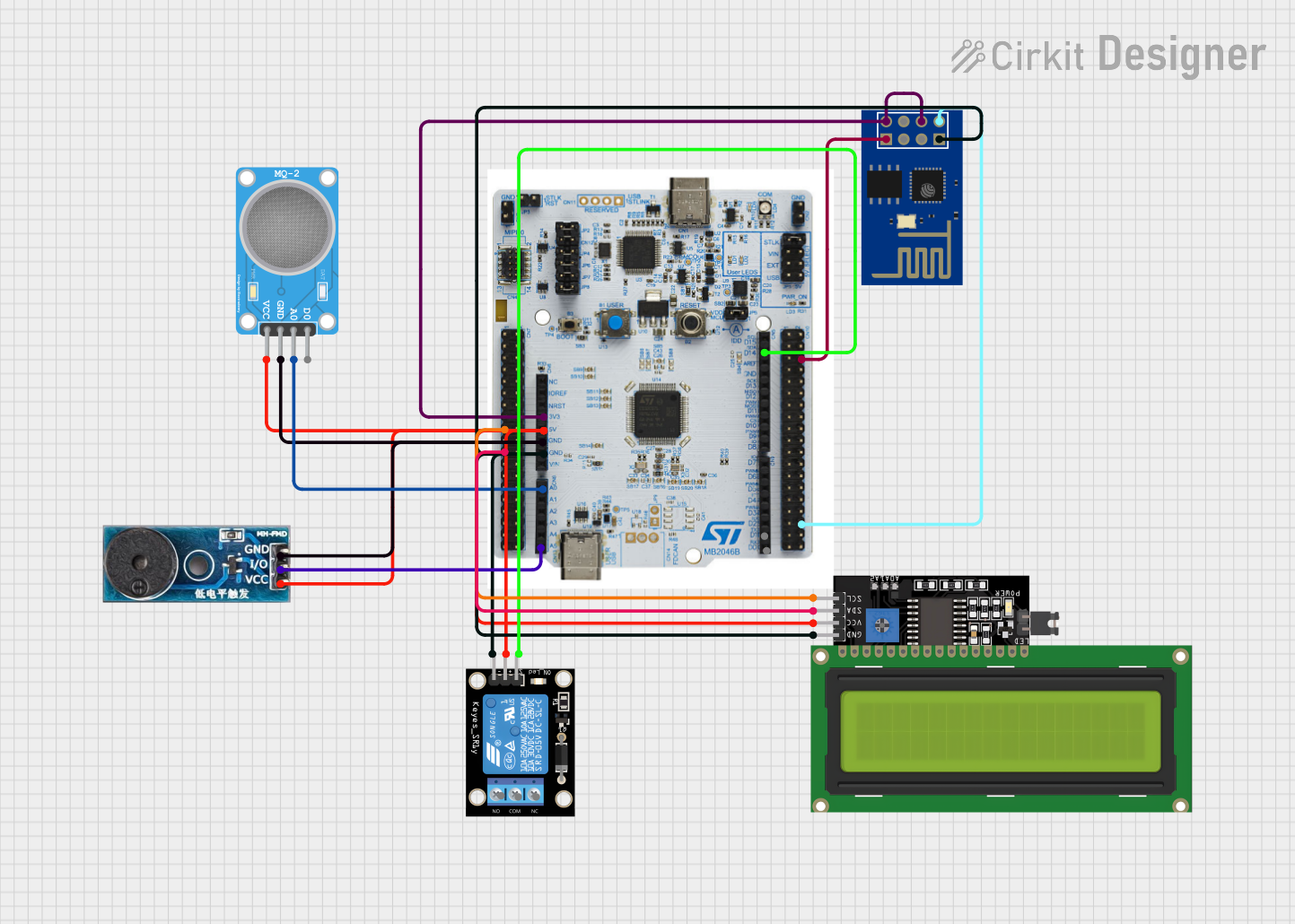
WiFi-Enabled Environmental Monitoring System with Alert Notifications
Image of GAS LEAKAGE DETECTION: A project utilizing STM-32 NUCLEO-F401RE-KLA in a practical application
This circuit features a NUCLEO-F303RE microcontroller board interfaced with several modules for sensing, actuation, and communication. It uses I2C communication to display data on an LCD screen, UART communication to interface with an ESP8266 WiFi module, and reads an MQ-2 gas sensor via an ADC pin. The microcontroller also controls a buzzer for audible alerts and a relay module for switching higher power loads, possibly in response to sensor readings or remote commands received over WiFi.
Cirkit Designer LogoOpen Project in Cirkit Designer
IoT-Enabled Environmental Monitoring System with NUCLEO-F303RE and ESP8266
Image of GAS LEAKAGE DETECTION: A project utilizing STM-32 NUCLEO-F401RE-KLA in a practical application
This circuit features a NUCLEO-F303RE microcontroller board interfaced with various modules for sensing, actuation, and communication. It includes an MQ-2 gas sensor for detecting combustible gases, a buzzer for audible alerts, and a relay for controlling high-power devices. Additionally, the circuit uses an ESP8266 WiFi module for wireless connectivity and an I2C LCD display for user interface and data display.
Cirkit Designer LogoOpen Project in Cirkit Designer
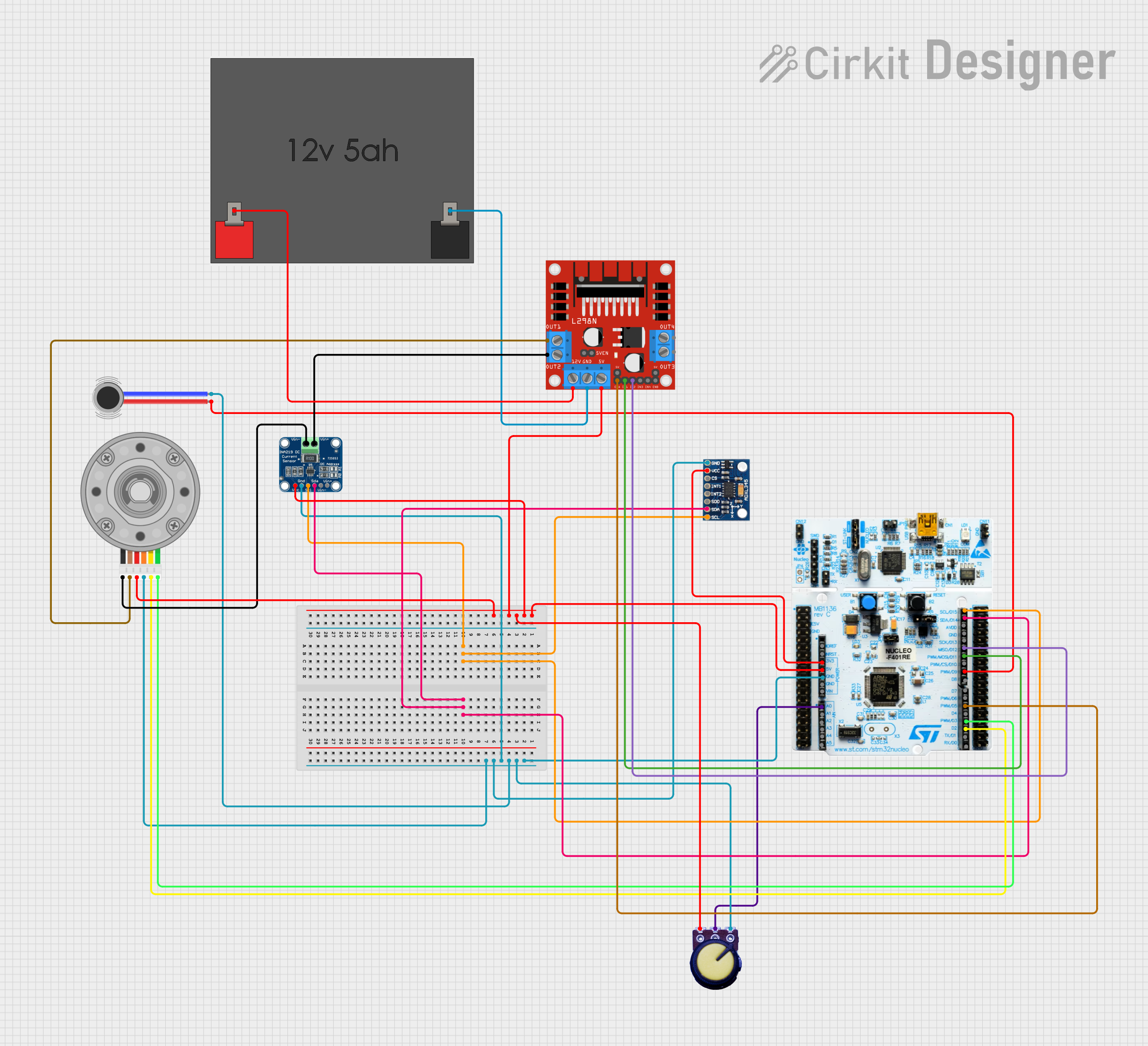
Nucleo 401RE Controlled Robotic Motor with Vibration Feedback and ADXL345 Accelerometer
Image of MLKIT: A project utilizing STM-32 NUCLEO-F401RE-KLA in a practical application
This circuit features a Nucleo 401RE microcontroller as the central processing unit, interfacing with an ADXL345 accelerometer and an INA219 current sensor over an I2C bus for motion sensing and power monitoring, respectively. A DC motor with an encoder is driven by an L298N motor driver, with speed control potentially provided by a connected potentiometer and vibration feedback through a vibration motor. The system is powered by a 12V battery, with voltage regulation provided for the various components.
Cirkit Designer LogoOpen Project in Cirkit Designer
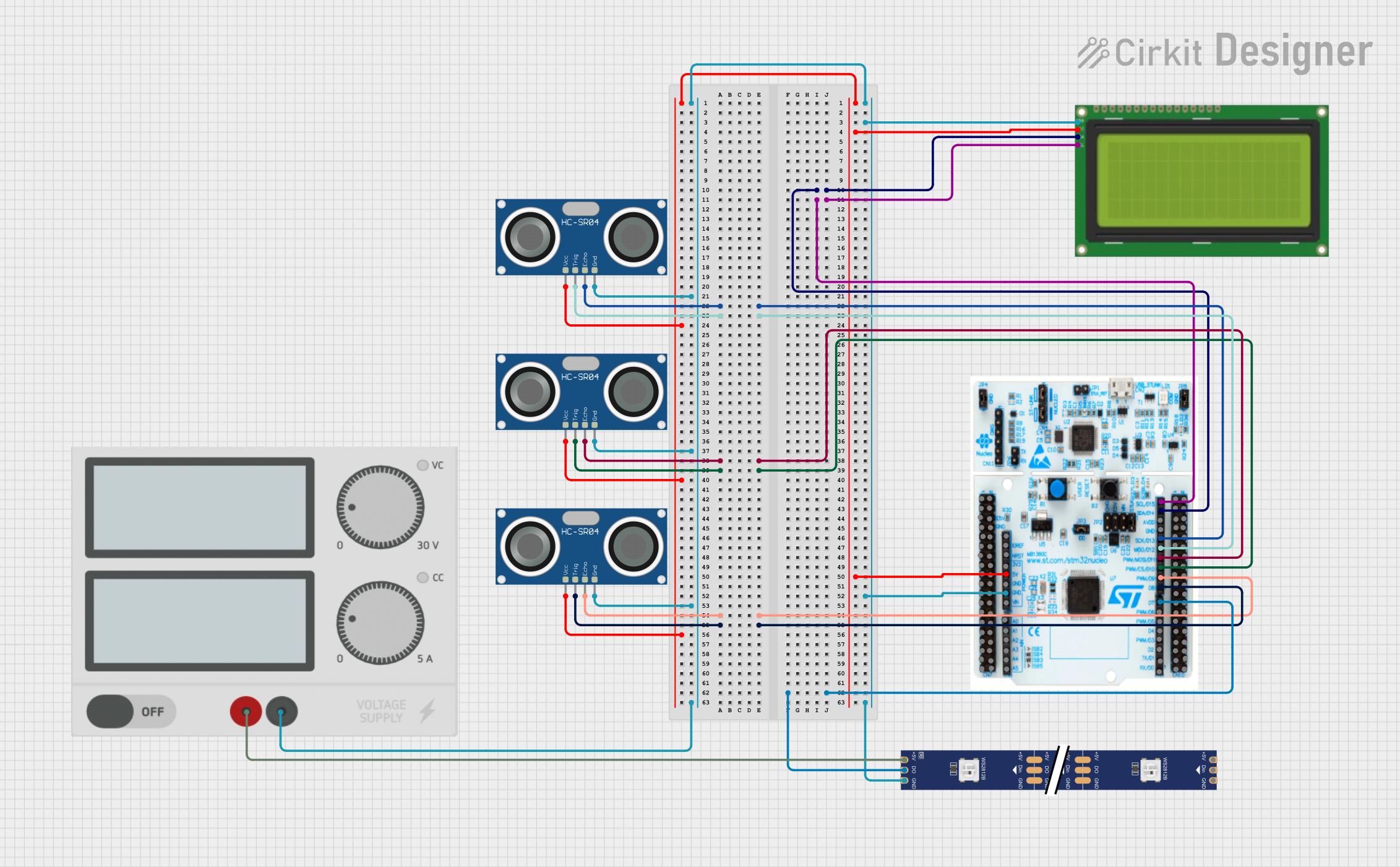
STM32 Nucleo F303RE Controlled Ultrasonic Sensing with RGB Feedback and I2C LCD Display
Image of CS435-final: A project utilizing STM-32 NUCLEO-F401RE-KLA in a practical application
This circuit features a STM32 Nucleo F303RE microcontroller interfaced with three HC-SR04 ultrasonic sensors for distance measurement and a 20x4 LCD display over I2C for data output. Additionally, there is a WS2812 RGB LED strip controlled by the microcontroller for visual feedback. The power supply provides a common 5V to the LCD, ultrasonic sensors, LED strip, and the microcontroller's +5V input, with all components sharing a common ground.
Cirkit Designer LogoOpen Project in Cirkit Designer

Explore Projects Built with STM-32 NUCLEO-F401RE-KLA

Use Cirkit Designer to design, explore, and prototype these projects online. Some projects support real-time simulation. Click "Open Project" to start designing instantly!
Image of GAS LEAKAGE DETECTION: A project utilizing STM-32 NUCLEO-F401RE-KLA in a practical application
WiFi-Enabled Environmental Monitoring System with Alert Notifications
This circuit features a NUCLEO-F303RE microcontroller board interfaced with several modules for sensing, actuation, and communication. It uses I2C communication to display data on an LCD screen, UART communication to interface with an ESP8266 WiFi module, and reads an MQ-2 gas sensor via an ADC pin. The microcontroller also controls a buzzer for audible alerts and a relay module for switching higher power loads, possibly in response to sensor readings or remote commands received over WiFi.
Cirkit Designer LogoOpen Project in Cirkit Designer
Image of GAS LEAKAGE DETECTION: A project utilizing STM-32 NUCLEO-F401RE-KLA in a practical application
IoT-Enabled Environmental Monitoring System with NUCLEO-F303RE and ESP8266
This circuit features a NUCLEO-F303RE microcontroller board interfaced with various modules for sensing, actuation, and communication. It includes an MQ-2 gas sensor for detecting combustible gases, a buzzer for audible alerts, and a relay for controlling high-power devices. Additionally, the circuit uses an ESP8266 WiFi module for wireless connectivity and an I2C LCD display for user interface and data display.
Cirkit Designer LogoOpen Project in Cirkit Designer
Image of MLKIT: A project utilizing STM-32 NUCLEO-F401RE-KLA in a practical application
Nucleo 401RE Controlled Robotic Motor with Vibration Feedback and ADXL345 Accelerometer
This circuit features a Nucleo 401RE microcontroller as the central processing unit, interfacing with an ADXL345 accelerometer and an INA219 current sensor over an I2C bus for motion sensing and power monitoring, respectively. A DC motor with an encoder is driven by an L298N motor driver, with speed control potentially provided by a connected potentiometer and vibration feedback through a vibration motor. The system is powered by a 12V battery, with voltage regulation provided for the various components.
Cirkit Designer LogoOpen Project in Cirkit Designer
Image of CS435-final: A project utilizing STM-32 NUCLEO-F401RE-KLA in a practical application
STM32 Nucleo F303RE Controlled Ultrasonic Sensing with RGB Feedback and I2C LCD Display
This circuit features a STM32 Nucleo F303RE microcontroller interfaced with three HC-SR04 ultrasonic sensors for distance measurement and a 20x4 LCD display over I2C for data output. Additionally, there is a WS2812 RGB LED strip controlled by the microcontroller for visual feedback. The power supply provides a common 5V to the LCD, ultrasonic sensors, LED strip, and the microcontroller's +5V input, with all components sharing a common ground.
Cirkit Designer LogoOpen Project in Cirkit Designer

Common Applications and Use Cases

  • IoT (Internet of Things) devices and applications
  • Robotics and automation systems
  • Sensor data acquisition and processing
  • Prototyping for industrial and consumer electronics
  • Educational purposes for learning embedded systems and microcontroller programming

Technical Specifications

The STM-32 NUCLEO-F401RE-KLA is equipped with the STM32F401RE microcontroller, which is based on the ARM Cortex-M4 core. Below are the key technical details:

Key Technical Details

Specification Value
Microcontroller STM32F401RE (ARM Cortex-M4, 32-bit)
Operating Voltage 3.3V
Input Voltage (via USB) 5V
Input Voltage (via VIN) 7V to 12V
Flash Memory 512 KB
SRAM 96 KB
Clock Speed 84 MHz
GPIO Pins 50
Communication Interfaces UART, I2C, SPI, CAN, USB
Analog Inputs 6 (12-bit ADC)
PWM Outputs 12
Debugging Interface ST-LINK/V2-1
Dimensions 68.6 mm x 53.4 mm

Pin Configuration and Descriptions

The STM-32 NUCLEO-F401RE-KLA features Arduino Uno R3-compatible headers and ST morpho headers for extended functionality. Below is a summary of the pin configuration:

Arduino Uno R3-Compatible Header

Pin Name Functionality Description
A0-A5 Analog Inputs 12-bit ADC channels
D0-D1 UART Communication Serial RX (D0) and TX (D1)
D2-D13 Digital I/O General-purpose digital pins
D3, D5, D6, D9, D10, D11 PWM Outputs Pulse-width modulation functionality
VIN Power Input External power supply (7V-12V)
3.3V Power Output 3.3V regulated output
5V Power Output 5V regulated output
GND Ground Common ground
RESET Reset Resets the microcontroller

ST Morpho Header (Partial List)

Pin Name Functionality Description
PA0-PA15 GPIO, ADC, PWM, Alternate Func General-purpose I/O and peripherals
PB0-PB15 GPIO, ADC, PWM, Alternate Func General-purpose I/O and peripherals
PC0-PC15 GPIO, ADC, PWM, Alternate Func General-purpose I/O and peripherals

Usage Instructions

How to Use the Component in a Circuit

  1. Powering the Board:

    • Connect the board to your computer via a micro-USB cable for power and programming.
    • Alternatively, use the VIN pin to supply an external voltage (7V-12V).
  2. Programming the Board:

    • Use STM32CubeIDE or Arduino IDE for programming.
    • The onboard ST-LINK/V2-1 debugger allows for easy programming and debugging.
  3. Connecting Peripherals:

    • Use the Arduino Uno R3-compatible headers for shields and modules.
    • For advanced functionality, connect peripherals to the ST morpho headers.
  4. Uploading Code:

    • Write your code in the IDE of your choice.
    • Compile and upload the code to the board via the USB connection.

Important Considerations and Best Practices

  • Ensure the input voltage does not exceed the specified range to avoid damaging the board.
  • Use decoupling capacitors when connecting external sensors or modules to reduce noise.
  • Avoid connecting high-current loads directly to GPIO pins; use transistors or relays instead.
  • Always ground all external components to the board's GND pin to ensure proper operation.

Example Code for Arduino IDE

Below is an example code to blink an LED connected to pin D13:

// Blink an LED on pin D13
// This example demonstrates basic GPIO functionality

void setup() {
  pinMode(13, OUTPUT); // Set pin D13 as an output
}

void loop() {
  digitalWrite(13, HIGH); // Turn the LED on
  delay(1000);            // Wait for 1 second
  digitalWrite(13, LOW);  // Turn the LED off
  delay(1000);            // Wait for 1 second
}

Troubleshooting and FAQs

Common Issues Users Might Face

  1. Board Not Detected by Computer:

    • Ensure the USB cable is functional and supports data transfer.
    • Check if the ST-LINK driver is installed on your computer.
  2. Code Upload Fails:

    • Verify that the correct board and port are selected in the IDE.
    • Ensure no other application is using the COM port.
  3. Peripherals Not Working:

    • Double-check the wiring and connections.
    • Confirm that the correct pins are defined in your code.
  4. Board Overheating:

    • Ensure the input voltage is within the specified range.
    • Avoid drawing excessive current from the GPIO pins.

Solutions and Tips for Troubleshooting

  • Use a multimeter to check voltage levels and continuity in your circuit.
  • Refer to the STM32F401RE datasheet for detailed information on pin functions and electrical characteristics.
  • If the board becomes unresponsive, press the RESET button or power cycle the board.

By following this documentation, users can effectively utilize the STM-32 NUCLEO-F401RE-KLA for their embedded development projects.