
How to Use Microcontroller : Examples, Pinouts, and Specs
 Design with Microcontroller in Cirkit Designer
Introduction
The AT89C51 is a compact and versatile microcontroller designed for embedded systems. Manufactured by Microcontroller, this device integrates a processor, memory, and input/output peripherals into a single chip, making it ideal for controlling specific operations in various applications. Its robust architecture and ease of use make it a popular choice for both beginners and experienced developers.
Explore Projects Built with Microcontroller
 Open Project in Cirkit Designer
 Open Project in Cirkit Designer
 Open Project in Cirkit Designer
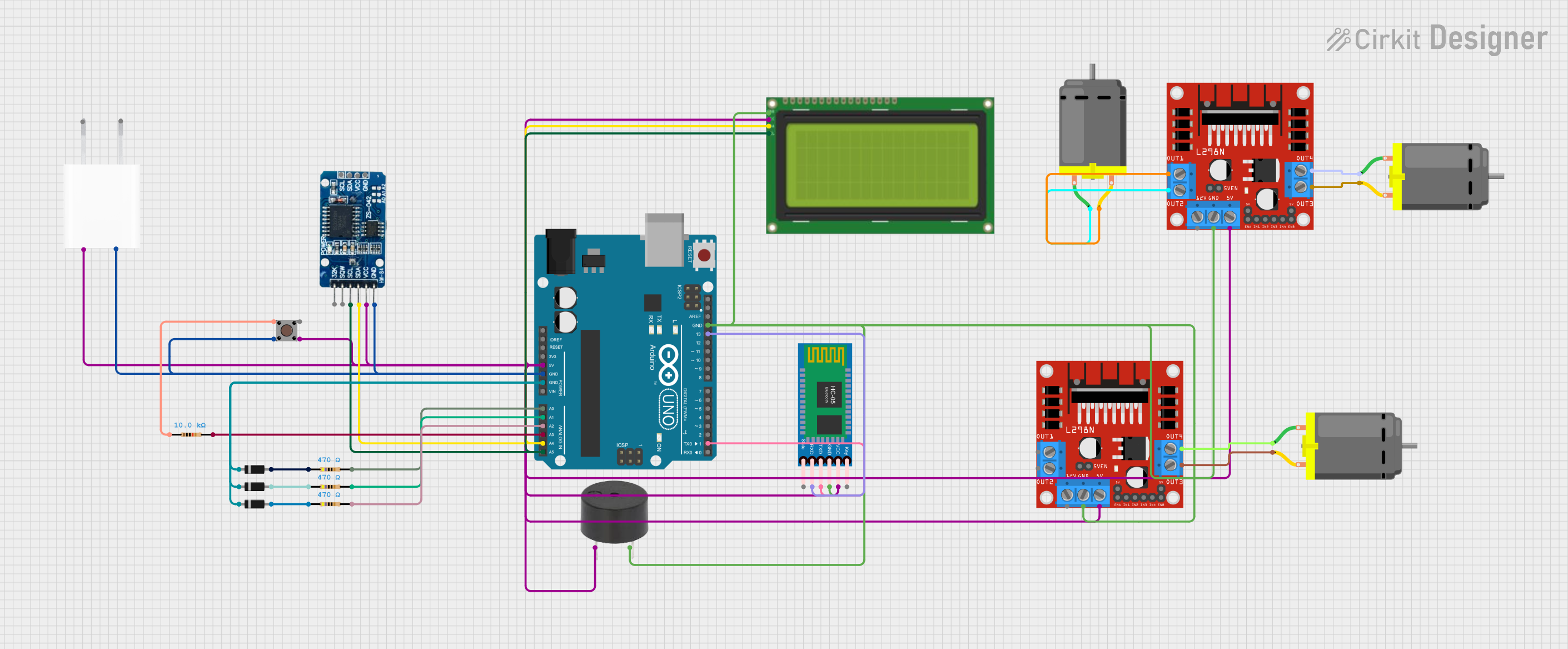 Open Project in Cirkit Designer
Explore Projects Built with Microcontroller
Open Project in Cirkit DesignerOpen Project in Cirkit DesignerOpen Project in Cirkit DesignerOpen Project in Cirkit DesignerCommon Applications and Use Cases
- Home automation systems
- Industrial control systems
- Consumer electronics
- Robotics and mechatronics
- Data acquisition systems
- Educational projects and prototyping
Technical Specifications
The AT89C51 microcontroller is based on the 8051 architecture and offers the following key specifications:
| Parameter | Value |
|---|---|
| Processor Core | 8-bit 8051 |
| Operating Voltage | 4.0V to 5.5V |
| Maximum Clock Frequency | 24 MHz |
| Flash Memory | 4 KB |
| RAM | 128 bytes |
| I/O Ports | 32 (4 ports, each with 8 pins) |
| Timers/Counters | 2 (16-bit each) |
| Serial Communication | 1 UART |
| Interrupt Sources | 6 |
| Power Consumption | Low power consumption in idle and power-down modes |
Pin Configuration and Descriptions
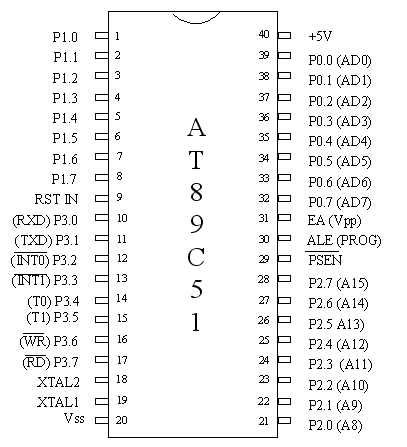
The AT89C51 comes in a 40-pin Dual Inline Package (DIP). Below is the pin configuration:
| Pin Number | Pin Name | Description |
|---|---|---|
| 1-8 | P1.0-P1.7 | Port 1: General-purpose I/O pins |
| 9 | RST | Reset: Active high reset input |
| 10-17 | P3.0-P3.7 | Port 3: I/O pins with alternate functions (e.g., UART, interrupts) |
| 18-19 | XTAL2, XTAL1 | Crystal oscillator pins for external clock input |
| 20 | GND | Ground |
| 21-28 | P2.0-P2.7 | Port 2: General-purpose I/O pins or high-order address bus |
| 29 | PSEN | Program Store Enable: Used for external program memory |
| 30 | ALE/PROG | Address Latch Enable: Latches low-order address bus |
| 31 | EA/VPP | External Access: Enables external memory access |
| 32-39 | P0.0-P0.7 | Port 0: General-purpose I/O pins or low-order address/data bus |
| 40 | VCC | Power supply (4.0V to 5.5V) |
Usage Instructions
How to Use the AT89C51 in a Circuit
- Power Supply: Connect the VCC pin to a 5V power source and the GND pin to ground.
- Clock Configuration: Attach a crystal oscillator (typically 12 MHz) between XTAL1 and XTAL2, along with two 33pF capacitors to stabilize the clock signal.
- Reset Circuit: Connect a 10 µF capacitor and a 10 kΩ resistor to the RST pin to ensure proper reset functionality.
- I/O Configuration: Use the I/O ports (P0, P1, P2, P3) for interfacing with external devices such as LEDs, sensors, or motors.
- Programming: Use an external programmer to load your program into the microcontroller's flash memory.
Important Considerations and Best Practices
- Ensure the operating voltage does not exceed 5.5V to avoid damaging the microcontroller.
- Use decoupling capacitors (e.g., 0.1 µF) near the power pins to reduce noise and improve stability.
- Avoid leaving unused pins floating; connect them to ground or configure them as outputs.
- For UART communication, connect the TXD and RXD pins (P3.1 and P3.0) to the corresponding pins of your serial device.
Example: Interfacing with an Arduino UNO
The AT89C51 can communicate with an Arduino UNO via UART. Below is an example Arduino code to send data to the AT89C51:
// Arduino code to send data to AT89C51 via UART
void setup() {
  Serial.begin(9600); // Initialize serial communication at 9600 baud
}

void loop() {
  Serial.println("Hello, AT89C51!"); // Send a message to the AT89C51
  delay(1000); // Wait for 1 second before sending the next message
}
Troubleshooting and FAQs
Common Issues and Solutions
Microcontroller Not Responding
- Cause: Incorrect power supply or clock configuration.
- Solution: Verify the power connections and ensure the crystal oscillator is properly connected.
Program Not Executing
- Cause: Improper programming or corrupted flash memory.
- Solution: Reprogram the microcontroller using a reliable programmer and verify the code.
UART Communication Fails
- Cause: Mismatched baud rates or incorrect wiring.
- Solution: Ensure both devices use the same baud rate and check the TXD/RXD connections.
I/O Pins Not Functioning
- Cause: Pins configured incorrectly or left floating.
- Solution: Verify the pin configuration in your code and connect unused pins to ground.
FAQs
Q: Can the AT89C51 be used with external memory?
A: Yes, the AT89C51 supports external program and data memory via the PSEN and EA pins.
Q: What is the maximum clock frequency supported?
A: The AT89C51 supports a maximum clock frequency of 24 MHz.
Q: How do I reduce power consumption?
A: Use the idle or power-down modes to minimize power consumption when the microcontroller is not actively processing.
Q: Can I use the AT89C51 for real-time applications?
A: Yes, the AT89C51 is suitable for real-time applications, but ensure the timing requirements are within its processing capabilities.