
How to Use HSHCC: Examples, Pinouts, and Specs
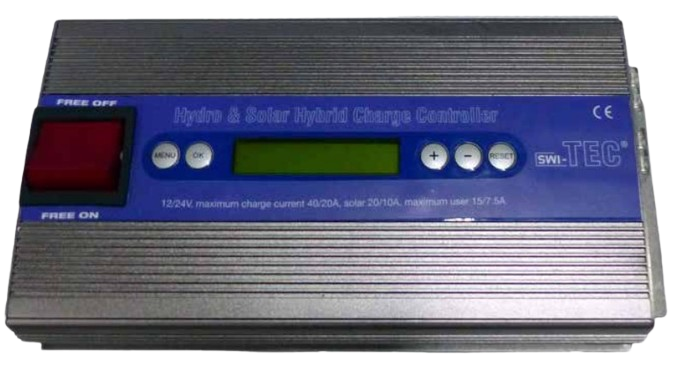
 Design with HSHCC in Cirkit Designer
Introduction
The HSHCC (High-Speed High-Current Connector) is a specialized electronic component designed for efficient power transmission in high-performance applications. It ensures minimal signal loss and heat generation, making it ideal for systems requiring reliable and high-speed power delivery. The HSHCC is commonly used in industrial automation, electric vehicles, robotics, and high-power computing systems.
Explore Projects Built with HSHCC
 Open Project in Cirkit Designer
 Open Project in Cirkit Designer
 Open Project in Cirkit Designer
 Open Project in Cirkit Designer
Explore Projects Built with HSHCC
Open Project in Cirkit DesignerOpen Project in Cirkit DesignerOpen Project in Cirkit DesignerOpen Project in Cirkit DesignerCommon Applications and Use Cases
- Electric vehicle power systems
- High-performance computing and data centers
- Industrial automation and robotics
- Renewable energy systems (e.g., solar inverters, wind turbines)
- Aerospace and defense applications
Technical Specifications
Key Technical Details
| Parameter | Value |
|---|---|
| Maximum Voltage Rating | 600V DC |
| Maximum Current Rating | 200A |
| Contact Resistance | ≤ 0.2 mΩ |
| Insulation Resistance | ≥ 1000 MΩ |
| Operating Temperature | -40°C to +125°C |
| Connector Material | Copper alloy with gold plating |
| Insulator Material | High-temperature thermoplastic |
| Durability | 500 mating cycles |
Pin Configuration and Descriptions
The HSHCC typically features a multi-pin configuration to support both power and signal connections. Below is a general description of the pin layout:
| Pin Number | Function | Description |
|---|---|---|
| 1 | Power (+) | Positive high-current power connection |
| 2 | Power (-) | Negative high-current power connection |
| 3 | Signal (TX) | Transmit signal for communication or monitoring |
| 4 | Signal (RX) | Receive signal for communication or monitoring |
| 5 | Ground (GND) | Common ground connection |
Note: The exact pin configuration may vary depending on the specific HSHCC model. Always refer to the manufacturer's datasheet for precise details.
Usage Instructions
How to Use the HSHCC in a Circuit
- Connector Selection: Choose the appropriate HSHCC model based on your system's voltage, current, and environmental requirements.
- Wiring:
- Use high-quality, appropriately rated cables for power connections to minimize resistance and heat generation.
- Ensure proper crimping or soldering of wires to the connector terminals for a secure connection.
- Mounting: Secure the HSHCC to a stable surface or panel using the provided mounting holes or clips to prevent mechanical stress.
- Mating and Unmating: Align the male and female connectors carefully to avoid damage to the pins. Do not force the connection.
- Testing: After installation, verify the connections using a multimeter to ensure proper continuity and insulation.
Important Considerations and Best Practices
- Heat Dissipation: Ensure adequate ventilation or cooling in high-current applications to prevent overheating.
- Contact Cleaning: Periodically clean the connector contacts with a non-abrasive cleaner to maintain low contact resistance.
- Environmental Protection: For outdoor or harsh environments, use HSHCC models with IP-rated sealing to protect against dust and moisture.
- Avoid Overloading: Do not exceed the specified voltage and current ratings to prevent damage or failure.
Example: Connecting HSHCC to an Arduino UNO
While the HSHCC is primarily a power connector, it can also transmit signals for monitoring or control. Below is an example of using the HSHCC's signal pins to communicate with an Arduino UNO:
// Example: Reading signal data from HSHCC using Arduino UNO
// Pin 3 (TX) of HSHCC is connected to Arduino pin 10 (RX)
// Pin 5 (GND) of HSHCC is connected to Arduino GND

void setup() {
  Serial.begin(9600); // Initialize serial communication at 9600 baud
  pinMode(10, INPUT); // Set Arduino pin 10 as input
}

void loop() {
  if (Serial.available() > 0) {
    // Read data from HSHCC's TX pin
    int signalData = Serial.read();
    // Print the received data to the Serial Monitor
    Serial.print("Received Signal: ");
    Serial.println(signalData);
  }
}
Note: Ensure proper voltage level shifting if the HSHCC's signal pins operate at a voltage different from the Arduino's logic level (5V or 3.3V).
Troubleshooting and FAQs
Common Issues and Solutions
| Issue | Possible Cause | Solution |
|---|---|---|
| Overheating of the connector | Exceeding current rating | Reduce the load current or use a higher-rated HSHCC model. |
| Signal loss or noise | Poor contact or damaged pins | Inspect and clean the contacts; replace damaged connectors. |
| Difficulty in mating connectors | Misalignment or debris in the connector | Align connectors carefully; clean any debris. |
| Intermittent power or signal loss | Loose or improper wiring | Check and secure all connections. |
FAQs
Can the HSHCC be used for AC power transmission?
Yes, the HSHCC can handle both AC and DC power, provided the voltage and current ratings are not exceeded.What is the recommended wire gauge for the HSHCC?
The recommended wire gauge depends on the current rating. For 200A, use at least 2 AWG or thicker cables.How do I ensure long-term reliability of the HSHCC?
Regularly inspect and clean the contacts, avoid overloading, and ensure proper installation to maintain optimal performance.Is the HSHCC compatible with other connector types?
The HSHCC is designed for specific mating connectors. Check the manufacturer's compatibility guidelines before use.
By following this documentation, users can effectively integrate the HSHCC into their systems for reliable and efficient power transmission.