
How to Use LaskaKit TPS62A02 Step-down 4.0-5.5V 3.3V/2A: Examples, Pinouts, and Specs
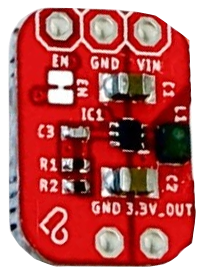
 Design with LaskaKit TPS62A02 Step-down 4.0-5.5V 3.3V/2A in Cirkit Designer
Introduction
The LaskaKit TPS62A02 is a high-efficiency step-down (buck) voltage regulator designed to convert input voltages ranging from 4.0V to 5.5V into a stable 3.3V output. It is capable of delivering up to 2A of continuous current, making it ideal for powering low-voltage devices from higher-voltage sources. This compact and reliable regulator is widely used in applications such as microcontroller-based systems, IoT devices, portable electronics, and battery-powered projects.
Explore Projects Built with LaskaKit TPS62A02 Step-down 4.0-5.5V 3.3V/2A
 Open Project in Cirkit Designer
 Open Project in Cirkit Designer
 Open Project in Cirkit Designer
 Open Project in Cirkit Designer
Explore Projects Built with LaskaKit TPS62A02 Step-down 4.0-5.5V 3.3V/2A
Open Project in Cirkit DesignerOpen Project in Cirkit DesignerOpen Project in Cirkit DesignerOpen Project in Cirkit DesignerCommon Applications
- Powering 3.3V microcontrollers (e.g., ESP32, Arduino boards with 3.3V logic)
- Supplying stable voltage to sensors and modules
- Battery-powered devices requiring efficient voltage conversion
- IoT and wearable electronics
Technical Specifications
The following table outlines the key technical details of the LaskaKit TPS62A02:
| Parameter | Value |
|---|---|
| Input Voltage Range | 4.0V to 5.5V |
| Output Voltage | 3.3V (fixed) |
| Maximum Output Current | 2A |
| Efficiency | Up to 95% |
| Switching Frequency | 2.25 MHz |
| Operating Temperature | -40°C to +125°C |
| Package Type | SOT-23-6 |
Pin Configuration and Descriptions
The TPS62A02 comes in a compact SOT-23-6 package with the following pinout:
| Pin Number | Pin Name | Description |
|---|---|---|
| 1 | VIN | Input voltage (4.0V to 5.5V) |
| 2 | GND | Ground connection |
| 3 | EN | Enable pin (active high, logic HIGH to enable) |
| 4 | FB | Feedback pin (internally connected for fixed output) |
| 5 | SW | Switching node (connect to inductor) |
| 6 | VOUT | Regulated 3.3V output |
Usage Instructions
How to Use the Component in a Circuit
- Input Voltage: Connect a DC voltage source (4.0V to 5.5V) to the
VINpin. Ensure the input voltage is within the specified range to avoid damage. - Output Voltage: Connect the load to the
VOUTpin. The output will be a stable 3.3V. - Inductor and Capacitors: Use an appropriate inductor (e.g., 2.2µH) and input/output capacitors (e.g., 10µF ceramic capacitors) as per the datasheet recommendations for optimal performance.
- Enable Pin: To enable the regulator, connect the
ENpin to a logic HIGH signal or directly toVIN. To disable, pull theENpin to GND. - Ground: Connect the
GNDpin to the ground of the circuit.
Important Considerations and Best Practices
- Thermal Management: Ensure adequate heat dissipation, especially when operating near the maximum current limit of 2A.
- PCB Layout: Minimize the trace length between the
SWpin and the inductor to reduce noise and improve efficiency. - Input Voltage Ripple: Use low-ESR capacitors to minimize input voltage ripple.
- Startup Behavior: Ensure the
ENpin is properly controlled during power-up to avoid erratic behavior.
Example: Connecting to an Arduino UNO
Although the Arduino UNO operates at 5V logic, the TPS62A02 can be used to power 3.3V peripherals. Below is an example of how to use the TPS62A02 to power a 3.3V sensor:
Circuit Connections
- Connect the Arduino's 5V pin to the
VINpin of the TPS62A02. - Connect the
VOUTpin of the TPS62A02 to the sensor's power input. - Connect the
GNDpin of the TPS62A02 to the Arduino's GND.
Example Code
// Example code to read data from a 3.3V sensor powered by TPS62A02
// Ensure the sensor's data pin is connected to an appropriate Arduino pin

const int sensorPin = A0; // Analog pin connected to the sensor output

void setup() {
  Serial.begin(9600); // Initialize serial communication
  pinMode(sensorPin, INPUT); // Set the sensor pin as input
}

void loop() {
  int sensorValue = analogRead(sensorPin); // Read the sensor value
  float voltage = sensorValue * (3.3 / 1023.0); // Convert to voltage (3.3V reference)

  // Print the sensor voltage to the Serial Monitor
  Serial.print("Sensor Voltage: ");
  Serial.print(voltage);
  Serial.println(" V");

  delay(1000); // Wait for 1 second before the next reading
}
Troubleshooting and FAQs
Common Issues and Solutions
No Output Voltage
- Cause: The
ENpin is not connected or is pulled LOW. - Solution: Ensure the
ENpin is connected to a logic HIGH signal orVIN.
- Cause: The
Overheating
- Cause: Excessive current draw or poor thermal management.
- Solution: Verify the load current is within the 2A limit. Improve heat dissipation by using a proper PCB layout or adding a heatsink.
Output Voltage Instability
- Cause: Incorrect or insufficient input/output capacitors.
- Solution: Use low-ESR ceramic capacitors as recommended in the datasheet.
High Noise on Output
- Cause: Poor PCB layout or long traces.
- Solution: Minimize trace lengths and place components as close as possible to the regulator.
FAQs
Q: Can the TPS62A02 be used with a 12V input?
A: No, the maximum input voltage for the TPS62A02 is 5.5V. Using a higher voltage may damage the component.
Q: Is the output voltage adjustable?
A: No, the TPS62A02 provides a fixed 3.3V output. For adjustable output, consider other regulators in the TPS62 series.
Q: Can I use the TPS62A02 to power a 3.3V microcontroller?
A: Yes, the TPS62A02 is ideal for powering 3.3V microcontrollers, provided the total current draw does not exceed 2A.
Q: What happens if the load exceeds 2A?
A: The regulator may enter thermal shutdown or current limit protection to prevent damage. Ensure the load stays within the specified limit.