
How to Use Voltage Regulator LM7809: Examples, Pinouts, and Specs
 Design with Voltage Regulator LM7809 in Cirkit Designer
Introduction
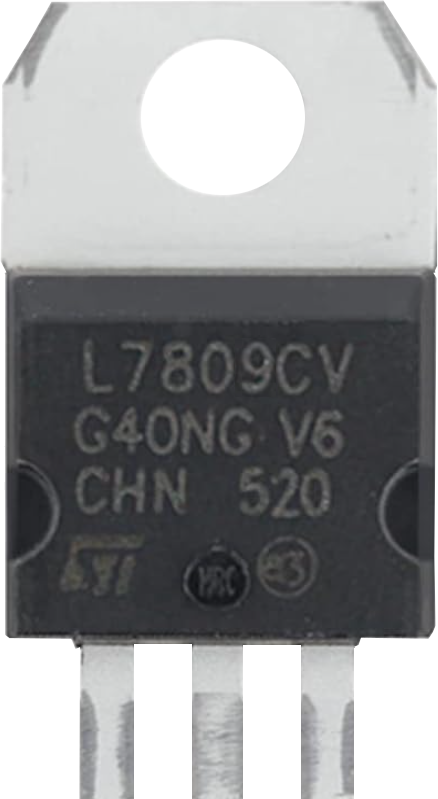
The LM7809 is a linear voltage regulator that provides a fixed output voltage of 9V. It is designed to deliver a maximum output current of 1A, making it ideal for powering low-power electronic circuits. The LM7809 features built-in thermal overload protection and short-circuit protection, ensuring safe and reliable operation. With its wide input voltage range, it is a versatile component for various applications.
Explore Projects Built with Voltage Regulator LM7809
 Open Project in Cirkit Designer
 Open Project in Cirkit Designer
 Open Project in Cirkit Designer
 Open Project in Cirkit Designer
Explore Projects Built with Voltage Regulator LM7809
Open Project in Cirkit DesignerOpen Project in Cirkit DesignerOpen Project in Cirkit DesignerOpen Project in Cirkit DesignerCommon Applications and Use Cases
- Power supply for microcontrollers and sensors
- Voltage regulation in battery-powered devices
- Protection of sensitive electronic components from voltage fluctuations
- Use in DIY electronics projects and prototyping
Technical Specifications
The LM7809 is a robust and reliable voltage regulator with the following key specifications:
| Parameter | Value |
|---|---|
| Output Voltage | 9V ± 2% |
| Maximum Output Current | 1A |
| Input Voltage Range | 11V to 35V |
| Dropout Voltage | 2V to 2.5V |
| Quiescent Current | 5mA (typical) |
| Operating Temperature | 0°C to +125°C |
| Thermal Overload Protection | Yes |
| Short-Circuit Protection | Yes |
| Package Types | TO-220, TO-3 |
Pin Configuration and Descriptions
The LM7809 typically comes in a TO-220 package with three pins. The pinout is as follows:
| Pin Number | Pin Name | Description |
|---|---|---|
| 1 | Input (IN) | Connect to the unregulated input voltage source. |
| 2 | Ground (GND) | Common ground for input and output. |
| 3 | Output (OUT) | Provides the regulated 9V output. |
Usage Instructions
How to Use the LM7809 in a Circuit
- Input Voltage: Connect the input pin (Pin 1) to a DC voltage source. Ensure the input voltage is at least 11V and does not exceed 35V.
- Output Voltage: Connect the output pin (Pin 3) to the load that requires a regulated 9V supply.
- Ground Connection: Connect the ground pin (Pin 2) to the common ground of the circuit.
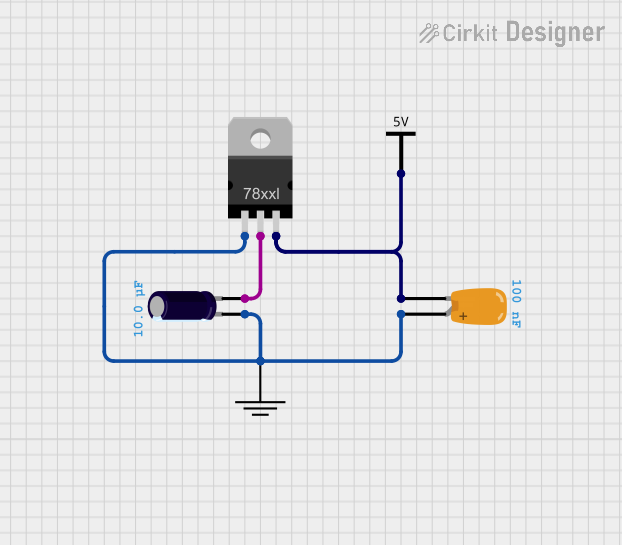
- Capacitors: Add decoupling capacitors to improve stability and reduce noise:
- Place a 0.33µF capacitor between the input pin and ground.
- Place a 0.1µF capacitor between the output pin and ground.
Circuit Diagram
Below is a simple circuit diagram for using the LM7809:
   Unregulated Input Voltage
           +12V
             |
             |
            [C1]  0.33µF
             |
             |-----> Pin 1 (Input)
             |
            GND
             |
             |-----> Pin 2 (Ground)
             |
            [C2]  0.1µF
             |
             |-----> Pin 3 (Output) -----> Regulated 9V Output
Important Considerations and Best Practices
- Heat Dissipation: The LM7809 can generate heat during operation, especially at high input voltages or currents. Use a heatsink with the TO-220 package to prevent overheating.
- Input Voltage: Ensure the input voltage is at least 2V higher than the output voltage (minimum 11V for a 9V output).
- Load Current: Do not exceed the maximum output current of 1A to avoid damaging the regulator.
- Capacitors: Always use the recommended capacitors to ensure stable operation and minimize noise.
Example: Using LM7809 with Arduino UNO
The LM7809 can be used to power an Arduino UNO by providing a stable 9V supply to its power jack. Below is an example of how to connect the LM7809 to an Arduino UNO:
// Example: Powering Arduino UNO with LM7809
// Connect the LM7809 output to the Arduino UNO power jack (9V input).

void setup() {
  // No specific code is required for powering the Arduino UNO.
  // Ensure the LM7809 is properly connected to the input voltage source
  // and the output is connected to the Arduino power jack.
}

void loop() {
  // Your Arduino code goes here.
}
Troubleshooting and FAQs
Common Issues and Solutions
No Output Voltage
- Cause: Input voltage is too low.
- Solution: Ensure the input voltage is at least 11V.
Overheating
- Cause: Excessive current draw or high input voltage.
- Solution: Use a heatsink to dissipate heat or reduce the input voltage.
Output Voltage Fluctuations
- Cause: Missing or incorrect decoupling capacitors.
- Solution: Add the recommended capacitors (0.33µF on input, 0.1µF on output).
Short Circuit
- Cause: Output is shorted to ground.
- Solution: Disconnect the circuit, check for shorts, and reconnect after resolving the issue.
FAQs
Q1: Can I use the LM7809 to power a 12V device?
A1: No, the LM7809 provides a fixed output of 9V. Using it to power a 12V device may result in insufficient voltage and improper operation.
Q2: What happens if the input voltage exceeds 35V?
A2: The LM7809 may be damaged if the input voltage exceeds its maximum rating of 35V. Always ensure the input voltage is within the specified range.
Q3: Can I use the LM7809 without capacitors?
A3: While the LM7809 may function without capacitors, it is not recommended. Capacitors improve stability and reduce noise, ensuring reliable operation.
Q4: Is the LM7809 suitable for battery-powered circuits?
A4: Yes, as long as the battery voltage is within the input voltage range (11V to 35V). However, consider the dropout voltage when designing the circuit.