
How to Use Battery: Examples, Pinouts, and Specs
 Design with Battery in Cirkit Designer
Introduction
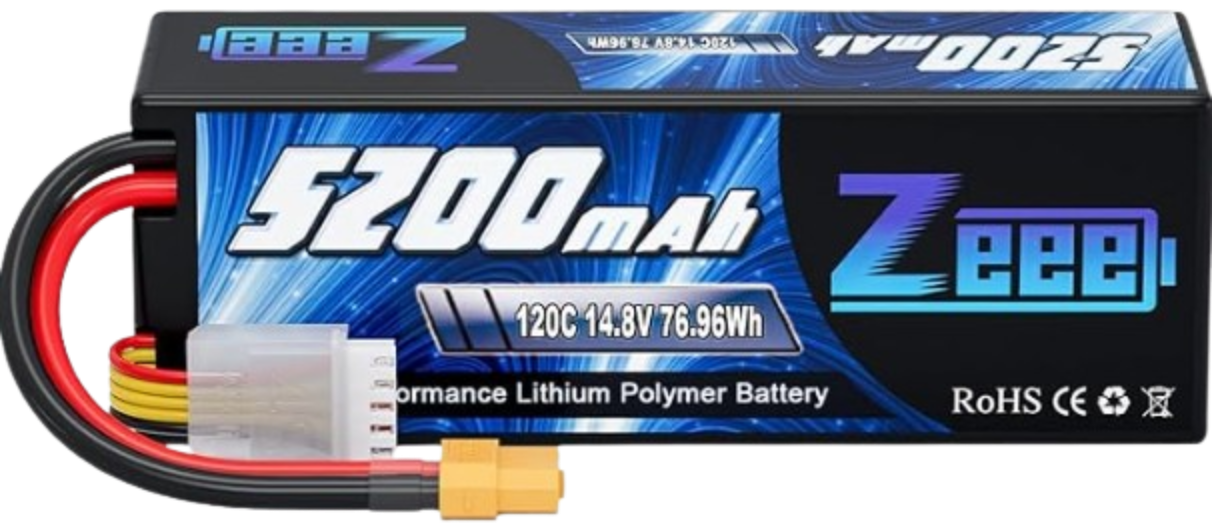
The Zeee 4S Lipo Battery 5200mAh 14.8V 120C is a high-performance lithium polymer (LiPo) battery designed for applications requiring reliable and powerful energy storage. This battery is commonly used in RC vehicles, drones, robotics, and other high-drain electronic systems. Its lightweight design and high discharge rate make it ideal for demanding applications where performance and efficiency are critical.
Explore Projects Built with Battery
 Open Project in Cirkit Designer
 Open Project in Cirkit Designer
 Open Project in Cirkit Designer
 Open Project in Cirkit Designer
Explore Projects Built with Battery
Open Project in Cirkit DesignerOpen Project in Cirkit DesignerOpen Project in Cirkit DesignerOpen Project in Cirkit DesignerCommon Applications and Use Cases
- Remote-controlled (RC) cars, boats, and drones
- Robotics and automation systems
- High-performance hobbyist projects
- Backup power for small electronic devices
- Portable power supplies for DIY electronics
Technical Specifications
The Zeee 4S Lipo Battery is engineered to deliver consistent performance under high loads. Below are its key technical specifications:
| Specification | Details |
|---|---|
| Manufacturer | Zeee |
| Part ID | Zeee 4S Lipo Battery 5200mAh 14.8V 120C |
| Battery Type | Lithium Polymer (LiPo) |
| Nominal Voltage | 14.8V |
| Capacity | 5200mAh |
| Discharge Rate (C Rating) | 120C |
| Maximum Discharge Current | 624A |
| Cell Configuration | 4S (4 cells in series) |
| Weight | ~450g |
| Dimensions (LxWxH) | 138mm x 46mm x 48mm |
| Connector Type | XT60 |
| Balance Connector | JST-XH |
| Operating Temperature | -20°C to 60°C |
| Charging Voltage | 16.8V (maximum) |
| Recommended Charge Rate | 1C (5.2A) |
Pin Configuration and Descriptions
The Zeee 4S Lipo Battery features two main connectors: the XT60 power connector and the JST-XH balance connector. Below is a description of each:
XT60 Power Connector
| Pin | Description |
|---|---|
| Positive (+) | Supplies positive voltage to the load |
| Negative (-) | Supplies ground (negative terminal) |
JST-XH Balance Connector
| Pin | Description |
|---|---|
| Pin 1 | Ground (negative terminal of Cell 1) |
| Pin 2 | Positive terminal of Cell 1 |
| Pin 3 | Positive terminal of Cell 2 |
| Pin 4 | Positive terminal of Cell 3 |
| Pin 5 | Positive terminal of Cell 4 |
Usage Instructions
How to Use the Zeee 4S Lipo Battery in a Circuit
- Connect the XT60 Connector: Use the XT60 connector to supply power to your circuit or device. Ensure the polarity matches the input terminals of your load.
- Balance Charging: Always use a LiPo-compatible balance charger to charge the battery. Connect the JST-XH balance connector to the charger to ensure all cells are charged evenly.
- Voltage Monitoring: Use a LiPo voltage alarm or monitor to prevent over-discharging. The minimum safe voltage per cell is 3.2V (12.8V for the entire pack).
- Secure Mounting: Secure the battery in your device using straps or holders to prevent physical damage during operation.
Important Considerations and Best Practices
- Charging Safety: Always charge the battery on a fireproof surface and never leave it unattended while charging.
- Storage: Store the battery at a voltage of 3.8V per cell (15.2V for the pack) when not in use for extended periods.
- Temperature Limits: Avoid using or charging the battery outside the specified temperature range (-20°C to 60°C).
- Avoid Over-Discharge: Discharging below 12.8V can permanently damage the battery.
- Inspect Regularly: Check for physical damage, swelling, or leaks before each use.
Example: Connecting to an Arduino UNO
The Zeee 4S Lipo Battery can be used to power an Arduino UNO via a voltage regulator or DC-DC converter to step down the voltage to 5V. Below is an example circuit and code:
Circuit Setup
- Connect the XT60 connector to a DC-DC converter (e.g., LM2596) to step down the voltage to 5V.
- Connect the output of the DC-DC converter to the Arduino UNO's 5V and GND pins.
Arduino Code Example
// Example code to read a sensor and print data to the Serial Monitor
// Ensure the battery voltage is stepped down to 5V before connecting to Arduino

const int sensorPin = A0; // Analog pin connected to the sensor
int sensorValue = 0;      // Variable to store sensor reading

void setup() {
  Serial.begin(9600); // Initialize serial communication at 9600 baud
}

void loop() {
  sensorValue = analogRead(sensorPin); // Read the sensor value
  Serial.print("Sensor Value: ");
  Serial.println(sensorValue); // Print the sensor value to the Serial Monitor
  delay(1000); // Wait for 1 second before the next reading
}
Troubleshooting and FAQs
Common Issues and Solutions
Battery Swelling or Puffing
- Cause: Overcharging, over-discharging, or physical damage.
- Solution: Stop using the battery immediately. Dispose of it safely according to local regulations.
Battery Not Charging
- Cause: Faulty charger, damaged connectors, or over-discharged cells.
- Solution: Check the charger and connectors. If the battery voltage is too low, use a LiPo charger with a recovery mode.
Short Runtime
- Cause: High load current or degraded battery capacity.
- Solution: Reduce the load or replace the battery if it has reached the end of its life cycle.
Overheating During Use
- Cause: Excessive current draw or poor ventilation.
- Solution: Ensure the load does not exceed the battery's maximum discharge current. Improve airflow around the battery.
FAQs
Q1: Can I use this battery for a 12V system?
A1: Yes, but you will need a voltage regulator to step down the voltage to 12V.
Q2: How long does it take to charge the battery?
A2: At the recommended charge rate of 1C (5.2A), it takes approximately 1 hour to fully charge the battery.
Q3: What happens if I over-discharge the battery?
A3: Over-discharging can permanently damage the battery and reduce its capacity. Always use a voltage monitor to prevent this.
Q4: Can I connect multiple batteries in series or parallel?
A4: Yes, but ensure the batteries are of the same type, capacity, and charge level. Use proper connectors and balancing circuits.
By following this documentation, you can safely and effectively use the Zeee 4S Lipo Battery 5200mAh 14.8V 120C in your projects.