
How to Use MAX3485: Examples, Pinouts, and Specs
 Design with MAX3485 in Cirkit Designer
Introduction
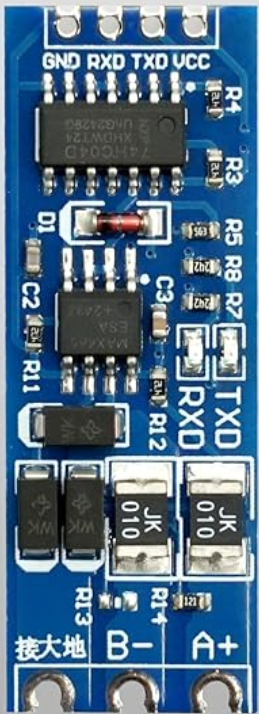
The MAX3485, manufactured by AYWHP, is a low-power, half-duplex RS-485 transceiver designed for robust and reliable data communication over long distances. It supports a wide operating voltage range and high data rates, making it ideal for industrial, commercial, and embedded systems. The MAX3485 is particularly well-suited for multipoint communication networks, where multiple devices share the same communication bus.
Explore Projects Built with MAX3485
 Open Project in Cirkit Designer
 Open Project in Cirkit Designer
 Open Project in Cirkit Designer
 Open Project in Cirkit Designer
Explore Projects Built with MAX3485
Open Project in Cirkit DesignerOpen Project in Cirkit DesignerOpen Project in Cirkit DesignerOpen Project in Cirkit DesignerCommon Applications
- Industrial automation and control systems
- Building automation (e.g., HVAC systems)
- Data acquisition systems
- Embedded systems requiring RS-485 communication
- Long-distance serial communication
Technical Specifications
Key Technical Details
| Parameter | Value |
|---|---|
| Supply Voltage (Vcc) | 3.0V to 3.6V |
| Data Rate | Up to 10 Mbps |
| Communication Mode | Half-duplex |
| Input Impedance | ≥ 96 kΩ (1/8 unit load) |
| Driver Output Voltage | -7V to +12V |
| Receiver Input Sensitivity | ±200 mV |
| Operating Temperature | -40°C to +85°C |
| Power Consumption | Low-power design with shutdown mode |
Pin Configuration and Descriptions
The MAX3485 is available in an 8-pin SOIC package. Below is the pinout and description:
| Pin Number | Pin Name | Description |
|---|---|---|
| 1 | RO | Receiver Output: Outputs the received data. |
| 2 | RE̅ | Receiver Enable: Active-low input. Enables |
| the receiver when low. | ||
| 3 | DE | Driver Enable: Enables the driver when high. |
| 4 | DI | Driver Input: Accepts the data to be sent. |
| 5 | GND | Ground: Connect to system ground. |
| 6 | A | Non-inverting Driver Output/Receiver Input. |
| 7 | B | Inverting Driver Output/Receiver Input. |
| 8 | Vcc | Power Supply: Connect to 3.0V to 3.6V. |
Usage Instructions
Using the MAX3485 in a Circuit
- Power Supply: Connect the Vcc pin to a 3.3V power source and the GND pin to the system ground.
- Bus Termination: For reliable communication, terminate the RS-485 bus with a 120Ω resistor between the A and B lines at both ends of the bus.
- Driver and Receiver Control:
- Set
DEhigh to enable the driver and transmit data. - Set
RE̅low to enable the receiver and read data.
- Set
- Data Transmission:
- Send data by applying a signal to the
DIpin when the driver is enabled. - Received data will appear on the
ROpin when the receiver is enabled.
- Send data by applying a signal to the
Important Considerations
- Fail-Safe Biasing: Use pull-up and pull-down resistors on the A and B lines to ensure a known state when the bus is idle.
- ESD Protection: Add external TVS diodes for enhanced protection against electrostatic discharge.
- Multipoint Networks: The MAX3485 supports up to 256 nodes on the same bus due to its 1/8 unit load input impedance.
Example: Connecting MAX3485 to an Arduino UNO
Below is an example of how to connect the MAX3485 to an Arduino UNO for RS-485 communication:
Wiring Diagram
| MAX3485 Pin | Arduino Pin | Description |
|---|---|---|
| Vcc | 3.3V | Power supply |
| GND | GND | Ground |
| DI | D3 | Data to be transmitted |
| RO | D2 | Received data |
| DE | D4 | Driver enable control |
| RE̅ | D5 | Receiver enable control |
| A | RS-485 A | Non-inverting bus line |
| B | RS-485 B | Inverting bus line |
Arduino Code Example
// MAX3485 RS-485 Communication Example
// This code demonstrates sending and receiving data using the MAX3485
// connected to an Arduino UNO.

#define DE_PIN 4  // Driver Enable pin
#define RE_PIN 5  // Receiver Enable pin
#define DI_PIN 3  // Driver Input pin
#define RO_PIN 2  // Receiver Output pin

void setup() {
  pinMode(DE_PIN, OUTPUT);  // Set DE as output
  pinMode(RE_PIN, OUTPUT);  // Set RE̅ as output
  pinMode(DI_PIN, OUTPUT);  // Set DI as output
  pinMode(RO_PIN, INPUT);   // Set RO as input

  digitalWrite(DE_PIN, LOW);  // Disable driver initially
  digitalWrite(RE_PIN, LOW);  // Enable receiver initially

  Serial.begin(9600);  // Initialize serial communication
}

void loop() {
  // Transmit data
  digitalWrite(DE_PIN, HIGH);  // Enable driver
  digitalWrite(RE_PIN, HIGH);  // Disable receiver
  digitalWrite(DI_PIN, HIGH);  // Send a HIGH signal
  delay(1000);                 // Wait for 1 second
  digitalWrite(DI_PIN, LOW);   // Send a LOW signal
  delay(1000);                 // Wait for 1 second

  // Receive data
  digitalWrite(DE_PIN, LOW);  // Disable driver
  digitalWrite(RE_PIN, LOW);  // Enable receiver
  int receivedData = digitalRead(RO_PIN);  // Read received data
  Serial.println(receivedData);  // Print received data to Serial Monitor
  delay(1000);  // Wait for 1 second
}
Troubleshooting and FAQs
Common Issues
No Communication on the Bus:
- Ensure the
DEandRE̅pins are correctly controlled to enable the driver or receiver as needed. - Verify that the A and B lines are properly terminated with 120Ω resistors at both ends of the bus.
- Ensure the
Data Corruption:
- Check for noise on the RS-485 bus and add shielding or filtering if necessary.
- Ensure the bus is not overloaded with too many devices.
Device Overheating:
- Verify that the supply voltage is within the specified range (3.0V to 3.6V).
- Check for short circuits on the A and B lines.
FAQs
Q: Can the MAX3485 operate in full-duplex mode?
A: No, the MAX3485 is designed for half-duplex communication only. For full-duplex operation, consider using a different RS-485 transceiver.
Q: How many devices can I connect to the RS-485 bus?
A: The MAX3485 supports up to 256 devices on the same bus due to its 1/8 unit load input impedance.
Q: What is the maximum cable length for RS-485 communication?
A: The maximum cable length depends on the data rate and cable quality. For example, at 100 kbps, the bus can typically extend up to 1200 meters.
Q: Is the MAX3485 compatible with 5V systems?
A: The MAX3485 operates at 3.3V. To interface with 5V systems, use level shifters or ensure the 5V signals are within the MAX3485's input tolerance.