
How to Use USB-6002: Examples, Pinouts, and Specs
 Design with USB-6002 in Cirkit Designer
Introduction
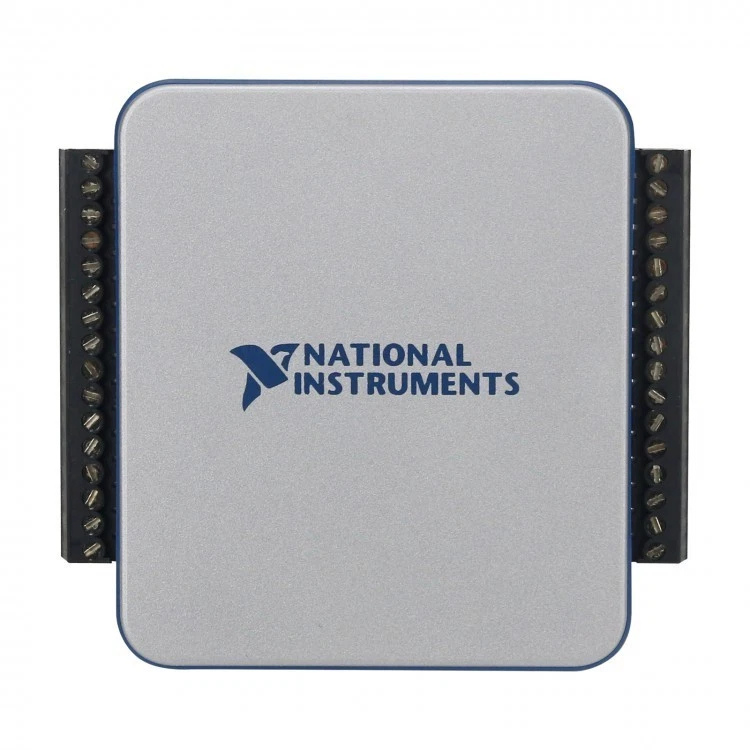
The USB-6002, manufactured by NI (National Instruments), is a multifunction data acquisition (DAQ) device designed for seamless integration with computers via USB. It provides a versatile platform for analog input, digital I/O, and counter/timer functionalities, making it ideal for a wide range of measurement and control applications. Its compact design and plug-and-play USB connectivity make it suitable for both laboratory and field use.
Explore Projects Built with USB-6002
 Open Project in Cirkit Designer
 Open Project in Cirkit Designer
 Open Project in Cirkit Designer
 Open Project in Cirkit Designer
Explore Projects Built with USB-6002
Open Project in Cirkit DesignerOpen Project in Cirkit DesignerOpen Project in Cirkit DesignerOpen Project in Cirkit DesignerCommon Applications and Use Cases
- Data logging and monitoring
- Sensor interfacing and signal acquisition
- Control systems and automation
- Prototyping and educational projects
- Laboratory experiments and research
Technical Specifications
Key Technical Details
| Parameter | Specification |
|---|---|
| Analog Input Channels | 8 single-ended or 4 differential |
| Analog Input Resolution | 16 bits |
| Analog Input Range | ±10 V, ±5 V, ±2 V, ±1 V |
| Sampling Rate (Max) | 50 kS/s (aggregate) |
| Digital I/O Channels | 13 bidirectional |
| Digital I/O Voltage Levels | 0–5 V (TTL compatible) |
| Counter/Timer Channels | 1 |
| Counter Resolution | 32 bits |
| USB Interface | USB 2.0 |
| Power Supply | USB-powered |
| Operating Temperature | 0 °C to 45 °C |
Pin Configuration and Descriptions
The USB-6002 features a 16-pin screw terminal block for easy connectivity. Below is the pin configuration:
| Pin Number | Signal Name | Description |
|---|---|---|
| 1 | AI 0+ | Analog Input Channel 0 Positive |
| 2 | AI 0- | Analog Input Channel 0 Negative |
| 3 | AI 1+ | Analog Input Channel 1 Positive |
| 4 | AI 1- | Analog Input Channel 1 Negative |
| 5 | GND | Ground |
| 6 | AO 0 | Analog Output Channel 0 |
| 7 | AO 1 | Analog Output Channel 1 |
| 8 | PFI 0 | Programmable Function Interface 0 |
| 9 | PFI 1 | Programmable Function Interface 1 |
| 10 | DIO 0 | Digital I/O Channel 0 |
| 11 | DIO 1 | Digital I/O Channel 1 |
| 12 | DIO 2 | Digital I/O Channel 2 |
| 13 | DIO 3 | Digital I/O Channel 3 |
| 14 | +5 V | 5 V Power Output |
| 15 | GND | Ground |
| 16 | NC | Not Connected |
Usage Instructions
How to Use the USB-6002 in a Circuit
- Connect the Device to a Computer: Use a USB cable to connect the USB-6002 to a computer. Ensure the NI-DAQmx driver is installed for proper operation.
- Power the Device: The USB-6002 is USB-powered, so no external power supply is required.
- Connect Signals: Use the screw terminal block to connect analog inputs, digital I/O, or other signals as needed.
- Configure in Software: Use NI software such as LabVIEW or NI MAX to configure the device, set up channels, and acquire data.
Important Considerations and Best Practices
- Signal Conditioning: Ensure proper signal conditioning (e.g., filtering, amplification) for accurate measurements.
- Grounding: Connect all grounds (GND) properly to avoid noise and ensure signal integrity.
- Input Voltage Limits: Do not exceed the specified input voltage range to prevent damage to the device.
- Sampling Rate: Distribute the sampling rate appropriately across channels when using multiple analog inputs.
- Software Compatibility: The USB-6002 is compatible with NI-DAQmx, LabVIEW, and other NI software tools.
Example Code for Arduino UNO Integration
Although the USB-6002 is primarily used with NI software, it can interface with an Arduino UNO for digital I/O control. Below is an example of controlling a digital output pin on the USB-6002 using an Arduino:
// Example: Controlling a digital output pin on the USB-6002
// This code toggles a digital output pin connected to the USB-6002
// Ensure proper wiring between the Arduino and USB-6002

const int usb6002Pin = 7; // Pin on Arduino connected to USB-6002 DIO 0

void setup() {
  pinMode(usb6002Pin, OUTPUT); // Set the pin as an output
}

void loop() {
  digitalWrite(usb6002Pin, HIGH); // Set the pin HIGH
  delay(1000); // Wait for 1 second
  digitalWrite(usb6002Pin, LOW);  // Set the pin LOW
  delay(1000); // Wait for 1 second
}
Note: Ensure proper voltage level translation if the Arduino operates at 3.3 V logic levels, as the USB-6002 uses 5 V TTL logic.
Troubleshooting and FAQs
Common Issues and Solutions
Device Not Recognized by Computer:
- Ensure the USB cable is securely connected.
- Verify that the NI-DAQmx driver is installed and up to date.
- Try connecting to a different USB port or computer.
Incorrect or No Signal Measurement:
- Check the wiring and ensure proper connections to the terminal block.
- Verify that the input signal is within the specified voltage range.
- Confirm that the correct channel is selected in the software.
Noise in Measurements:
- Use shielded cables and proper grounding to minimize noise.
- Add filtering to the input signal if necessary.
Digital I/O Not Responding:
- Ensure the digital I/O pin is configured correctly in the software.
- Check for any short circuits or incorrect wiring.
FAQs
Q: Can the USB-6002 be used with third-party software?
A: Yes, the USB-6002 can be used with third-party software that supports NI-DAQmx or provides APIs for data acquisition.
Q: What is the maximum cable length for USB connectivity?
A: The maximum recommended USB cable length is 5 meters. Use a USB repeater or hub for longer distances.
Q: Can the USB-6002 output analog signals?
A: Yes, the USB-6002 has two analog output channels (AO 0 and AO 1) for generating signals.
Q: Is the USB-6002 suitable for portable applications?
A: Yes, its compact size and USB-powered design make it ideal for portable and field applications.