
How to Use Kontaktor : Examples, Pinouts, and Specs
 Design with Kontaktor in Cirkit Designer
Introduction
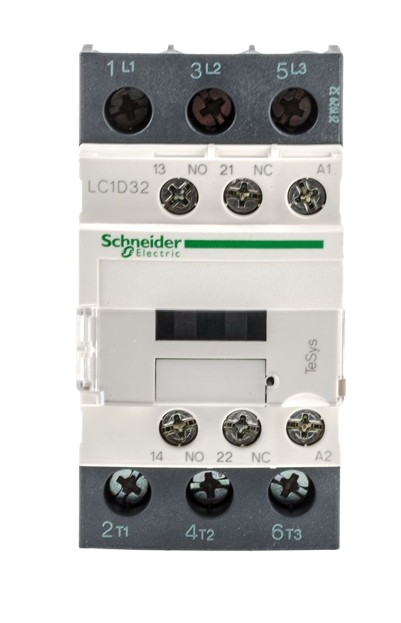
A kontaktor, such as the Schneider High Volt model, is an electromechanical switch designed to control high-power circuits using low-power signals. It is widely used in industrial and commercial applications to manage electrical loads like motors, lighting systems, and heating equipment. The Schneider High Volt kontaktor is known for its reliability, durability, and efficiency in handling high-current loads.
Explore Projects Built with Kontaktor
 Open Project in Cirkit Designer
 Open Project in Cirkit Designer
 Open Project in Cirkit Designer
 Open Project in Cirkit Designer
Explore Projects Built with Kontaktor
Open Project in Cirkit DesignerOpen Project in Cirkit DesignerOpen Project in Cirkit DesignerOpen Project in Cirkit DesignerCommon Applications and Use Cases
- Motor Control: Switching and protecting electric motors in industrial machinery.
- Lighting Systems: Controlling large-scale lighting installations in commercial buildings.
- HVAC Systems: Managing heating, ventilation, and air conditioning equipment.
- Power Distribution: Switching high-power circuits in electrical panels and distribution systems.
- Automation Systems: Used in programmable logic controllers (PLCs) for automated processes.
Technical Specifications
Key Technical Details
| Parameter | Value |
|---|---|
| Manufacturer | Schneider |
| Model | High Volt |
| Rated Operating Voltage | 230V AC / 400V AC |
| Rated Current | 32A |
| Coil Voltage | 24V DC / 230V AC |
| Number of Poles | 3P (Three Poles) |
| Contact Type | Normally Open (NO) |
| Mechanical Durability | 10 million operations |
| Electrical Durability | 1 million operations |
| Operating Temperature | -25°C to +60°C |
| Mounting Type | DIN Rail |
| Dimensions (LxWxH) | 45mm x 75mm x 85mm |
Pin Configuration and Descriptions
The Schneider High Volt kontaktor has the following terminal layout:
| Terminal Label | Description |
|---|---|
| L1, L2, L3 | Input terminals for the three-phase power supply. |
| T1, T2, T3 | Output terminals for the load connection. |
| A1, A2 | Coil terminals for controlling the kontaktor. |
| NO (Auxiliary) | Auxiliary normally open contact for signaling or control. |
Usage Instructions
How to Use the Component in a Circuit
Power Supply Connection:
- Connect the three-phase power supply to the input terminals (L1, L2, L3).
- Ensure the voltage matches the rated operating voltage of the kontaktor.
Load Connection:
- Connect the load (e.g., motor, lighting system) to the output terminals (T1, T2, T3).
- Verify that the load current does not exceed the rated current of 32A.
Coil Control:
- Connect the control signal (24V DC or 230V AC) to the coil terminals (A1, A2).
- Use a low-power control circuit, such as a relay or PLC, to activate the coil.
Auxiliary Contact:
- Use the auxiliary normally open (NO) contact for additional control or signaling purposes, such as indicating the status of the kontaktor.
Important Considerations and Best Practices
- Overload Protection: Always use an appropriate overload relay or circuit breaker to protect the load and the kontaktor.
- Wiring: Ensure all connections are secure and use appropriately rated wires for the current and voltage.
- Mounting: Install the kontaktor on a DIN rail in a well-ventilated enclosure to prevent overheating.
- Testing: Before powering the circuit, test the coil operation and verify the contactor switches correctly.
- Noise Suppression: For DC coils, consider adding a flyback diode across the coil terminals to suppress voltage spikes.
Example: Connecting to an Arduino UNO
The Schneider High Volt kontaktor can be controlled using an Arduino UNO. Below is an example circuit and code to control the kontaktor using a 24V DC coil.
Circuit Description
- Use a 5V relay module to interface the Arduino with the kontaktor's coil.
- The relay module will act as an intermediary to handle the higher voltage required by the coil.
Arduino Code
// Define the pin connected to the relay module
const int relayPin = 7;

void setup() {
  // Set the relay pin as an output
  pinMode(relayPin, OUTPUT);
  // Ensure the relay is off at startup
  digitalWrite(relayPin, LOW);
}

void loop() {
  // Turn the kontaktor ON
  digitalWrite(relayPin, HIGH);
  delay(5000); // Keep the kontaktor ON for 5 seconds

  // Turn the kontaktor OFF
  digitalWrite(relayPin, LOW);
  delay(5000); // Keep the kontaktor OFF for 5 seconds
}
Note: Ensure the relay module is rated for the coil voltage (24V DC) and current.
Troubleshooting and FAQs
Common Issues and Solutions
Kontaktor Does Not Switch On:
- Cause: Insufficient coil voltage or incorrect wiring.
- Solution: Verify the control voltage at the coil terminals (A1, A2) and check the wiring.
Excessive Heating:
- Cause: Overloaded circuit or poor ventilation.
- Solution: Ensure the load current does not exceed 32A and improve ventilation around the kontaktor.
Chattering Noise:
- Cause: Unstable control voltage or loose connections.
- Solution: Check the control voltage stability and tighten all connections.
Auxiliary Contact Not Working:
- Cause: Miswiring or damaged contact.
- Solution: Verify the wiring and test the auxiliary contact with a multimeter.
FAQs
Q: Can the Schneider High Volt kontaktor be used for single-phase loads?
A: Yes, connect the single-phase load to one of the poles (e.g., L1 and T1) and leave the other poles unused.Q: How do I know if the coil is energized?
A: The auxiliary contact (NO) can be used to signal the coil status, or you can check for a clicking sound when the coil is activated.Q: Can I use this kontaktor outdoors?
A: The Schneider High Volt kontaktor is not weatherproof. Use it in a protected enclosure for outdoor applications.Q: What is the lifespan of the kontaktor?
A: The mechanical durability is rated for 10 million operations, while the electrical durability is rated for 1 million operations under normal conditions.