
How to Use ultrasonic sensor: Examples, Pinouts, and Specs
 Design with ultrasonic sensor in Cirkit Designer
Introduction
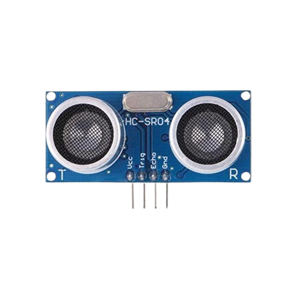
An ultrasonic sensor is a device that uses ultrasonic waves to measure distance or detect objects. It emits a sound wave at a frequency above the audible range and measures the time it takes for the echo to return, allowing it to calculate the distance to the object.
Ultrasonic sensors are widely used in various applications, including:
- Obstacle detection in robotics
- Distance measurement in automation systems
- Parking assistance in vehicles
- Liquid level sensing in tanks
- Proximity detection in security systems
Explore Projects Built with ultrasonic sensor
 Open Project in Cirkit Designer
 Open Project in Cirkit Designer
 Open Project in Cirkit Designer
 Open Project in Cirkit Designer
Explore Projects Built with ultrasonic sensor
Open Project in Cirkit DesignerOpen Project in Cirkit DesignerOpen Project in Cirkit DesignerOpen Project in Cirkit DesignerTechnical Specifications
Below are the key technical details for a typical ultrasonic sensor, such as the HC-SR04:
| Parameter | Value |
|---|---|
| Operating Voltage | 5V DC |
| Operating Current | 15 mA |
| Operating Frequency | 40 kHz |
| Measuring Range | 2 cm to 400 cm |
| Accuracy | ±3 mm |
| Trigger Input Signal | 10 µs TTL pulse |
| Echo Output Signal | TTL pulse proportional to distance |
| Dimensions | 45 mm x 20 mm x 15 mm |
Pin Configuration
The ultrasonic sensor typically has four pins, as described below:
| Pin | Name | Description |
|---|---|---|
| 1 | VCC | Power supply pin. Connect to 5V DC. |
| 2 | Trig | Trigger pin. Send a 10 µs HIGH pulse to initiate distance measurement. |
| 3 | Echo | Echo pin. Outputs a pulse whose duration corresponds to the measured distance. |
| 4 | GND | Ground pin. Connect to the ground of the power supply. |
Usage Instructions
How to Use the Ultrasonic Sensor in a Circuit
- Power the Sensor: Connect the VCC pin to a 5V power supply and the GND pin to the ground.
- Trigger the Sensor: Send a 10 µs HIGH pulse to the Trig pin to initiate a measurement.
- Read the Echo: Measure the duration of the HIGH pulse on the Echo pin. The duration is proportional to the distance of the object.
- Calculate Distance: Use the formula below to calculate the distance: [ \text{Distance (cm)} = \frac{\text{Pulse Duration (µs)} \times 0.034}{2} ] The factor 0.034 represents the speed of sound in cm/µs, and the division by 2 accounts for the round trip of the sound wave.
Important Considerations and Best Practices
- Ensure the sensor is mounted securely and aligned properly for accurate measurements.
- Avoid placing the sensor near ultrasonic noise sources, such as motors or other ultrasonic devices.
- Use a capacitor (e.g., 10 µF) across the VCC and GND pins to filter out power supply noise.
- The sensor may not work reliably on soft or irregular surfaces, as they may absorb or scatter the sound waves.
Example: Connecting to an Arduino UNO
Below is an example of how to use the HC-SR04 ultrasonic sensor with an Arduino UNO:
// Define pins for the ultrasonic sensor
const int trigPin = 9; // Trig pin connected to digital pin 9
const int echoPin = 10; // Echo pin connected to digital pin 10

void setup() {
  // Initialize serial communication for debugging
  Serial.begin(9600);

  // Set pin modes
  pinMode(trigPin, OUTPUT); // Trig pin as output
  pinMode(echoPin, INPUT);  // Echo pin as input
}

void loop() {
  // Send a 10 µs HIGH pulse to the Trig pin
  digitalWrite(trigPin, LOW);
  delayMicroseconds(2);
  digitalWrite(trigPin, HIGH);
  delayMicroseconds(10);
  digitalWrite(trigPin, LOW);

  // Measure the duration of the HIGH pulse on the Echo pin
  long duration = pulseIn(echoPin, HIGH);

  // Calculate the distance in cm
  float distance = (duration * 0.034) / 2;

  // Print the distance to the Serial Monitor
  Serial.print("Distance: ");
  Serial.print(distance);
  Serial.println(" cm");

  // Wait before the next measurement
  delay(500);
}
Notes:
- Ensure the Trig and Echo pins are connected to the correct digital pins on the Arduino.
- Use a resistor divider or level shifter if connecting the Echo pin to a microcontroller that operates at 3.3V logic.
Troubleshooting and FAQs
Common Issues and Solutions
No Output or Incorrect Readings:
- Ensure the sensor is powered with 5V and properly grounded.
- Verify the Trig and Echo pins are connected to the correct microcontroller pins.
- Check for loose or faulty wiring.
Unstable or Fluctuating Measurements:
- Add a capacitor (e.g., 10 µF) across the VCC and GND pins to stabilize the power supply.
- Ensure there are no obstacles or reflective surfaces near the sensor that could interfere with measurements.
Sensor Not Detecting Objects:
- Ensure the object is within the sensor's measuring range (2 cm to 400 cm).
- Check if the object has a surface that reflects ultrasonic waves effectively. Soft or irregular surfaces may not work well.
FAQs
Q: Can the ultrasonic sensor measure through transparent materials like glass?
A: No, ultrasonic sensors cannot measure through transparent materials like glass, as ultrasonic waves are reflected by the surface.
Q: What is the maximum distance the sensor can measure?
A: The maximum distance is typically 400 cm, but this may vary slightly depending on the specific sensor model.
Q: Can I use the ultrasonic sensor outdoors?
A: While the sensor can be used outdoors, environmental factors like wind, temperature, and rain may affect its performance. Consider using a weatherproof enclosure for protection.
Q: How do I reduce noise in the sensor readings?
A: Use a capacitor across the power pins, ensure proper grounding, and average multiple readings in your code to reduce noise.
This concludes the documentation for the ultrasonic sensor.