
How to Use 10000mah power bank: Examples, Pinouts, and Specs
 Design with 10000mah power bank in Cirkit Designer
Introduction
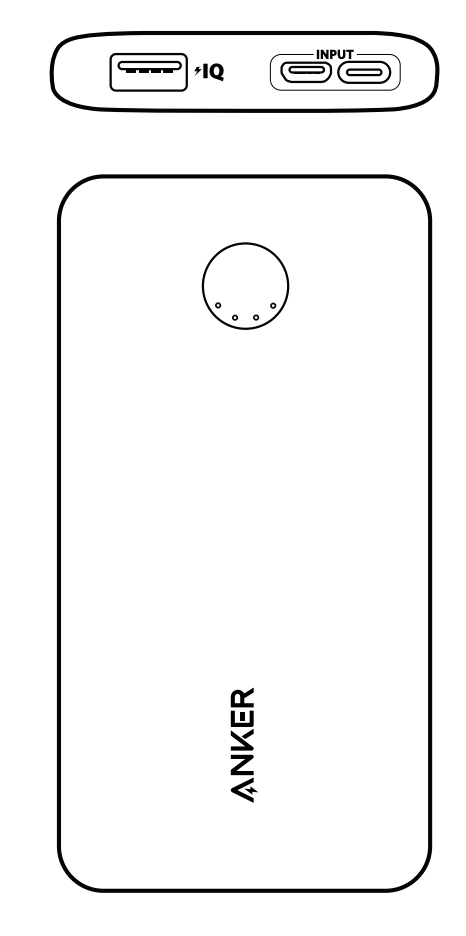
The Anker 10000mAh Power Bank is a portable battery storage device designed to charge electronic devices such as smartphones, tablets, and other USB-powered gadgets. With a capacity of 10,000 milliamp-hours (mAh), it provides sufficient power to charge most devices multiple times. This power bank is compact, lightweight, and equipped with multiple output ports, making it an ideal companion for travel, outdoor activities, and emergency power needs.
Explore Projects Built with 10000mah power bank
 Open Project in Cirkit Designer
 Open Project in Cirkit Designer
 Open Project in Cirkit Designer
 Open Project in Cirkit Designer
Explore Projects Built with 10000mah power bank
Open Project in Cirkit DesignerOpen Project in Cirkit DesignerOpen Project in Cirkit DesignerOpen Project in Cirkit DesignerCommon Applications and Use Cases
- Charging smartphones, tablets, and smartwatches on the go.
- Providing backup power during power outages or emergencies.
- Powering small USB devices such as LED lights, fans, or Bluetooth speakers.
- Supporting outdoor activities like camping or hiking where access to power is limited.
Technical Specifications
Below are the key technical details of the Anker 10000mAh Power Bank:
| Specification | Details |
|---|---|
| Battery Capacity | 10,000mAh |
| Input Ports | Micro-USB (5V/2A) or USB-C (5V/2A) |
| Output Ports | 2 x USB-A (5V/2.4A max per port, 12W total) |
| Dimensions | 92 x 60 x 22 mm (approx.) |
| Weight | ~180g |
| Charging Time | ~5-6 hours (using a 2A charger) |
| Safety Features | Overcharge protection, short-circuit protection, temperature control |
| LED Indicators | 4 LEDs to indicate remaining battery level (25%, 50%, 75%, 100%) |
Pin Configuration and Descriptions
The Anker 10000mAh Power Bank features the following ports and indicators:
| Port/Indicator | Description |
|---|---|
| Micro-USB Input | Used to charge the power bank (5V/2A input). |
| USB-C Input | Alternative input for charging the power bank (5V/2A input). |
| USB-A Output 1 | Standard USB port for charging devices (5V/2.4A max). |
| USB-A Output 2 | Second USB port for charging devices (5V/2.4A max). |
| LED Indicators | Four LEDs to display the remaining battery level in 25% increments. |
| Power Button | Press to check battery level or start charging connected devices. |
Usage Instructions
How to Use the Power Bank
Charging the Power Bank:
- Connect a Micro-USB or USB-C cable to the input port of the power bank.
- Plug the other end of the cable into a wall adapter (5V/2A recommended).
- The LED indicators will blink to show the charging progress. When all four LEDs are solid, the power bank is fully charged.
Charging Devices:
- Connect your device to one of the USB-A output ports using a compatible charging cable.
- Press the power button to start charging. The LED indicators will light up to show the remaining battery level.
- Disconnect your device once it is fully charged to conserve power.
Checking Battery Level:
- Press the power button briefly to check the remaining battery level. The number of lit LEDs corresponds to the charge percentage:
- 1 LED: 0-25%
- 2 LEDs: 26-50%
- 3 LEDs: 51-75%
- 4 LEDs: 76-100%
- Press the power button briefly to check the remaining battery level. The number of lit LEDs corresponds to the charge percentage:
Important Considerations and Best Practices
- Use only high-quality charging cables and adapters to ensure safe and efficient charging.
- Avoid exposing the power bank to extreme temperatures (below 0°C or above 40°C).
- Do not charge the power bank and charge devices from it simultaneously, as this may reduce its lifespan.
- Store the power bank in a cool, dry place when not in use for extended periods.
- Recharge the power bank at least once every three months to maintain battery health.
Example: Using the Power Bank with an Arduino UNO
The Anker 10000mAh Power Bank can be used to power an Arduino UNO via its USB-A output port. Below is an example of how to connect and use it:
- Connect the USB-A end of a USB cable to one of the power bank's output ports.
- Connect the other end (USB-B) to the Arduino UNO's power input port.
- Press the power button on the power bank to start supplying power to the Arduino UNO.
Here is a simple Arduino sketch to blink an LED while powered by the power bank:
// Simple LED Blink Example
// This code blinks an LED connected to pin 13 of the Arduino UNO.
// Ensure the power bank is connected to the Arduino UNO via USB.

void setup() {
  pinMode(13, OUTPUT); // Set pin 13 as an output pin
}

void loop() {
  digitalWrite(13, HIGH); // Turn the LED on
  delay(1000);            // Wait for 1 second
  digitalWrite(13, LOW);  // Turn the LED off
  delay(1000);            // Wait for 1 second
}
Troubleshooting and FAQs
Common Issues and Solutions
Power Bank Not Charging:
- Ensure the charging cable and adapter are functioning properly.
- Check that the input port is free of dust or debris.
- Use a 5V/2A adapter for optimal charging speed.
Device Not Charging from Power Bank:
- Verify that the device is compatible with the power bank's output (5V/2.4A max).
- Ensure the charging cable is securely connected to both the power bank and the device.
- Press the power button to start charging if it does not begin automatically.
Power Bank Drains Quickly:
- Check if multiple devices are connected simultaneously, as this will drain the battery faster.
- Ensure the power bank is fully charged before use.
- Avoid using the power bank in extreme temperatures, as this can affect battery performance.
LED Indicators Not Working:
- Press the power button to check if the LEDs light up.
- If the LEDs remain off, the power bank may be completely discharged. Recharge it for at least 30 minutes and try again.
FAQs
Q: Can I charge the power bank and charge devices from it at the same time?
A: It is not recommended, as this may reduce the lifespan of the power bank and affect charging efficiency.Q: How many times can the power bank charge my smartphone?
A: This depends on your smartphone's battery capacity. For example, a phone with a 3,000mAh battery can be charged approximately 2-3 times.Q: Is the power bank safe to carry on airplanes?
A: Yes, the Anker 10000mAh Power Bank complies with airline regulations for portable batteries and can be carried in your carry-on luggage.Q: Can I use the power bank to power small USB devices like LED lights?
A: Yes, as long as the device operates within the power bank's output specifications (5V/2.4A max).
By following this documentation, you can effectively use and maintain your Anker 10000mAh Power Bank for reliable portable power.