
How to Use 3 pin header: Examples, Pinouts, and Specs
 Design with 3 pin header in Cirkit Designer
Introduction
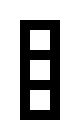
A 3 pin header is a type of electrical connector that consists of three pins arranged in a single row. It is commonly used in electronics for connecting wires, modules, or other components to a circuit. The 3 pin header provides a simple and reliable way to establish connections, making it a popular choice in prototyping, breadboarding, and PCB designs.
Explore Projects Built with 3 pin header
 Open Project in Cirkit Designer
 Open Project in Cirkit Designer
 Open Project in Cirkit Designer
 Open Project in Cirkit Designer
Explore Projects Built with 3 pin header
Open Project in Cirkit DesignerOpen Project in Cirkit DesignerOpen Project in Cirkit DesignerOpen Project in Cirkit DesignerCommon Applications and Use Cases
- Connecting sensors, modules, or peripherals to microcontrollers.
- Power distribution in circuits.
- Signal transmission between components.
- Prototyping and testing circuits on breadboards.
- Creating modular connections on printed circuit boards (PCBs).
Technical Specifications
Key Technical Details
- Number of Pins: 3
- Pin Spacing (Pitch): Typically 2.54 mm (0.1 inch)
- Material: Pins are usually made of brass or phosphor bronze with a tin or gold plating.
- Current Rating: Typically up to 3A per pin (varies by manufacturer).
- Voltage Rating: Typically up to 250V (varies by manufacturer).
- Temperature Range: -40°C to +105°C (varies by manufacturer).
Pin Configuration and Descriptions
The 3 pin header does not have a fixed pin assignment, as it is a generic connector. However, it is often used in the following configurations:
Example 1: Power and Signal Connection
| Pin Number | Typical Use | Description |
|---|---|---|
| 1 | VCC (Power) | Supplies power to the connected device. |
| 2 | Signal (Data) | Transmits data or signal. |
| 3 | GND (Ground) | Provides a ground connection. |
Example 2: Jumper Configuration
| Pin Number | Typical Use | Description |
|---|---|---|
| 1 | Open/Connected | Used to configure a circuit setting. |
| 2 | Common Pin | Shared connection point. |
| 3 | Open/Connected | Used to configure a circuit setting. |
Usage Instructions
How to Use the Component in a Circuit
- Identify the Pinout: Determine the function of each pin (e.g., power, ground, signal) based on your circuit design.
- Insert the Header: Solder the 3 pin header onto a PCB or insert it into a breadboard.
- Connect Wires or Components: Use jumper wires, connectors, or female headers to connect the 3 pin header to other components.
- Secure the Connection: Ensure that the connections are firm to avoid loose contacts.
Important Considerations and Best Practices
- Pin Spacing: Ensure that the pin spacing (pitch) matches the holes on your PCB or breadboard.
- Current and Voltage Ratings: Do not exceed the specified current and voltage ratings to avoid damage.
- Plating Material: For long-term use, consider headers with gold plating to prevent corrosion.
- Orientation: Double-check the orientation of the header to avoid incorrect connections.
- Use with Microcontrollers: When connecting to microcontrollers like Arduino, ensure proper alignment of power, ground, and signal pins.
Example: Connecting a 3 Pin Header to an Arduino UNO
Here is an example of how to connect a 3 pin header to an Arduino UNO for reading a sensor signal:
// Example: Reading a signal from a sensor connected via a 3 pin header
// Pin 1: VCC (5V from Arduino)
// Pin 2: Signal (connected to A0 on Arduino)
// Pin 3: GND (connected to Arduino GND)

const int sensorPin = A0; // Analog pin connected to the signal pin of the header
int sensorValue = 0;      // Variable to store the sensor reading

void setup() {
  Serial.begin(9600); // Initialize serial communication at 9600 baud
  pinMode(sensorPin, INPUT); // Set the sensor pin as an input
}

void loop() {
  sensorValue = analogRead(sensorPin); // Read the sensor value
  Serial.print("Sensor Value: ");      // Print the sensor value to the serial monitor
  Serial.println(sensorValue);
  delay(500); // Wait for 500ms before the next reading
}
Troubleshooting and FAQs
Common Issues Users Might Face
Loose Connections: The header pins may not make proper contact with the wires or connectors.
- Solution: Ensure that the connections are secure and use female headers or jumper wires with tight fits.
Incorrect Pin Assignment: Misidentifying the pins can lead to incorrect connections.
- Solution: Double-check the pinout and ensure proper alignment with the circuit.
Corrosion or Oxidation: Over time, the pins may corrode, leading to poor conductivity.
- Solution: Use headers with gold plating for better durability and conductivity.
Overloading the Pins: Exceeding the current or voltage ratings can damage the header or connected components.
- Solution: Verify the ratings and ensure the load is within the specified limits.
FAQs
Q: Can I use a 3 pin header for high-frequency signals?
A: Yes, but ensure that the header and connected wires are suitable for the frequency range to avoid signal degradation.
Q: How do I remove a 3 pin header from a PCB?
A: Use a soldering iron and desoldering pump or wick to carefully remove the solder, then gently pull out the header.
Q: Can I connect multiple devices to a single 3 pin header?
A: Yes, but ensure that the total current and voltage requirements of the devices do not exceed the header's ratings.
Q: Are 3 pin headers compatible with breadboards?
A: Yes, as long as the pin spacing (2.54 mm) matches the breadboard's hole spacing.