
How to Use DWM3001CDK: Examples, Pinouts, and Specs
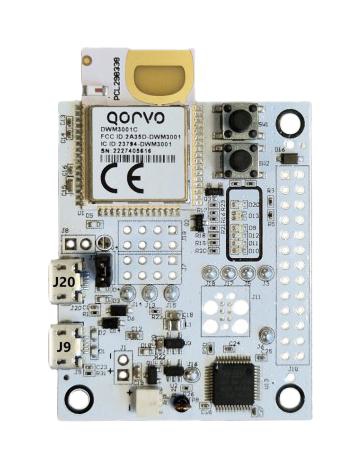
 Design with DWM3001CDK in Cirkit Designer
Introduction
The DWM3001CDK is a development kit manufactured by Qorvo for the DWM3001 module. This module is designed for ultra-wideband (UWB) applications, enabling precise ranging and positioning capabilities. The DWM3001CDK provides a platform for evaluating and developing UWB-based solutions, making it ideal for applications such as indoor navigation, asset tracking, and other location-based services.
Explore Projects Built with DWM3001CDK
 Open Project in Cirkit Designer
 Open Project in Cirkit Designer
 Open Project in Cirkit Designer
 Open Project in Cirkit Designer
Explore Projects Built with DWM3001CDK
Open Project in Cirkit DesignerOpen Project in Cirkit DesignerOpen Project in Cirkit DesignerOpen Project in Cirkit DesignerCommon Applications
- Indoor navigation systems
- Asset tracking in warehouses or factories
- Real-time location systems (RTLS)
- Proximity detection and geofencing
- Smart home and IoT applications requiring precise positioning
Technical Specifications
Key Technical Details
| Parameter | Value/Description |
|---|---|
| Module | DWM3001 (based on Qorvo's UWB technology) |
| Frequency Range | 6.5 GHz to 8 GHz (UWB channels 5 and 9) |
| Communication Protocol | IEEE 802.15.4z UWB |
| Ranging Accuracy | ±10 cm (line-of-sight conditions) |
| Operating Voltage | 3.3 V (via USB or external power supply) |
| Power Consumption | Low power consumption for battery-powered applications |
| Interfaces | UART, SPI, I2C, GPIO |
| Antenna | Integrated UWB antenna |
| Dimensions | Compact form factor for easy integration |
Pin Configuration and Descriptions
The DWM3001CDK provides several interfaces for communication and control. Below is the pin configuration for the module:
| Pin Number | Pin Name | Description |
|---|---|---|
| 1 | VCC | Power supply input (3.3 V) |
| 2 | GND | Ground connection |
| 3 | UART_TX | UART transmit pin for serial communication |
| 4 | UART_RX | UART receive pin for serial communication |
| 5 | SPI_MOSI | SPI Master Out Slave In (data input to the module) |
| 6 | SPI_MISO | SPI Master In Slave Out (data output from the module) |
| 7 | SPI_CLK | SPI clock signal |
| 8 | SPI_CS | SPI chip select |
| 9 | I2C_SCL | I2C clock signal |
| 10 | I2C_SDA | I2C data signal |
| 11 | GPIO1 | General-purpose input/output |
| 12 | GPIO2 | General-purpose input/output |
Usage Instructions
How to Use the DWM3001CDK in a Circuit
Powering the Module:
- Connect the VCC pin to a 3.3 V power source and the GND pin to ground.
- Alternatively, power the module via USB if using the development kit's onboard USB interface.
Communication Interface:
- Use UART for serial communication with a microcontroller or PC.
- For high-speed communication, use the SPI interface.
- The I2C interface is available for simpler, low-speed communication.
Antenna Placement:
- Ensure the integrated UWB antenna has a clear line of sight for optimal performance.
- Avoid placing the module near metal objects or other sources of interference.
Programming and Configuration:
- Use Qorvo's software tools to configure the module for your specific application.
- The module supports IEEE 802.15.4z UWB protocol for precise ranging and positioning.
Important Considerations and Best Practices
- Power Supply: Ensure a stable 3.3 V power supply to avoid performance issues.
- Antenna Orientation: Properly orient the module to maximize UWB signal strength.
- Firmware Updates: Regularly update the firmware using Qorvo's tools to access the latest features and improvements.
- Environmental Factors: Be aware of environmental factors such as walls, furniture, or other obstacles that may affect UWB signal propagation.
Example: Connecting to an Arduino UNO
The DWM3001CDK can be connected to an Arduino UNO via the UART interface. Below is an example code snippet for initializing communication and reading data:
// Include necessary libraries
#include <SoftwareSerial.h>

// Define UART pins for DWM3001CDK
#define DWM_TX 2  // Connect to DWM3001CDK UART_TX
#define DWM_RX 3  // Connect to DWM3001CDK UART_RX

// Initialize SoftwareSerial for communication
SoftwareSerial dwmSerial(DWM_RX, DWM_TX);

void setup() {
  // Start serial communication with the Arduino IDE
  Serial.begin(9600);
  // Start communication with the DWM3001CDK
  dwmSerial.begin(115200);

  Serial.println("DWM3001CDK Initialized");
}

void loop() {
  // Check if data is available from the DWM3001CDK
  if (dwmSerial.available()) {
    // Read and print the data to the Serial Monitor
    String data = dwmSerial.readString();
    Serial.println("Received from DWM3001CDK: " + data);
  }

  delay(100); // Small delay to avoid overwhelming the serial buffer
}
Note: Ensure the DWM3001CDK is configured to output data via UART before running the code.
Troubleshooting and FAQs
Common Issues and Solutions
No Communication with the Module:
- Cause: Incorrect wiring or baud rate mismatch.
- Solution: Double-check the connections and ensure the baud rate matches the module's configuration.
Inaccurate Ranging Results:
- Cause: Environmental interference or improper antenna placement.
- Solution: Ensure a clear line of sight and minimize obstacles in the UWB signal path.
Module Not Powering On:
- Cause: Insufficient power supply or incorrect voltage.
- Solution: Verify the power supply provides a stable 3.3 V.
Firmware Update Fails:
- Cause: Interrupted connection during the update process.
- Solution: Ensure a stable connection and retry the update using Qorvo's tools.
FAQs
Q: Can the DWM3001CDK be used outdoors?
A: While the module can function outdoors, UWB signals are optimized for indoor environments and may be affected by weather conditions.Q: What is the maximum range of the DWM3001CDK?
A: The module supports a range of up to 50 meters in line-of-sight conditions.Q: Is the DWM3001CDK compatible with other UWB devices?
A: Yes, it supports the IEEE 802.15.4z UWB protocol, ensuring compatibility with other compliant devices.Q: Can I use the module with a battery?
A: Yes, the module's low power consumption makes it suitable for battery-powered applications. Ensure the battery provides a stable 3.3 V output.
This documentation provides a comprehensive guide to using the DWM3001CDK for UWB applications. For further assistance, refer to Qorvo's official resources or contact their support team.