
How to Use ESP 32 CAM: Examples, Pinouts, and Specs
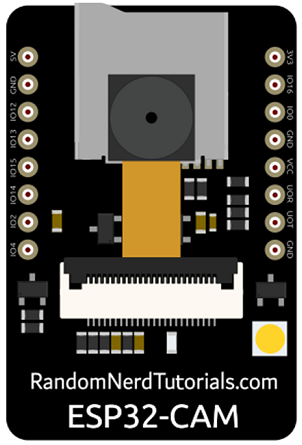
 Design with ESP 32 CAM in Cirkit Designer
Introduction
The ESP 32 CAM is a low-cost development board that features a camera module and Wi-Fi/Bluetooth capabilities. It is based on the ESP32 chip, which provides robust processing power and wireless connectivity. This board is ideal for IoT projects that require image capture, video streaming, or remote monitoring. Its compact size and versatility make it a popular choice for developers working on smart home devices, security systems, and AI-based image recognition applications.
Explore Projects Built with ESP 32 CAM
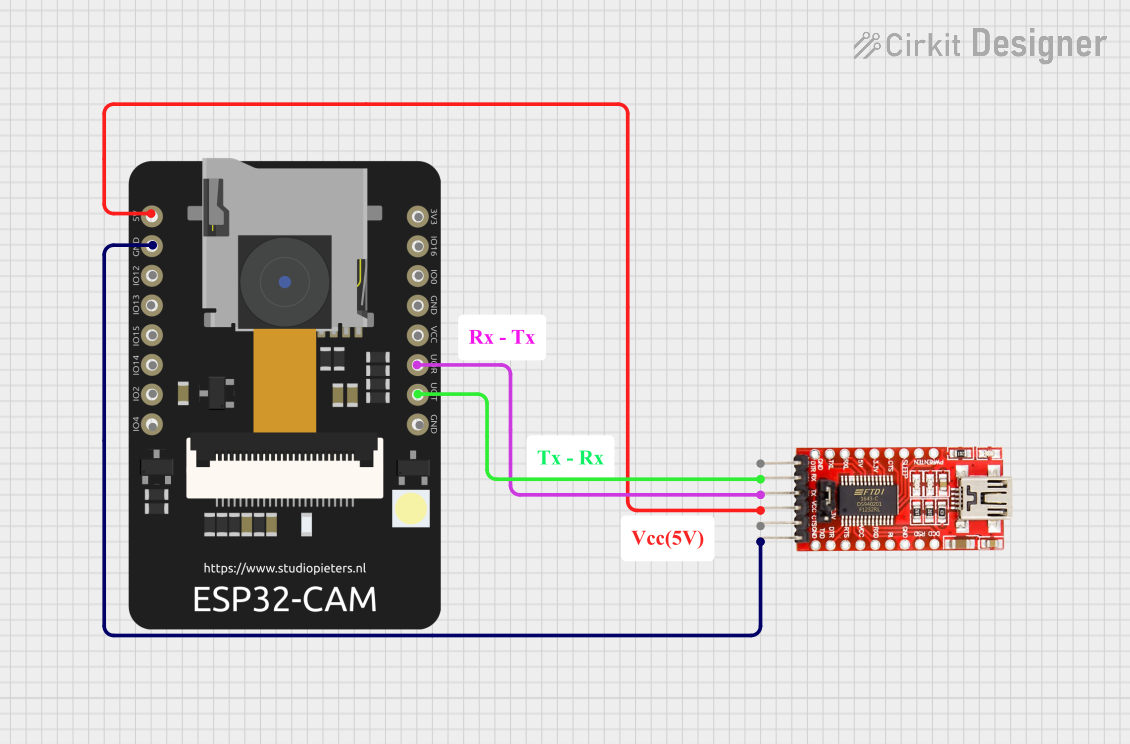 Open Project in Cirkit Designer
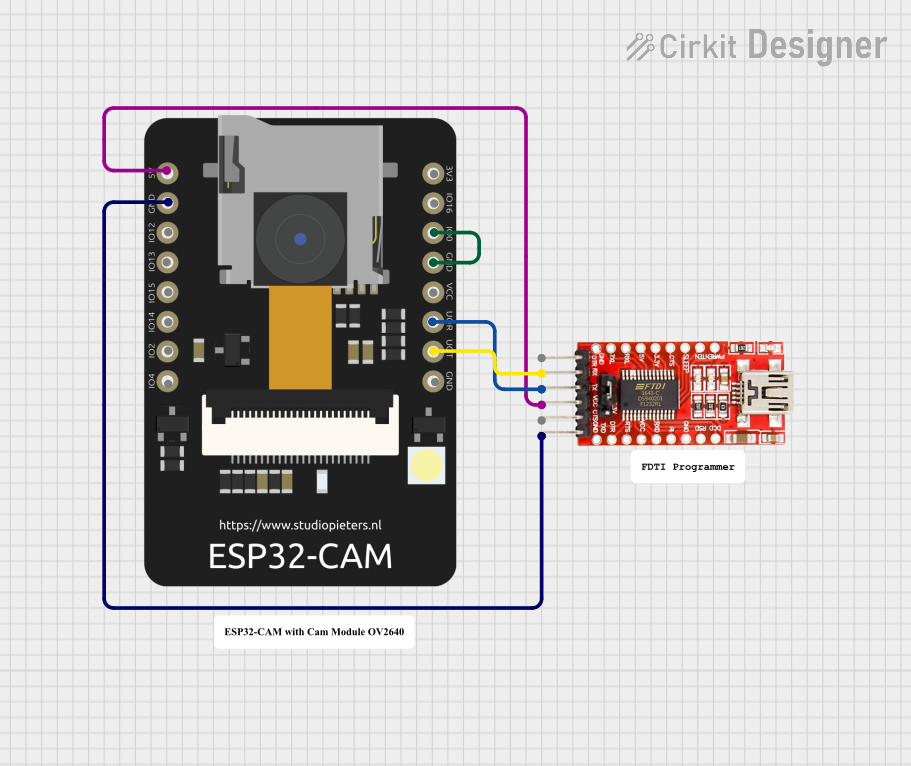 Open Project in Cirkit Designer
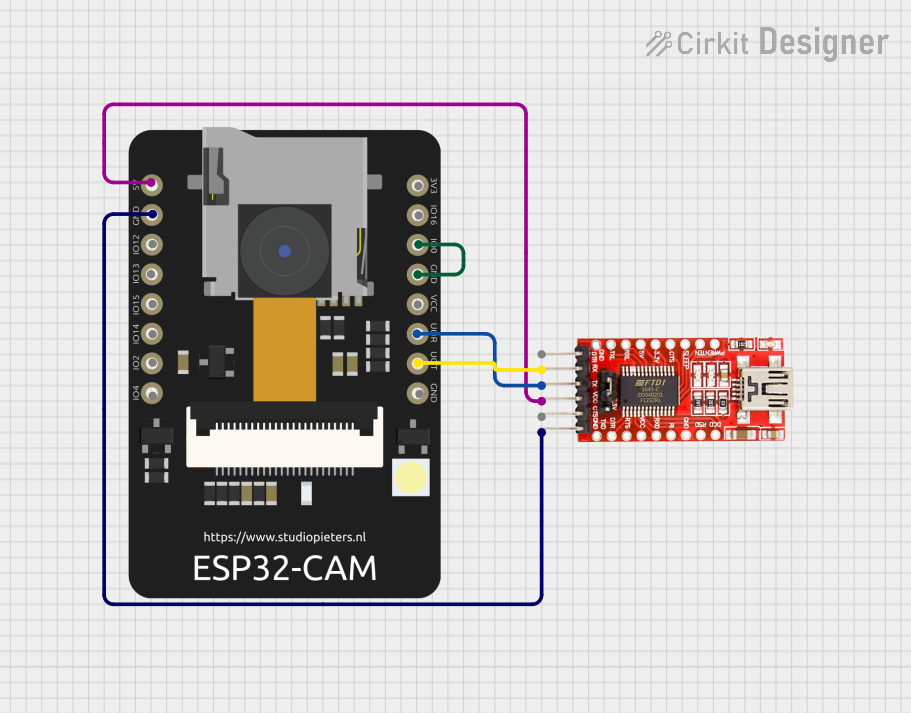 Open Project in Cirkit Designer
 Open Project in Cirkit Designer
Explore Projects Built with ESP 32 CAM
Open Project in Cirkit DesignerOpen Project in Cirkit DesignerOpen Project in Cirkit DesignerOpen Project in Cirkit DesignerCommon Applications:
- Smart surveillance systems
- IoT-enabled image and video streaming
- Face recognition and object detection
- Home automation with visual feedback
- Wireless camera modules for robotics
Technical Specifications
The ESP 32 CAM combines the ESP32 microcontroller with a camera module and other essential components. Below are its key specifications:
General Specifications:
| Feature | Specification |
|---|---|
| Microcontroller | ESP32-D0WD |
| Wireless Connectivity | Wi-Fi 802.11 b/g/n, Bluetooth 4.2 |
| Camera Module | OV2640 (default) |
| Flash Memory | 4 MB (PSRAM) |
| Storage | MicroSD card slot (up to 4 GB) |
| Operating Voltage | 3.3V |
| Power Supply | 5V via micro-USB or external source |
| GPIO Pins | 9 (configurable for various functions) |
| Dimensions | 27 mm x 40.5 mm |
Pin Configuration:
The ESP 32 CAM has a total of 16 pins. Below is the pinout description:
| Pin Name | Function | Description |
|---|---|---|
| GND | Ground | Connect to ground of the power supply |
| 3.3V | Power Supply | Provides 3.3V output |
| 5V | Power Supply | Input for 5V power |
| GPIO0 | Boot Mode Selection | Used for programming (connect to GND to flash) |
| GPIO1 | UART TX | Serial communication (transmit) |
| GPIO3 | UART RX | Serial communication (receive) |
| GPIO16 | General Purpose I/O | Configurable GPIO |
| GPIO17 | General Purpose I/O | Configurable GPIO |
| GPIO33 | General Purpose I/O | Configurable GPIO |
| GPIO34 | General Purpose I/O (Input only) | Input-only GPIO |
| GPIO35 | General Purpose I/O (Input only) | Input-only GPIO |
| GPIO36 | General Purpose I/O (Input only) | Input-only GPIO |
| GPIO39 | General Purpose I/O (Input only) | Input-only GPIO |
| SD_CMD | SD Card Command Line | Used for microSD card communication |
| SD_CLK | SD Card Clock Line | Used for microSD card communication |
| SD_DATA0 | SD Card Data Line | Used for microSD card communication |
Usage Instructions
How to Use the ESP 32 CAM in a Circuit:
Powering the Board:
- Supply 5V to the
5Vpin or use a micro-USB cable to power the board. - Ensure the power source can provide at least 500mA of current.
- Supply 5V to the
Programming the Board:
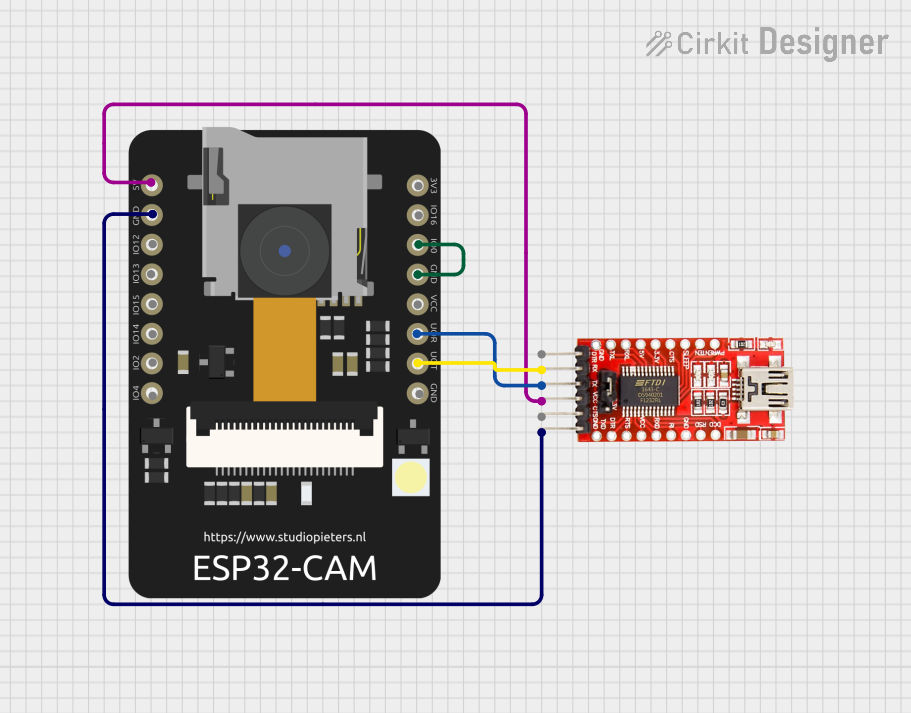
- Connect the ESP 32 CAM to a USB-to-TTL converter (e.g., FTDI module).
- Connect the
GNDpin of the ESP 32 CAM to theGNDof the FTDI module. - Connect the
5Vpin of the ESP 32 CAM to theVCCof the FTDI module. - Connect
UART TX(GPIO1) to the RX pin of the FTDI module andUART RX(GPIO3) to the TX pin. - Pull
GPIO0toGNDto enable programming mode. - Use the Arduino IDE or other compatible software to upload code.
Connecting Peripherals:
- Use the GPIO pins to connect sensors, actuators, or other peripherals.
- For camera functionality, ensure the OV2640 module is securely connected to the board.
MicroSD Card Usage:
- Insert a formatted microSD card into the slot.
- Use the SD card pins (
SD_CMD,SD_CLK,SD_DATA0) for data storage or retrieval.
Important Considerations:
- The ESP 32 CAM generates heat during operation; ensure proper ventilation.
- Use a stable power supply to avoid unexpected resets or malfunctions.
- Avoid connecting peripherals that exceed the GPIO voltage/current limits.
Example Code for Arduino IDE:
Below is an example of how to set up the ESP 32 CAM for basic camera streaming:
#include <WiFi.h>
#include <esp_camera.h>

// Replace with your Wi-Fi credentials
const char* ssid = "Your_SSID";
const char* password = "Your_PASSWORD";

void startCameraServer();

void setup() {
  Serial.begin(115200);

  // Configure Wi-Fi
  WiFi.begin(ssid, password);
  while (WiFi.status() != WL_CONNECTED) {
    delay(500);
    Serial.print(".");
  }
  Serial.println("");
  Serial.println("WiFi connected");
  Serial.println("IP address: ");
  Serial.println(WiFi.localIP());

  // Initialize the camera
  camera_config_t config;
  config.ledc_channel = LEDC_CHANNEL_0;
  config.ledc_timer = LEDC_TIMER_0;
  config.pin_d0 = 5;
  config.pin_d1 = 18;
  config.pin_d2 = 19;
  config.pin_d3 = 21;
  config.pin_d4 = 36;
  config.pin_d5 = 39;
  config.pin_d6 = 34;
  config.pin_d7 = 35;
  config.pin_xclk = 0;
  config.pin_pclk = 22;
  config.pin_vsync = 25;
  config.pin_href = 23;
  config.pin_sscb_sda = 26;
  config.pin_sscb_scl = 27;
  config.pin_pwdn = -1;
  config.pin_reset = -1;
  config.xclk_freq_hz = 20000000;
  config.pixel_format = PIXFORMAT_JPEG;

  if (!esp_camera_init(&config)) {
    Serial.println("Camera init failed");
    return;
  }

  // Start the camera server
  startCameraServer();
}

void loop() {
  // Main loop does nothing; camera server handles requests
}
Troubleshooting and FAQs
Common Issues:
The ESP 32 CAM is not detected by the computer:
- Ensure the FTDI module is connected correctly.
- Check that
GPIO0is pulled toGNDduring programming. - Verify the correct COM port is selected in the Arduino IDE.
Wi-Fi connection fails:
- Double-check the SSID and password in the code.
- Ensure the Wi-Fi network is within range and operational.
Camera initialization fails:
- Verify that the OV2640 module is securely connected.
- Ensure the camera pins are correctly configured in the code.
Board resets unexpectedly:
- Use a stable power supply capable of providing at least 500mA.
- Avoid overloading the GPIO pins with high-current peripherals.
FAQs:
Can I use the ESP 32 CAM without a camera module?
Yes, the board can function as a standard ESP32 development board for other IoT applications.What is the maximum resolution of the OV2640 camera?
The OV2640 supports resolutions up to 1600x1200 (UXGA).Can I power the ESP 32 CAM with a battery?
Yes, you can use a 3.7V LiPo battery with a suitable voltage regulator to provide 5V input.Is the ESP 32 CAM compatible with Arduino libraries?
Yes, the ESP 32 CAM is compatible with most Arduino libraries for ESP32.