An RGB LED light is a light-emitting diode capable of emitting red, green, and blue light. By adjusting the intensity of each color, a wide spectrum of colors can be produced. This makes RGB LEDs versatile and widely used in applications requiring dynamic lighting effects.
Explore Projects Built with RGB led light
Use Cirkit Designer to design, explore, and prototype these projects online. Some projects support real-time simulation. Click "Open Project" to start designing instantly!
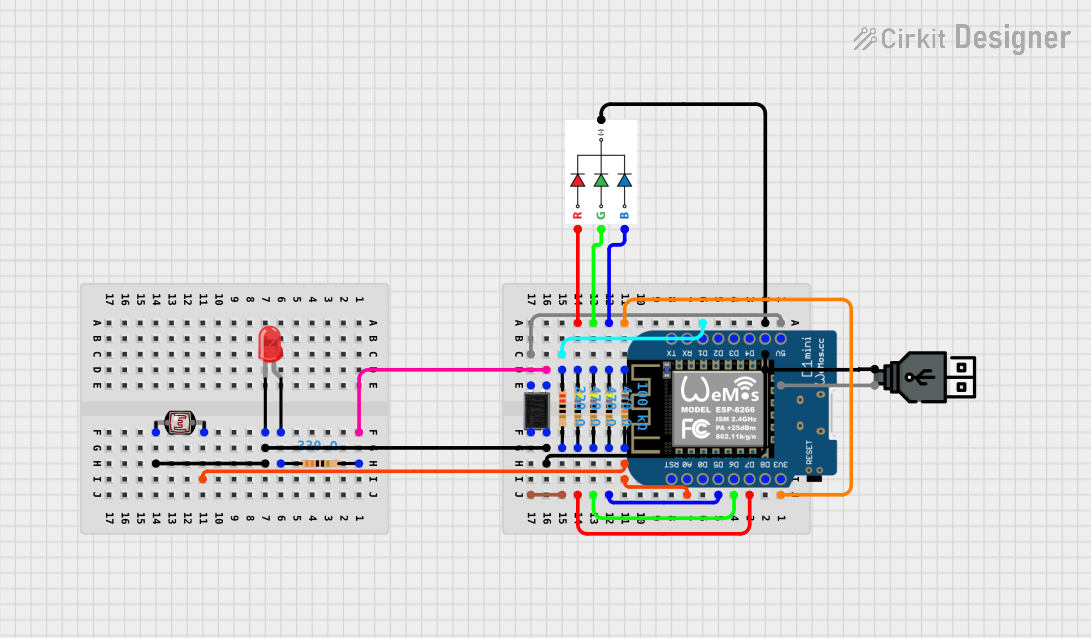
This circuit features a Wemos D1 Mini microcontroller that likely controls an RGB LED and a red indicator LED, reads from a photocell (LDR), and interfaces with an octocoupler for electrical isolation. The circuit is USB-powered and is designed for light sensing and LED control applications.
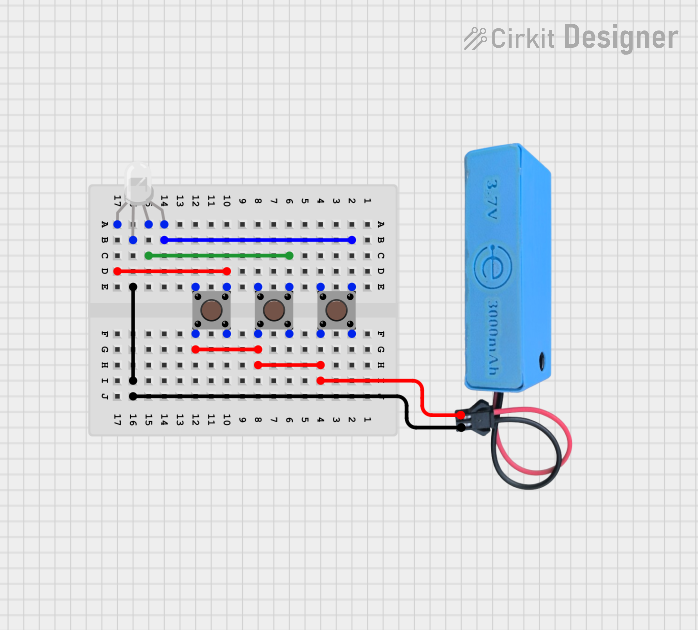
This circuit consists of an RGB LED controlled by three pushbuttons, each corresponding to one of the LED's color channels (Red, Green, and Blue). The pushbuttons are powered by a MAHIR 1.mini power source, allowing the user to manually toggle each color channel of the RGB LED.
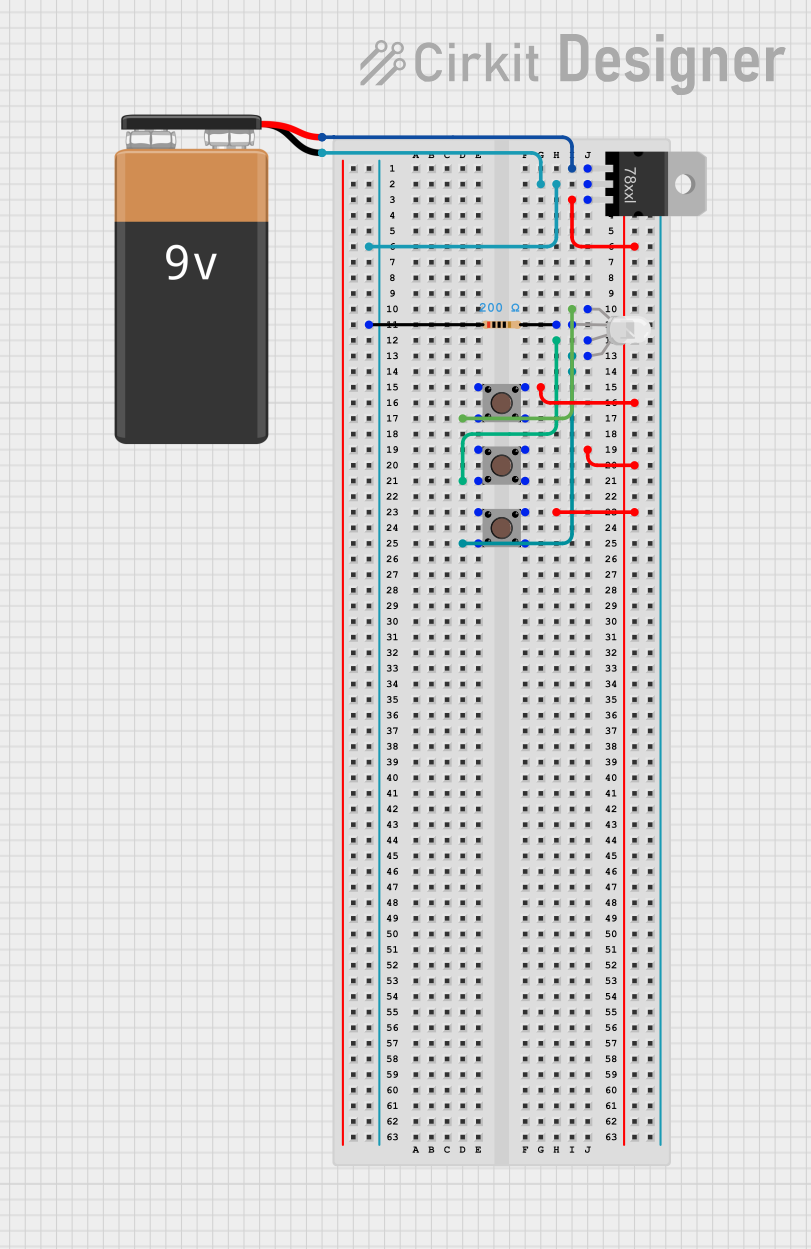
This circuit features a 9V battery connected to a voltage regulator, which likely steps down the voltage to a lower level suitable for driving an RGB LED. Three pushbuttons are connected to the output of the voltage regulator, each controlling one color channel (red, green, and blue) of the RGB LED. A resistor is connected in series with the common cathode of the RGB LED to limit the current through the LED.
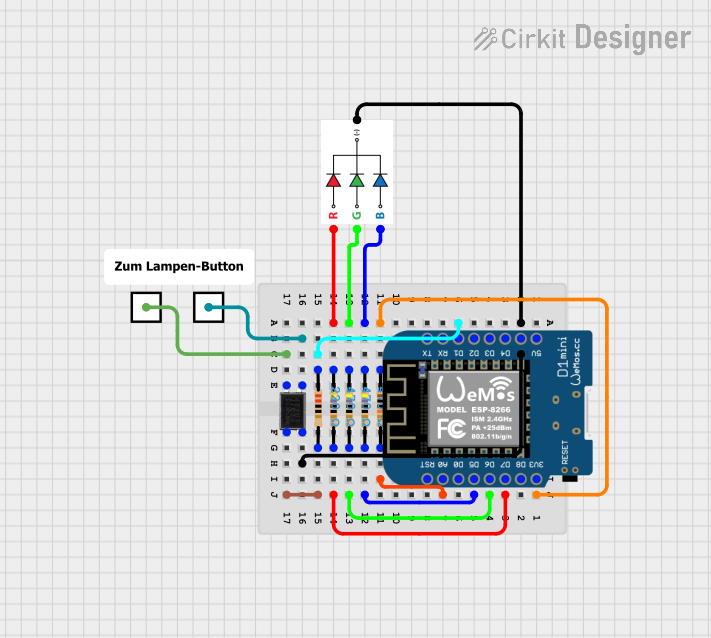
This circuit is an 'On Air' lamp controlled via a Wemos D1 Mini microcontroller. It uses an RGB LED to display different colors and an optocoupler to control an external device, with the microcontroller handling WiFi connectivity and web server functionality to switch the lamp on and off remotely.
Educational projects and prototyping with microcontrollers
Technical Specifications
Below are the key technical details for a standard common cathode RGB LED. Note that specifications may vary slightly depending on the manufacturer.
Parameter
Value
Forward Voltage (Red)
1.8V - 2.2V
Forward Voltage (Green)
3.0V - 3.2V
Forward Voltage (Blue)
3.0V - 3.2V
Forward Current
20mA (per color channel)
Power Dissipation
60mW (typical)
Viewing Angle
120°
Operating Temperature
-40°C to +85°C
Pin Configuration
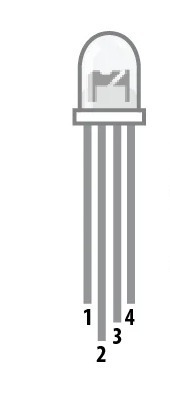
RGB LEDs typically have four pins: one for each color (red, green, and blue) and a common pin. The common pin can either be a cathode (connected to ground) or an anode (connected to the power supply). Below is the pinout for a common cathode RGB LED.
Pin Number
Pin Name
Description
1
Red
Controls the red LED
2
Common Cathode
Shared ground for all LEDs
3
Green
Controls the green LED
4
Blue
Controls the blue LED
Usage Instructions
How to Use the RGB LED in a Circuit
Identify the Pins: Use the pinout table above to identify the red, green, blue, and common cathode pins.
Connect Resistors: To prevent damage, connect a current-limiting resistor (typically 220Ω to 330Ω) in series with each color pin.
Power the LED: Connect the common cathode pin to ground (GND) and the color pins to a microcontroller or power source through the resistors.
Control the Colors: Adjust the voltage or use pulse-width modulation (PWM) on the red, green, and blue pins to mix colors.
Example Circuit with Arduino UNO
Below is an example of how to connect and control an RGB LED using an Arduino UNO.
Circuit Connections
Connect the common cathode pin to the Arduino's GND.
Connect the red pin to Arduino pin 9 through a 220Ω resistor.
Connect the green pin to Arduino pin 10 through a 220Ω resistor.
Connect the blue pin to Arduino pin 11 through a 220Ω resistor.
Arduino Code
// Define the RGB LED pins
const int redPin = 9;   // Pin connected to the red LED
const int greenPin = 10; // Pin connected to the green LED
const int bluePin = 11;  // Pin connected to the blue LED

void setup() {
  // Set the RGB pins as output
  pinMode(redPin, OUTPUT);
  pinMode(greenPin, OUTPUT);
  pinMode(bluePin, OUTPUT);
}

void loop() {
  // Example: Display red color
  analogWrite(redPin, 255);   // Full brightness for red
  analogWrite(greenPin, 0);   // Turn off green
  analogWrite(bluePin, 0);    // Turn off blue
  delay(1000);                // Wait for 1 second

  // Example: Display green color
  analogWrite(redPin, 0);     // Turn off red
  analogWrite(greenPin, 255); // Full brightness for green
  analogWrite(bluePin, 0);    // Turn off blue
  delay(1000);                // Wait for 1 second

  // Example: Display blue color
  analogWrite(redPin, 0);     // Turn off red
  analogWrite(greenPin, 0);   // Turn off green
  analogWrite(bluePin, 255);  // Full brightness for blue
  delay(1000);                // Wait for 1 second

  // Example: Display white color (all LEDs on)
  analogWrite(redPin, 255);   // Full brightness for red
  analogWrite(greenPin, 255); // Full brightness for green
  analogWrite(bluePin, 255);  // Full brightness for blue
  delay(1000);                // Wait for 1 second
}
Important Considerations and Best Practices
Always use current-limiting resistors to prevent excessive current from damaging the LED.
If using PWM to control brightness, ensure the frequency is high enough to avoid visible flickering.
Verify the type of RGB LED (common cathode or common anode) before connecting it to your circuit.
Avoid exceeding the maximum forward current (20mA per channel) to prolong the LED's lifespan.
Troubleshooting and FAQs
Common Issues and Solutions
The LED does not light up:
Check the connections and ensure the common cathode pin is connected to GND.
Verify that the resistors are properly connected and not open-circuited.
Ensure the power supply voltage matches the LED's forward voltage requirements.
The colors are not mixing correctly:
Verify the PWM values being sent to each color pin.
Check for loose or incorrect connections.
The LED is dim:
Ensure the resistors are not too large (e.g., higher than 330Ω).
Verify the power supply voltage is sufficient.
The LED overheats:
Reduce the current by increasing the resistor values slightly.
Avoid running the LED at maximum brightness for extended periods.
FAQs
Q: Can I use an RGB LED without a microcontroller?
A: Yes, you can use simple switches or potentiometers to control the voltage applied to each color pin, but a microcontroller provides more precise control.
Q: How do I create custom colors?
A: Use PWM to adjust the brightness of each color channel. For example, setting red, green, and blue to equal intensities produces white light, while varying the intensities creates other colors.
Q: What is the difference between common cathode and common anode RGB LEDs?
A: In a common cathode RGB LED, the cathode (negative terminal) is shared, and each color pin is connected to a positive voltage. In a common anode RGB LED, the anode (positive terminal) is shared, and each color pin is connected to ground.
By following this documentation, you can effectively use an RGB LED in your projects and troubleshoot common issues.

 Open Project in Cirkit Designer