
How to Use Terminal PCB 3 Pin: Examples, Pinouts, and Specs
 Design with Terminal PCB 3 Pin in Cirkit Designer
Introduction
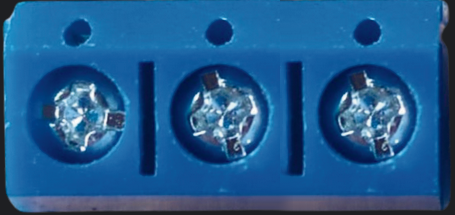
The Terminal PCB 3 Pin is a compact and reliable 3-pin terminal block designed for use on printed circuit boards (PCBs). It provides a secure and convenient way to connect wires to a circuit, allowing for easy disconnection and reconnection without the need for soldering. This component is widely used in applications where frequent wiring changes or maintenance is required, such as industrial control systems, power supplies, and prototyping.
Explore Projects Built with Terminal PCB 3 Pin
 Open Project in Cirkit Designer
 Open Project in Cirkit Designer
 Open Project in Cirkit Designer
 Open Project in Cirkit Designer
Explore Projects Built with Terminal PCB 3 Pin
Open Project in Cirkit DesignerOpen Project in Cirkit DesignerOpen Project in Cirkit DesignerOpen Project in Cirkit DesignerCommon Applications:
- Industrial control panels
- Power distribution in PCBs
- Prototyping and testing circuits
- Home automation systems
- Audio and signal connections
Technical Specifications
The following table outlines the key technical details of the Terminal PCB 3 Pin:
| Parameter | Specification |
|---|---|
| Number of Pins | 3 |
| Rated Voltage | 300V AC/DC |
| Rated Current | 10A |
| Wire Gauge Support | 26-12 AWG |
| Pitch (Pin Spacing) | 5.08 mm (0.2 inches) |
| Material (Housing) | Polyamide (PA66), flame-retardant |
| Contact Material | Copper alloy with nickel plating |
| Operating Temperature | -40°C to +105°C |
| Mounting Type | Through-hole (THT) |
| Screw Type | M2.5 slotted screws |
Pin Configuration and Description
The Terminal PCB 3 Pin has three pins, each corresponding to a terminal for wire connection. The pin configuration is as follows:
| Pin Number | Description |
|---|---|
| 1 | Terminal 1 (Wire 1) |
| 2 | Terminal 2 (Wire 2) |
| 3 | Terminal 3 (Wire 3) |
Usage Instructions
How to Use the Terminal PCB 3 Pin in a Circuit:
Mounting the Terminal Block:
- Insert the terminal block into the PCB through the designated through-hole pads.
- Solder the pins securely to the PCB to ensure a stable connection.
Connecting Wires:
- Strip the insulation from the wire ends (approximately 5-7 mm).
- Insert the stripped wire into the terminal opening.
- Tighten the screw above the terminal to secure the wire in place. Ensure the connection is firm but avoid overtightening to prevent damage.
Testing the Connection:
- Verify the electrical connection using a multimeter to ensure continuity.
- Power on the circuit and check for proper operation.
Important Considerations:
- Ensure the wire gauge is within the supported range (26-12 AWG) for optimal performance.
- Avoid exceeding the rated voltage and current to prevent overheating or damage.
- Use a screwdriver of the correct size to tighten the screws without stripping them.
- For high-vibration environments, periodically check the screws to ensure they remain tight.
Example: Connecting to an Arduino UNO
The Terminal PCB 3 Pin can be used to connect external components, such as sensors or power supplies, to an Arduino UNO. Below is an example of wiring a 12V power supply to an Arduino UNO using the terminal block.
Circuit Diagram:
- Pin 1: Connect to the positive terminal of the 12V power supply.
- Pin 2: Connect to the ground (GND) of the power supply.
- Pin 3: Connect to the Arduino's VIN pin for power input.
Arduino Code Example:
// Example code for powering an Arduino UNO using a 12V power supply
// connected through a Terminal PCB 3 Pin block.

// No specific code is required for power input, but ensure the
// Arduino is powered correctly and the VIN pin is used for voltages
// between 7-12V.

void setup() {
  // Initialize serial communication for debugging
  Serial.begin(9600);
  Serial.println("Arduino powered via Terminal PCB 3 Pin.");
}

void loop() {
  // Main loop does nothing in this example
}
Troubleshooting and FAQs
Common Issues:
Loose Wire Connections:
- Cause: Screws not tightened properly.
- Solution: Re-tighten the screws and ensure the wire is securely clamped.
Overheating of Terminal Block:
- Cause: Exceeding the rated current or voltage.
- Solution: Verify the circuit's current and voltage requirements and ensure they are within the terminal block's specifications.
Intermittent Connections:
- Cause: Poor soldering or vibration loosening the screws.
- Solution: Inspect solder joints for cracks and re-solder if necessary. Check and tighten screws periodically.
Wire Slipping Out:
- Cause: Insufficient wire stripping or improper clamping.
- Solution: Strip the wire to the recommended length (5-7 mm) and re-secure it.
FAQs:
Q1: Can I use this terminal block for AC connections?
A1: Yes, the Terminal PCB 3 Pin supports both AC and DC connections up to 300V.
Q2: Is this terminal block suitable for high-frequency signals?
A2: While it can handle low-frequency signals, it is not ideal for high-frequency applications due to potential signal degradation.
Q3: Can I use stranded wires with this terminal block?
A3: Yes, stranded wires are supported. Ensure the strands are twisted tightly or use ferrules for a more secure connection.
Q4: How do I remove a wire from the terminal block?
A4: Loosen the screw above the terminal and gently pull the wire out.
By following this documentation, you can effectively use the Terminal PCB 3 Pin in your projects and ensure reliable connections.