
How to Use Battery: Examples, Pinouts, and Specs
 Design with Battery in Cirkit Designer
Introduction
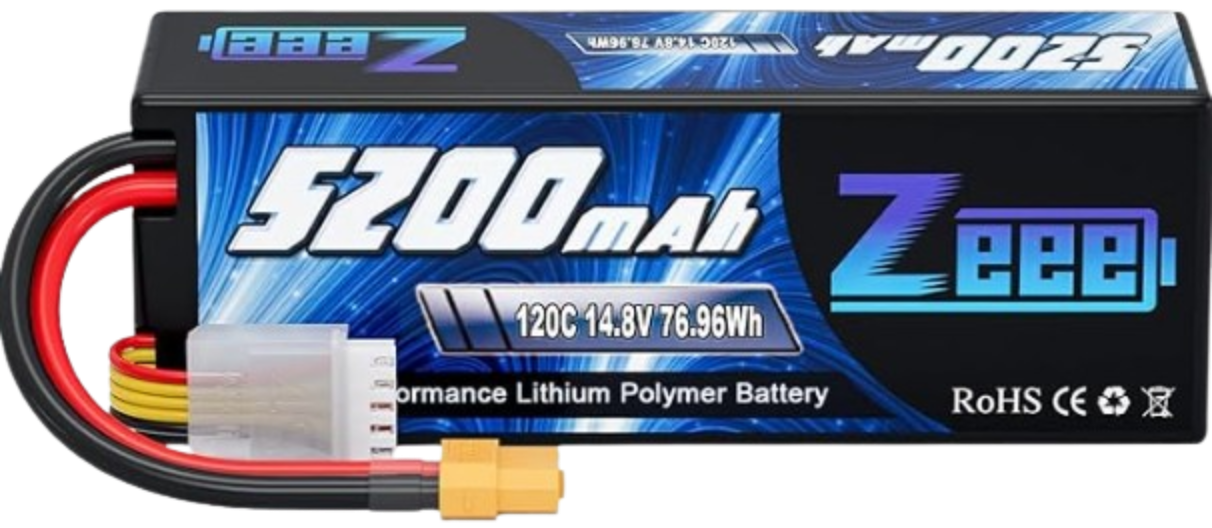
The Zeee 4S Lipo Battery 5200mAh 14.8V 120C is a high-performance lithium polymer (LiPo) battery designed for applications requiring reliable and powerful energy storage. This battery provides a nominal voltage of 14.8V and a high discharge rate of 120C, making it suitable for demanding applications such as RC vehicles, drones, robotics, and other high-power electronic systems.
Explore Projects Built with Battery
 Open Project in Cirkit Designer
 Open Project in Cirkit Designer
 Open Project in Cirkit Designer
 Open Project in Cirkit Designer
Explore Projects Built with Battery
Open Project in Cirkit DesignerOpen Project in Cirkit DesignerOpen Project in Cirkit DesignerOpen Project in Cirkit DesignerCommon Applications and Use Cases
- Remote-controlled (RC) cars, boats, and drones
- Robotics and automation systems
- High-performance hobbyist projects
- Backup power for small electronic devices
- Portable power supplies for DIY electronics
Technical Specifications
The following table outlines the key technical details of the Zeee 4S Lipo Battery:
| Parameter | Specification |
|---|---|
| Manufacturer | Zeee |
| Part ID | Zeee 4S Lipo Battery 5200mAh 14.8V 120C |
| Battery Type | Lithium Polymer (LiPo) |
| Nominal Voltage | 14.8V |
| Capacity | 5200mAh |
| Discharge Rate (C Rating) | 120C |
| Maximum Discharge Current | 624A |
| Cell Configuration | 4S (4 cells in series) |
| Dimensions | 138mm x 46mm x 48mm |
| Weight | ~500g |
| Connector Type | XT60 |
| Balance Connector Type | JST-XH |
| Operating Temperature | -20°C to 60°C |
| Storage Voltage | 3.8V per cell |
Pin Configuration and Descriptions
The Zeee 4S Lipo Battery has two main connectors: the power connector and the balance connector.
Power Connector (XT60)
| Pin | Description |
|---|---|
| + | Positive terminal |
| - | Negative terminal |
Balance Connector (JST-XH)
| Pin | Description |
|---|---|
| 1 | Cell 1 positive terminal |
| 2 | Cell 2 positive terminal |
| 3 | Cell 3 positive terminal |
| 4 | Cell 4 positive terminal |
| 5 | Common ground (negative terminal) |
Usage Instructions
How to Use the Component in a Circuit
Connecting the Battery:
- Use the XT60 connector to connect the battery to your circuit or electronic device.
- Ensure the polarity matches the device's power input to avoid damage.
- For charging, connect the JST-XH balance connector to a compatible LiPo balance charger.
Charging the Battery:
- Use a LiPo-compatible balance charger to charge the battery.
- Set the charger to 4S mode (14.8V) and ensure the charging current does not exceed 1C (5.2A for this battery).
- Monitor the charging process to prevent overcharging or overheating.
Discharging the Battery:
- Avoid discharging the battery below 3.2V per cell (12.8V for the entire pack) to prevent damage.
- Use a voltage alarm or battery management system (BMS) to monitor the voltage during use.
Storage:
- Store the battery at a storage voltage of 3.8V per cell (15.2V for the entire pack).
- Keep the battery in a cool, dry place away from flammable materials.
Important Considerations and Best Practices
- Safety: Always handle LiPo batteries with care. Avoid puncturing, short-circuiting, or exposing the battery to fire or water.
- Balancing: Regularly balance the cells during charging to ensure even voltage distribution.
- Temperature: Do not operate the battery outside the specified temperature range (-20°C to 60°C).
- Discharge Rate: Ensure the connected device does not exceed the maximum discharge current of 624A.
Example: Using the Battery with an Arduino UNO
To power an Arduino UNO with the Zeee 4S Lipo Battery, use a voltage regulator (e.g., LM7805) to step down the voltage to 5V. Below is an example circuit and code:
Circuit Setup
- Connect the battery's XT60 connector to the input of the voltage regulator.
- Connect the regulator's output to the Arduino UNO's 5V and GND pins.
- Use a voltage divider or sensor to monitor the battery voltage.
Arduino Code
// Example code to monitor battery voltage using Arduino UNO
const int voltagePin = A0; // Analog pin connected to voltage divider
const float voltageDividerRatio = 5.7; // Adjust based on resistor values

void setup() {
  Serial.begin(9600); // Initialize serial communication
}

void loop() {
  int sensorValue = analogRead(voltagePin); // Read analog value
  float batteryVoltage = (sensorValue * 5.0 / 1023.0) * voltageDividerRatio;

  // Print the battery voltage to the Serial Monitor
  Serial.print("Battery Voltage: ");
  Serial.print(batteryVoltage);
  Serial.println(" V");

  delay(1000); // Wait for 1 second before next reading
}
Troubleshooting and FAQs
Common Issues Users Might Face
Battery Not Charging:
- Cause: Incorrect charger settings or damaged balance connector.
- Solution: Verify the charger is set to 4S mode and check the balance connector for damage.
Battery Swelling:
- Cause: Overcharging, over-discharging, or overheating.
- Solution: Stop using the battery immediately and dispose of it safely.
Low Runtime:
- Cause: Battery not fully charged or degraded capacity.
- Solution: Ensure the battery is fully charged and check for signs of wear.
Voltage Drop Under Load:
- Cause: Excessive current draw or internal resistance.
- Solution: Use a device with a lower current requirement or replace the battery if it is old.
Solutions and Tips for Troubleshooting
- Always use a multimeter to verify the battery voltage and connections.
- Use a LiPo-safe storage bag for added safety during charging and storage.
- If the battery becomes damaged, dispose of it at a certified recycling facility.
By following these guidelines, you can safely and effectively use the Zeee 4S Lipo Battery 5200mAh 14.8V 120C in your projects.