
How to Use MicoAir743v2: Examples, Pinouts, and Specs
 Design with MicoAir743v2 in Cirkit Designer
Introduction
The MicoAir743v2 is a compact, low-power wireless communication module designed for Internet of Things (IoT) applications. Manufactured by MicoAir, this module offers advanced connectivity options and efficient data transmission capabilities, making it ideal for a wide range of wireless communication needs. Its small form factor and energy-efficient design make it particularly suitable for battery-powered devices and space-constrained applications.
Explore Projects Built with MicoAir743v2
 Open Project in Cirkit Designer
 Open Project in Cirkit Designer
 Open Project in Cirkit Designer
 Open Project in Cirkit Designer
Explore Projects Built with MicoAir743v2
Open Project in Cirkit DesignerOpen Project in Cirkit DesignerOpen Project in Cirkit DesignerOpen Project in Cirkit DesignerCommon Applications and Use Cases
- Smart home devices (e.g., smart thermostats, lighting systems)
- Industrial IoT (e.g., sensor networks, asset tracking)
- Wearable technology
- Remote monitoring and control systems
- Wireless data logging and telemetry
Technical Specifications
The MicoAir743v2 is designed to deliver reliable performance while maintaining low power consumption. Below are its key technical specifications:
| Parameter | Value |
|---|---|
| Manufacturer | MicoAir |
| Part ID | MicoAir743v2 |
| Wireless Protocols | Wi-Fi (802.11 b/g/n), Bluetooth 5.0 |
| Operating Voltage | 3.3V |
| Power Consumption | 10 mA (idle), 120 mA (transmit) |
| Operating Temperature Range | -40°C to +85°C |
| Data Rate | Up to 150 Mbps (Wi-Fi) |
| Dimensions | 18mm x 15mm x 3mm |
| Antenna | Integrated PCB antenna |
| Interface | UART, SPI, I2C |
| Flash Memory | 4 MB |
| RAM | 512 KB |
Pin Configuration and Descriptions
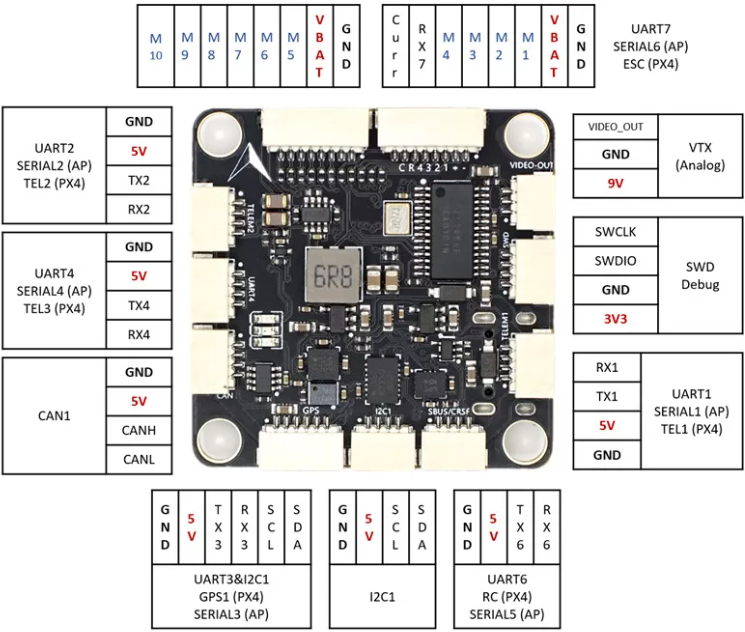
The MicoAir743v2 module has 12 pins, each serving a specific function. The table below provides details about the pin configuration:
| Pin Number | Pin Name | Description |
|---|---|---|
| 1 | GND | Ground connection |
| 2 | VCC | Power supply (3.3V) |
| 3 | TX | UART Transmit |
| 4 | RX | UART Receive |
| 5 | GPIO1 | General-purpose I/O pin |
| 6 | GPIO2 | General-purpose I/O pin |
| 7 | SPI_MOSI | SPI Master Out Slave In |
| 8 | SPI_MISO | SPI Master In Slave Out |
| 9 | SPI_CLK | SPI Clock |
| 10 | I2C_SCL | I2C Clock |
| 11 | I2C_SDA | I2C Data |
| 12 | RESET | Active-low reset pin |
Usage Instructions
The MicoAir743v2 is straightforward to integrate into IoT projects. Below are the steps and best practices for using the module:
How to Use the Component in a Circuit
- Power Supply: Connect the VCC pin to a stable 3.3V power source and the GND pin to ground.
- Communication Interface: Choose the appropriate communication protocol (UART, SPI, or I2C) based on your application:
- For UART, connect the TX and RX pins to the corresponding pins on your microcontroller.
- For SPI, connect SPI_MOSI, SPI_MISO, and SPI_CLK to the respective SPI pins on your microcontroller.
- For I2C, connect I2C_SCL and I2C_SDA to the I2C pins on your microcontroller.
- Antenna: The module includes an integrated PCB antenna, so no external antenna is required.
- Reset: Optionally, connect the RESET pin to a GPIO pin on your microcontroller for manual or software-controlled resets.
Important Considerations and Best Practices
- Voltage Levels: Ensure that all connected devices operate at 3.3V logic levels to avoid damaging the module.
- Decoupling Capacitor: Place a 0.1 µF decoupling capacitor near the VCC pin to stabilize the power supply.
- Firmware Updates: Check the MicoAir website for the latest firmware updates to ensure optimal performance and security.
- Antenna Placement: Avoid placing metal objects or other components near the module's antenna to prevent signal interference.
Example: Connecting to an Arduino UNO
The MicoAir743v2 can be easily connected to an Arduino UNO using the UART interface. Below is an example of how to send and receive data using the module:
Wiring Diagram
| MicoAir743v2 Pin | Arduino UNO Pin |
|---|---|
| VCC | 3.3V |
| GND | GND |
| TX | RX (Pin 0) |
| RX | TX (Pin 1) |
| RESET | Digital Pin 7 |
Arduino Code Example
#include <SoftwareSerial.h>

// Define RX and TX pins for SoftwareSerial
SoftwareSerial MicoAir(10, 11); // RX = Pin 10, TX = Pin 11

void setup() {
  // Initialize serial communication with the module
  MicoAir.begin(9600); // Set baud rate to 9600
  Serial.begin(9600);  // For debugging via Serial Monitor

  // Send a test message to the module
  MicoAir.println("Hello, MicoAir743v2!");
  Serial.println("Message sent to MicoAir743v2.");
}

void loop() {
  // Check if data is available from the module
  if (MicoAir.available()) {
    String receivedData = MicoAir.readString(); // Read incoming data
    Serial.print("Received: ");
    Serial.println(receivedData); // Print data to Serial Monitor
  }

  // Check if data is available from Serial Monitor
  if (Serial.available()) {
    String userInput = Serial.readString(); // Read user input
    MicoAir.println(userInput); // Send user input to the module
  }
}
Troubleshooting and FAQs
Common Issues and Solutions
No Communication with the Module
- Cause: Incorrect wiring or baud rate mismatch.
- Solution: Double-check the wiring and ensure the baud rate in your code matches the module's default baud rate (9600).
Weak or Unstable Wireless Signal
- Cause: Interference from nearby components or poor antenna placement.
- Solution: Ensure the module's antenna is unobstructed and away from metal objects.
Module Not Powering On
- Cause: Insufficient power supply or incorrect voltage.
- Solution: Verify that the VCC pin is receiving a stable 3.3V supply.
Data Transmission Errors
- Cause: Noise or incorrect protocol configuration.
- Solution: Use shorter wires for connections and verify protocol settings in your code.
FAQs
Q: Can the MicoAir743v2 operate at 5V?
A: No, the module is designed to operate at 3.3V. Using 5V may damage the module.
Q: Does the module support over-the-air (OTA) updates?
A: Yes, the MicoAir743v2 supports OTA updates. Refer to the manufacturer's documentation for detailed instructions.
Q: Can I use the module with a Raspberry Pi?
A: Yes, the module can be connected to a Raspberry Pi using UART, SPI, or I2C interfaces.
Q: What is the maximum range of the module?
A: The range depends on environmental factors but typically extends up to 50 meters indoors and 200 meters outdoors in line-of-sight conditions.