
How to Use Microstep Driver: Examples, Pinouts, and Specs
 Design with Microstep Driver in Cirkit Designer
Introduction
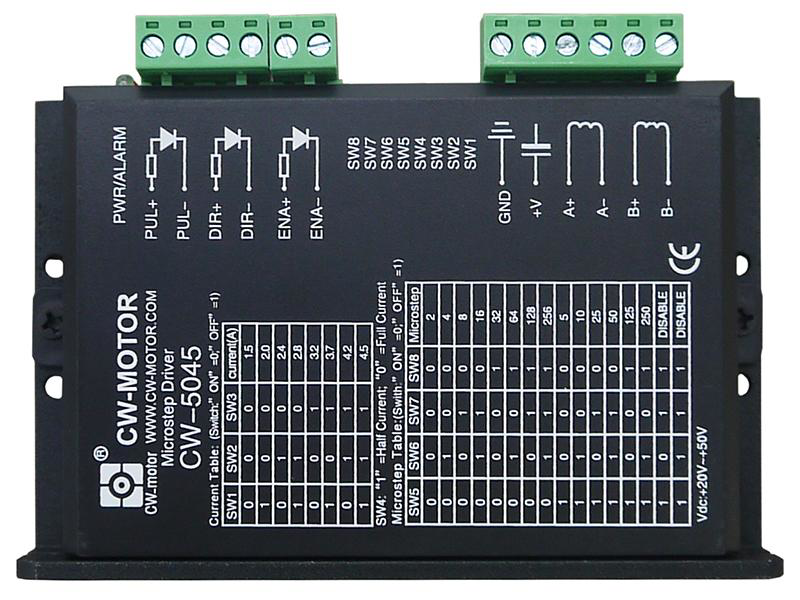
The CW-5045 Microstep Driver by CNC4YOU is an advanced electronic device designed to control stepper motors with high precision. By dividing each full step of a stepper motor into smaller microsteps, this driver enables smoother motion, reduced vibration, and improved positional accuracy. It is ideal for applications requiring precise motor control, such as CNC machines, 3D printers, robotics, and automated systems.
Explore Projects Built with Microstep Driver
 Open Project in Cirkit Designer
 Open Project in Cirkit Designer
 Open Project in Cirkit Designer
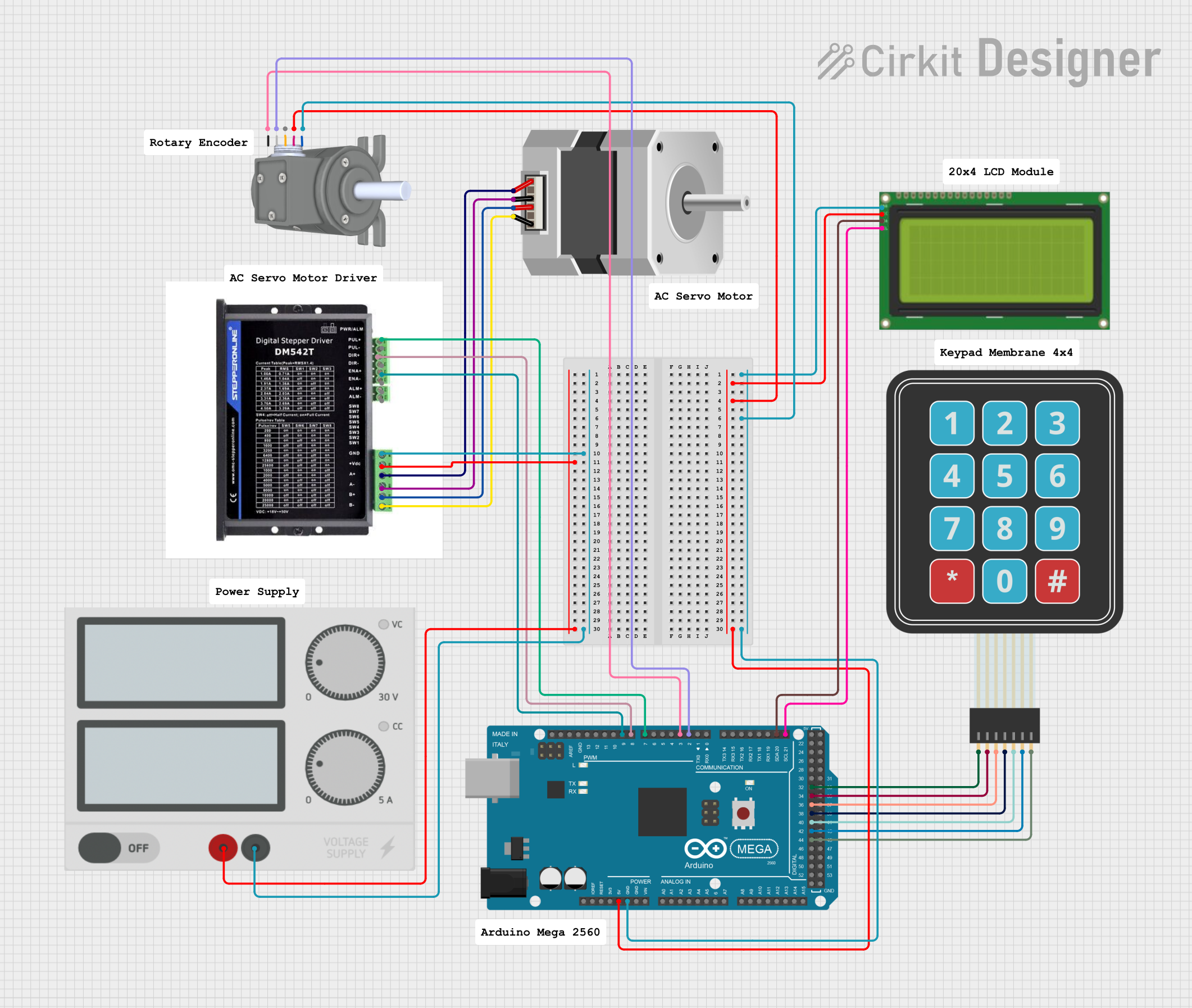 Open Project in Cirkit Designer
Explore Projects Built with Microstep Driver
Open Project in Cirkit DesignerOpen Project in Cirkit DesignerOpen Project in Cirkit DesignerOpen Project in Cirkit DesignerCommon Applications
- CNC machines for precise cutting, milling, and engraving
- 3D printers for accurate layer deposition
- Robotics for smooth and controlled motion
- Conveyor systems in industrial automation
- Camera sliders and other motion control systems
Technical Specifications
The following table outlines the key technical details of the CW-5045 Microstep Driver:
| Parameter | Specification |
|---|---|
| Input Voltage Range | 20V to 50V DC |
| Output Current Range | 1.5A to 4.5A (adjustable) |
| Microstep Resolution | 1, 2, 4, 8, 16, 32 (selectable) |
| Control Signal Voltage | 5V (compatible with most controllers) |
| Step Frequency Range | 0 to 200 kHz |
| Operating Temperature | -10°C to +45°C |
| Dimensions | 118mm x 75.5mm x 34mm |
| Weight | 280g |
Pin Configuration and Descriptions
The CW-5045 Microstep Driver has the following pin configuration:
Input Signal Pins
| Pin Name | Description |
|---|---|
| PUL+ | Pulse signal input (positive terminal) |
| PUL- | Pulse signal input (negative terminal) |
| DIR+ | Direction signal input (positive terminal) |
| DIR- | Direction signal input (negative terminal) |
| ENA+ | Enable signal input (positive terminal) (optional) |
| ENA- | Enable signal input (negative terminal) (optional) |
Motor Output Pins
| Pin Name | Description |
|---|---|
| A+ | Motor coil A positive terminal |
| A- | Motor coil A negative terminal |
| B+ | Motor coil B positive terminal |
| B- | Motor coil B negative terminal |
Power Input Pins
| Pin Name | Description |
|---|---|
| VCC | Power supply positive terminal (20V to 50V DC) |
| GND | Power supply ground terminal |
Usage Instructions
Connecting the CW-5045 Microstep Driver
- Power Supply: Connect a DC power supply (20V to 50V) to the VCC and GND pins. Ensure the power supply can provide sufficient current for the stepper motor.
- Stepper Motor: Connect the stepper motor's coils to the A+, A-, B+, and B- pins. Refer to the motor's datasheet to identify the correct coil pairs.
- Control Signals: Connect the PUL, DIR, and ENA pins to a microcontroller or CNC controller. Use the "+" and "-" terminals as appropriate for your control signal voltage.
- Microstep and Current Settings: Use the DIP switches on the driver to configure the microstep resolution and output current. Refer to the driver’s user manual for DIP switch settings.
Example: Connecting to an Arduino UNO
The CW-5045 can be easily interfaced with an Arduino UNO for stepper motor control. Below is an example Arduino sketch:
// Example code to control a stepper motor using the CW-5045 Microstep Driver
// Connect PUL+ to Arduino pin 9, DIR+ to pin 8, and ENA+ to pin 7
// Connect PUL-, DIR-, and ENA- to Arduino GND

#define PUL_PIN 9  // Pulse signal pin
#define DIR_PIN 8  // Direction signal pin
#define ENA_PIN 7  // Enable signal pin

void setup() {
  pinMode(PUL_PIN, OUTPUT); // Set pulse pin as output
  pinMode(DIR_PIN, OUTPUT); // Set direction pin as output
  pinMode(ENA_PIN, OUTPUT); // Set enable pin as output

  digitalWrite(ENA_PIN, LOW); // Enable the driver (LOW = enabled)
}

void loop() {
  digitalWrite(DIR_PIN, HIGH); // Set direction (HIGH = one direction, LOW = reverse)

  // Generate pulses to move the motor
  for (int i = 0; i < 200; i++) { // 200 pulses for one revolution (1.8° step motor)
    digitalWrite(PUL_PIN, HIGH); // Pulse HIGH
    delayMicroseconds(500);      // Delay for pulse width (500 µs)
    digitalWrite(PUL_PIN, LOW);  // Pulse LOW
    delayMicroseconds(500);      // Delay for pulse interval
  }

  delay(1000); // Wait 1 second before reversing direction

  digitalWrite(DIR_PIN, LOW); // Reverse direction

  // Generate pulses to move the motor in the opposite direction
  for (int i = 0; i < 200; i++) {
    digitalWrite(PUL_PIN, HIGH);
    delayMicroseconds(500);
    digitalWrite(PUL_PIN, LOW);
    delayMicroseconds(500);
  }

  delay(1000); // Wait 1 second before repeating
}
Important Considerations
- Power Supply: Ensure the power supply voltage and current match the requirements of both the driver and the stepper motor.
- Heat Dissipation: The driver may heat up during operation. Use a heatsink or cooling fan if necessary.
- Signal Noise: Use shielded cables for control signals to minimize noise and interference.
- Microstep Settings: Choose an appropriate microstep resolution based on the application's precision and speed requirements.
Troubleshooting and FAQs
Common Issues and Solutions
Motor Not Moving:
- Check the power supply connections and ensure the voltage is within the specified range.
- Verify the control signal connections (PUL, DIR, ENA) and ensure the microcontroller is generating pulses.
- Ensure the motor coils are correctly connected to the driver.
Motor Vibrates but Does Not Rotate:
- Verify the motor coil connections. Incorrect wiring can cause the motor to vibrate without rotating.
- Check the microstep and current settings on the DIP switches.
Driver Overheating:
- Ensure proper ventilation and consider adding a heatsink or cooling fan.
- Verify that the output current setting matches the motor's rated current.
Inconsistent Motor Movement:
- Check for noise or interference in the control signal lines.
- Use shielded cables and ensure proper grounding.
FAQs
Q: Can the CW-5045 drive any stepper motor?
A: The CW-5045 is compatible with most 2-phase and 4-phase stepper motors, provided their voltage and current ratings are within the driver's specifications.
Q: How do I select the microstep resolution?
A: Use the DIP switches on the driver to configure the microstep resolution. Refer to the user manual for the DIP switch settings.
Q: Is the ENA signal mandatory?
A: No, the ENA signal is optional. If not used, leave the ENA+ and ENA- pins disconnected or set ENA+ to HIGH to enable the driver.
Q: Can I use the CW-5045 with a 12V power supply?
A: No, the minimum input voltage for the CW-5045 is 20V. Using a lower voltage may damage the driver or result in improper operation.