
How to Use Power Supply 12v 12.5a 150w: Examples, Pinouts, and Specs
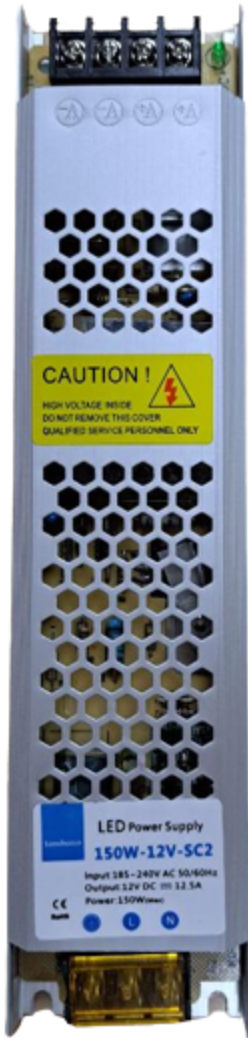
 Design with Power Supply 12v 12.5a 150w in Cirkit Designer
Introduction
The Power Supply 12V 12.5A 150W is a reliable and efficient device designed to convert AC voltage (typically 110V or 220V) into a stable 12V DC output. With a maximum current capacity of 12.5A and a total power output of 150W, this power supply is ideal for powering a wide range of electronic devices, including LED strips, motors, microcontrollers, and other DC-powered equipment. Its robust design ensures consistent performance and protection against overvoltage, overcurrent, and short circuits.
Explore Projects Built with Power Supply 12v 12.5a 150w
 Open Project in Cirkit Designer
 Open Project in Cirkit Designer
 Open Project in Cirkit Designer
 Open Project in Cirkit Designer
Explore Projects Built with Power Supply 12v 12.5a 150w
Open Project in Cirkit DesignerOpen Project in Cirkit DesignerOpen Project in Cirkit DesignerOpen Project in Cirkit DesignerCommon Applications and Use Cases
- Powering LED lighting systems, such as LED strips or panels.
- Supplying power to DC motors in robotics or industrial applications.
- Providing stable power for microcontroller-based projects (e.g., Arduino, Raspberry Pi).
- Operating CCTV cameras and other security systems.
- General-purpose DC power supply for laboratory or prototyping use.
Technical Specifications
Below are the key technical details of the Power Supply 12V 12.5A 150W:
| Parameter | Specification |
|---|---|
| Input Voltage Range | 100-240V AC, 50/60Hz |
| Output Voltage | 12V DC |
| Maximum Output Current | 12.5A |
| Maximum Power Output | 150W |
| Efficiency | ≥85% |
| Operating Temperature | -10°C to +60°C |
| Protection Features | Overvoltage, Overcurrent, Short Circuit |
| Dimensions | Varies by model (e.g., 200mm x 100mm x 50mm) |
| Weight | Approximately 500g |
Pin Configuration and Descriptions
The power supply typically has the following input and output terminals:
| Terminal | Label | Description |
|---|---|---|
| Input 1 | L | Live wire connection for AC input |
| Input 2 | N | Neutral wire connection for AC input |
| Input 3 | GND | Ground connection for safety |
| Output 1 | +V | Positive terminal for 12V DC output |
| Output 2 | -V | Negative terminal for 12V DC output |
| Adjustment | V-ADJ | Voltage adjustment knob (fine-tuning output voltage) |
Usage Instructions
How to Use the Component in a Circuit
- Safety First: Ensure the power supply is disconnected from the AC mains before making any connections.
- Connect the Input:
- Connect the live (L) and neutral (N) wires from the AC mains to the respective input terminals.
- Attach the ground (GND) terminal to a proper earth ground for safety.
- Connect the Output:
- Connect the +V terminal to the positive side of your load or circuit.
- Connect the -V terminal to the negative side of your load or circuit.
- Adjust the Voltage (Optional):
- Use the V-ADJ knob to fine-tune the output voltage if necessary (e.g., to compensate for voltage drops in long wires).
- Power On:
- Plug the power supply into the AC mains and switch it on.
- Verify the output voltage using a multimeter before connecting sensitive devices.
Important Considerations and Best Practices
- Load Capacity: Ensure the total current draw of your connected devices does not exceed 12.5A.
- Ventilation: Place the power supply in a well-ventilated area to prevent overheating.
- Polarity: Double-check the polarity of the output connections to avoid damaging your devices.
- Voltage Adjustment: Avoid excessive adjustment of the V-ADJ knob, as it may cause instability or damage.
- Fuse Protection: Use an appropriate fuse on the input side for added safety.
Example: Connecting to an Arduino UNO
To power an Arduino UNO using this power supply:
- Connect the +V terminal to the VIN pin on the Arduino.
- Connect the -V terminal to the GND pin on the Arduino.
- Ensure the output voltage is set to 12V before powering the Arduino.
Here is an example Arduino sketch to blink an LED when powered by the 12V power supply:
// Blink an LED connected to pin 13
// Ensure the Arduino is powered via the VIN pin with 12V DC

void setup() {
  pinMode(13, OUTPUT); // Set pin 13 as an output
}

void loop() {
  digitalWrite(13, HIGH); // Turn the LED on
  delay(1000);            // Wait for 1 second
  digitalWrite(13, LOW);  // Turn the LED off
  delay(1000);            // Wait for 1 second
}
Troubleshooting and FAQs
Common Issues and Solutions
No Output Voltage:
- Check if the power supply is properly connected to the AC mains.
- Verify that the input voltage matches the specified range (100-240V AC).
- Inspect the fuse and replace it if blown.
Overheating:
- Ensure the power supply is not overloaded (current draw exceeds 12.5A).
- Check for proper ventilation and remove any obstructions.
Voltage Fluctuations:
- Verify the stability of the AC input voltage.
- Adjust the V-ADJ knob carefully to stabilize the output voltage.
Device Not Powering On:
- Confirm the polarity of the output connections.
- Use a multimeter to measure the output voltage and ensure it is 12V.
FAQs
Q: Can this power supply be used outdoors?
A: No, this power supply is not waterproof. Use it indoors or in a protected environment.
Q: Can I use this power supply to charge a 12V battery?
A: While it is possible, it is not recommended unless the power supply has a built-in charging circuit. Use a dedicated battery charger for optimal safety and performance.
Q: What happens if I exceed the 12.5A current limit?
A: The power supply's overcurrent protection will activate, shutting down the output to prevent damage.
Q: Can I adjust the output voltage to values other than 12V?
A: Yes, the V-ADJ knob allows slight adjustments (typically ±10% of the rated voltage). However, avoid excessive adjustments to maintain stability.
This concludes the documentation for the Power Supply 12V 12.5A 150W.