
How to Use CH582F: Examples, Pinouts, and Specs
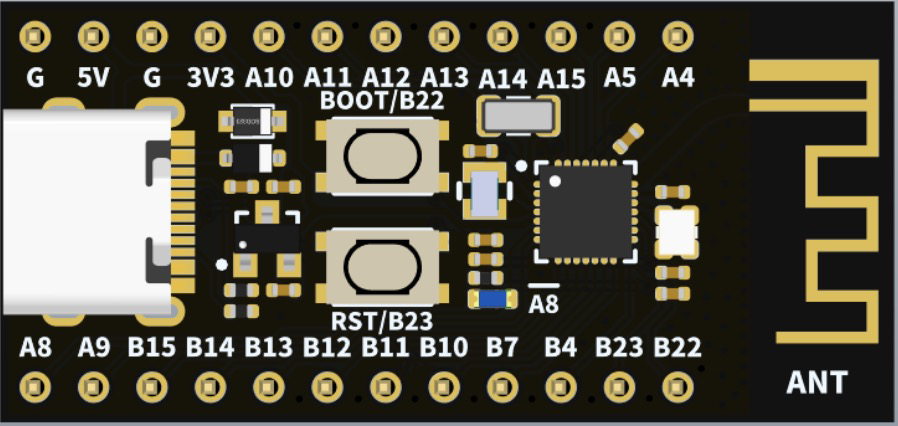
 Design with CH582F in Cirkit Designer
Introduction
The CH582F is a low-power microcontroller designed for Internet of Things (IoT) applications. It features integrated Bluetooth and Wi-Fi capabilities, making it ideal for wireless communication in smart devices. Built on a 32-bit RISC architecture, the CH582F offers high performance and efficiency. With multiple GPIOs and support for various communication protocols, it is a versatile solution for embedded systems requiring connectivity and control.
Explore Projects Built with CH582F
 Open Project in Cirkit Designer
 Open Project in Cirkit Designer
 Open Project in Cirkit Designer
 Open Project in Cirkit Designer
Explore Projects Built with CH582F
Open Project in Cirkit DesignerOpen Project in Cirkit DesignerOpen Project in Cirkit DesignerOpen Project in Cirkit DesignerCommon Applications
- Smart home devices (e.g., smart plugs, thermostats)
- Wearable technology
- Industrial IoT sensors and controllers
- Wireless data transmission modules
- Consumer electronics with Bluetooth or Wi-Fi functionality
Technical Specifications
Key Technical Details
| Parameter | Specification |
|---|---|
| Architecture | 32-bit RISC |
| Operating Voltage | 2.7V to 3.6V |
| Operating Frequency | Up to 48 MHz |
| Flash Memory | 64 KB |
| SRAM | 8 KB |
| GPIO Pins | 18 |
| Communication Protocols | UART, SPI, I2C, PWM, Bluetooth, Wi-Fi |
| Bluetooth Version | Bluetooth 5.0 |
| Wi-Fi Standard | IEEE 802.11 b/g/n |
| Power Consumption | Ultra-low power mode: <1 µA |
| Operating Temperature | -40°C to +85°C |
| Package Type | QFN28 |
Pin Configuration and Descriptions
| Pin Number | Pin Name | Function |
|---|---|---|
| 1 | VDD | Power supply (2.7V to 3.6V) |
| 2 | GND | Ground |
| 3 | GPIO1 | General-purpose I/O, UART TX |
| 4 | GPIO2 | General-purpose I/O, UART RX |
| 5 | GPIO3 | General-purpose I/O, SPI MOSI |
| 6 | GPIO4 | General-purpose I/O, SPI MISO |
| 7 | GPIO5 | General-purpose I/O, SPI SCK |
| 8 | GPIO6 | General-purpose I/O, I2C SDA |
| 9 | GPIO7 | General-purpose I/O, I2C SCL |
| 10 | GPIO8 | General-purpose I/O, PWM output |
| 11 | GPIO9 | General-purpose I/O, ADC input |
| 12 | GPIO10 | General-purpose I/O, ADC input |
| 13 | GPIO11 | General-purpose I/O, Bluetooth TX |
| 14 | GPIO12 | General-purpose I/O, Bluetooth RX |
| 15 | GPIO13 | General-purpose I/O, Wi-Fi TX |
| 16 | GPIO14 | General-purpose I/O, Wi-Fi RX |
| 17 | RESET | Reset pin |
| 18 | NC | Not connected |
Usage Instructions
Using the CH582F in a Circuit
- Power Supply: Connect the VDD pin to a 3.3V power source and the GND pin to ground.
- GPIO Configuration: Configure the GPIO pins based on your application. For example:
- Use GPIO1 and GPIO2 for UART communication.
- Use GPIO6 and GPIO7 for I2C communication.
- Bluetooth and Wi-Fi: Enable wireless communication by configuring the Bluetooth and Wi-Fi modules through software.
- Programming: Use a compatible programmer or development board to upload firmware to the CH582F.
Important Considerations
- Ensure the operating voltage does not exceed 3.6V to avoid damaging the microcontroller.
- Use decoupling capacitors (e.g., 0.1 µF) near the VDD pin to stabilize the power supply.
- For wireless applications, ensure proper antenna placement to maximize signal strength.
- Avoid leaving unused GPIO pins floating; connect them to ground or configure them as inputs with pull-up or pull-down resistors.
Example Code for Arduino UNO
The CH582F can be interfaced with an Arduino UNO for UART communication. Below is an example code snippet:
// Example: Communicating with CH582F via UART
// Connect CH582F GPIO1 (TX) to Arduino RX (Pin 0)
// Connect CH582F GPIO2 (RX) to Arduino TX (Pin 1)

void setup() {
  Serial.begin(9600); // Initialize UART communication at 9600 baud rate
  delay(1000);        // Wait for CH582F to initialize
  Serial.println("Hello, CH582F!"); // Send a test message
}

void loop() {
  if (Serial.available()) {
    // Read data from CH582F and echo it back
    char data = Serial.read();
    Serial.print("Received: ");
    Serial.println(data);
  }
}
Notes:
- Ensure the baud rate matches the CH582F's UART configuration.
- Use level shifters if the Arduino operates at 5V logic levels.
Troubleshooting and FAQs
Common Issues and Solutions
Microcontroller Not Responding
- Cause: Incorrect power supply or wiring.
- Solution: Verify the VDD and GND connections. Ensure the voltage is within the specified range.
Bluetooth/Wi-Fi Not Connecting
- Cause: Poor antenna placement or incorrect configuration.
- Solution: Check the antenna connection and ensure the software settings (e.g., SSID, password) are correct.
GPIO Pins Not Functioning
- Cause: Pins not configured properly in software.
- Solution: Double-check the pin configuration in your firmware.
High Power Consumption
- Cause: Wireless modules are active when not needed.
- Solution: Use low-power modes and disable unused modules.
FAQs
Q: Can the CH582F operate at 5V?
A: No, the CH582F operates within a voltage range of 2.7V to 3.6V. Exceeding this range may damage the microcontroller.
Q: How do I update the firmware on the CH582F?
A: Use a compatible programmer or development board to upload firmware via the UART or SPI interface.
Q: Does the CH582F support external interrupts?
A: Yes, the CH582F supports external interrupts on configurable GPIO pins.
Q: Can I use the CH582F for battery-powered applications?
A: Yes, the CH582F is designed for low-power operation, making it suitable for battery-powered devices.