
How to Use Fuse: Examples, Pinouts, and Specs
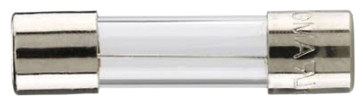
 Design with Fuse in Cirkit Designer
Introduction
A fuse is a safety device designed to protect electrical circuits by breaking the circuit when excessive current flows through it. This prevents damage to components, reduces the risk of fire, and ensures the safety of the overall system. Fuses are widely used in various applications, including household appliances, automotive systems, industrial equipment, and electronic circuits.
Explore Projects Built with Fuse
 Open Project in Cirkit Designer
 Open Project in Cirkit Designer
 Open Project in Cirkit Designer
 Open Project in Cirkit Designer
Explore Projects Built with Fuse
Open Project in Cirkit DesignerOpen Project in Cirkit DesignerOpen Project in Cirkit DesignerOpen Project in Cirkit DesignerCommon Applications and Use Cases
- Household Appliances: Protects devices like microwaves, refrigerators, and washing machines.
- Automotive Systems: Safeguards electrical systems in vehicles, such as lighting and infotainment systems.
- Industrial Equipment: Prevents damage to heavy machinery and control systems.
- Electronic Circuits: Protects sensitive components like microcontrollers, sensors, and power supplies.
Technical Specifications
Key Technical Details
- Voltage Rating: Typically ranges from 12V to 600V, depending on the application.
- Current Rating: Commonly available from 0.1A to 100A or more.
- Breaking Capacity: The maximum current the fuse can safely interrupt (e.g., 1kA, 10kA).
- Response Time: Can be fast-blow (quick response) or slow-blow (delayed response).
- Material: Fuse elements are often made of zinc, copper, or silver.
- Form Factor: Includes cylindrical, blade, and surface-mount types.
Pin Configuration and Descriptions
Fuses do not have traditional pins like ICs but instead have terminals or leads for connection. Below is a table describing common fuse types and their configurations:
| Fuse Type | Configuration/Terminals | Description |
|---|---|---|
| Glass Tube Fuse | Two metal caps at each end | Cylindrical glass body with visible element. |
| Blade Fuse | Two flat metal prongs | Plastic body with prongs for automotive use. |
| Surface-Mount | Solderable metal pads | Compact design for PCB mounting. |
| Cartridge Fuse | Cylindrical with metal ends | Used in industrial and high-power systems. |
Usage Instructions
How to Use the Component in a Circuit
Select the Appropriate Fuse:
- Determine the voltage and current requirements of your circuit.
- Choose a fuse with a voltage rating higher than the circuit voltage.
- Select a current rating slightly above the normal operating current of the circuit.
Install the Fuse:
- For through-hole fuses, solder the leads to the PCB or use a fuse holder.
- For blade fuses, insert them into the designated fuse slot.
- For surface-mount fuses, solder them directly onto the PCB pads.
Test the Circuit:
- Power on the circuit and verify that the fuse does not blow under normal operation.
- If the fuse blows immediately, check for short circuits or incorrect ratings.
Important Considerations and Best Practices
- Always use a fuse with the correct voltage and current ratings to avoid overloading or under-protecting the circuit.
- Use a fuse holder or clip for easy replacement in case of failure.
- For sensitive electronics, consider using slow-blow fuses to handle inrush currents without unnecessary interruptions.
- Ensure proper ventilation around the fuse to prevent overheating.
Example: Using a Fuse with an Arduino UNO
When connecting an Arduino UNO to a power supply, you can add a fuse to protect the board from overcurrent. Below is an example circuit and code:
Circuit Setup
- Connect a 5V power supply to the Arduino UNO through a 1A fast-blow fuse.
- Place the fuse in series with the power supply's positive terminal.
Code Example
// Example code for Arduino UNO with a fuse-protected power supply
// This code blinks an LED connected to pin 13

void setup() {
  pinMode(13, OUTPUT); // Set pin 13 as an output for the LED
}

void loop() {
  digitalWrite(13, HIGH); // Turn the LED on
  delay(1000);            // Wait for 1 second
  digitalWrite(13, LOW);  // Turn the LED off
  delay(1000);            // Wait for 1 second
}
Troubleshooting and FAQs
Common Issues Users Might Face
Fuse Blows Immediately:
- Cause: Short circuit or incorrect fuse rating.
- Solution: Check the circuit for shorts and ensure the fuse rating matches the circuit requirements.
Fuse Does Not Blow During Overcurrent:
- Cause: Fuse rating is too high or the fuse is defective.
- Solution: Replace the fuse with one that has the correct rating.
Frequent Fuse Failures:
- Cause: Repeated overcurrent events or inrush currents.
- Solution: Use a slow-blow fuse for circuits with high inrush currents.
Fuse Overheats Without Blowing:
- Cause: Poor contact or undersized fuse holder.
- Solution: Ensure secure connections and use a properly rated fuse holder.
Solutions and Tips for Troubleshooting
- Use a multimeter to check for continuity across the fuse. A blown fuse will show no continuity.
- Inspect the circuit for loose connections or damaged components that may cause overcurrent.
- Keep spare fuses on hand for quick replacements during testing or operation.
By following these guidelines, you can effectively use fuses to protect your circuits and ensure reliable operation.