
How to Use 8 Bits 5V WS2812 5050 RGB : Examples, Pinouts, and Specs
 Design with 8 Bits 5V WS2812 5050 RGB in Cirkit Designer
Introduction
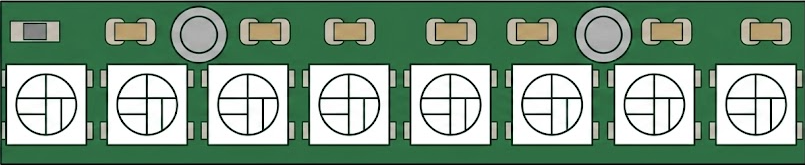
The 8 Bits 5V WS2812 5050 RGB is a programmable RGB LED strip that operates at 5V. It features individually addressable 5050 RGB LEDs, allowing for vibrant color displays and dynamic lighting effects. Each LED contains an integrated driver chip, enabling precise control of brightness and color through a single data line. This component is widely used in decorative lighting, displays, and DIY electronics projects.
Explore Projects Built with 8 Bits 5V WS2812 5050 RGB
 Open Project in Cirkit Designer
 Open Project in Cirkit Designer
 Open Project in Cirkit Designer
 Open Project in Cirkit Designer
Explore Projects Built with 8 Bits 5V WS2812 5050 RGB
Open Project in Cirkit DesignerOpen Project in Cirkit DesignerOpen Project in Cirkit DesignerOpen Project in Cirkit DesignerCommon Applications
- Decorative lighting for homes, events, and holidays
- LED displays and signage
- Wearable electronics
- Gaming setups and PC case lighting
- DIY projects with microcontrollers like Arduino or Raspberry Pi
Technical Specifications
The WS2812 5050 RGB LED strip is designed for ease of use and high performance. Below are its key technical details:
Key Specifications
| Parameter | Value |
|---|---|
| Operating Voltage | 5V DC |
| LED Type | 5050 RGB |
| Communication Protocol | Single-wire (WS2812 protocol) |
| Number of LEDs | 8 LEDs |
| Power Consumption | ~60mA per LED (at full white) |
| Color Depth | 24-bit (8 bits per channel) |
| Refresh Rate | ~400 Hz |
| Operating Temperature | -25°C to 80°C |
Pin Configuration
The WS2812 LED strip has three main pins for operation:
| Pin Name | Description |
|---|---|
| VCC | Power supply (5V DC) |
| GND | Ground |
| DIN | Data input for control signals |
Note: Some strips may have an additional
DOUTpin at the end of the strip for cascading multiple strips.
Usage Instructions
Connecting the WS2812 to a Circuit
- Power Supply: Connect the
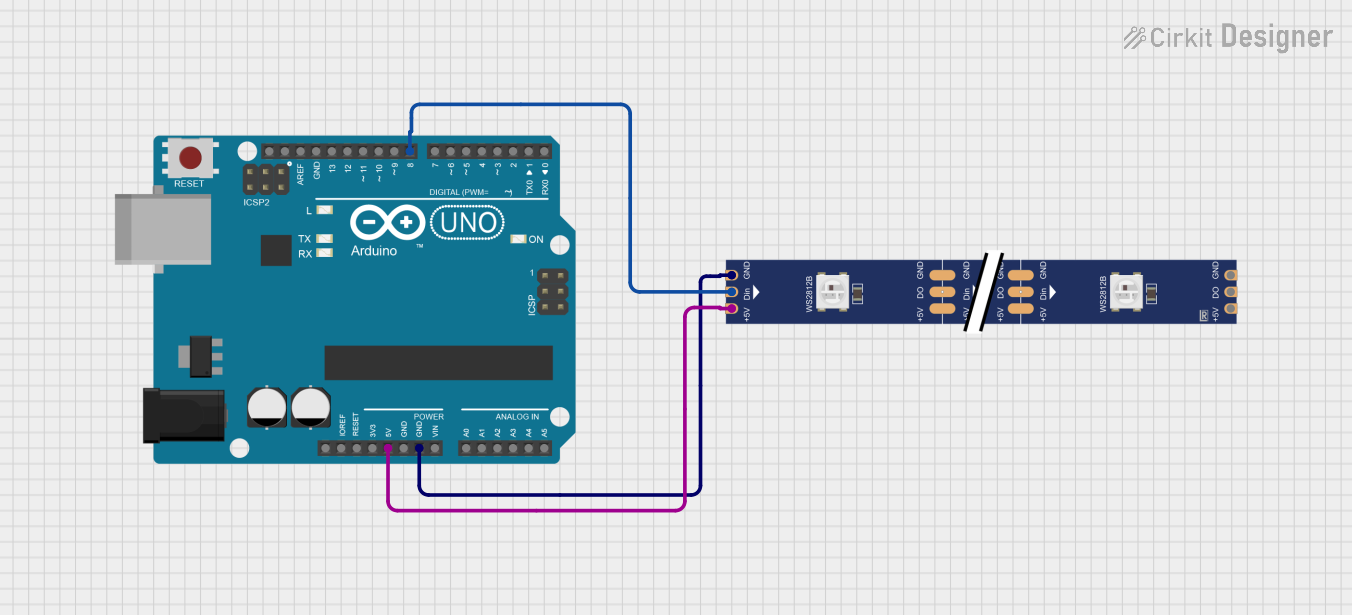
VCCpin to a 5V DC power source and theGNDpin to ground. - Data Line: Connect the
DINpin to the data output pin of your microcontroller (e.g., Arduino). - Capacitor: Place a 1000 µF capacitor across
VCCandGNDto stabilize the power supply. - Resistor: Use a 330-500 ohm resistor between the microcontroller's data pin and the
DINpin to protect the LEDs from voltage spikes. - Cascading: To connect multiple strips, link the
DOUTpin of the first strip to theDINpin of the next strip.
Arduino Example Code
Below is an example of how to control the WS2812 LED strip using an Arduino UNO and the Adafruit NeoPixel library:
#include <Adafruit_NeoPixel.h>

// Define the number of LEDs in the strip
#define NUM_LEDS 8

// Define the pin connected to the DIN pin of the WS2812 strip
#define DATA_PIN 6

// Create a NeoPixel object
Adafruit_NeoPixel strip = Adafruit_NeoPixel(NUM_LEDS, DATA_PIN, NEO_GRB + NEO_KHZ800);

void setup() {
  strip.begin();  // Initialize the NeoPixel library
  strip.show();   // Turn off all LEDs initially
}

void loop() {
  // Example: Cycle through colors
  for (int i = 0; i < strip.numPixels(); i++) {
    strip.setPixelColor(i, strip.Color(255, 0, 0)); // Set LED to red
    strip.show();                                   // Update the strip
    delay(100);                                     // Wait 100ms
  }
}
Best Practices
- Power Supply: Ensure the power supply can handle the total current draw of the LEDs. For example, 8 LEDs at full brightness (white) will draw approximately 480mA.
- Signal Integrity: Keep the data line as short as possible to avoid signal degradation. For longer distances, consider using a level shifter to boost the signal.
- Heat Management: Avoid running the LEDs at full brightness for extended periods to prevent overheating.
Troubleshooting and FAQs
Common Issues
LEDs not lighting up:
- Check the power supply voltage (should be 5V).
- Verify the connections to
VCC,GND, andDIN. - Ensure the data pin on the microcontroller matches the pin defined in the code.
Incorrect colors or flickering:
- Verify the resistor on the data line (330-500 ohms recommended).
- Check for loose or poor connections.
- Ensure the correct color order (e.g.,
NEO_GRBin the code).
Only the first LED works:
- Check the data signal integrity.
- Ensure the
DINpin of the second LED is properly connected to theDOUTpin of the first LED.
FAQs
Q: Can I cut the LED strip to a smaller size?
A: Yes, the strip can be cut at designated points (usually marked with a scissor icon). Ensure you reconnect the DIN, VCC, and GND pins properly.
Q: How many LEDs can I control with one microcontroller?
A: Theoretically, you can control hundreds of LEDs, but the refresh rate and memory usage of your microcontroller will limit performance.
Q: Can I power the strip directly from the Arduino?
A: No, the Arduino's 5V pin cannot supply enough current for multiple LEDs. Use an external 5V power supply.
By following this documentation, you can effectively integrate and troubleshoot the 8 Bits 5V WS2812 5050 RGB LED strip in your projects!